- bullet
:execute getline(".")
inoremap png 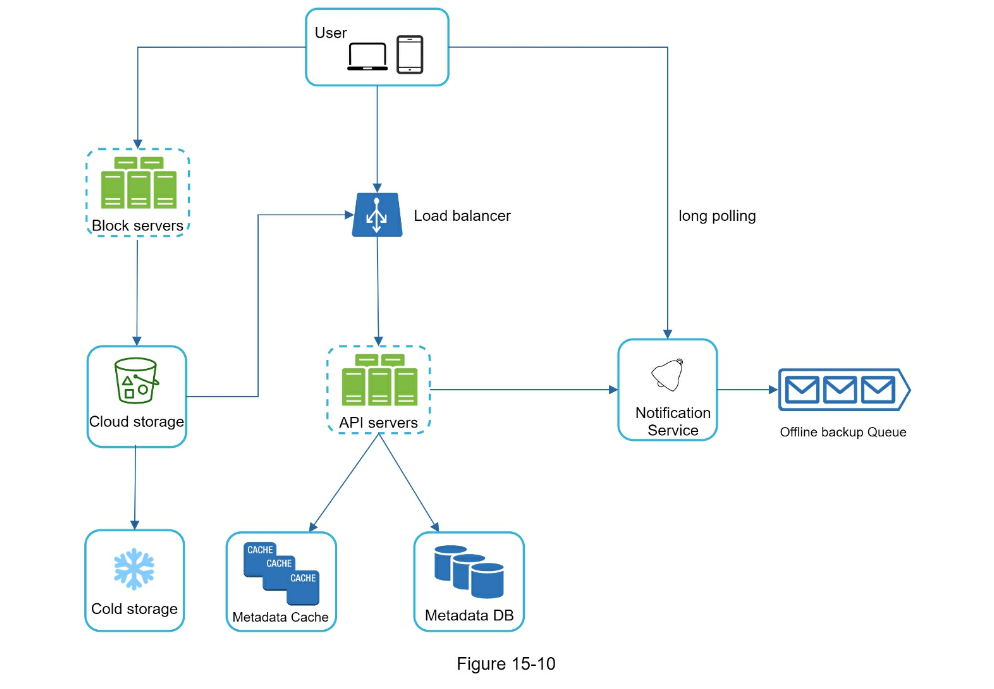<ESC>5<left>r
- bullet 2
System Design Interview PDF

Ask a lot of questions
- Why
- Requirements
-
- What features are required?
- Nice to have?
- Out of scope
- Design considerations
-
- Capacity estimation and constraints
-
- Remember CAP Theorem
- How many users
- How fast
- Storage (Characters are 8 bytes)
-
- Metadata - perhaps key-value store (NoSQL fast reads)
- Bandwidth
- Usage Metrics
-
- Capacity estimation
- What’s the average user usage pattern (reads to writes)
- Availability/Latency
- System interface design (API)
-
- postTweet(user_id, tweet_text, image_url, user_location, timestamp,…)
- Data Model
- High level design
- Detailed design for selected components
- Identifying and resolving bottlenecks
Youtube
URL Shortener

- Functional
-
- API
- Throttling
-
- Noisy neighbors
- Thundering herd
- DDOS
- Non Functional
-
- Instagram example - pictures can wait, feed cannot
- What does “top picture” mean
- What does “follow” mean
- Calculate space requirements
- What type of storage
- Object storage - will likely need a db entry for path
- DB Storage
-
- Size of each column * number (i.e. users, pictures, etc) * retention length
- Sharding/Partitioning will be an interesting conversation
- 20/80 rule - 20% of the reads account for 80% of the traffic
- What type of traffic are we looking at
- Users
-
- Deduplication
Solutions
- Segregate traffic
-
- Need to research tree designs
- Dynamic Programming
-
- Caching
-
- If it hits the database draw a route back to caching
- LRU
- Load balancing
-
- Round robin
- Least traffic
- CDN - don’t forget
- SQL vs. NoSQL
-
- Sql easier to update (no duplicate data)
- NoSQL - faster reads, no schema or relations
-
- Updates more difficult
- Horizontal scaling easier
- Great performance for mass (simple) read/write requests
- SQL - data distributed across tables
Interesting examples
- Dropbox - chunk the images
-
- Reduces duplicates, retry only failed chunks, diff only affected chunks
- Long polling
-
- Keeps a connection open until there’s a response
- Instagram
-
Common Questions
- Design goals
- System scale
- Apply CAP Theorem
- Ask - read vs. write heavy
Video Description of a lot of these designs
https://www.youtube.com/channel/UC1HEtidkUVwmofYXnR3PYtg
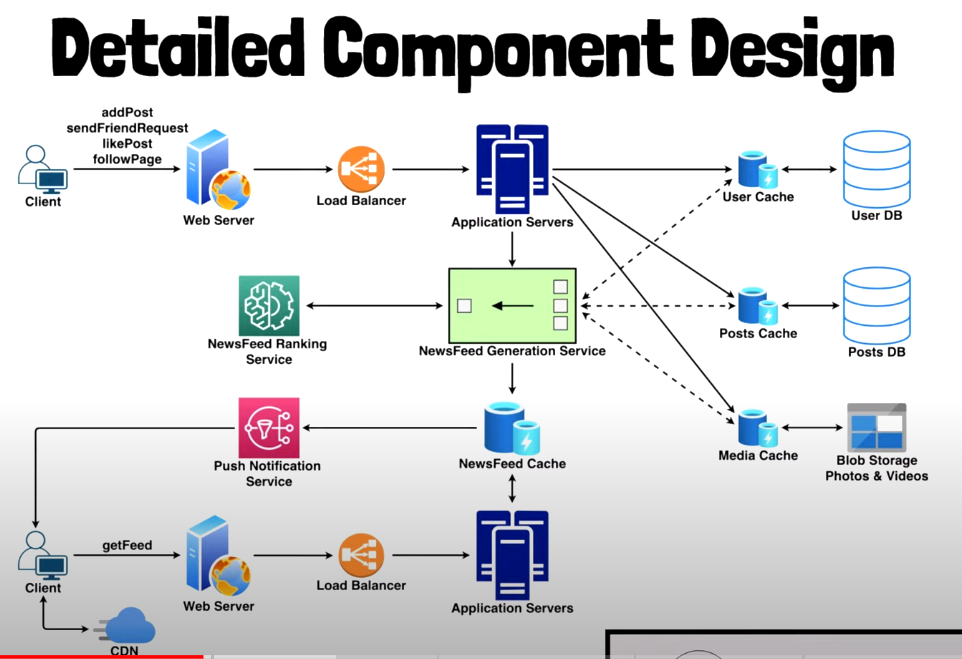
Design Facebook news feed -
| [TOP FACEBOOK SYSTEM DESIGN INTERVIEW QUESTIONS (PART 1) |
Facebook Pirate Interview Round](https://www.youtube.com/watch?v=hykjbT5Z0oE) |
- Latency concerns
- Highly available - eventually consistent
- Read heavy in nature - caching
- Walk through the experience -log in, formulate feed, pagination

Design Facebook Status Search


Facebook Chat

Design Instagram

Design Proximity Server

Typeahead

Top N Songs

Design Privacy Settings

Design Web Crawler

Netflix Design Interview
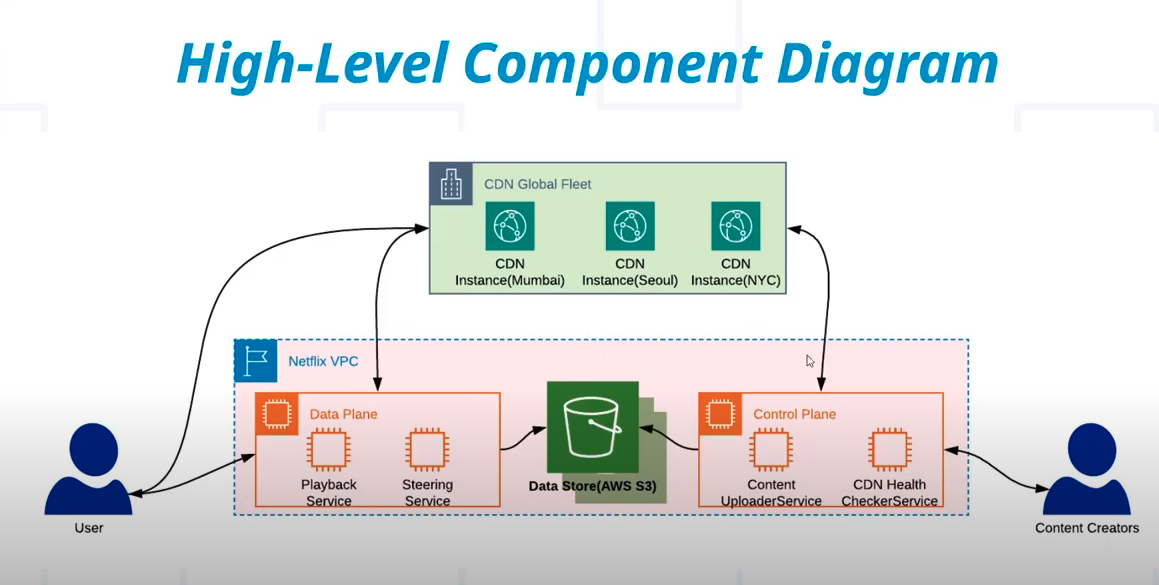

- Read vs. Write load
- Distribution
- CDN
- Chunking the files to resolution, codecs, etc
1. Design Facebook News Feed
Key features
- User sees news feed of posts & status from friends and pages followed
- Post and Like status ocntining text/images/videos
- Send friend requests
- Follow Pages
Design Goals:
- Minimum Latency: e.g. on news feed generation
- High Availability: e.g. server goes down
- Eventually Consistent system (CAP)
- Read-heavy service: more reads than writes
Scale Estimations:
- 1B DAU
- Each user fetching timeline 10/day ie 10B requests a day
- Avg user posts 2/day
- Avg post is liked 5/day
- Avg user has 200 friends, follows 100 pages
Feed Generation
- Obtain IDs of all friends and pages followed
- Retrieve most recent and popular posts
- Rank these posts based on relevance, and store in cache
- Top posts, ~30, returned and displayed on UI
- When end of feed is reached, next 30 top posts will be displayed
Updating Feed?
- Run feed generation on a 5 min queue
- Notify user of updated feed
Feed Publishing (Pull vs Push)
Pull (Fan out on load)
- recent feed data is kept in memory on server
- User can pull feed manual or on schedule
- Issues:
- Stale data unless pull is requested
- Pull request may result in empty response (no new feed) which is a waste of resources
Push Model (Fan out on write)
- Server immediately pushes updates
- User has to maintain Long Poll request
- Issues:
- Server has to push lots of updates for popular users (Celebrity User issue)
Ideal solution is hybrid
2. Status Search
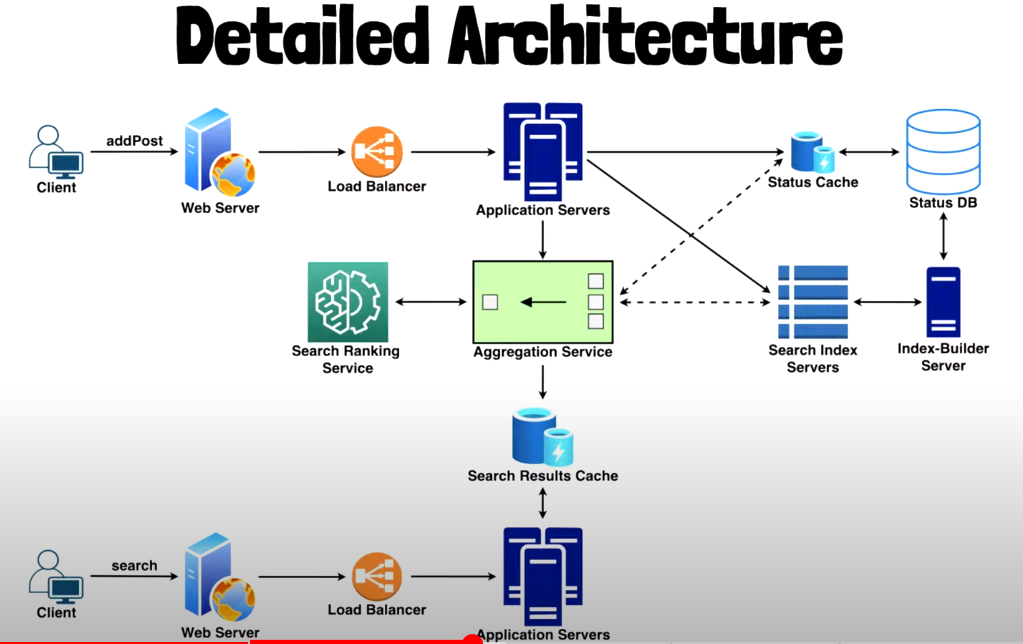
Provide search bar to allow searching posts/status/video/content posted by friends and pages they follow
Key Features
- User can search status posted by friends and followed pages
- Status only contains text
Design Goals
- minimum latency
- HA
- Eventual consistency (CAP)
- Read heavy service
Scale estimations
- 1B DAU
- 5B daily search
- 1B status generated a day
REST APIs
/searchStatuses
- Read API to fetch search results
- Params: UserID, search query, max results, page number, timestamp
/postStatus
- write API to post new status
- Params: UID, Status content, timestamp
High Level Design
- Store status in a DB
- Build search index to keep track of which word appears in which status
- Index to quickly find status
Important Questions
- How is search index built for quick retrieval
- How to store and shard search index
- How to rebuild index with fault-tolerant design
- What happens if app server dies
- How to balance load across multiple app servers
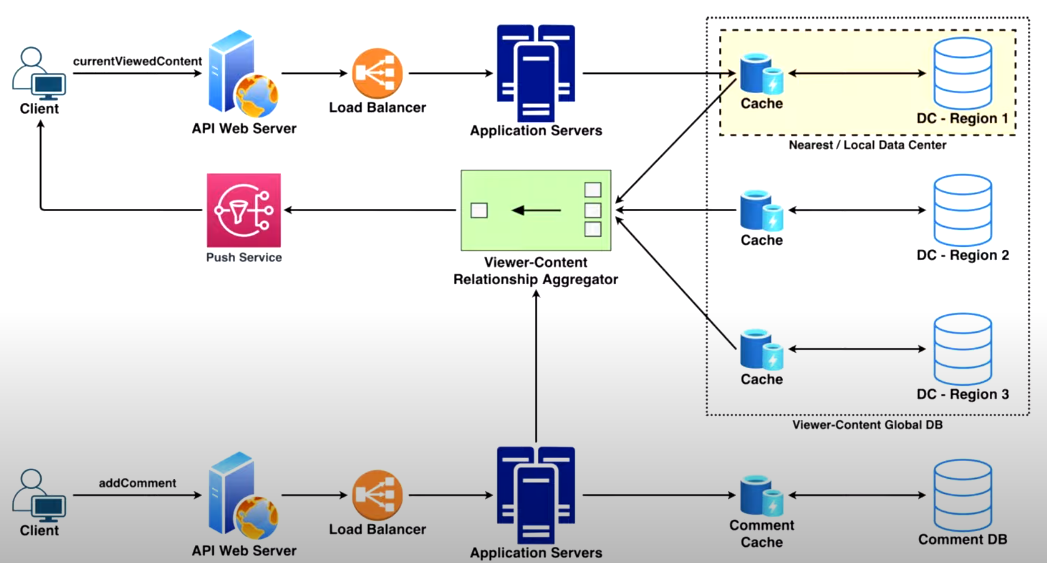
Key Features
- enable real-time commenting on posts
- User sees new comments real-time as they’re posted
Challenging
- Users are continuously scrolling news feed
- Posts that are visible change frequently
Scale Estimations
- Every minute, FB servers 100M content that may receive comments
- Each minute, users submits 1M comments
High Level Design
Push (Fan-out-on-write) vs Pull(Fan-out-on-load)
-
Push: maintains connection with client directly to send new comments (websockets?)
-
Pull: User has to request updates
Storage
- need to store millions of viewer-to-content associations per second
- 2 Approaches:
- Write locally, Read globally
- Write globally, Read locally
4. Messenger/WhatsApp

Key Features
- support 1-1 conversation
- track online/offline status of user
- group conversations
- push notifications
Design Goals
- minimum latency
- high consistency
- CAP: tolerate lower avialability for high consistency
Scale Estimations
- 1B DAU
- Each user sends ~50 messages daily
High Level Design
- chat server as main component of design. Orchestrate communication between users
- User connects to server to send message
- server passes message to user and stores in DB
Use Cases
- receive incoming messages
- deliver outgoing messages
- store and retrieve messages form db
- keep user status and notify “friends” of change
5. Instagram
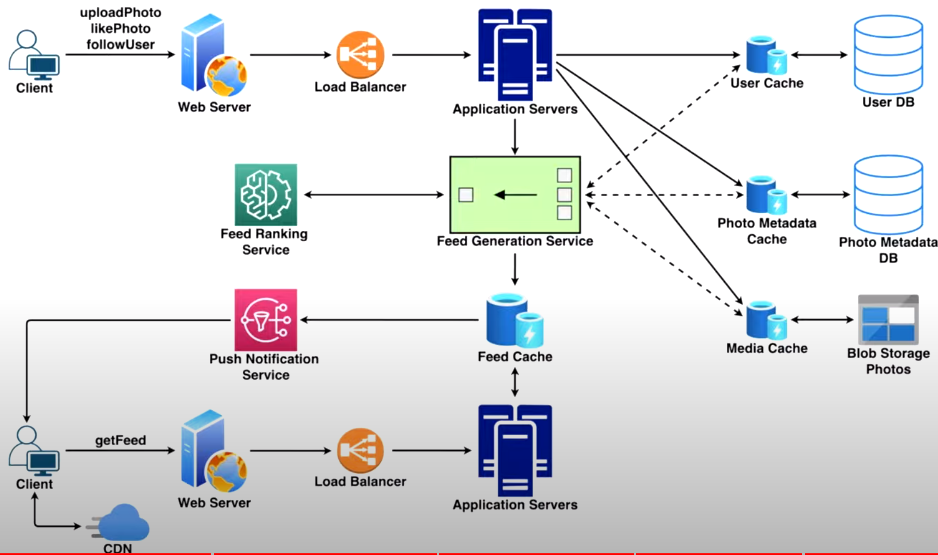
Key Features
- User can upload and share photos
- Follow users
- Like photos
- Get a scrollable feed of photos posted by followed users
Design Goals
- minimum latency
- HA
- Eventually consistency (CAP)
- Read-heavy
Scale Estimations
- 1B DAU
- 5B feed requests daily
- 500M photos uploaded daily
- each photo liked 5 times avg
- Avg user follows 100 other users
Feed Generation
- Obtain IDs of all users followed
- retrieve most recent/popular photos
- rank photos based on relevance and store in cache
- Top photos, about 20 in number will be returned and displayed on UI
- When end of feed is reached, retreive next set of top photos
Feed Publishing
Pull vs Push
TODO/Links
Notes
1 Scale
- 5 DB types: RDMBS vs NoSQL (KV, Graph, Column, Document)
- Load Balancer
- shard DB: main (write) vs replica(s) (read)
- Performance, Reliability, HA
- Cache for temporary, (mostly) RO data
- CDN for static assets
- Stateless servers for autoscaling. Use persistent nosql (redis) to store state
- geoDNS for DC geo-routing
- MQ for long-running tasks
2 Estimation
- memory > compression > disk > network
- Commonly back-of-the-envelope: QPS, peak QPS, storage, cache, number of servers
3 Interview
-
communicate with interviewer
- Understand problem and establish design scope
- Step 2 - Propose High-Level Design And Get Buy-In
- Design Deep Dive
- Wrap Up
Vertical vs Horizontal Scaling
- split web/db for independent scaling
- RDBMS vs NoSQL
- Vertical scaling has hard limit and no failover/redundancy
- Vertical is easier to scale
- Load balancer distributes incoming traffic
- Database replication
- Primary DB for write, (multiple) Secondary for Read
- Performance, Reliability, HA
- Secondary Data will be stale
- Cache
- Cache frequently read, rarely updated data for faster retrieval
- e.g. memcache
- Temp data store, faster than db
- consider for “write-rarely” data,
- expiration policy,
- consistency (hard to sync across datastores),
- spof (can use multi cache across DC),
- eviction policy
- CDN: Content delivery network (CDN)
- Use for static content,
- expiration policy as can be expensive
- Stateless web tier
- allows horizontal scaling of web tier
- cache state in memcache/redis/nosql
- Data centers
- georouting w/ geoDNS for “nearest DC”
- Message queue
- defer long running jobs e.g. photo processing (blur/crop/etc)
- Tools
- Logging/metrics/monitoring/automation
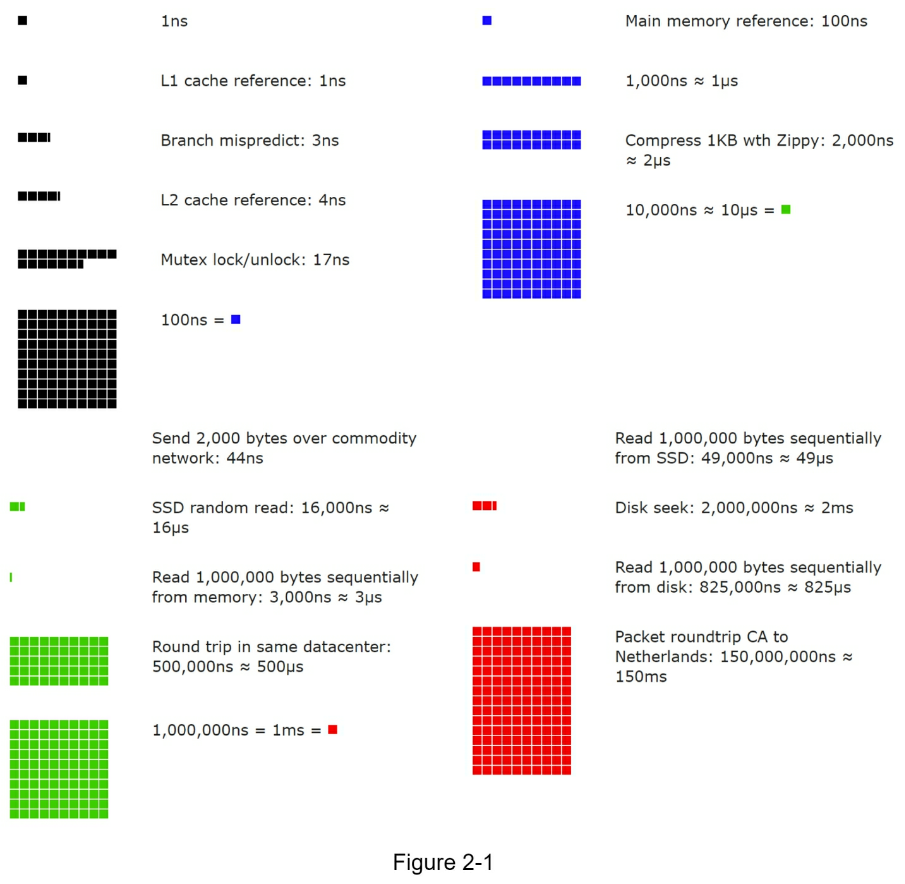
- Memory is fast but the disk is slow.
- Avoid disk seeks if possible.
- Simple compression algorithms are fast.
- Compress data before sending it over the internet if possible.
- Data centers are usually in different regions, and it takes time to send data between them.
- Availability numbers
- 99% = 3.65 days / year
- 99.9% = 8.77 hours / year
- 99.99% = 52.60 mins / year
- 99.999% = 5.26 mins / year
- 99.9999% = 31.56 sec / year
- Example: Estimate Twitter QPS and storage requirements
- Assumptions:
- 300 million monthly active users.
- 50% of users use Twitter daily.
- Users post 2 tweets per day on average.
- 10% of tweets contain media.
- Data is stored for 5 years.
- Query per second (QPS) estimate:
- Daily active users (DAU) = 300 million * 50% = 150 million
- Tweets QPS = 150 million * 2 tweets / 24 hour / 3600 seconds = ~3500
- Peek QPS = 2 * QPS = ~7000
- Average tweet size.: We will only estimate media storage here.
- tweet_id 64 bytes
- text 140 bytes
- media 1 MB
- Media storage: 150 million * 2 * 10% * 1 MB = 30 TB per day
- 5-year media storage: 30 TB * 365 * 5 = ~55 PB
-
Step 1 - Understand the problem and establish design scope
- What specific features are we going to build?
- How many users does the product have?
- How fast does the company anticipate to scale up?
- What are the anticipated scales in 3 months, 6 months, and a year?
- What is the company’s technology stack?
- What existing services you might leverage to simplify the design?
-
Step 2 - Propose high-level design and get buy-in
- start with initial blueprint
- get feedback
- draw diagrams
- do back-of-envolope calculations
- Communicate with your interviewer
-
Step 3 - Design deep dive
-
Step 4 - Wrap up
-
Dos
- Always ask for clarification. Do not assume your assumption is correct.
- Understand the requirements of the problem.
- There is neither the right answer nor the best answer.
- A solution designed to solve the problems of a young startup is different from that of an established company with millions of users.
- Make sure you understand the requirements.
- Let the interviewer know what you are thinking. Communicate with your interview.
- Suggest multiple approaches if possible.
- Once you agree with your interviewer on the blueprint, go into details on each component.
- Design the most critical components first.
- Bounce ideas off the interviewer. A good interviewer works with you as a teammate.
-
Never give up.
-
Don’ts
- Don’t be unprepared for typical interview questions.
- Don’t jump into a solution without clarifying the requirements and assumptions.
- Don’t go into too much detail on a single component in the beginning. Give the highlevel design first then drills down.
- If you get stuck, don’t hesitate to ask for hints.
- Again, communicate. Don’t think in silence.
- Don’t think your interview is done once you give the design.
- You are not done until your interviewer says you are done.
-
Ask for feedback early and often.
- Time allocation on each step
- 3-10 mins: Step 1 Understand the problem and establish design scope: 3 - 10 minutes
- 10-15 mins: Step 2 Propose high-level design and get buy-in: 10 - 15 minutes
- 10-25 mins: Step 3 Design deep dive: 10 - 25 minutes
- 5 mins: Step 4 Wrap: 3 - 5 minutes
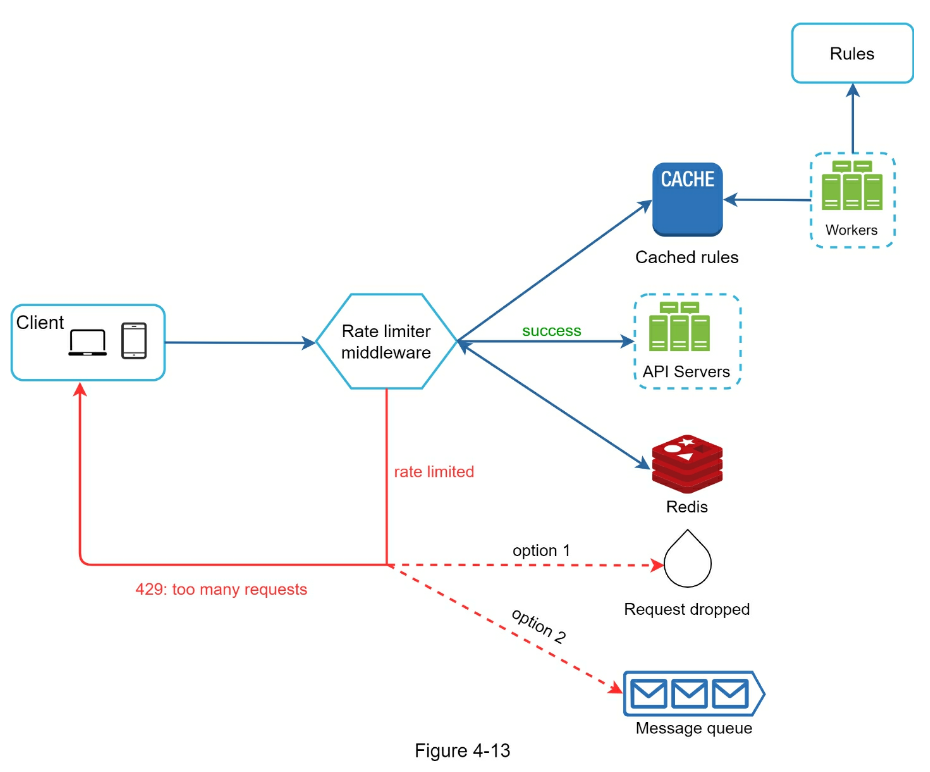
-
Step 1 - Understand the problem and establish design scope
- Accurately limit excessive requests.
- Low latency. The rate limiter should not slow down HTTP response time.
- Use as little memory as possible.
- Distributed rate limiting. The rate limiter can be shared across multiple servers or processes.
- Exception handling. Show clear exceptions to users when their requests are throttled.
- High fault tolerance. If there are any problems with the rate limiter (for example, a cache server goes offline), it does not affect the entire system.
-
Step 2 - Propose high-level design and get buy-in
- Where to put the rate limiter?
-
middleware vs client vs server side
- e.g. cloudflare or AWS API Gateway
-
Algorithms for rate limiting vs Token bucket algorithm vs Leaking bucket algorithm vs Fixed window counter algorithm vs Sliding window log algorithm vs Sliding window counter algorithm
- Hard vs Soft rate limiting
-
Step 3 - Design deep dive
- Rate limiting rules
domain: auth descriptors: - key: auth_type Value: login rate_limit: unit: minute requests_per_unit: 5- HTTP response code
429 (too many requests)
- Rate limiter headers
-
X-Ratelimit-Remaining: The remaining number of allowed requests within the window.
-
X-Ratelimit-Limit: It indicates how many calls the client can make per time window.
-
X-Ratelimit-Retry-After: The number of seconds to wait until you can make a request again without being throttled.
- Rate limiter in a distributed environment
- Can lead to race condition
- Can lock, but that slows system design
- Use sorted sets data structure in Redis
- Synchronization issue
- Use central data store like Redis

- Performance optimization
- Route to closest edge server
- opt for eventual consistency of data
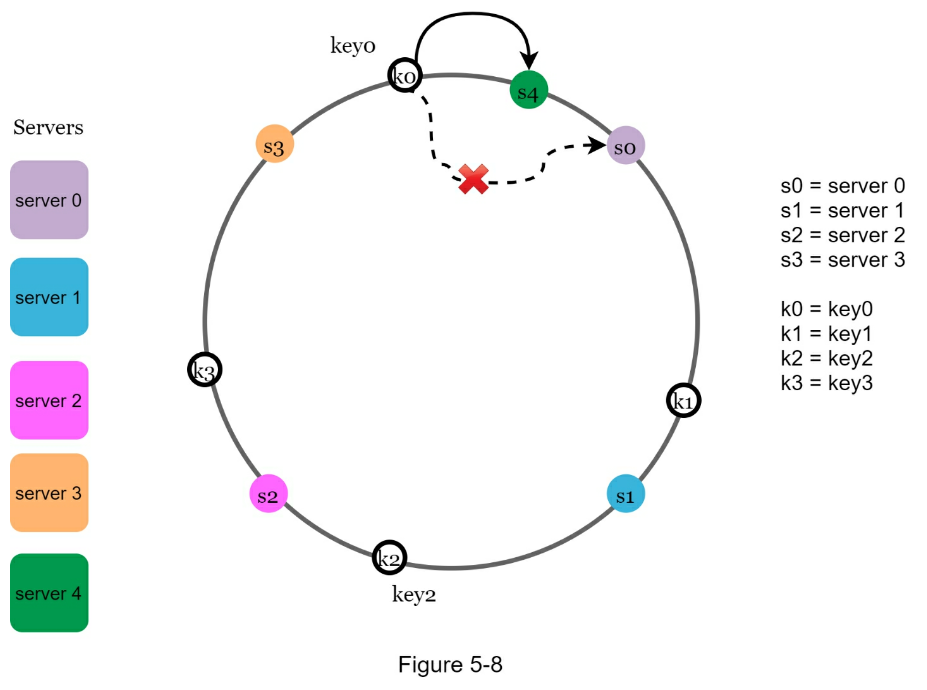
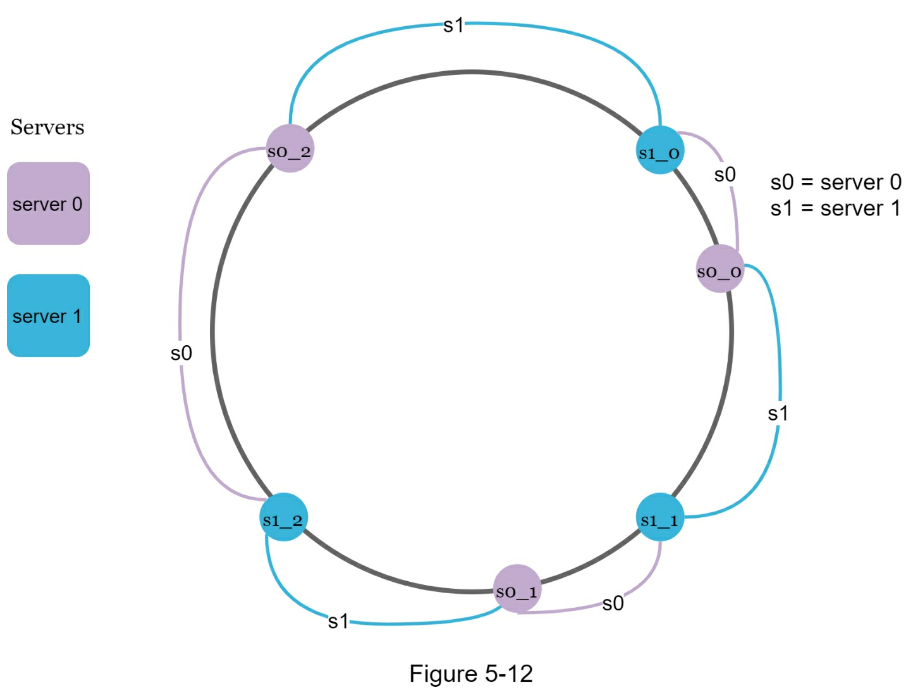
- The rehashing problem
- Given
N cache servers we want to distribute keys across
serverIndex = hash(key) % N- Avoid having to rekey hashes when server is added/removed
- Hash space and hash ring
- Keeping server sizes relatively equal
- Balance load across servers w/ Virtual nodes
- As the number of virtual nodes increases, the distribution of keys becomes more balanced.
- Wrap up
- The benefits of consistent hashing include:
- Minimized keys are redistributed when servers are added or removed.
- It is easy to scale horizontally because data are more evenly distributed.
- Mitigate hotspot key problem. Excessive access to a specific shard could cause server overload. Imagine data for Katy Perry, Justin Bieber, and Lady Gaga all end up on the same shard. Consistent hashing helps to mitigate the problem by distributing the data more evenly.
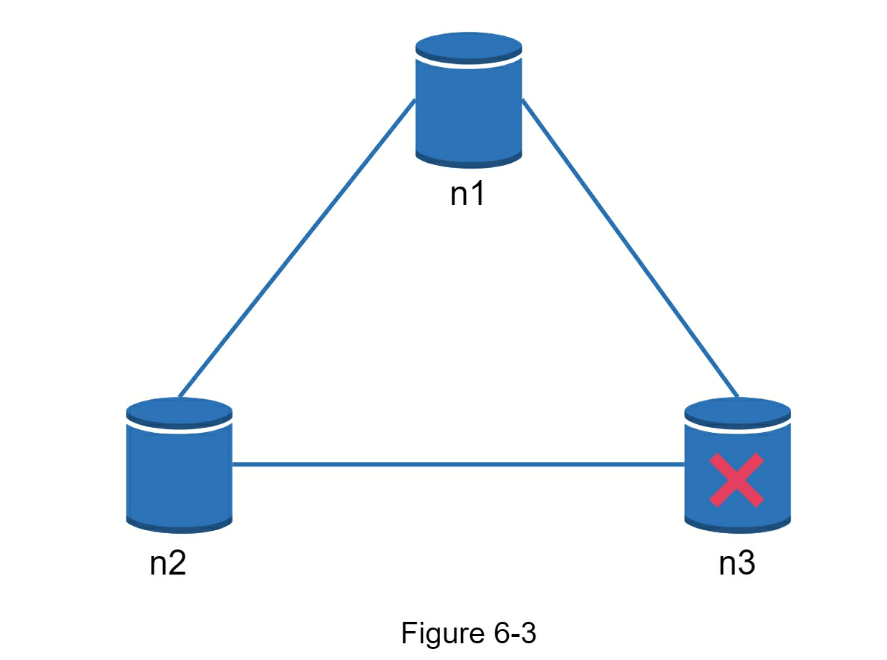
- Understand the problem and establish design scope
- The size of a key-value pair is small: less than 10 KB.
- Ability to store big data.
- High availability: The system responds quickly, even during failures.
- High scalability: The system can be scaled to support large data set.
- Automatic scaling: The addition/deletion of servers should be automatic based on traffic.
- Tunable consistency.
- Low latency.
- Single server key-value store
- Two optimizations can be done to fit more data in a single server:
- Data compression
- Store only frequently used data in memory and the rest on disk
-
CAP theorem
-
Consistency: consistency means all clients see the same data at the same time no matter which node they connect to.
-
Availability: availability means any client which requests data gets a response even if some of the nodes are down.
-
Partition Tolerance: a partition indicates a communication break between two nodes. Partition tolerance means the system continues to operate despite network partitions.
- In the ideal world, network partition never occurs. Data written to n1 is automatically replicated to n2 and n3. Both consistency and availability are achieved.
- If we choose consistency over availability (CP system), we must block all write operations to n1 and n2 to avoid data inconsistency among these three servers, which makes the system unavailable.
- Bank systems usually have extremely high consistent requirements.
- if we choose availability over consistency (AP system), the system keeps accepting reads, even though it might return stale data.
- For writes, n1 and n2 will keep accepting writes, and data will be synced to n3 when the network partition is resolved.
- System components
- Data partition
- Data replication
- Consistency
- Inconsistency resolution
- Handling failures
- System architecture diagram
- Write path
- Read path
- Data partition
- Use a hash ring for scaling allowing auto scaling and heterogeneity
- Data replication
- For better reliability, replicas are placed in distinct data centers, and data centers are connected through high-speed networks.
- Consistency
-
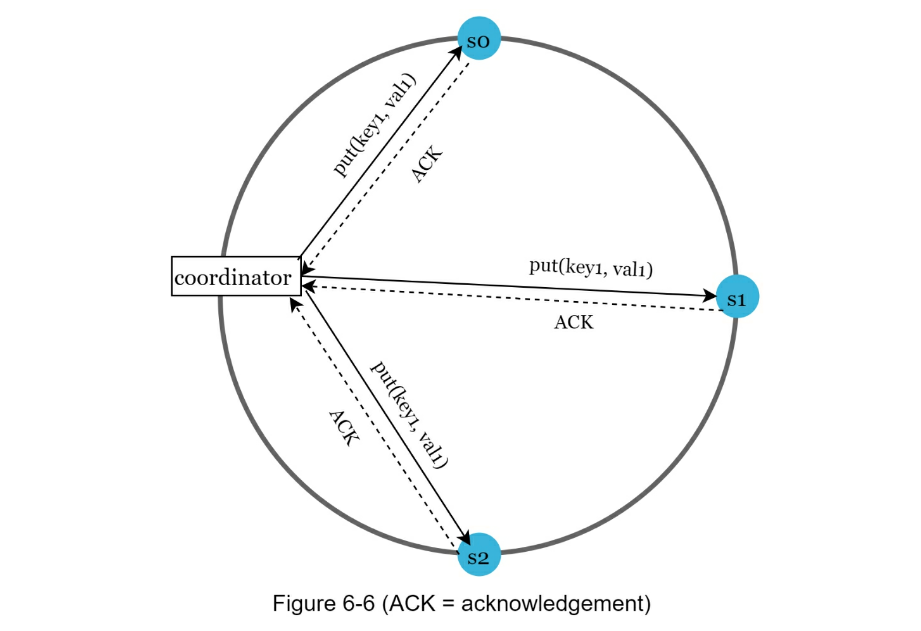
Quorum consensus can guarantee consistency for both read and write
-
-
N = The number of replicas
-
W = A write quorum of size W. For a write operation to be considered as successful, write operation must be acknowledged from W replicas.
-
R = A read quorum of size R. For a read operation to be considered as successful, read operation must wait for responses from at least R replicas.
- If R = 1 and W = N, the system is optimized for a fast read.
- If W = 1 and R = N, the system is optimized for fast write.
- If W + R > N, strong consistency is guaranteed (Usually N = 3, W = R = 2).
- If W + R <= N, strong consistency is not guaranteed.
- Consistency models
-
Strong consistency: any read operation returns a value corresponding to the result of the most updated write data item. A client never sees out-of-date data.
-
Weak consistency: subsequent read operations may not see the most updated value.
-
Eventual consistency: this is a specific form of weak consistency. Given enough time, all updates are propagated, and all replicas are consistent.
- Inconsistency resolution: versioning
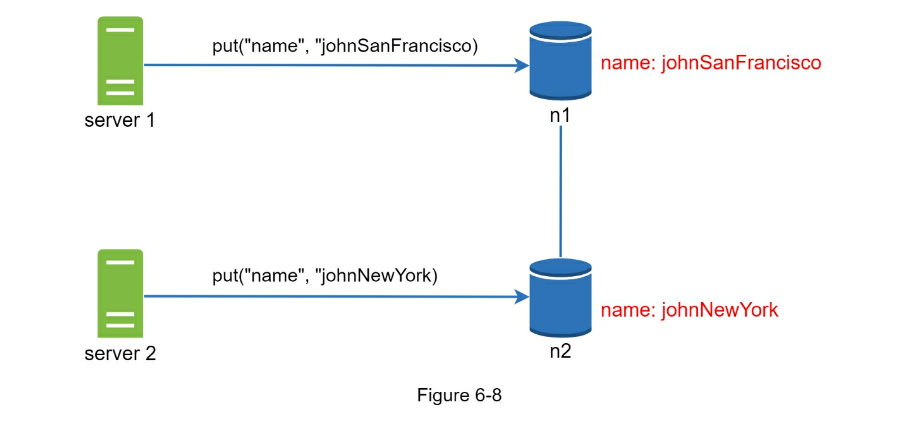
- A vector clock is a [server, version] pair associated with a data item. It can be used to check if one version precedes, succeeds, or in conflict with others.

- Failure detection w/ Gossip Protocol
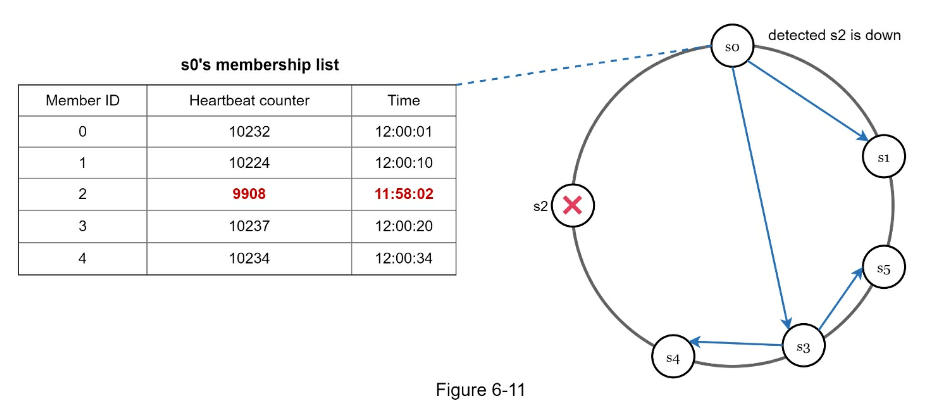
- Handling temporary failures
- sloppy quorum: Instead of enforcing the quorum requirement, the system chooses the first W healthy servers for writes and first R healthy servers for reads on the hash ring. Offline servers are ignored.
- Handling permanent failures
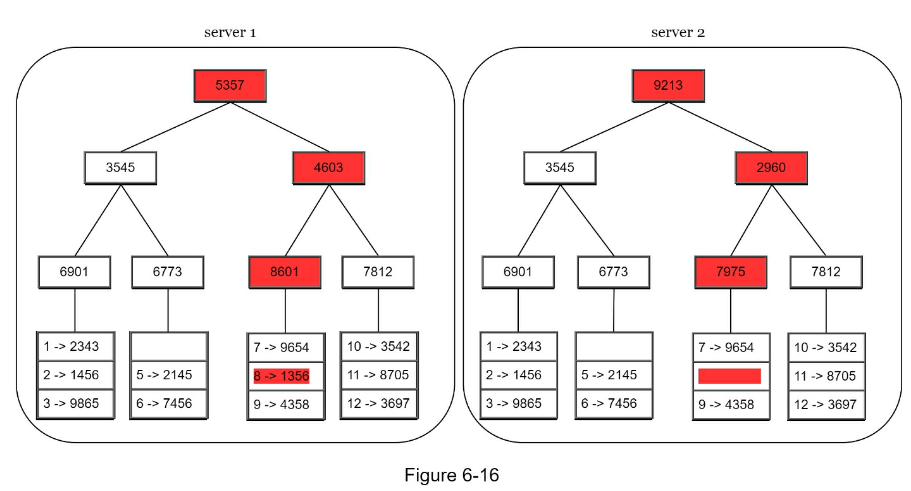
- Handling data center outage by replicate across DCs
- System architecture diagram
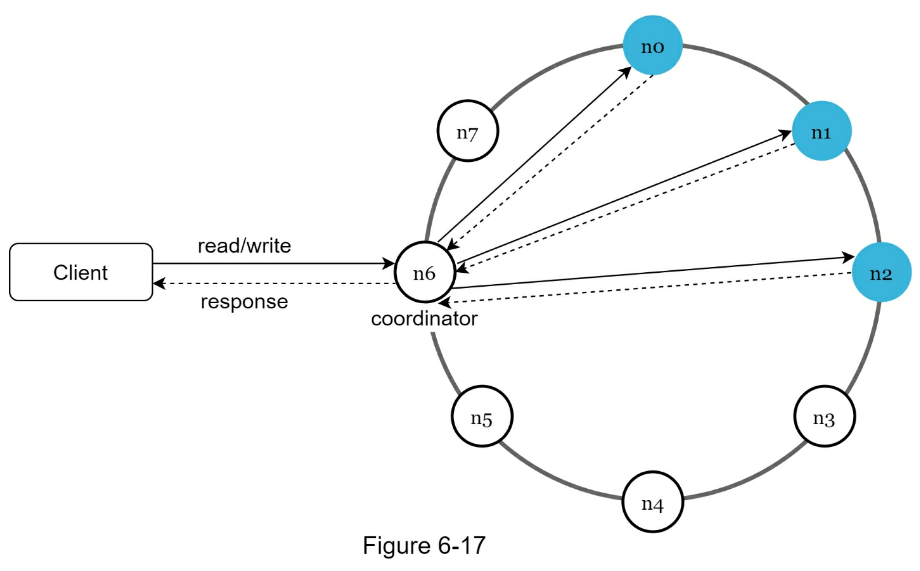
- Clients communicate with the key-value store through simple APIs: get(key) and put(key, value).
- A coordinator is a node that acts as a proxy between the client and the key-value store.
- Nodes are distributed on a ring using consistent hashing.
- The system is completely decentralized so adding and moving nodes can be automatic.
- Data is replicated at multiple nodes.
- There is no single point of failure as every node has the same set of responsibilities.
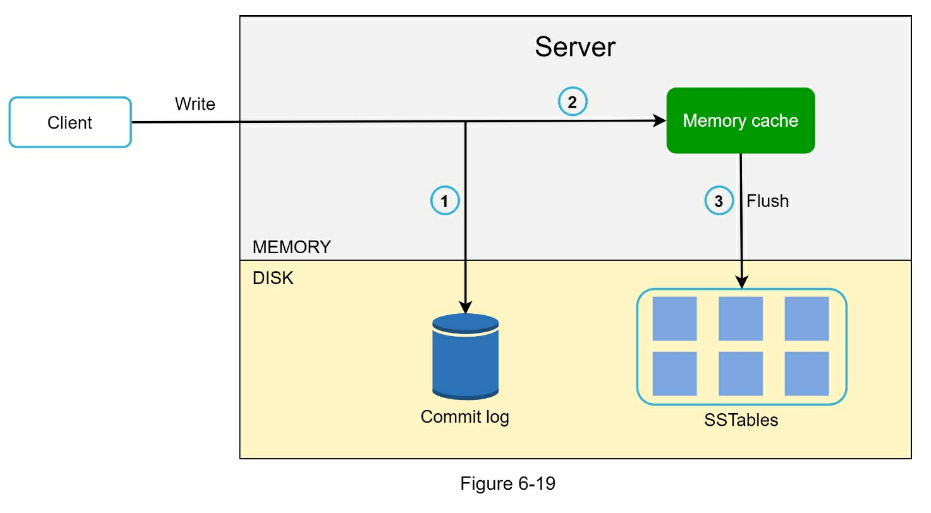
-
 is similar to what Casandra does
- Step 1 - Understand the problem and establish design scope
- IDs must be unique.
- IDs are numerical values only.
- IDs fit into 64-bit.
- IDs are ordered by date.
- Ability to generate over 10,000 unique IDs per second.
- Step 2 - Propose high-level design and get buy-in
- The options we considered are:
- Multi-master replication
- Universally unique identifier (UUID)
- Ticket server
- Twitter snowflake approach
- For multi-master replication Use inherent DB auto_increment. Scalability concerns and doesn’t meet ID tied to time
- UUID is too long (128 bits) and not time based
- A ticket Server => Central (SPOF) Db to generate IDs
- Twitter snowflake approach

- Step 3 - Design deep dive
- The maximum timestamp that can be represented in 41 bits is 2 ^ 41 - 1 = 2199023255551 milliseconds (ms), which gives us: ~ 69 years = 2199023255551 ms / 1000 seconds / 365 days / 24 hours/ 3600 seconds.
- Step 4 - Wrap up
- If there is extra time at the end of the interview, here are a few additional talking points:
-
Clock synchronization. In our design, we assume ID generation servers have the same clock. This assumption might not be true when a server is running on multiple cores. The same challenge exists in multi-machine scenarios. Solutions to clock synchronization are out of the scope of this book; however, it is important to understand the problem exists. Network Time Protocol is the most popular solution to this problem. For interested readers, refer to the reference material [4].
-
Section length tuning. For example, fewer sequence numbers but more timestamp bits are effective for low concurrency and long-term applications.
-
High availability. Since an ID generator is a mission-critical system, it must be highly available.
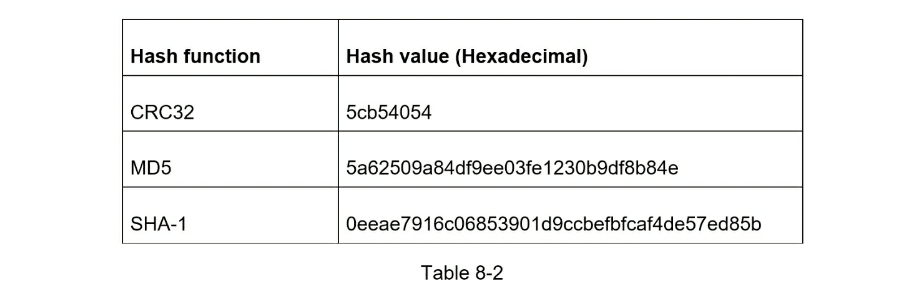
www.tinyurl.com/{hashValue}- Step 1 - Understand the problem and establish design scope
- Here are the basic use cases:
-
URL shortening: given a long URL => return a much shorter URL
-
URL redirecting: given a shorter URL => redirect to the original URL
-
High availability, scalability, and fault tolerance considerations
- Back of the envelope estimation
-
Write operation: 100 million URLs are generated per day.
-
Write operation per second: 100 million / 24 /3600 = 1160
-
Read operation: Assuming ratio of read operation to write operation is 10:1, read operation per second: 1160 * 10 = 11,600
-
Assuming the URL shortener service will run for 10 years, this means we must support 100 million * 365 * 10 = 365 billion records.
-
Assume average URL length is 100.
-
Storage requirement over 10 years: 365 billion * 100 bytes * 10 years = 365 TB
- Step 2 - Propose high-level design and get buy-in
- API Endpoints
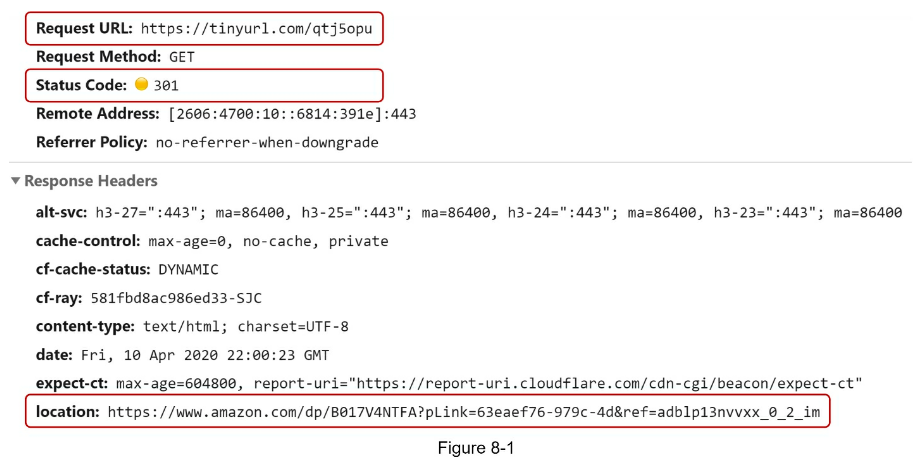
- URL redirecting
- If the priority is to reduce the server load, using 301 redirect makes sense as only the first request of the same URL is sent to URL shortening servers.
- However, if analytics is important, 302 redirect is a better choice as it can track click rate and source of the click more easily.
- Step 3 - Design deep dive
- A hash table can be expensive and resource hungry. RDBMS is probably more ideal
- The hashValue consists of characters from [0-9, a-z, A-Z], containing 10 + 26 + 26 = 62 possible characters.
- To figure out the length of hashValue, find the smallest n such that 62^n ≥ 365 billion.
- The system must support up to 365 billion URLs based on the back of the envelope estimation.
- When n = 7, 62 ^ n = ~3.5 trillion, 3.5 trillion is more than enough to hold 365 billion URLs, so the length of hashValue is 7.
- Use bloom filter to detect hash collisions
- Can use Base 62 conversion for hash function
- URL length is not fixed
- depends on unique ID generator (CHAP 7)
- collision impossible (based on unique ID)
- security concern that you can rev eng the next shorturl
- URL shortening deep dive
- Assuming the input longURL is: https://en.wikipedia.org/wiki/Systems_design
- Unique ID generator returns ID: 2009215674938.
- Convert the ID to shortURL using the base 62 conversion. ID (2009215674938) is converted to “zn9edcu”.
- Save ID, shortURL, and longURL to the database as shown in Table 8-4.
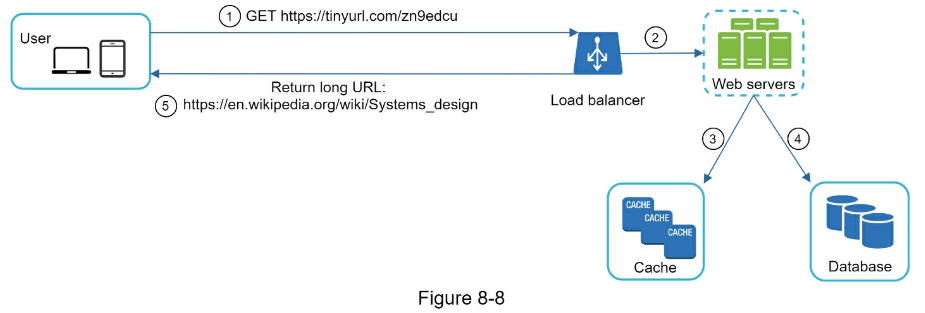
- here are a few additional talking points.
-
Rate limiter: A potential security problem we could face is that malicious users send an overwhelmingly large number of URL shortening requests. Rate limiter helps to filter out requests based on IP address or other filtering rules. If you want to refresh your memory about rate limiting, refer to “Chapter 4: Design a rate limiter”.
-
Web server scaling: Since the web tier is stateless, it is easy to scale the web tier by adding or removing web servers.
-
Database scaling: Database replication and sharding are common techniques.
-
Analytics: Data is increasingly important for business success. Integrating an analytics solution to the URL shortener could help to answer important questions like how many people click on a link? When do they click the link? etc.
-
Availability, consistency, and reliability. These concepts are at the core of any large system’s success. We discussed them in detail in Chapter 1, please refresh your memory on these topics.
-
Step 1 - Understand the problem and establish design scope
- Given a set of URLs, download all the web pages addressed by the URLs.
- Extract URLs from these web pages
- Add new URLs to the list of URLs to be downloaded. Repeat these 3 steps.
- Also address:
-
Scalability: The web is very large. There are billions of web pages out there. Web crawling should be extremely efficient using parallelization.
-
Robustness: The web is full of traps. Bad HTML, unresponsive servers, crashes, malicious links, etc. are all common. The crawler must handle all those edge cases.
-
Politeness: The crawler should not make too many requests to a website within a short time interval.
-
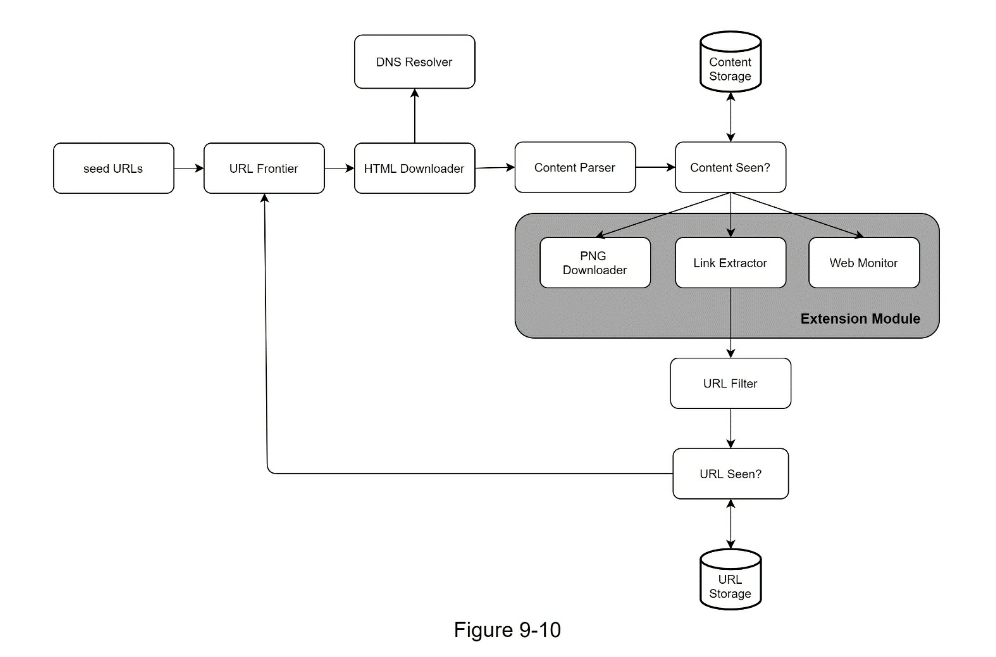
Extensibility: The system is flexible so that minimal changes are needed to support new content types. For example, if we want to crawl image files in the future, we should not need to redesign the entire system.
- Back of the envelope estimation
- Assume 1 billion web pages are downloaded every month.
- QPS: 1,000,000,000 / 30 days / 24 hours / 3600 seconds = ~400 pages per second.
-
Peak QPS = 2 * QPS = 800
- Assume the average web page size is 500k.
- 1-billion-page x 500k = 500 TB storage per month. If you are unclear about digital storage units, go through “Power of 2” section in Chapter 2 again.
- Assuming data are stored for five years, 500 TB * 12 months * 5 years = 30 PB. A 30 PB storage is needed to store five-year content.
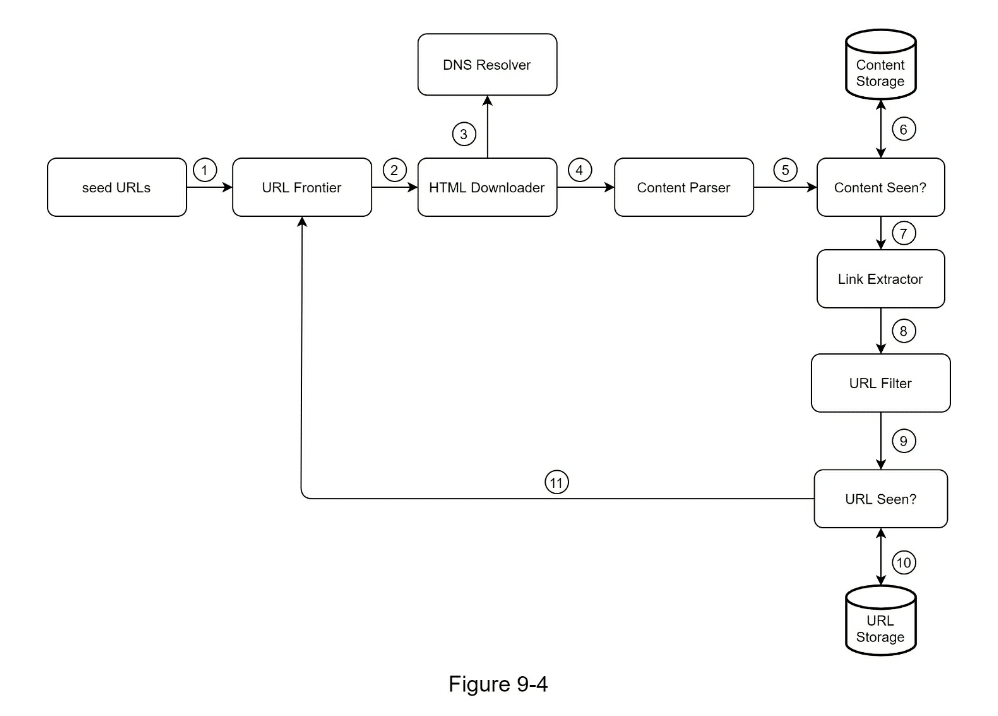
- Step 2 - Propose high-level design and get buy-in
- URL Frontier to decide if To be downloaded vs already downloaded
- Content Seen to compare hash of content
- Content Storage
- store popular content in memory to reduce latency
- everything else on disk
- URL Extractor to track all links on this page
- URL Seen? Use bloom filter to avoid revisiting a seen page
- Step 3 - Design deep dive
- DFS vs BFS
- Treat links as a graph
- Depth vs Breadth first
- Prefer BFS as deep links might not be as valuable
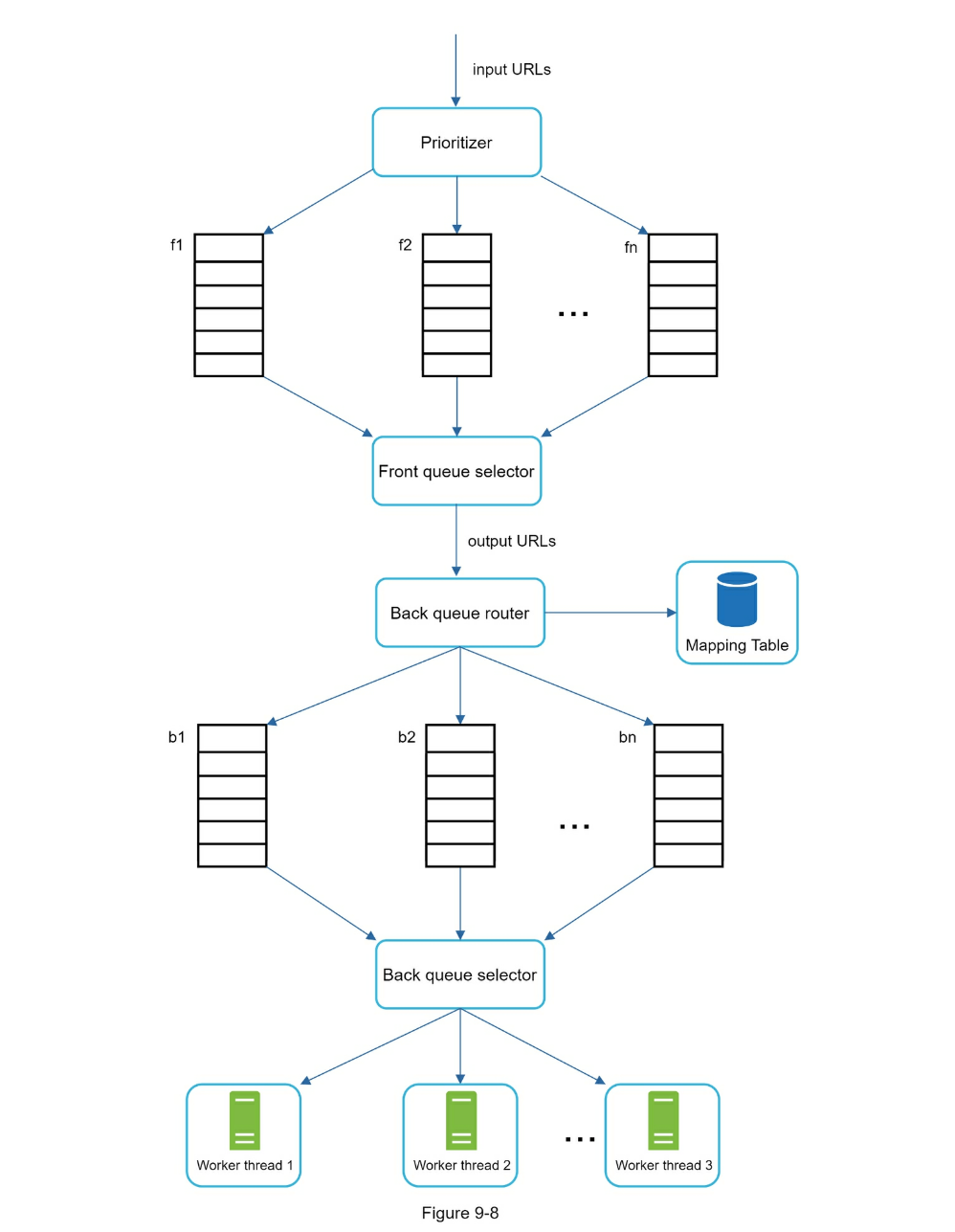
- Avoid hammering single url as that’s impolite
- Be polite, use a queue to avoid DOS’ing
- Prioritize crawl e.g. PageRank, traffic data, update frequency, etc
- Consider Robots.txt
- Performance optimization
- Robustness
-
Consistent hashing: This helps to distribute loads among downloaders. A new downloader server can be added or removed using consistent hashing. Refer to Chapter 5: Design consistent hashing for more details.
-
Save crawl states and data: To guard against failures, crawl states and data are written to a storage system. A disrupted crawl can be restarted easily by loading saved states and data.
-
Exception handling: Errors are inevitable and common in a large-scale system. The crawler must handle exceptions gracefully without crashing the system.
-
Data validation: This is an important measure to prevent system errors.
- Extensibility
- Can separate specific downloaders e.g. Image downloader, Link Extractor, etc
- Detect and avoid problematic content
- Step 4 - Wrap up
- relevant talking points:
- Server-side rendering: Numerous websites use scripts like JavaScript, AJAX, etc to generate links on the fly. If we download and parse web pages directly, we will not be able to retrieve dynamically generated links. To solve this problem, we perform server-side rendering (also called dynamic rendering) first before parsing a page [12].
-
Filter out unwanted pages: With finite storage capacity and crawl resources, an anti-spam component is beneficial in filtering out low quality and spam pages [13] [14].
-
Database replication and sharding: Techniques like replication and sharding are used to improve the data layer availability, scalability, and reliability.
-
Horizontal scaling: For large scale crawl, hundreds or even thousands of servers are needed to perform download tasks. The key is to keep servers stateless.
-
Availability, consistency, and reliability: These concepts are at the core of any large system’s success. We discussed these concepts in detail in Chapter 1. Refresh your memory on these topics.
-
Analytics: Collecting and analyzing data are important parts of any system because data is key ingredient for fine-tuning.
- Step 1 - Understand the problem and establish design scope
- Candidate: What types of notifications does the system support? Interviewer: Push notification, SMS message, and email.
- Candidate: Is it a real-time system? Interviewer: Let us say it is a soft real-time system. We want a user to receive notifications as soon as possible. However, if the system is under a high workload, a slight delay is acceptable.
- Candidate: What are the supported devices? Interviewer: iOS devices, android devices, and laptop/desktop.
- Candidate: What triggers notifications? Interviewer: Notifications can be triggered by client applications. They can also be scheduled on the server-side.
- Candidate: Will users be able to opt-out? Interviewer: Yes, users who choose to opt-out will no longer receive notifications.
- Candidate: How many notifications are sent out each day? Interviewer: 10 million mobile push notifications, 1 million SMS messages, and 5 million emails.
- Step 2 - Propose high-level design and get buy-in
- Notification systems: iOS, Android, Email, SMS
- Contact Info gathering Flow
- Notification sending/receiving flow
- User & Device info
- Flow
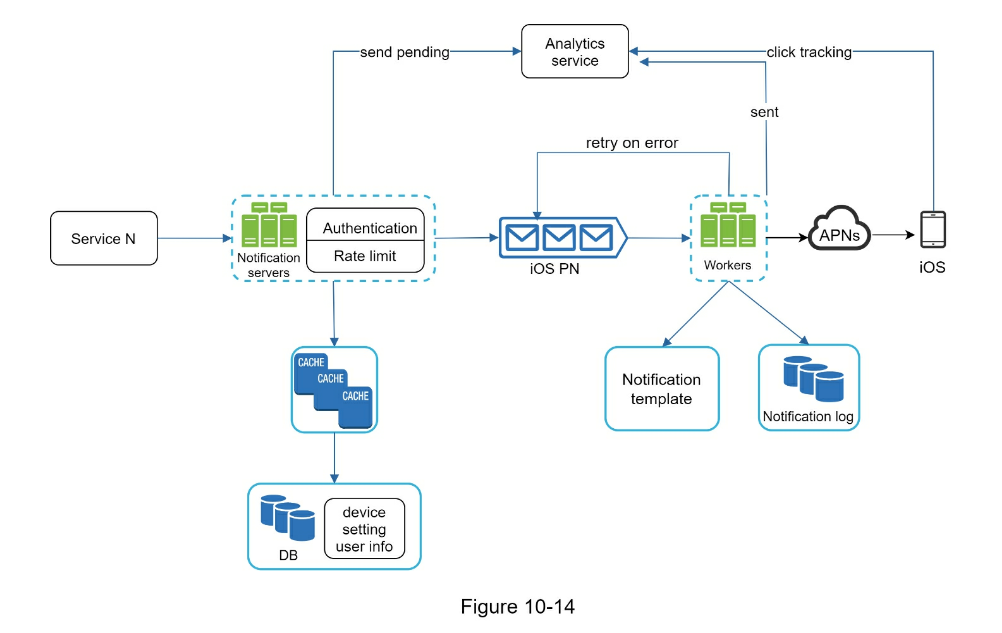
- A service calls APIs provided by notification servers to send notifications.
-
Notification servers fetch metadata such as user info, device token, and notification setting from the cache or database.
- A notification event is sent to the corresponding queue for processing. For instance, an iOS push notification event is sent to the iOS PN queue.
-
Workers pull notification events from message queues.
-
Workers send notifications to third party services.
-
Third-party services send notifications to user devices.
- Step 3 - Design deep dive
- Reliability
- Cache notifications and verify receipt
- Dedupe logic to reduce duplicate notifications
- Additional components and considerations
- The notification servers are equipped with two more critical features: authentication and rate-limiting.
- We also add a retry mechanism to handle notification failures. If the system fails to send notifications, they are put back in the messaging queue and the workers will retry for a predefined number of times.
- Furthermore, notification templates provide a consistent and efficient notification creation process.
- Finally, monitoring and tracking systems are added for system health checks and future improvements.
- Step 4 - Wrap up
- Reliability: We proposed a robust retry mechanism to minimize the failure rate.
- Security: AppKey/appSecret pair is used to ensure only verified clients can send notifications.
- Tracking and monitoring: These are implemented in any stage of a notification flow to capture important stats.
- Respect user settings: Users may opt-out of receiving notifications. Our system checks user settings first before sending notifications.
- Rate limiting: Users will appreciate a frequency capping on the number of notifications they receive.
- Step 1 - Understand the problem and establish design scope
- Candidate: Is this a mobile app? Or a web app? Or both? Interviewer: Both
- Candidate: What are the important features? Interview: A user can publish a post and see her friends’ posts on the news feed page.
- Candidate: Is the news feed sorted by reverse chronological order or any particular order such as topic scores? For instance, posts from your close friends have higher scores. Interviewer: To keep things simple, let us assume the feed is sorted by reverse chronological order.
- Candidate: How many friends can a user have? Interviewer: 5000
- Candidate: What is the traffic volume? Interviewer: 10 million DAU
- Candidate: Can feed contain images, videos, or just text? Interviewer: It can contain media files, including both images and videos.
- Step 2 - Propose high-level design and get buy-in
- Newsfeed APIs
- Feed publishing API
POST /v1/me/feed
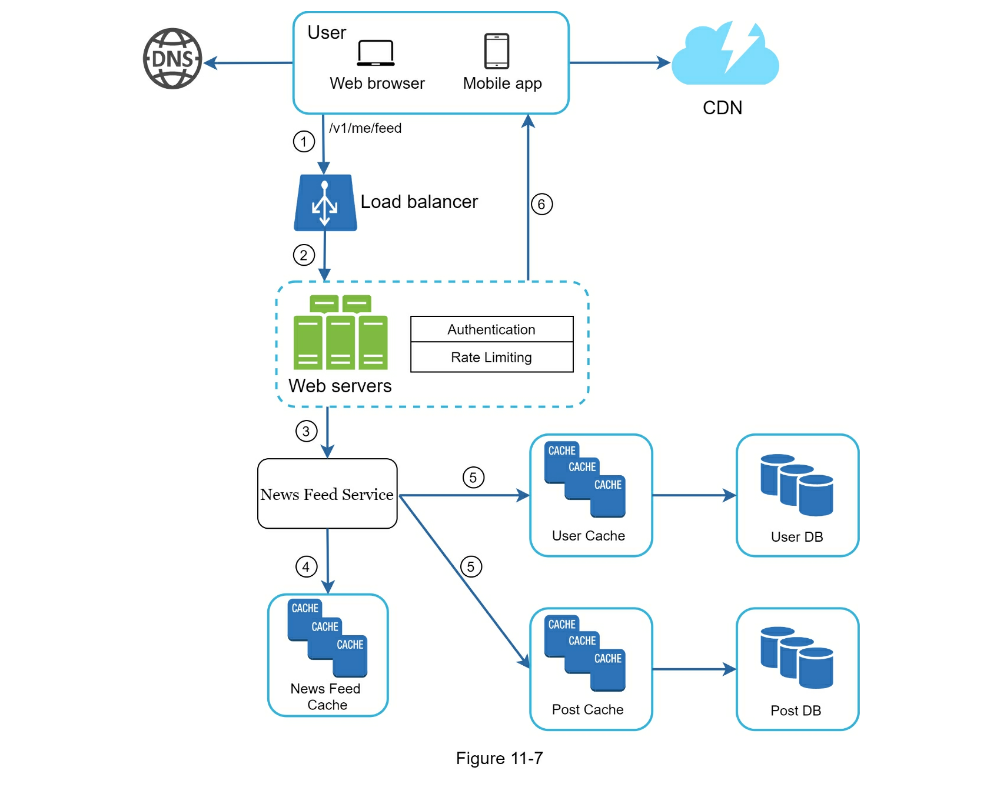
- Newsfeed retrieval API
POST /v1/me/feed
- Feed publishing
- Newsfeed building
- Step 3 - Design deep dive
- Feed Publishing
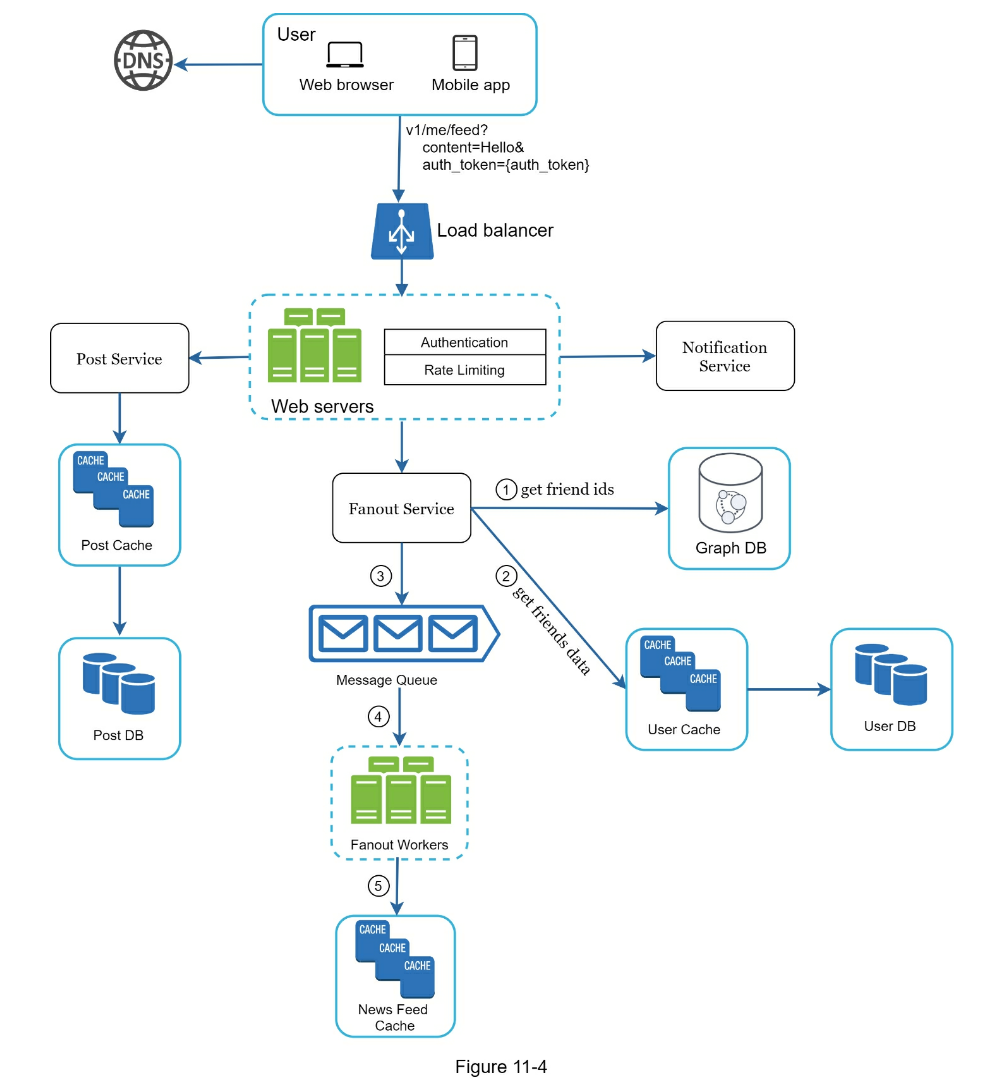
- Fetch friend IDs from the graph database (better for storing network type data than rdbms)
- Get friends info from user cache
- Fanout Service for Celebrity Problem
- fanout on write (push) as default
- fanout on read (pull) for “celebrities” to reduce system load
- Feed Retrieval
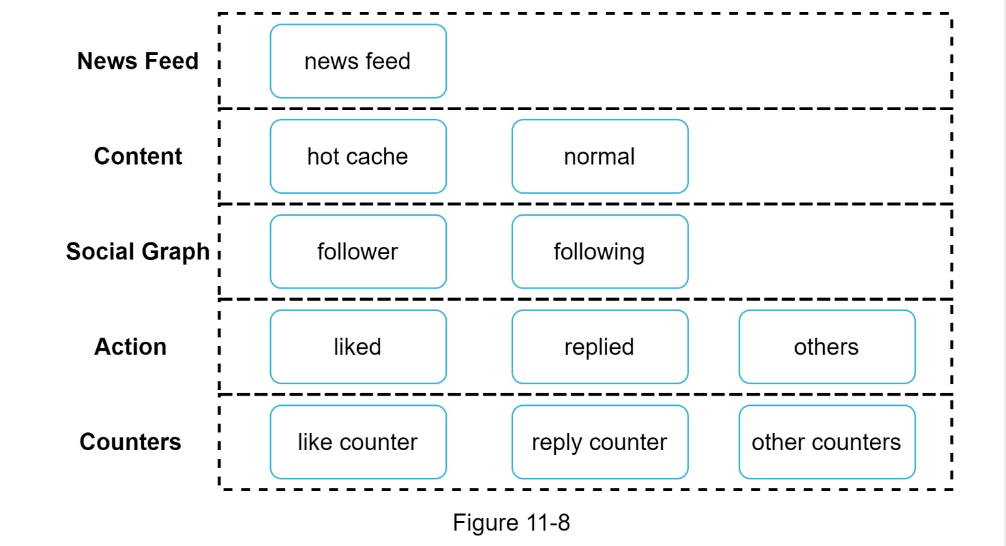
- Cache architecture
- Step 4 - Wrap up
- Scaling the database:
- Vertical scaling vs Horizontal scaling
- SQL vs NoSQL
- Master-slave replication
- Read replicas
- Consistency models
- Database sharding
- Other talking points:
- Keep web tier stateless
- Cache data as much as you can
- Support multiple data centers
- Lose couple components with message queues
- Monitor key metrics. For instance, QPS during peak hours and latency while users refreshing their news feed are interesting to monitor.
-

- Chat servers facilitate message sending/receiving.
- Presence servers manage online/offline status.
- API servers handle everything including user login, signup, change profile, etc.
- Notification servers send push notifications.
- Finally, the key-value store is used to store chat history. When an offline user comes online, she will see all her previous chat history.
- Step 1 - Understand the problem and establish design scope
- Candidate: What kind of chat app shall we design? 1 on 1 or group based? Interviewer: It should support both 1 on 1 and group chat.
- Candidate: Is this a mobile app? Or a web app? Or both? Interviewer: Both.
- Candidate: What is the scale of this app? A startup app or massive scale? Interviewer: It should support 50 million daily active users (DAU).
- Candidate: For group chat, what is the group member limit? Interviewer: A maximum of 100 people
- Candidate: What features are important for the chat app? Can it support attachment? Interviewer: 1 on 1 chat, group chat, online indicator. The system only supports text messages.
- Candidate: Is there a message size limit? Interviewer: Yes, text length should be less than 100,000 characters long.
- Candidate: Is end-to-end encryption required? Interviewer: Not required for now but we will discuss that if time allows.
- Candidate: How long shall we store the chat history? Interviewer: Forever.
- Step 2 - Propose high-level design and get buy-in
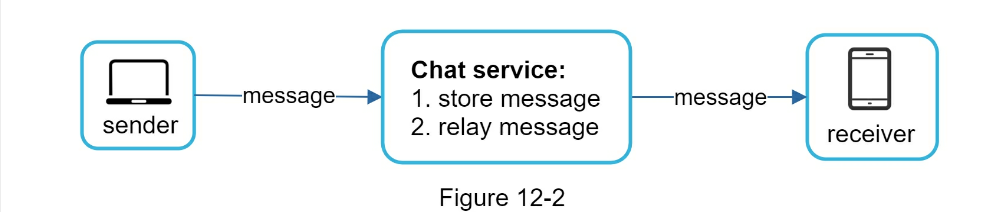
- HTTP
keep-alive on sender is efficient to maintain connection
- Receiver needs polling/websockets
- pollling is noisy
- Long polling is a little better but in stateless architecture might be connected to wrong server
- websocket works best

- Websocket can also be used for sender
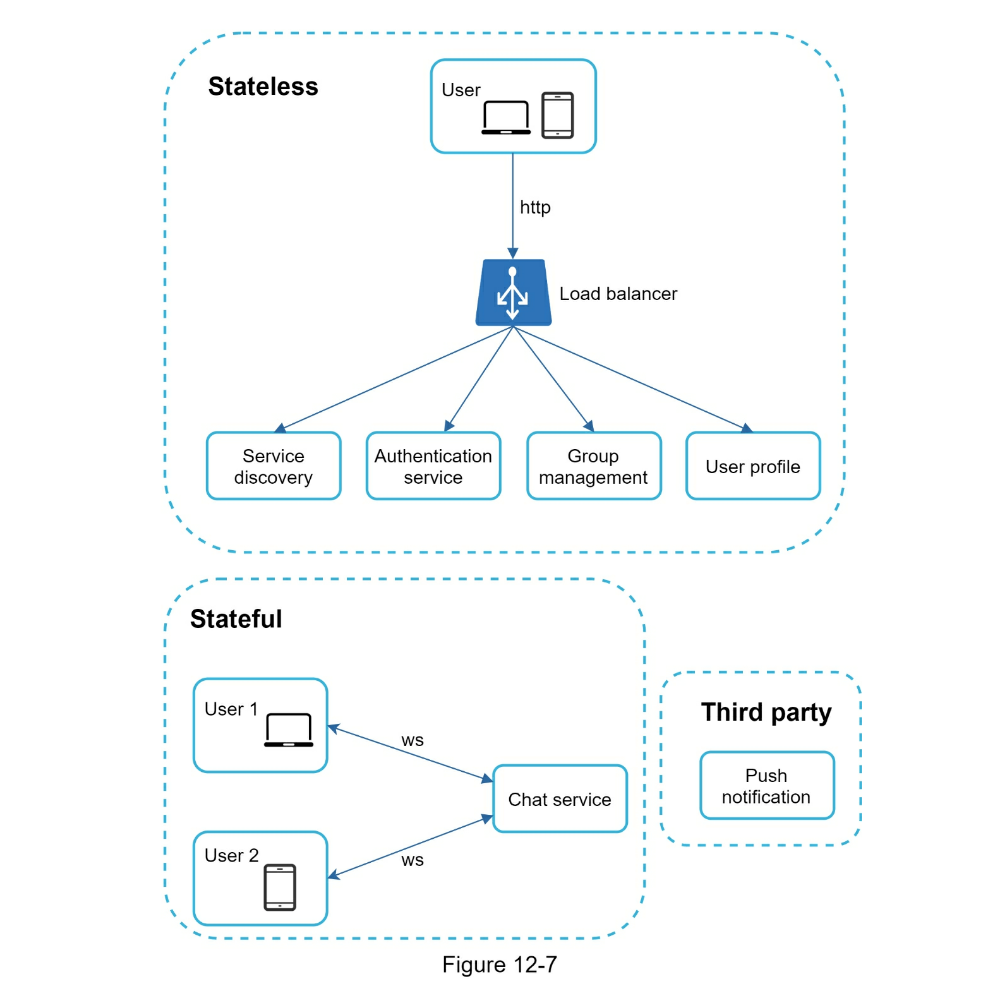
- Step 3 - Design deep dive
- Service discovery: Most efficient server for client to connect to e.g. geographic location, server capacity etc
Apache Zookeeper- 1 on 1 chat flow
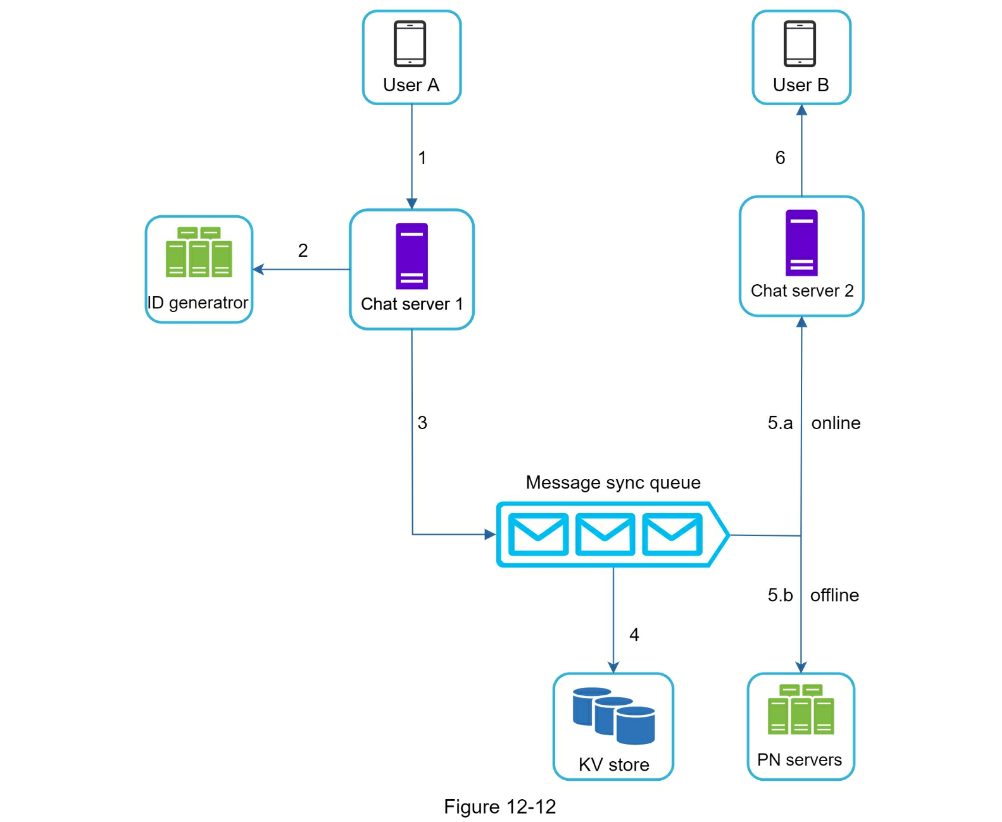
- Small group chat flow
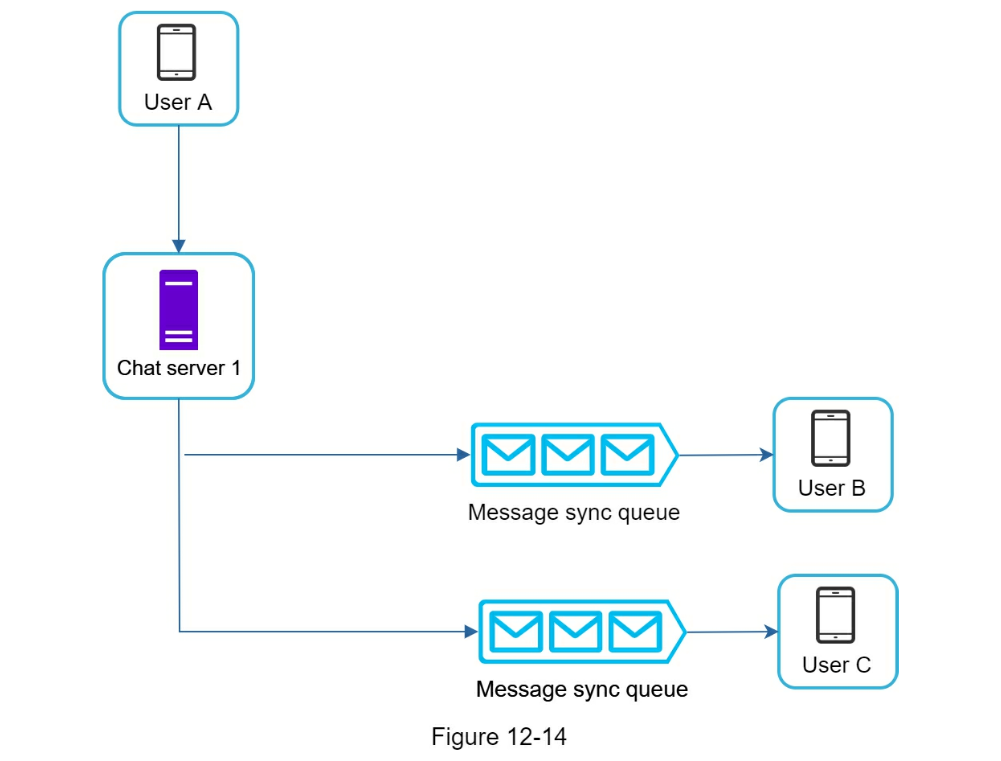
- Online presence
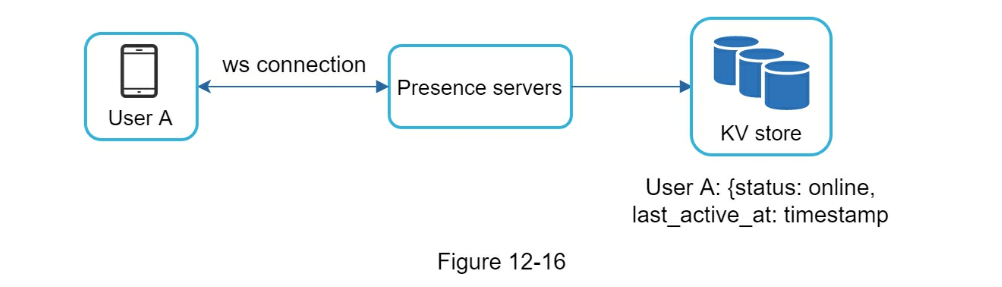
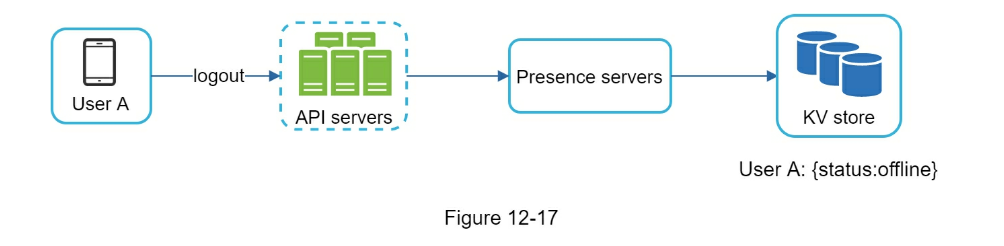
- Online status fanout
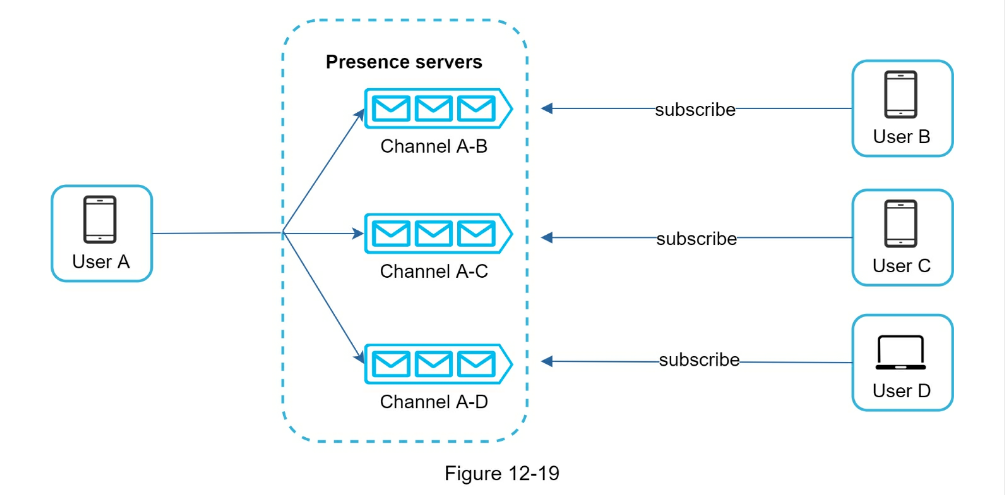
- For large groups, this is a lot of events. Can limit by fetching only when a user enters a group or manually refreshes list
- Step 4 - Wrap up
- Extend the chat app to support media files such as photos and videos. Media files are significantly larger than text in size. Compression, cloud storage, and thumbnails are interesting topics to talk about.
- End-to-end encryption. Whatsapp supports end-to-end encryption for messages. Only the sender and the recipient can read messages. Interested readers should refer to the article in the reference materials [9].
- Caching messages on the client-side is effective to reduce the data transfer between the client and server.
- Improve load time. Slack built a geographically distributed network to cache users’ data, channels, etc. for better load time [10].
- Error handling.
- The chat server error. There might be hundreds of thousands, or even more persistent connections to a chat server. If a chat server goes offline, service discovery (Zookeeper) will provide a new chat server for clients to establish new connections with.
- Message resent mechanism. Retry and queueing are common techniques for resending messages.
- Step 1 - Understand the problem and establish design scope
- Candidate: Is the matching only supported at the beginning of a search query or in the middle as well? Interviewer: Only at the beginning of a search query.
- Candidate: How many autocomplete suggestions should the system return? Interviewer: 5
- Candidate: How does the system know which 5 suggestions to return? Interviewer: This is determined by popularity, decided by the historical query frequency.
- Candidate: Does the system support spell check? Interviewer: No, spell check or autocorrect is not supported.
- Candidate: Are search queries in English? Interviewer: Yes. If time allows at the end, we can discuss multi-language support.
- Candidate: Do we allow capitalization and special characters? Interviewer: No, we assume all search queries have lowercase alphabetic characters.
- Candidate: How many users use the product? Interviewer: 10 million DAU.
- Step 2 - Propose high-level design and get buy-in
- Data gathering service
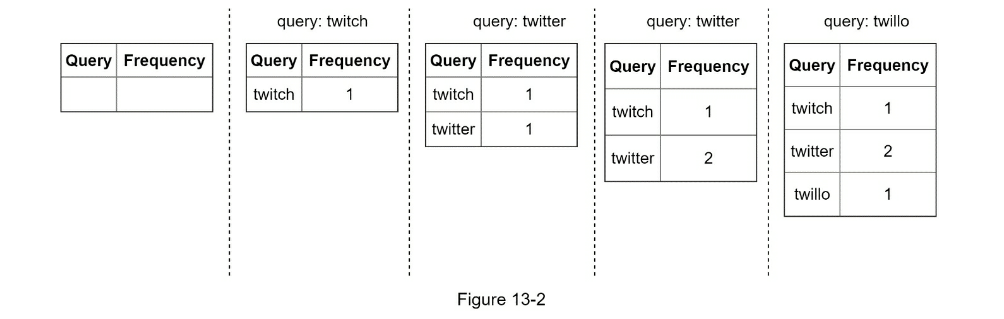
- Query service
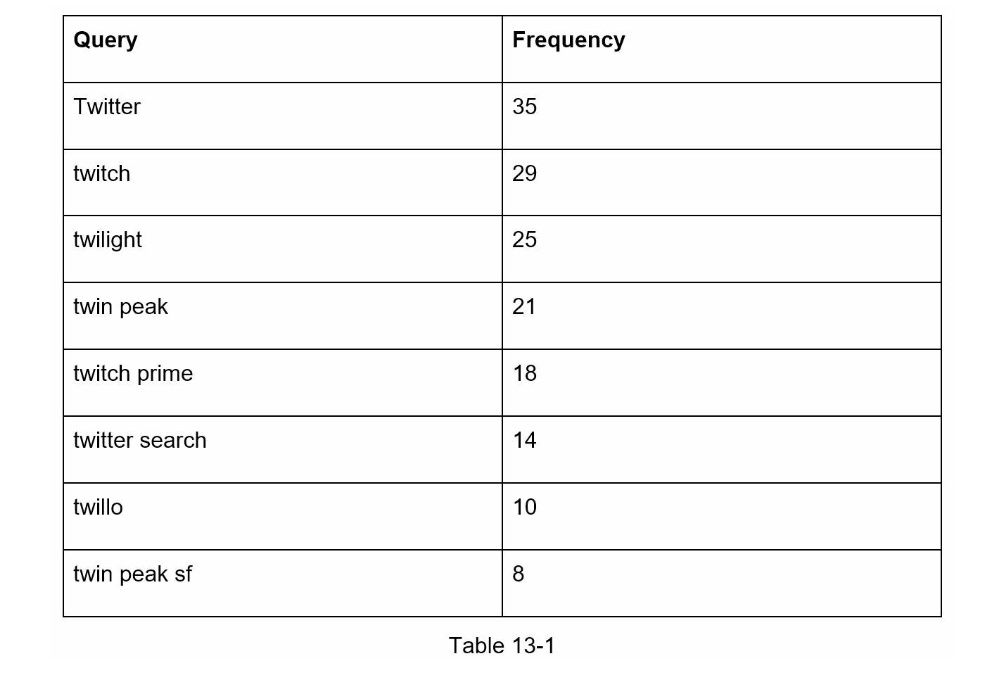
- Step 3 - Design deep dive
- Trie data structure

-
p: length of a prefix
-
n: total number of nodes in a trie
-
c: number of children of a given node
- Find the prefix. Time complexity:
O(p).
- Traverse the subtree from the prefix node to get all valid children. A child is valid if it can form a valid query string. Time complexity:
O(c)
- Sort the children and get top k. Time complexity:
O(clogc)
- The time complexity of this algorithm is the sum of time spent on each step mentioned above:
O(p) + O(c) + O(clogc)
- two optimizations:
- Limit the max length of a prefix: reduces to
O(small constant), aka O(1)
- Cache top search queries at each node
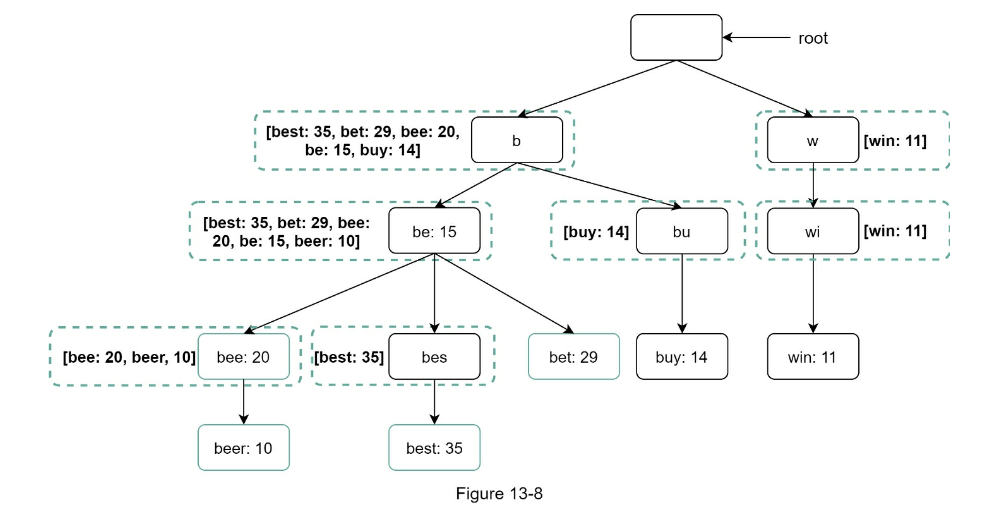
- Limit the max length of a prefix
- Cache top search queries at each node
- Data gathering service
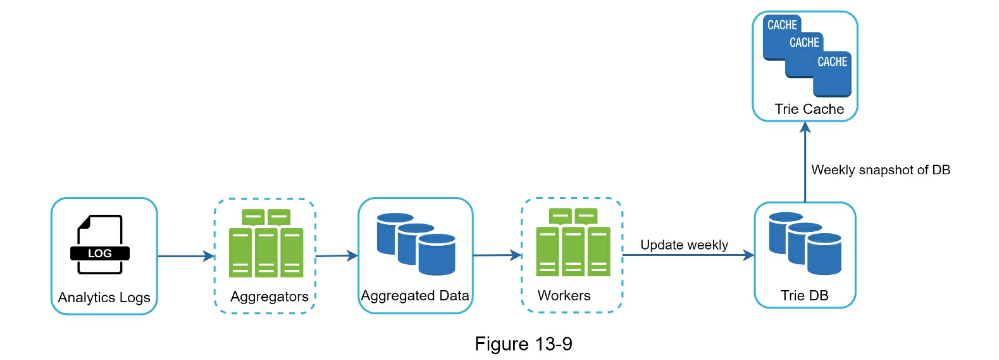
- Update cache on a schedule to reduce load
- Analytics log stores raw search queries
- Aggregators run on a schedule depending on how ‘recent’ you need results to be
- Aggregated Data.
- Workers to run async jobs on schedule
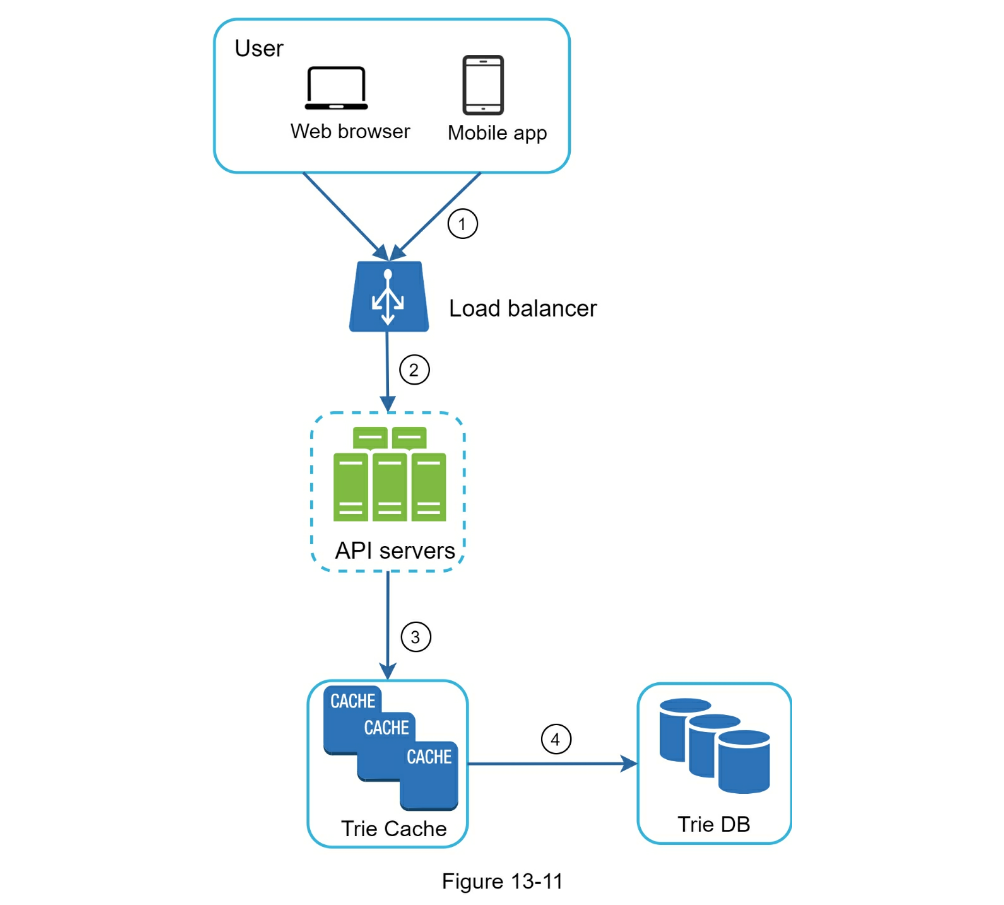
- Trie cache: Distributed for fast read
- Trie DB: long term store. Can be put in document store or KV
- Example Trie KV
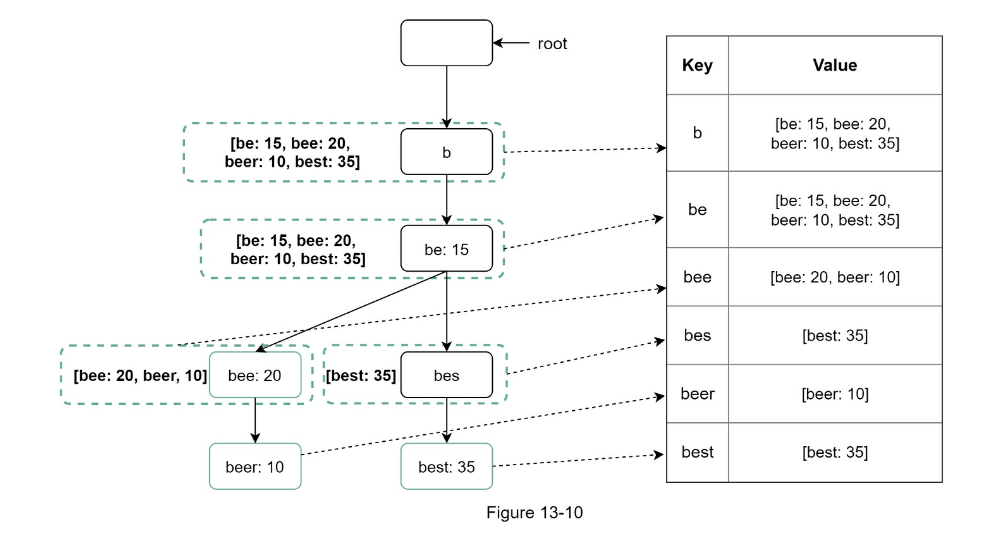
- Query service
- Optimizations
- AJAX request. For web applications, browsers usually send AJAX requests to fetch autocomplete results. The main benefit of AJAX is that sending/receiving a request/response does not refresh the whole web page.
- Browser caching. For many applications, autocomplete search suggestions may not change much within a short time. Thus, autocomplete suggestions can be saved in browser cache to allow subsequent requests to get results from the cache directly. Google search engine uses the same cache mechanism. Figure 13-12 shows the response header when you type “system design interview” on the Google search engine. As you can see, Google caches the results in the browser for 1 hour. Please note: “private” in cache-control means results are intended for a single user and must not be cached by a shared cache. “maxage=3600” means the cache is valid for 3600 seconds, aka, an hour.
- Data sampling: For a large-scale system, logging every search query requires a lot of processing power and storage. Data sampling is important. For instance, only 1 out of every N requests is logged by the system.
- Trie operations: Create, Update, Delete
- Delete for spam/adult content
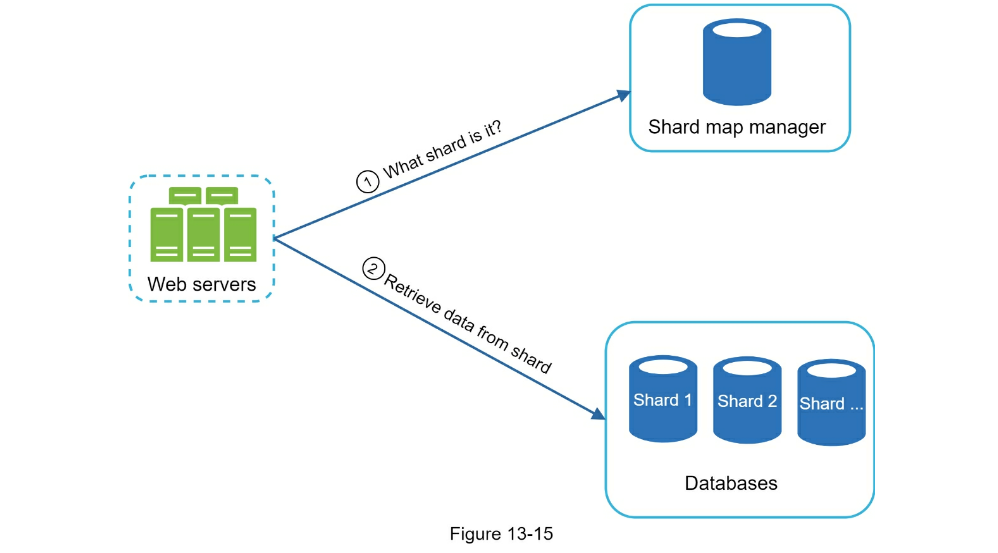
- Scale the storage
- Can shard data e.g. shard for each letter in alphabet
- Step 4 - Wrap up
- support multiple languages
- different tries for each locale
- real-time queries
- reduce working data set by sharding
- change ranking model to weigh recent queries
- Reference Materials
- Step 1 - Understand the problem and establish design scope
- Candidate: What features are important? Interviewer: Ability to upload a video and watch a video.
- Candidate: What clients do we need to support? Interviewer: Mobile apps, web browsers, and smart TV.
- Candidate: How many daily active users do we have? Interviewer: 5 million
- Candidate: What is the average daily time spent on the product? Interviewer: 30 minutes.
- Candidate: Do we need to support international users? Interviewer: Yes, a large percentage of users are international users.
- Candidate: What are the supported video resolutions? Interviewer: The system accepts most of the video resolutions and formats.
- Candidate: Is encryption required? Interviewer: Yes
- Candidate: Any file size requirement for videos? Interviewer: Our platform focuses on small and medium-sized videos. The maximum allowed video size is 1GB.
- Candidate: Can we leverage some of the existing cloud infrastructures provided by Amazon, Google, or Microsoft? Interviewer: That is a great question. Building everything from scratch is unrealistic for most companies it is recommended to leverage some of the existing cloud services.
- Back of the envelope estimation
- Assume the product has 5 million daily active users (DAU).
- Users watch 5 videos per day.
- 10% of users upload 1 video per day.
- Assume the average video size is 300 MB.
- Total daily storage space needed: 5 million * 10% * 300 MB = 150TB
- CDN cost.
- When cloud CDN serves a video, you are charged for data transferred out of the CDN.
- Let us use Amazon’s CDN CloudFront for cost estimation (Figure 14-2) [3].
- Assume 100% of traffic is served from the United States.
- The average cost per GB is $0.02.
- For simplicity, we only calculate the cost of video streaming. 5 million * 5 videos * 0.3GB * 0.02= 150,000 per day
- Step 2 - Propose high-level design and get buy-in
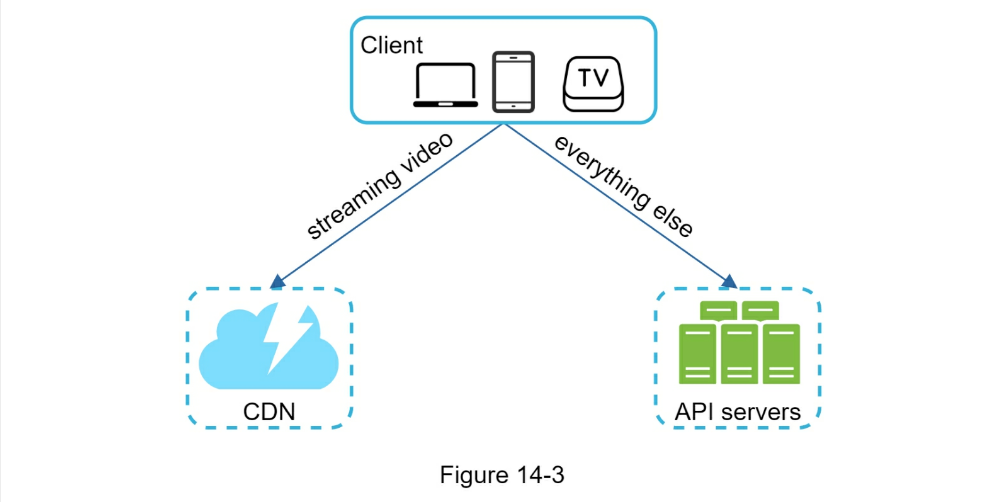
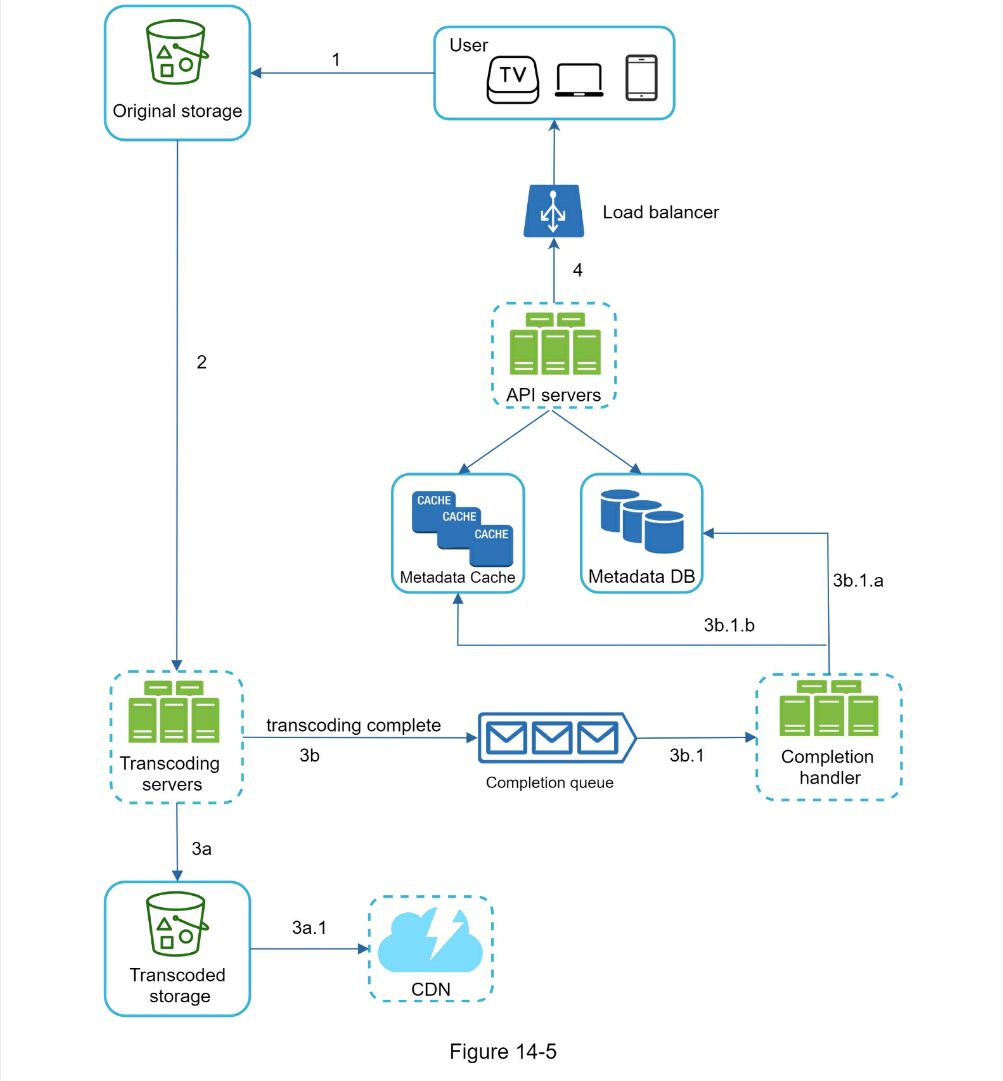
- Video uploading flow
- Video streaming flow can utilize CDN
- Step 3 - Design deep dive
- Video transcoding can parallelize different aspects
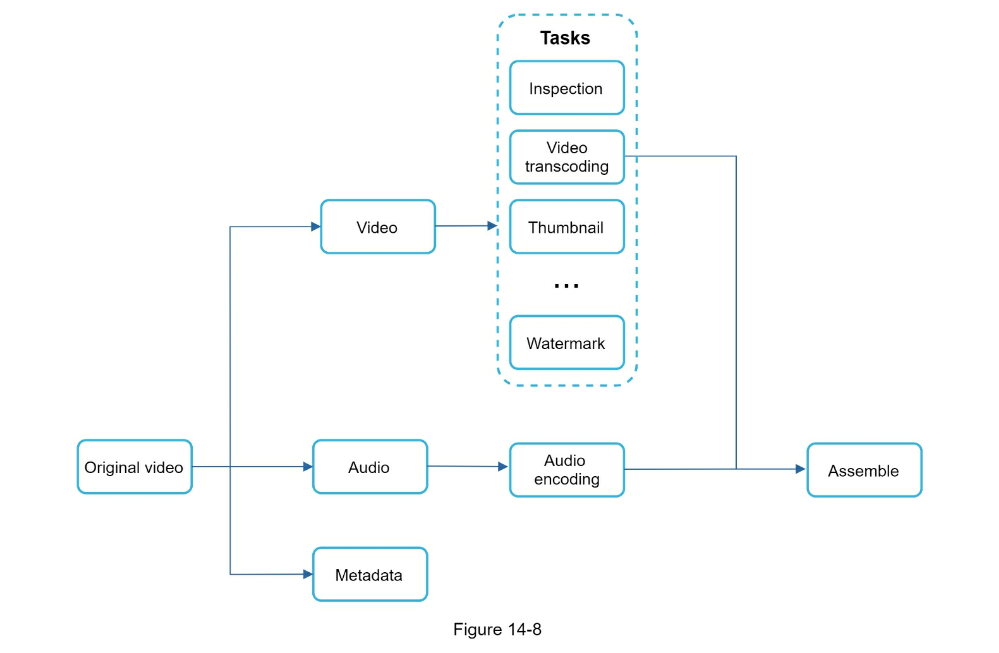
- Preprocessor: Can split videos into smaller chunks for faster streaming
- Task workers

- Temporary storage
- Encoded video
- System optimizations
- place upload centers close to users
- parallelism everywhere w/ message queues
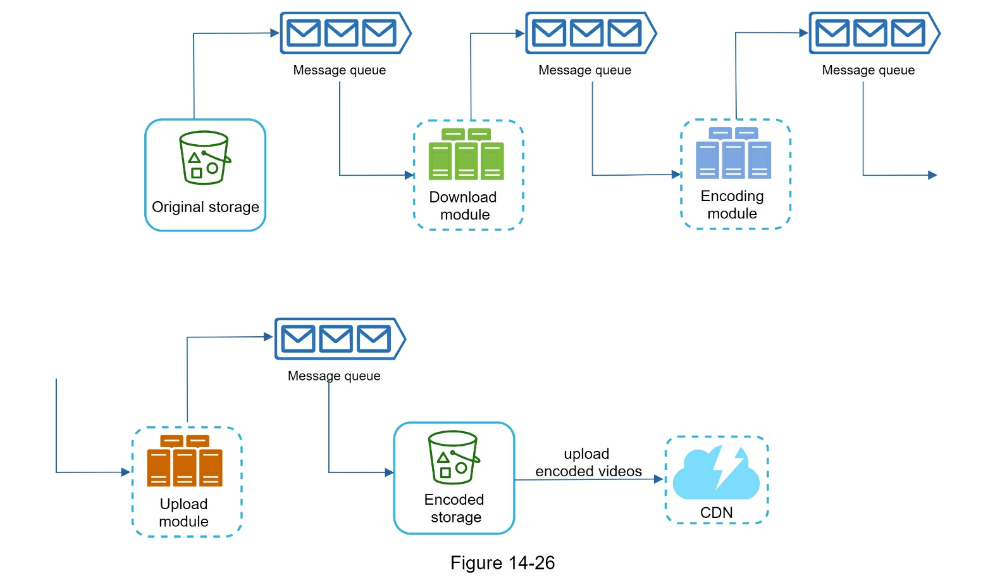
- Safety optimization:
- pre-signed upload URL to verify authorized user
- protect your videos w/ DRM/Encryption/watermarking
- Cost-saving optimization
- use CDN only for popular videos
- Limit video distribution to specific regions (DC)
- build your own CDN
- Error handling
- Step 4 - Wrap up
- Scale the API tier: Because API servers are stateless, it is easy to scale API tier horizontally.
- Scale the database: You can talk about database replication and sharding.
- Live streaming: It refers to the process of how a video is recorded and broadcasted in real time. Although our system is not designed specifically for live streaming, live streaming and non-live streaming have some similarities: both require uploading, encoding, and streaming. The notable differences are:
- Live streaming has a higher latency requirement, so it might need a different streaming protocol.
- Live streaming has a lower requirement for parallelism because small chunks of data are already processed in real-time.
- Live streaming requires different sets of error handling. Any error handling that takes too much time is not acceptable.
- Video takedowns: Videos that violate copyrights, pornography, or other illegal acts shall be removed. Some can be discovered by the system during the upload process, while others might be discovered through user flagging.
- Reference Materials
- Step 1 - Understand the problem and establish design scope
- Candidate: What are the most important features? Interviewer: Upload and download files, file sync, and notifications.
- Candidate: Is this a mobile app, a web app, or both? Interviewer: Both.
- Candidate: What are the supported file formats? Interviewer: Any file type.
- Candidate: Do files need to be encrypted? Interview: Yes, files in the storage must be encrypted.
- Candidate: Is there a file size limit? Interview: Yes, files must be 10 GB or smaller.
- Candidate: How many users does the product have? Interviewer: 10M DAU.
- Back of the envelope estimation
- Assume the application has 50 million signed up users and 10 million DAU.
- Users get 10 GB free space.
- Assume users upload 2 files per day. The average file size is 500 KB.
- 1:1 read to write ratio.
- Total space allocated: 50 million * 10 GB = 500 Petabyte
- QPS for upload API: 10 million * 2 uploads / 24 hours / 3600 seconds = ~ 240
- Peak QPS = QPS * 2 = 480
- Step 2 - Propose high-level design and get buy-in
- single server setup as listed below:
- A web server to upload and download files.
- A database to keep track of metadata like user data, login info, files info, etc.
- A storage system to store files. We allocate 1TB of storage space to store files.
- APIs
-
- Upload a file to Google Drive
-
- Download a file from Google Drive
-
- Get file revisions
- Move away from single server
- Use S3 for blob storage
- load balancer, web servers, metadata db
- Sync conflicts
- version changes and allow manual merge
- High-level design

- Step 3 - Design deep dive
- Block servers can be optimized
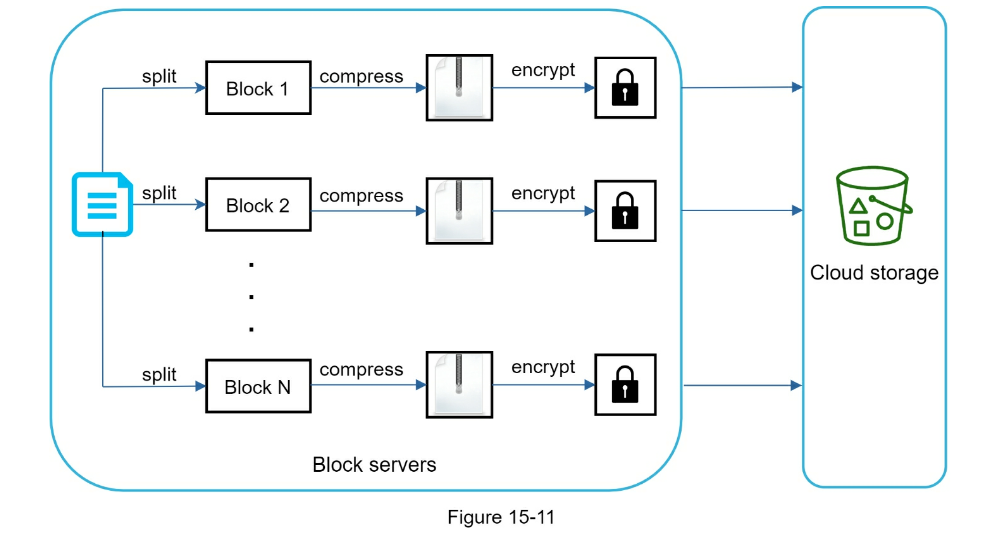
- Delta sync: only sync modifications instead of whole block
- Compression
- Save storage space
-
De-duplicate data blocks. Eliminating redundant blocks at the account level is an easy way to save space. Two blocks are identical if they have the same hash value.
- Adopt an intelligent data backup strategy. Two optimization strategies can be applied:
-
Set a limit: We can set a limit for the number of versions to store. If the limit is reached, the oldest version will be replaced with the new version.
-
Keep valuable versions only: Some files might be edited frequently. For example, saving every edited version for a heavily modified document could mean the file is saved over 1000 times within a short period. To avoid unnecessary copies, we could limit the number of saved versions. We give more weight to recent versions. Experimentation is helpful to figure out the optimal number of versions to save.
-
Moving infrequently used data to cold storage. Cold data is the data that has not been active for months or years. Cold storage like Amazon S3 glacier [11] is much cheaper than S3.
- Failure Handling
-
Load balancer failure: If a load balancer fails, the secondary would become active and pick up the traffic. Load balancers usually monitor each other using a heartbeat, a periodic signal sent between load balancers. A load balancer is considered as failed if it has not sent a heartbeat for some time.
-
Block server failure: If a block server fails, other servers pick up unfinished or pending jobs.
-
Cloud storage failure: S3 buckets are replicated multiple times in different regions. If files are not available in one region, they can be fetched from different regions.
-
API server failure: It is a stateless service. If an API server fails, the traffic is redirected to other API servers by a load balancer.
-
Metadata cache failure: Metadata cache servers are replicated multiple times. If one node goes down, you can still access other nodes to fetch data. We will bring up a new cache server to replace the failed one.
- _Metadata DB failure.
-
Master down: If the master is down, promote one of the slaves to act as a new master and bring up a new slave node.
-
Slave down: If a slave is down, you can use another slave for read operations and bring another database server to replace the failed one.
-
Notification service failure: Every online user keeps a long poll connection with the notification server. Thus, each notification server is connected with many users. According to the Dropbox talk in 2012 [6], over 1 million connections are open per machine. If a server goes down, all the long poll connections are lost so clients must reconnect to a different server. Even though one server can keep many open connections, it cannot reconnect all the lost connections at once. Reconnecting with all the lost clients is a relatively slow process.
-
Offline backup queue failure: Queues are replicated multiple times. If one queue fails, consumers of the queue may need to re-subscribe to the backup queue.
CHAPTER 1: SCALE FROM ZERO TO MILLIONS OF USERS
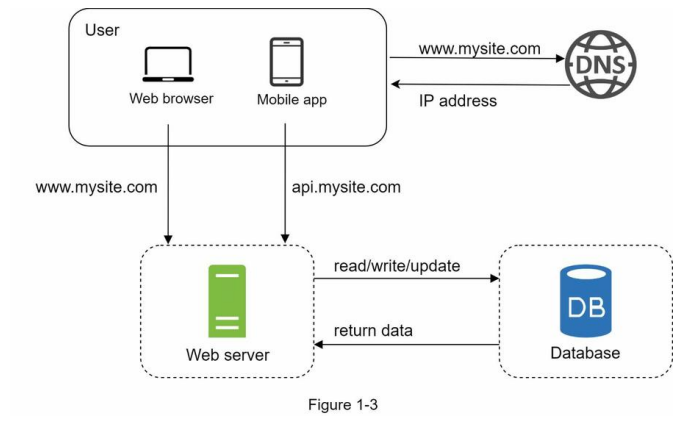
Single server setup
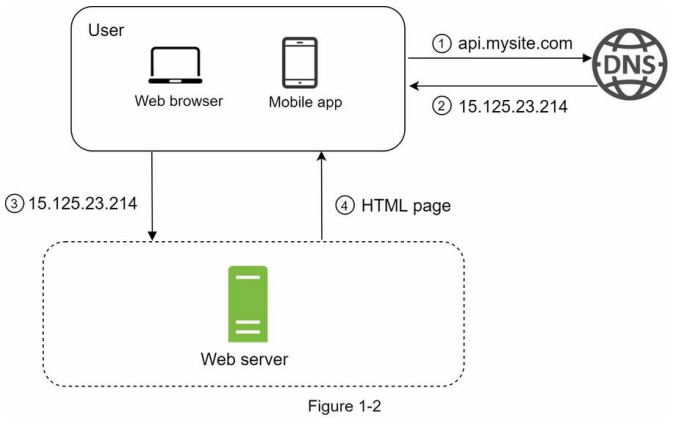
To understand this setup, it is helpful to investigate the request flow and traffic source.
request flow
- Users access websites through domain names, such as api.mysite.com. Usually,
the Domain Name System (DNS) is a paid service provided by 3rd parties and
not hosted by our servers.
- Internet Protocol (IP) address is returned to the browser or mobile app. In
the example, IP address 15.125.23.214 is returned.
- Once the IP address is obtained, Hypertext Transfer Protocol (HTTP) [1]
requests are sent directly to your web server.
- The web server returns HTML pages or JSON response for rendering.
traffic source
- Web application: it uses a combination of server-side languages (Java,
Python, etc.) to handle business logic, storage, etc., and client-side
languages (HTML and JavaScript) for presentation.
- Mobile application: HTTP protocol is the communication protocol between the
mobile app and the web server. JavaScript Object Notation (JSON) is commonly
used API response format to transfer data due to its simplicity. An example
of the API response in JSON format is shown below:
GET /users/12 – Retrieve user object for id = 12
{
  "id": 12,
  "firstName": "John",
  ...,
  "address":{
  "streetAddress": "21 2nd Street",
  ...,
  }
}
Database
Split Web/DB to allow independent scaling
Which databases to use?
-
RDMBS MySQL, Oracle database, PostgreSQL, etc.
-
NoSQL CouchDB, Neo4j, Cassandra, HBase, Amazon DynamoDB, etc.
- Grouped into four categories:
- key-value stores,
- graph stores,
- column stores, and
- document stores.
Generally RDBMS are the best option. However, might not suitable for your
specific use cases, e.g.
- Your application requires super-low latency.
- Your data are unstructured, or you do not have any relational data.
- You only need to serialize and deserialize data (JSON, XML, YAML, etc.).
- You need to store a massive amount of data.
Vertical scaling vs horizontal scaling
Vertical scaling, referred to as “scale up”, means the process of adding
more power (CPU, RAM, etc.) to your servers.
Horizontal scaling, referred to as “scale-out”, allows you to scale by
adding more servers into your pool of resources.
When traffic is low, vertical scaling is a great option, and the simplicity of vertical scaling is
its main advantage. Unfortunately, it comes with serious limitations.
-
Vertical scaling has a hard limit. It is impossible to add unlimited CPU and
memory to a single server.
- Vertical scaling does not have failover and redundancy. If one server goes
down, the website/app goes down with it completely.
Horizontal scaling is more desirable for large scale applications due to the
limitations of vertical scaling.
In the previous design, users are connected to the web server directly. Users will unable to
access the website if the web server is offline. In another scenario, if many users access the
web server simultaneously and it reaches the web server’s load limit, users generally
experience slower response or fail to connect to the server. A load balancer is the best
technique to address these problems.
Load balancer
A load balancer evenly distributes incoming traffic among web servers that
are defined in a load-balanced set.
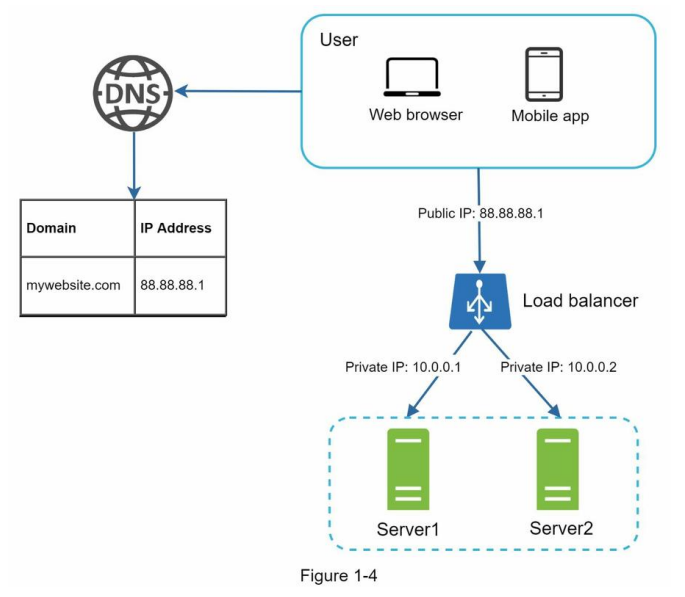
As shown in Figure 1-4, users connect to the public IP of the load balancer
directly. With this setup, web servers are unreachable directly by clients
anymore.
For better security, private IPs are used for communication between servers. A
private IP is an IP address reachable only between servers in the same network;
however, it is unreachable over the internet. The load balancer communicates
with web servers through private IPs.
In Figure 1-4, after a load balancer and a second web server are added, we
successfully solved no failover issue and improved the availability of the web
tier. Details are explained below:
- If server 1 goes offline, all the traffic will be routed to server 2. This
prevents the website from going offline. We will also add a new healthy web
server to the server pool to balance the load.
- If the website traffic grows rapidly, and two servers are not enough to
handle the traffic, the load balancer can handle this problem gracefully. You
only need to add more servers to the web server pool, and the load balancer
automatically starts to send requests to them.
Now the web tier looks good, what about the data tier? The current design has
one database, so it does not support failover and redundancy. Database
replication is a common technique to address those problems. Let us take a
look.
Database replication
Quoted from Wikipedia: “Database replication can be used in many database
management systems, usually with a master/slave relationship between the
original (master) and the copies (slaves)” [3].
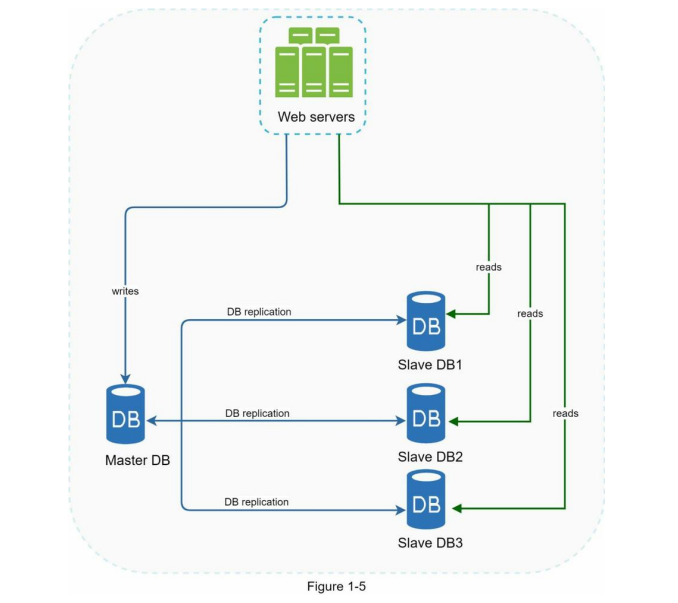
A master database generally only supports write operations. A slave database
gets copies of the data from the master database and only supports read
operations.
All the data-modifying commands like insert, delete, or update must be sent to
the master database. Most applications require a much higher ratio of reads to
writes; thus, the number of slave databases in a system is usually larger than
the number of master databases. Figure 1-5 shows a master database with
multiple slave databases.
Advantages of database replication:
- Better performance: In the master-slave model, all writes and updates
happen in master nodes; whereas, read operations are distributed across slave
nodes. This model improves performance because it allows more queries to be
processed in parallel.
-
Reliability: If one of your database servers is destroyed by a natural
disaster, such as a typhoon or an earthquake, data is still preserved. You do
not need to worry about data loss because data is replicated across multiple
locations.
-
High availability: By replicating data across different locations, your
website remains in operation even if a database is offline as you can access
data stored in another database server.
In the previous section, we discussed how a load balancer helped to improve
system availability. We ask the same question here: what if one of the
databases goes offline? The architectural design discussed in Figure 1-5 can
handle this case:
- If only one slave database is available and it goes offline, read operations
will be directed to the master database temporarily. As soon as the issue is
found, a new slave database will replace the old one. In case multiple slave
databases are available, read operations are redirected to other healthy
slave databases. A new database server will replace the old one.
- If the master database goes offline, a slave database will be promoted to be
the new master. All the database operations will be temporarily executed on
the new master database. A new slave database will replace the old one for
data replication immediately.
In production systems, promoting a new master is more complicated as the data in a slave
database might not be up to date. The missing data needs to be updated by running data
recovery scripts. Although some other replication methods like multi-masters and circular
replication could help, those setups are more complicated; and their discussions are
beyond the scope of this book. Interested readers should refer to the listed reference
materials [4][5].
Figure 1-6 shows the system design after adding the load balancer and database replication.
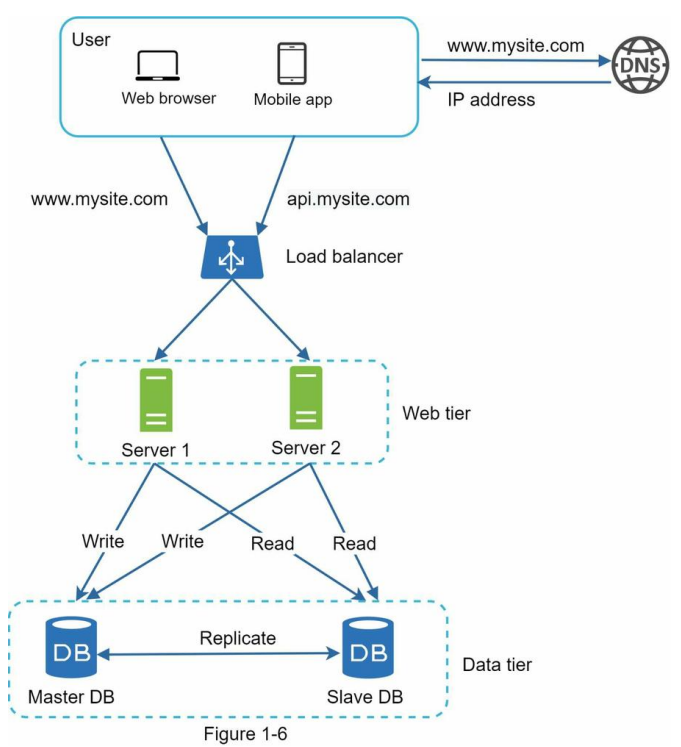
Let us take a look at the design:
- A user gets the IP address of the load balancer from DNS.
- A user connects the load balancer with this IP address.
- The HTTP request is routed to either Server 1 or Server 2.
- A web server reads user data from a slave database.
- A web server routes any data-modifying operations to the master database.
This includes write, update, and delete operations.
Now, you have a solid understanding of the web and data tiers, it is time to
improve the load/response time. This can be done by adding a cache layer and
shifting static content (JavaScript/CSS/image/video files) to the content
delivery network (CDN).
Cache
A cache is a temporary storage area that stores the result of expensive
responses or frequently accessed data in memory so that subsequent requests are
served more quickly. As illustrated in Figure 1-6, every time a new web page
loads, one or more database calls are executed to fetch data. The application
performance is greatly affected by calling the database repeatedly.
The cache can mitigate this problem.
Cache tier
The cache tier is a temporary data store layer, much faster than the
database. The benefits of having a separate cache tier include better system
performance, ability to reduce database workloads, and the ability to scale the
cache tier independently. Figure 1-7 shows a possible setup of a cache server:

After receiving a request, a web server first checks if the cache has the
available response. If it has, it sends data back to the client. If not, it
queries the database, stores the response in cache, and sends it back to the
client. This caching strategy is called a read-through cache.
Other caching strategies are available depending on the data type, size, and
access patterns. A previous study explains how different caching strategies
work [6].
Interacting with cache servers is simple because most cache servers provide
APIs for common programming languages. The following code snippet shows typical
Memcached APIs:
SECONDS=1
cache.set('myKey', 'hi there', 3600 * SECONDS)
cache.get('myKey')
Considerations for using cache
Here are a few considerations for using a cache system:
-
Decide when to use cache. Consider using cache when data is read
frequently but modified infrequently. Since cached data is stored in
volatile memory, a cache server is not ideal for persisting data. For
instance, if a cache server restarts, all the data in memory is lost. Thus,
important data should be saved in persistent data stores.
-
Expiration policy. It is a good practice to implement an expiration
policy. Once cached data is expired, it is removed from the cache. When
there is no expiration policy, cached data will be stored in the memory
permanently. It is advisable not to make the expiration date too short as
this will cause the system to reload data from the database too frequently.
Meanwhile, it is advisable not to make the expiration date too long as the
data can become stale.
-
Consistency: This involves keeping the data store and the cache in sync.
Inconsistency can happen because data-modifying operations on the data store
and cache are not in a single transaction. When scaling across multiple
regions, maintaining consistency between the data store and cache is
challenging. For further details, refer to the paper titled “Scaling
Memcache at Facebook” published by Facebook [7].
-
Mitigating failures: A single cache server represents a potential single
point of failure (SPOF), defined in Wikipedia as follows: “A single point
of failure (SPOF) is a part of a system that, if it fails, will stop the
entire system from working” [8]. As a result, multiple cache servers across
different data centers are recommended to avoid SPOF. Another recommended
approach is to overprovision the required memory by certain percentages.
This provides a buffer as the memory usage increases.
-
Eviction Policy: Once the cache is full, any requests to add items to the
cache might cause existing items to be removed. This is called cache
eviction. Least-recently-used (LRU) is the most popular cache eviction
policy. Other eviction policies, such as the Least Frequently Used (LFU) or
First in First Out (FIFO), can be adopted to satisfy different use cases.
Content delivery network (CDN)
A CDN is a network of geographically dispersed servers used to deliver static
content. CDN servers cache static content like images, videos, CSS, JavaScript
files, etc.
Dynamic content caching is a relatively new concept and beyond the scope of
this book. It enables the caching of HTML pages that are based on request path,
query strings, cookies, and request headers. Refer to the article mentioned in
reference material [9] for more about this. This book focuses on how to use CDN
to cache static content.
Here is how CDN works at the high-level: when a user visits a website, a CDN
server closest to the user will deliver static content. Intuitively, the
further users are from CDN servers, the slower the website loads. For example,
if CDN servers are in San Francisco, users in Los Angeles will get content
faster than users in Europe. Figure 1-9 is a great example that shows how CDN
improves load time.
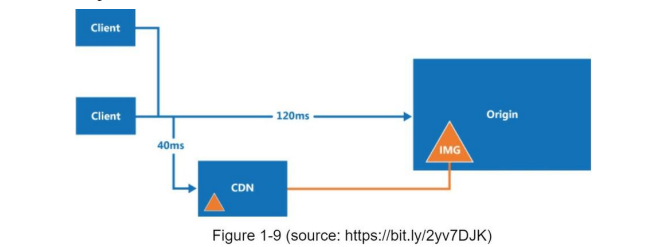
Figure 1-10 demonstrates the CDN workflow.
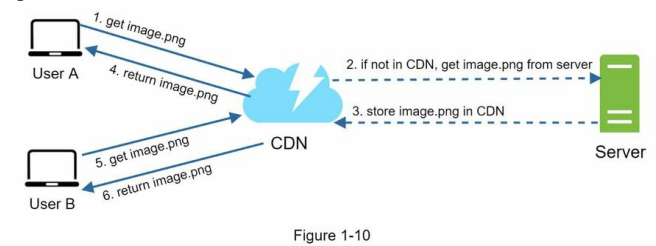
- User A tries to get image.png by using an image URL. The URL’s domain is
provided by the CDN provider. The following two image URLs are samples used
to demonstrate what image URLs look like on Amazon and Akamai CDNs:
- https://mysite.cloudfront.net/logo.jpg
- https://mysite.akamai.com/image-manager/img/logo.jpg
- If the CDN server does not have image.png in the cache, the CDN server
requests the file from the origin, which can be a web server or online
storage like Amazon S3.
- The origin returns image.png to the CDN server, which includes optional HTTP
header Time-to-Live (TTL) which describes how long the image is cached.
- The CDN caches the image and returns it to User A. The image remains cached
in the CDN until the TTL expires.
- User B sends a request to get the same image.
- The image is returned from the cache as long as the TTL has not expired.
Considerations of using a CDN
-
Cost: CDNs are run by third-party providers, and you are charged for data
transfers in and out of the CDN. Caching infrequently used assets provides no
significant benefits so you should consider moving them out of the CDN.
- Setting an appropriate cache expiry: For time-sensitive content, setting
a cache expiry time is important. The cache expiry time should neither be too
long nor too short. If it is too long, the content might no longer be fresh.
If it is too short, it can cause repeat reloading of content from origin
servers to the CDN.
-
CDN fallback: You should consider how your website/application copes with
CDN failure. If there is a temporary CDN outage, clients should be able to
detect the problem and request resources from the origin.
-
Invalidating files: You can remove a file from the CDN before it expires
by performing one of the following operations:
- Invalidate the CDN object using APIs provided by CDN vendors.
- Use object versioning to serve a different version of the object. To
version an object, you can add a parameter to the URL, such as a version
number. For example, version number 2 is added to the query string:
image.png?v=2.
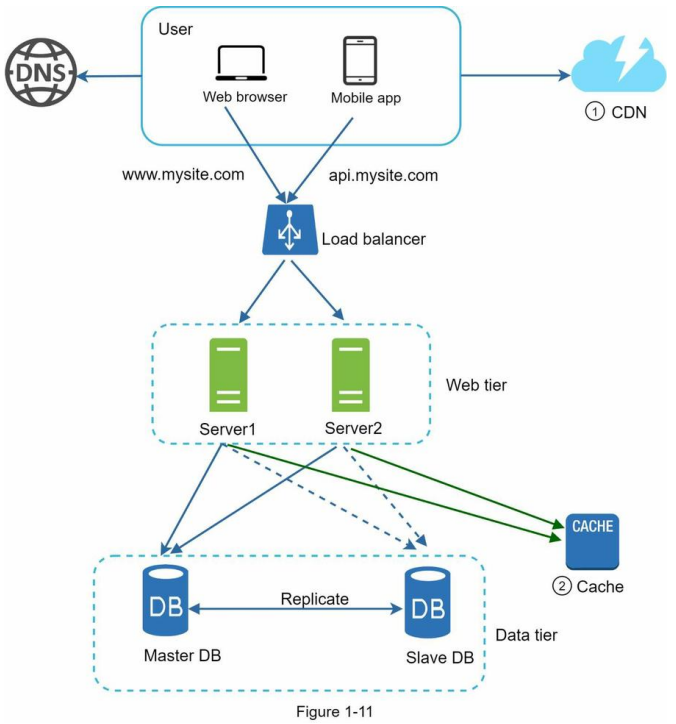
Figure 1-11 shows the design after the CDN and cache are added.
- Static assets (JS, CSS, images, etc.,) are no longer served by web servers.
They are fetched from the CDN for better performance.
- The database load is lightened by caching data.
Stateless web tier
Now it is time to consider scaling the web tier horizontally. For this, we need
to move state (for instance user session data) out of the web tier. A good
practice is to store session data in the persistent storage such as relational
database or NoSQL. Each web server in the cluster can access state data from
databases. This is called stateless web tier.
Stateful architecture
A stateful server and stateless server has some key differences. A stateful
server remembers client data (state) from one request to the next. A stateless
server keeps no state information.
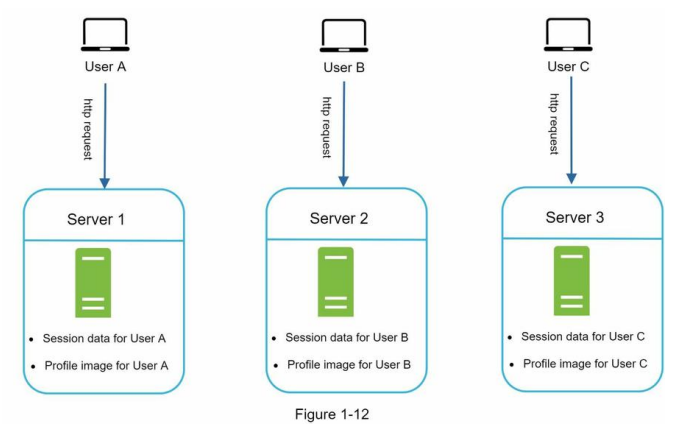
In Figure 1-12, user A’s session data and profile image are stored in Server 1.
To authenticate User A, HTTP requests must be routed to Server 1. If a request
is sent to other servers like Server 2, authentication would fail because
Server 2 does not contain User A’s session data.
Similarly, all HTTP requests from User B must be routed to Server 2; all
requests from User C must be sent to Server 3.
The issue is that every request from the same client must be routed to the
same server. This can be done with sticky sessions in most load balancers
[10]; however, this adds the overhead. Adding or removing servers is much more
difficult with this approach. It is also challenging to handle server
failures.
Stateless architecture
Figure 1-13 shows the stateless architecture.
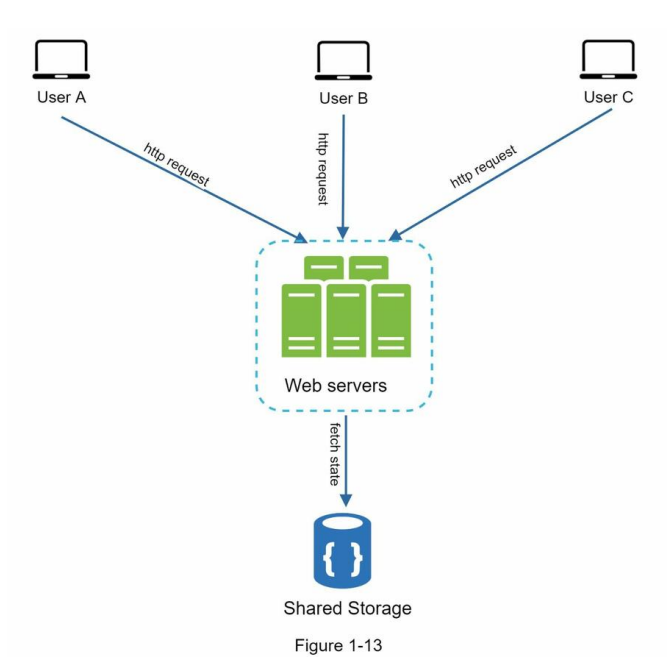
In this stateless architecture, HTTP requests from users can be sent to any web
servers, which fetch state data from a shared data store. State data is stored
in a shared data store and kept out of web servers. A stateless system is
simpler, more robust, and scalable.
Figure 1-14 shows the updated design with a stateless web tier.
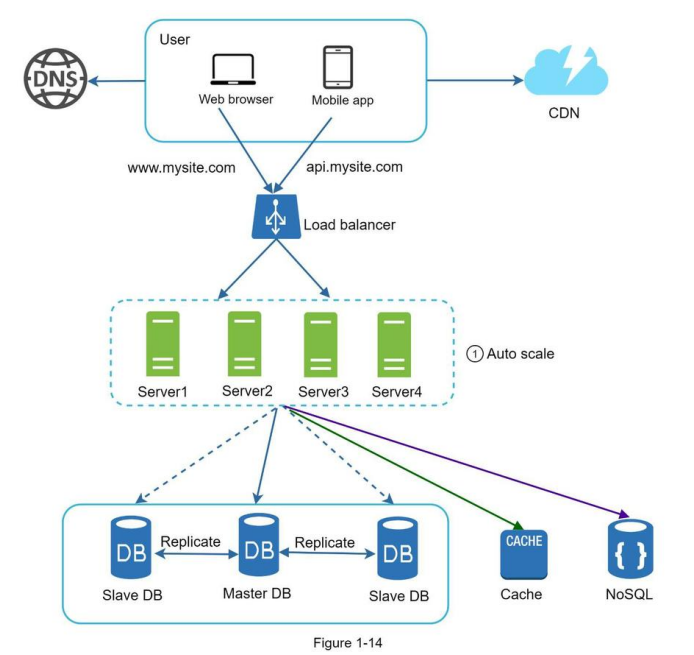
In Figure 1-14, we move the session data out of the web tier and store them in
the persistent data store. The shared data store could be a relational
database, Memcached/Redis, NoSQL, etc. The NoSQL data store is chosen as it is
easy to scale. Autoscaling means adding or removing web servers automatically
based on the traffic load. After the state data is removed out of web servers,
auto-scaling of the web tier is easily achieved by adding or removing servers
based on traffic load.
Your website grows rapidly and attracts a significant number of users
internationally. To improve availability and provide a better user experience
across wider geographical areas, supporting multiple data centers is crucial.
Data centers
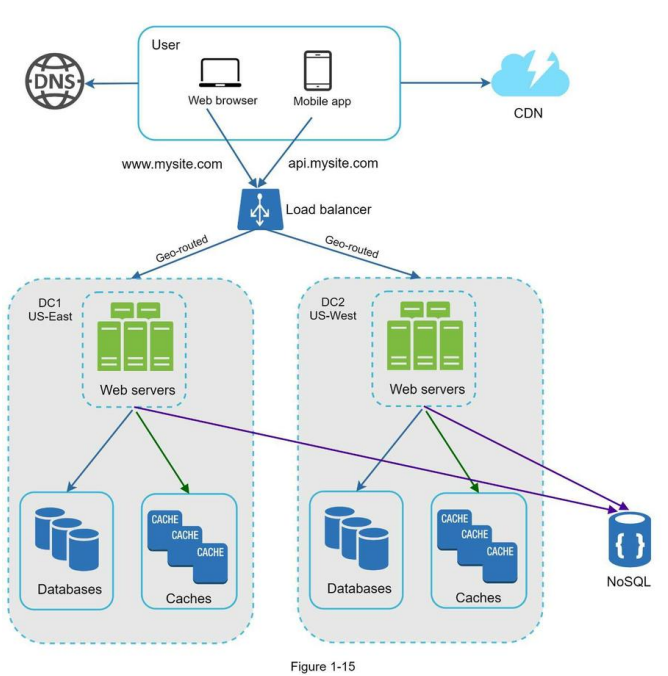
Figure 1-15 shows an example setup with two data centers. In normal operation,
users are geoDNS-routed, also known as geo-routed, to the closest data center,
with a split traffic of x% in US-East and (100 – x)% in US-West. geoDNS is
a DNS service that allows domain names to be resolved to IP addresses based on
the location of a user.
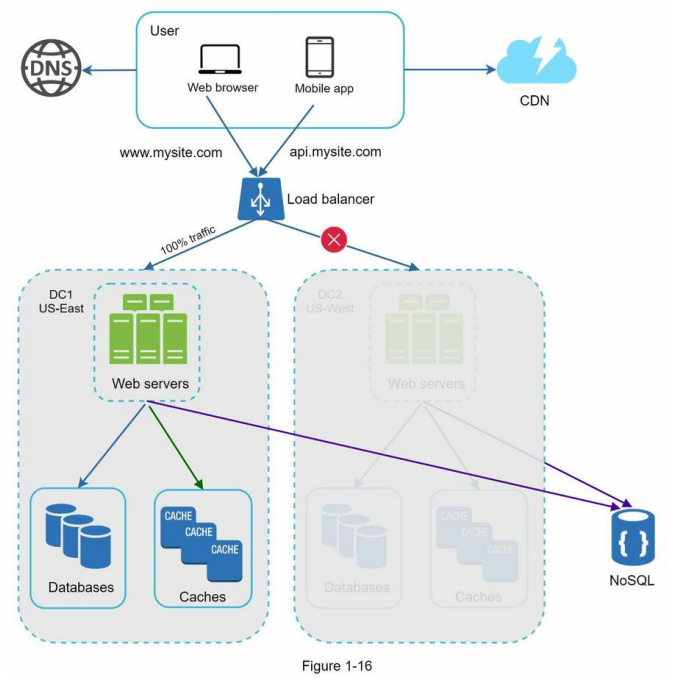
In the event of any significant data center outage, we direct all traffic to a
healthy data center.
In Figure 1-16, data center 2 (US-West) is offline, and 100% of the traffic is
routed to data center 1 (US-East).
Several technical challenges must be resolved to achieve multi-data center
setup:
-
Traffic redirection: Effective tools are needed to direct traffic to the
correct data center. GeoDNS can be used to direct traffic to the nearest data
center depending on where a user is located.
-
Data synchronization: Users from different regions could use different
local databases or caches. In failover cases, traffic might be routed to a
data center where data is unavailable. A common strategy is to replicate data
across multiple data centers. A previous study shows how Netflix implements
asynchronous multi-data center replication [11].
-
Test and deployment: With multi-data center setup, it is important to
test your website/application at different locations. Automated deployment
tools are vital to keep services consistent through all the data centers
[11].
To further scale our system, we need to decouple different components of the
system so they can be scaled independently. Messaging queue is a key strategy
employed by many realworld distributed systems to solve this problem.
Message queue
A message queue is a durable component, stored in memory, that supports
asynchronous communication. It serves as a buffer and distributes asynchronous
requests. The basic architecture of a message queue is simple. Input services,
called producers/publishers, create messages, and publish them to a message
queue. Other services or servers, called consumers/subscribers, connect to the
queue, and perform actions defined by the messages. The model is shown in Figure 1-17.
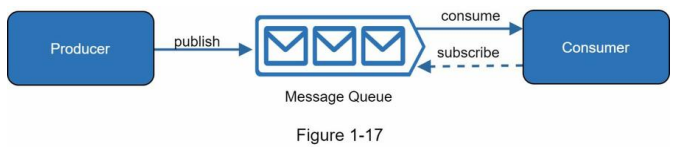
Decoupling makes the message queue a preferred architecture for building a
scalable and reliable application. With the message queue, the producer can
post a message to the queue when the consumer is unavailable to process it.
The consumer can read messages from the queue even when the producer is
unavailable.
Consider the following use case: your application supports photo customization, including
cropping, sharpening, blurring, etc. Those customization tasks take time to
complete. In Figure 1-18, web servers publish photo processing jobs to the
message queue. Photo processing workers pick up jobs from the message queue and
asynchronously perform photo customization tasks. The producer and the consumer
can be scaled independently. When the size of the queue becomes large, more
workers are added to reduce the processing time.
However, if the queue is empty most of the time, the number of workers can be reduced.
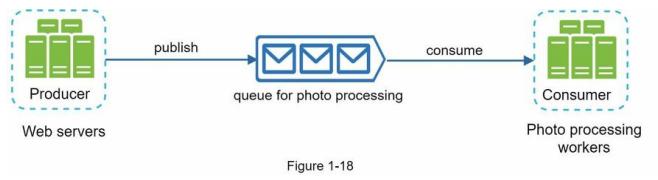
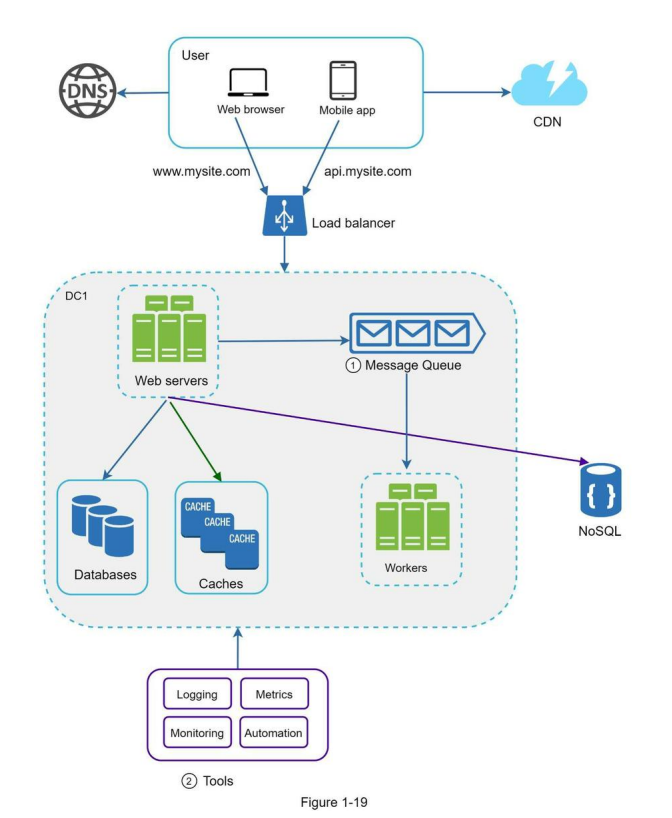
Figure 1-19 shows the updated design. Due to the space constraint, only one
data center is shown in the figure.
- The design includes a message queue, which helps to make the system more
loosely coupled and failure resilient.
- Logging, monitoring, metrics, and automation tools are included.
As the data grows every day, your database gets more overloaded. It is time to
scale the data tier.
Database scaling
There are two broad approaches for database scaling: vertical scaling and horizontal scaling.
Millions of users and beyond
Scaling a system is an iterative process. Iterating on what we have learned
in this chapter could get us far. More fine-tuning and new strategies are
needed to scale beyond millions of users. For example, you might need to
optimize your system and decouple the system to even smaller services. All the
techniques learned in this chapter should provide a good foundation to tackle
new challenges. To conclude this chapter, we provide a summary of how we scale
our system to support millions of users:
- Keep web tier stateless
- Build redundancy at every tier
- Cache data as much as you can
- Support multiple data centers
- Host static assets in CDN
- Scale your data tier by sharding
- Split tiers into individual services
- Monitor your system and use automation tools
Congratulations on getting this far! Now give yourself a pat on the back. Good
job!
Reference materials
- [1] Hypertext Transfer Protocol: https://en.wikipedia.org/wiki/Hypertext_Transfer_Protocol
- [2] Should you go Beyond Relational Databases?: https://blog.teamtreehouse.com/should-you-go-beyond-relational-databases
- [3] Replication: https://en.wikipedia.org/wiki/Replication_(computing)
- [4] Multi-master replication: https://en.wikipedia.org/wiki/Multi-master_replication
- [5] NDB Cluster Replication: Multi-Master and Circular Replication: https://dev.mysql.com/doc/refman/5.7/en/mysql-cluster-replication-multi-master.html
- [6] Caching Strategies and How to Choose the Right One: https://codeahoy.com/2017/08/11/caching-strategies-and-how-to-choose-the-right-one/
- [7] R. Nishtala, “Facebook, Scaling Memcache at,” 10th USENIX Symposium on Networked Systems Design and Implementation (NSDI ’13).
- [8] Single point of failure: https://en.wikipedia.org/wiki/Single_point_of_failure
- [9] Amazon CloudFront Dynamic Content Delivery: https://aws.amazon.com/cloudfront/dynamic-content/
- [10] Configure Sticky Sessions for Your Classic Load Balancer: https://docs.aws.amazon.com/elasticloadbalancing/latest/classic/elb-sticky-sessions.html
- [11] Active-Active for Multi-Regional Resiliency: https://netflixtechblog.com/active-active-for-multi-regional-resiliency-c47719f6685b
- [12] Amazon EC2 High Memory Instances: https://aws.amazon.com/ec2/instance-types/high-memory/
- [13] What it takes to run Stack Overflow: http://nickcraver.com/blog/2013/11/22/what-it-takes-to-run-stack-overflow
- [14] What The Heck Are You Actually Using NoSQL For: http://highscalability.com/blog/2010/12/6/what-the-heck-are-you-actually-using-nosqlfor.html
CHAPTER 2: BACK-OF-THE-ENVELOPE ESTIMATION
In a system design interview, sometimes you are asked to estimate system
capacity or performance requirements using a back-of-the-envelope estimation.
According to Jeff Dean,
Google Senior Fellow, “back-of-the-envelope calculations are estimates you
create using a combination of thought experiments and common performance
numbers to get a good feel for which designs will meet your requirements” [1].
You need to have a good sense of scalability basics to effectively carry out
back-of-theenvelope estimation. The following concepts should be well
understood: power of two [2], latency numbers every programmer should
know, and availability numbers.
Power of two
Although data volume can become enormous when dealing with distributed systems,
calculation all boils down to the basics. To obtain correct calculations, it is
critical to know the data volume unit using the power of 2. A byte is a
sequence of 8 bits. An ASCII character uses one byte of memory (8 bits). Below
is a table explaining the data volume unit (Table 2- 1).
| Power |
Approx Value |
Full Name |
Short Name |
| 10 |
1 Thousand |
1 Kilobyte |
1 KB |
| 20 |
1 Million |
1 Megabyte |
1 MB |
| 30 |
1 Billion |
1 Gigabyte |
1 GB |
| 40 |
1 Trillion |
1 Terabyte |
1 TB |
| 50 |
1 Quadrillion |
1 Petabyte |
1 PB |
Latency numbers every programmer should know
Dr. Dean from Google reveals the length of typical computer operations in 2010
[1]. Some numbers are outdated as computers become faster and more powerful.
However, those numbers should still be able to give us an idea of the fastness
and slowness of different computer operations.
| Operation Name |
Time |
| L1 cache reference |
0.5 ns |
| Branch mispredict |
5 ns |
| L2 cache reference |
7 ns |
| Mutex lock/unlock |
100 ns |
| Main memory reference |
100 ns |
| Compress 1K bytes with Zippy |
10k ns = 10 µs |
| Send 2K bytes over 1 Gbps network |
20k ns = 20 µs |
| Read 1 MB sequentially from memory |
250k ns = 250 µs |
| Round trip within the same datacenter |
500k ns = 500 µs |
| Disk seek |
10m ns = 10 ms |
| Read 1 MB sequentially from the network |
10m ns = 10 ms |
| Read 1 MB sequentially from disk |
30m ns = 30 ms |
| Send packet CA -> ND -> CA |
150m ns = 150 ms |
A Google software engineer built a tool to visualize Dr. Dean’s numbers. The
tool also takes the time factor into consideration. Figures 2-1 shows the
visualized latency numbers as of 2020 (source of figures: reference material
[3]).
By analyzing the numbers in Figure 2-1, we get the following conclusions:
- Memory is fast but the disk is slow.
- Avoid disk seeks if possible.
- Simple compression algorithms are fast.
- Compress data before sending it over the internet if possible.
- Data centers are usually in different regions, and it takes time to send data
between them.
Availability numbers
High availability is the ability of a system to be continuously operational for
a desirably long period of time. High availability is measured as a percentage,
with 100% means a service that has 0 downtime. Most services fall between 99%
and 100%.
A service level agreement (SLA) is a commonly used term for service providers.
This is an agreement between you (the service provider) and your customer, and
this agreement formally defines the level of uptime your service will deliver.
Cloud providers Amazon [4], Google [5] and Microsoft [6] set their SLAs at
99.9% or above. Uptime is traditionally measured in nines. The more the nines,
the better. As shown in Table 2-3, the number of nines correlate to the
expected system downtime.
| Availability |
Downtime / day |
Downtime / year |
| 99% |
14.40 min |
3.65 days |
| 99.9% |
1.44 min |
8.77 hours |
| 99.99% |
8.64 sec |
52.60 mins |
| 99.999% |
864 ms |
5.26 mins |
| 99.9999% |
86.4 ms |
31.56 sec |
Example: Estimate Twitter QPS and storage requirements
Please note the following numbers are for this exercise only as they are not
real numbers from Twitter.
Assumptions:
- 300 million monthly active users.
- 50% of users use Twitter daily.
- Users post 2 tweets per day on average.
- 10% of tweets contain media.
- Data is stored for 5 years.
Estimations:
- Query per second (QPS) estimate:
- Daily active users (DAU) = 300 million * 50% = 150 million
- Tweets QPS = 150 million * 2 tweets / 24 hour / 3600 seconds = ~3500
- Peek QPS = 2 * QPS = ~7000
- Average tweet size.: We will only estimate media storage here.
- tweet_id 64 bytes
- text 140 bytes
- media 1 MB
- Media storage: 150 million * 2 * 10% * 1 MB = 30 TB per day
- 5-year media storage: 30 TB * 365 * 5 = ~55 PB
Tips
Back-of-the-envelope estimation is all about the process. Solving the problem
is more important than obtaining results. Interviewers may test your
problem-solving skills.
Here are a few tips to follow:
- Rounding and Approximation. It is difficult to perform complicated math
operations during the interview. For example, what is the result of “99987 /
9.1”? There is no need to spend valuable time to solve complicated math
problems. Precision is not expected. Use round numbers and approximation to
your advantage. The division question can be simplified as follows: “100,000
/ 10”.
- Write down your assumptions. It is a good idea to write down your assumptions
to be referenced later.
- Label your units. When you write down “5”, does it mean 5 KB or 5 MB? You
might confuse yourself with this. Write down the units because “5 MB” helps
to remove ambiguity.
-
Commonly asked back-of-the-envelope estimations: QPS, peak QPS, storage,
cache, number of servers, etc. You can practice these calculations when
preparing for an interview. Practice makes perfect.
Congratulations on getting this far! Now give yourself a pat on the back. Good
job!
Reference materials
- [1] J. Dean.Google Pro Tip: Use Back-Of-The-Envelope-Calculations To Choose The Best Design: http://highscalability.com/blog/2011/1/26/google-pro-tip-use-back-of-the-envelopecalculations-to-choo.html
- [2] System design primer: https://github.com/donnemartin/system-design-primer
- [3] Latency Numbers Every Programmer Should Know: https://colin-scott.github.io/personal_website/research/interactive_latency.html
- [4] Amazon Compute Service Level Agreement: https://aws.amazon.com/compute/sla/
- [5] Compute Engine Service Level Agreement (SLA): https://cloud.google.com/compute/sla
- [6] SLA summary for Azure services: https://azure.microsoft.com/enus/support/legal/sla/summary/
CHAPTER 3: A FRAMEWORK FOR SYSTEM DESIGN INTERVIEWS
You have just landed a coveted on-site interview at your dream company. The
hiring coordinator sends you a schedule for that day. Scanning down the list,
you feel pretty good about it until your eyes land on this interview session -
System Design Interview.
System design interviews are often intimidating. It could be as vague as
“designing a wellknown product X?”. The questions are ambiguous and seem
unreasonably broad. Your weariness is understandable. After all, how could
anyone design a popular product in an hour that has taken hundreds if not
thousands of engineers to build?
The good news is that no one expects you to. Real-world system design is
extremely complicated. For example, Google search is deceptively simple;
however, the amount of technology that underpins that simplicity is truly
astonishing. If no one expects you to design a real-world system in an hour,
what is the benefit of a system design interview?
The system design interview simulates real-life problem solving where two
co-workers collaborate on an ambiguous problem and come up with a solution that
meets their goals. The problem is open-ended, and there is no perfect answer.
The final design is less important compared to the work you put in the design
process. This allows you to demonstrate your design skill, defend your design
choices, and respond to feedback in a constructive manner.
Let us flip the table and consider what goes through the interviewer’s head as
she walks into the conference room to meet you. The primary goal of the
interviewer is to accurately assess your abilities. The last thing she wants is
to give an inconclusive evaluation because the session has gone poorly and
there are not enough signals. What is an interviewer looking for in a system
design interview?
Many think that system design interview is all about a person’s technical
design skills. It is much more than that. An effective system design interview
gives strong signals about a person’s ability to collaborate, to work under
pressure, and to resolve ambiguity constructively. The ability to ask good
questions is also an essential skill, and many interviewers specifically look
for this skill.
A good interviewer also looks for red flags. Over-engineering is a real disease
of many engineers as they delight in design purity and ignore tradeoffs. They
are often unaware of the compounding costs of over-engineered systems, and many
companies pay a high price for that ignorance. You certainly do not want to
demonstrate this tendency in a system design interview. Other red flags include
narrow mindedness, stubbornness, etc.
In this chapter, we will go over some useful tips and introduce a simple and
effective framework to solve system design interview problems.
A 4-step process for effective system design interview
Every system design interview is different. A great system design interview is
open-ended and there is no one-size-fits-all solution. However, there are steps
and common ground to cover in every system design interview.
Step 1 - Understand the problem and establish design scope
“Why did the tiger roar?”
A hand shot up in the back of the class.
“Yes, Jimmy?”, the teacher responded.
“Because he was HUNGRY”.
“Very good Jimmy.”
Throughout his childhood, Jimmy has always been the first to answer questions
in the class.
Whenever the teacher asks a question, there is always a kid in the classroom
who loves to take a crack at the question, no matter if he knows the answer or
not. That is Jimmy.
Jimmy is an ace student. He takes pride in knowing all the answers fast. In
exams, he is usually the first person to finish the questions. He is a
teacher’s top choice for any academic competition.
DON’T be like Jimmy.
In a system design interview, giving out an answer quickly without thinking
gives you no bonus points. Answering without a thorough understanding of the
requirements is a huge red flag as the interview is not a trivia contest. There
is no right answer.
So, do not jump right in to give a solution. Slow down. Think deeply and ask
questions to clarify requirements and assumptions. This is extremely important.
As an engineer, we like to solve hard problems and jump into the final design;
however, this approach is likely to lead you to design the wrong system. One of
the most important skills as an engineer is to ask the right questions, make
the proper assumptions, and gather all the information needed to build a
system. So, do not be afraid to ask questions.
When you ask a question, the interviewer either answers your question directly
or asks you to make your assumptions. If the latter happens, write down your
assumptions on the whiteboard or paper. You might need them later.
What kind of questions to ask? Ask questions to understand the exact
requirements. Here is a list of questions to help you get started:
What specific features are we going to build?
How many users does the product have?
How fast does the company anticipate to scale up?
What are the anticipated scales in 3 months, 6 months, and a year?
What is the company’s technology stack?
What existing services you might leverage to simplify the design?
Example
If you are asked to design a news feed system, you want to ask questions that
help you clarify the requirements. The conversation between you and the
interviewer might look like this:
- Candidate: Is this a mobile app? Or a web app? Or both?
- Interviewer: Both.
- Candidate: What are the most important features for the product?
- Interviewer: Ability to make a post and see friends’ news feed.
- Candidate: Is the news feed sorted in reverse chronological order or a
particular order? The particular order means each post is given a different
weight. For instance, posts from your close friends are more important than
posts from a group.
- Interviewer: To keep things simple, let us assume the feed is sorted by
reverse chronological order.
- Candidate: How many friends can a user have?
- Interviewer: 5000
- Candidate: What is the traffic volume?
- Interviewer: 10 million daily active users (DAU)
- Candidate: Can feed contain images, videos, or just text?
- Interviewer: It can contain media files, including both images and videos.
- Above are some sample questions that you can ask your interviewer. It is
important to understand the requirements and clarify ambiguities
Step 2 - Propose high-level design and get buy-in
In this step, we aim to develop a high-level design and reach an agreement with
the interviewer on the design. It is a great idea to collaborate with the
interviewer during the process.
- Come up with an initial blueprint for the design. Ask for feedback.
Treat your interviewer as a teammate and work together. Many good
interviewers love to talk and get involved.
- Draw box diagrams with key components on the whiteboard or paper. This
might include clients (mobile/web), APIs, web servers, data stores, cache,
CDN, message queue, etc.
- Do back-of-the-envelope calculations to evaluate if your blueprint fits
the scale constraints. Think out loud. Communicate with your interviewer if
back-of-the-envelope is necessary before diving into it.
If possible, go through a few concrete use cases. This will help you frame the
high-level design. It is also likely that the use cases would help you discover
edge cases you have not yet considered.
Should we include API endpoints and database schema here? This depends on the
problem.
For large design problems like “Design Google search engine”, this is a bit of
too low level.
For a problem like designing the backend for a multi-player poker game, this is
a fair game.
Communicate with your interviewer.
Example
Let us use “Design a news feed system” to demonstrate how to approach the
high-level design. Here you are not required to understand how the system
actually works. All the details will be explained in Chapter 11.
At the high level, the design is divided into two flows: feed publishing and
news feed building.
- Feed publishing: when a user publishes a post, corresponding data is written
into cache/database, and the post will be populated into friends’ news feed.
- Newsfeed building: the news feed is built by aggregating friends’ posts in a
reverse chronological order.
Figure 3-1 and Figure 3-2 present high-level designs for feed publishing and news feed
building flows, respectively.
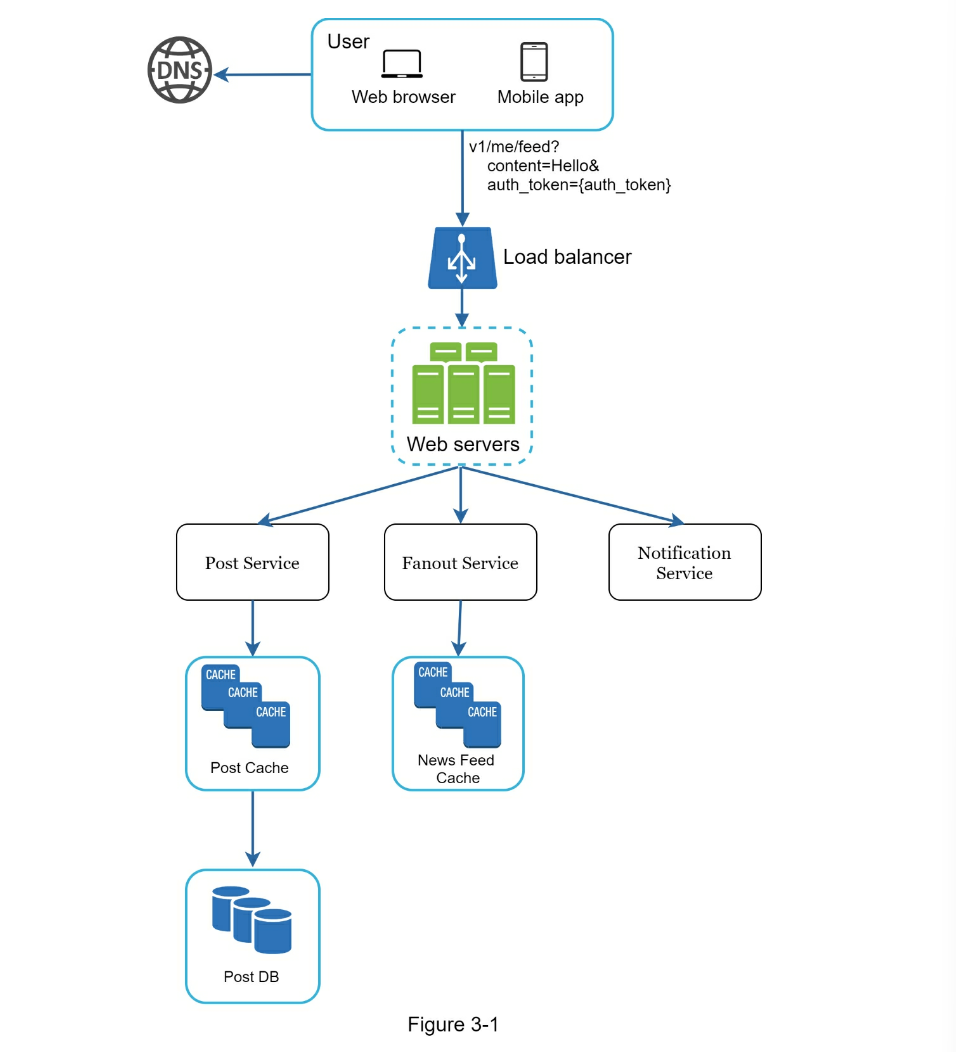
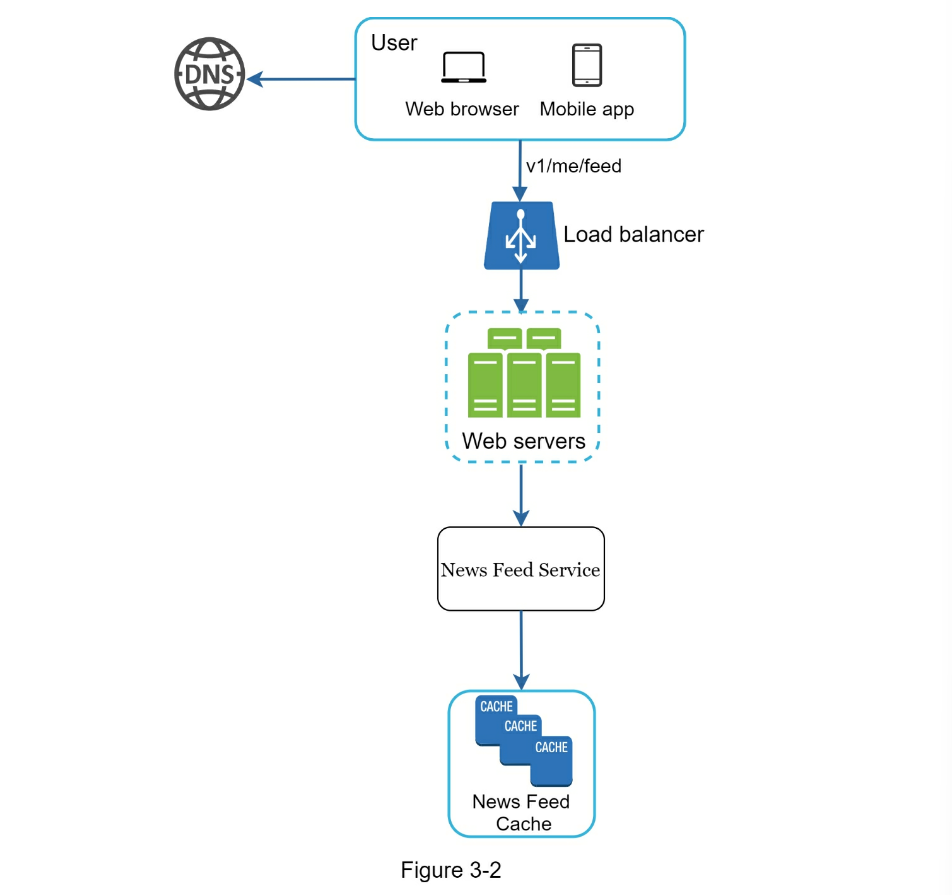
Step 3 - Design deep dive
At this step, you and your interviewer should have already achieved the
following objectives:
- Agreed on the overall goals and feature scope
- Sketched out a high-level blueprint for the overall design
- Obtained feedback from your interviewer on the high-level design
- Had some initial ideas about areas to focus on in deep dive based on her
feedback
You shall work with the interviewer to identify and prioritize components in
the architecture.
It is worth stressing that every interview is different. Sometimes, the
interviewer may give off hints that she likes focusing on high-level design.
Sometimes, for a senior candidate interview, the discussion could be on the
system performance characteristics, likely focusing on the bottlenecks and
resource estimations. In most cases, the interviewer may want you to dig into
details of some system components. For URL shortener, it is interesting to dive
into the hash function design that converts a long URL to a short one. For a
chat system, how to reduce latency and how to support online/offline status are
two interesting topics.
Time management is essential as it is easy to get carried away with minute
details that do not demonstrate your abilities. You must be armed with signals
to show your interviewer. Try not to get into unnecessary details. For example,
talking about the EdgeRank algorithm of Facebook feed ranking in detail is not
ideal during a system design interview as this takes much precious time and
does not prove your ability in designing a scalable system.
Example
At this point, we have discussed the high-level design for a news feed system,
and the interviewer is happy with your proposal. Next, we will investigate two
of the most important use cases:
- Feed publishing
- News feed retrieval
Figure 3-3 and Figure 3-4 show the detailed design for the two use cases, which
will be explained in detail in Chapter 11.
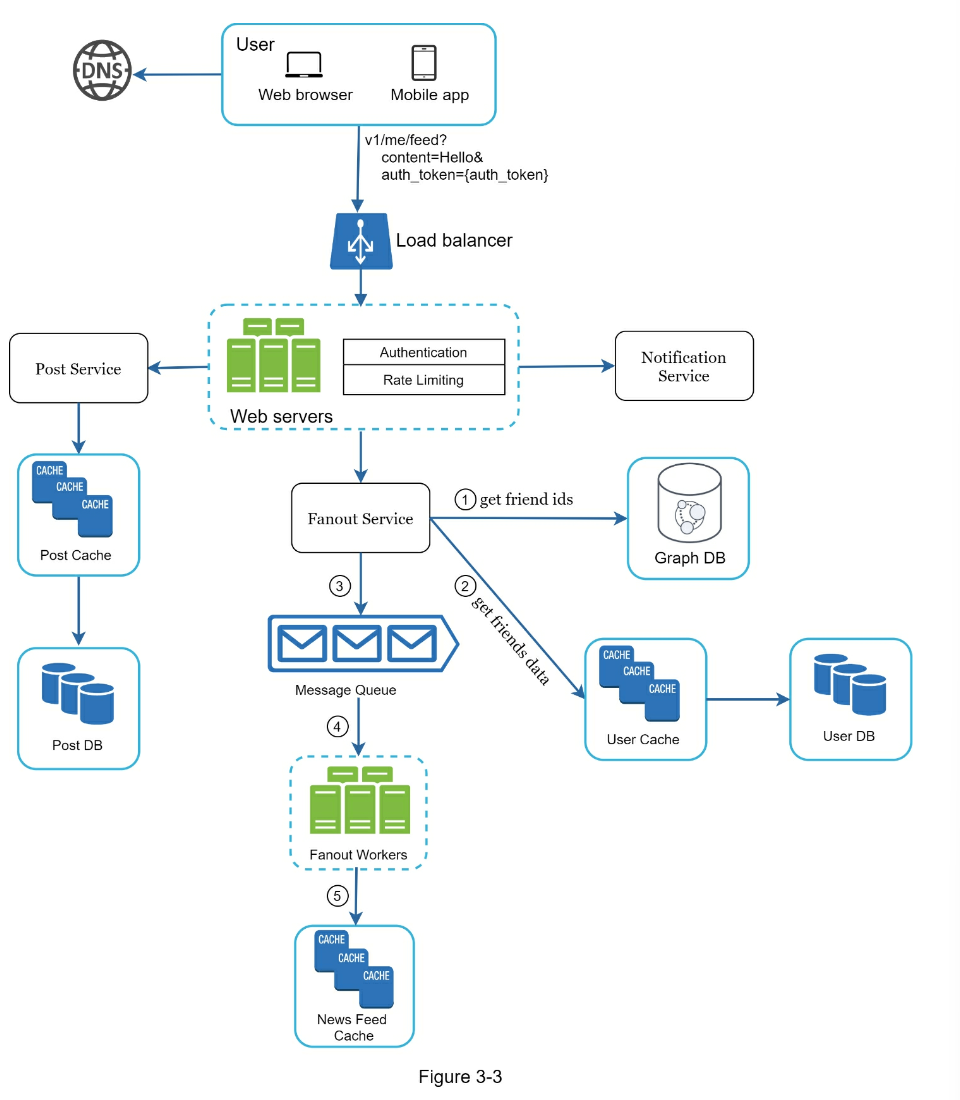
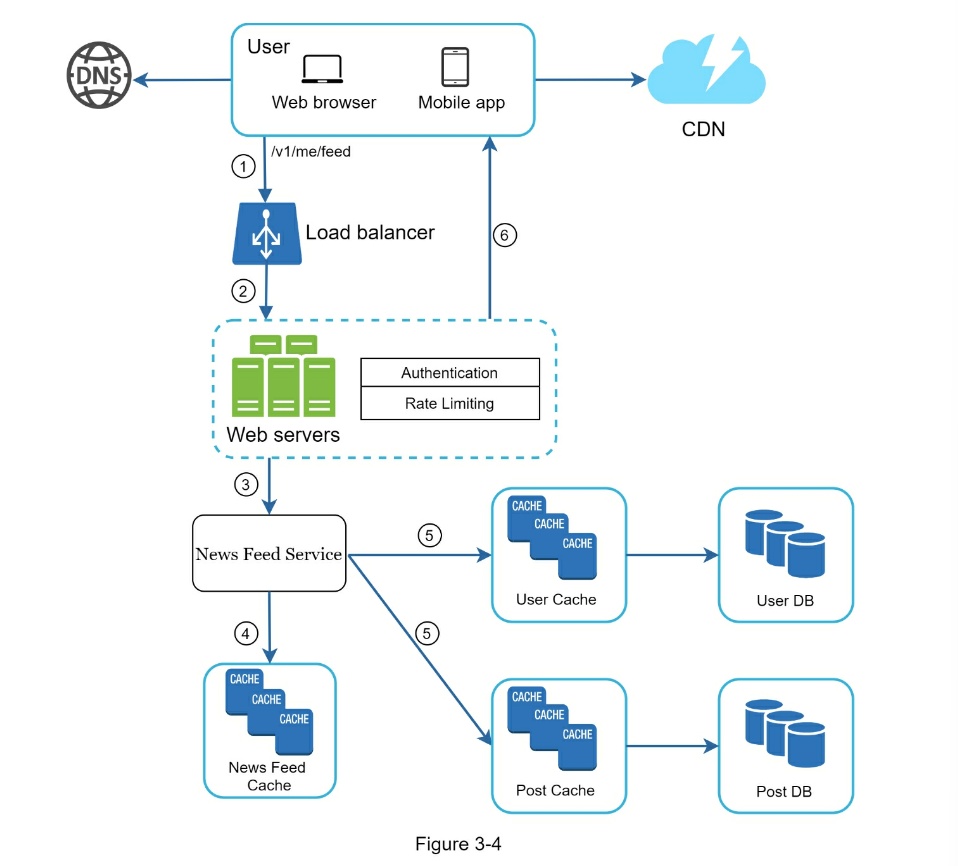
Step 4 - Wrap up
In this final step, the interviewer might ask you a few follow-up questions or
give you the freedom to discuss other additional points. Here are a few
directions to follow:
- The interviewer might want you to identify the system bottlenecks and discuss
potential improvements. Never say your design is perfect and nothing can be
improved. There is always something to improve upon. This is a great
opportunity to show your critical thinking and leave a good final impression.
- It could be useful to give the interviewer a recap of your design. This is
particularly important if you suggested a few solutions. Refreshing your
interviewer’s memory can be helpful after a long session.
- Error cases (server failure, network loss, etc.) are interesting to talk
about.
- Operation issues are worth mentioning. How do you monitor metrics and error
logs?
How to roll out the system?
- How to handle the next scale curve is also an interesting topic. For example,
if your current design supports 1 million users, what changes do you need to
make to support 10 million users?
- Propose other refinements you need if you had more time.
To wrap up, we summarize a list of the Dos and Don’ts.
Dos
- Always ask for clarification. Do not assume your assumption is correct.
- Understand the requirements of the problem.
- There is neither the right answer nor the best answer. A solution designed to
solve the problems of a young startup is different from that of an
established company with millions of users. Make sure you understand the
requirements.
- Let the interviewer know what you are thinking. Communicate with your
interview.
- Suggest multiple approaches if possible.
- Once you agree with your interviewer on the blueprint, go into details on
each component. Design the most critical components first.
- Bounce ideas off the interviewer. A good interviewer works with you as a
teammate.
- Never give up.
Don’ts
- Don’t be unprepared for typical interview questions.
- Don’t jump into a solution without clarifying the requirements and
assumptions.
- Don’t go into too much detail on a single component in the beginning. Give
the highlevel design first then drills down.
- If you get stuck, don’t hesitate to ask for hints.
- Again, communicate. Don’t think in silence.
- Don’t think your interview is done once you give the design. You are not done
until your interviewer says you are done. Ask for feedback early and often.
Time allocation on each step
System design interview questions are usually very broad, and 45 minutes or an
hour is not enough to cover the entire design. Time management is essential.
How much time should you spend on each step? The following is a very rough
guide on distributing your time in a 45- minute interview session. Please
remember this is a rough estimate, and the actual time distribution depends on
the scope of the problem and the requirements from the interviewer.
- Step 1 Understand the problem and establish design scope: 3 - 10 minutes
- Step 2 Propose high-level design and get buy-in: 10 - 15 minutes
- Step 3 Design deep dive: 10 - 25 minutes
- Step 4 Wrap: 3 - 5 minutes
CHAPTER 4: DESIGN A RATE LIMITER
In a network system, a rate limiter is used to control the rate of traffic sent
by a client or a service. In the HTTP world, a rate limiter limits the number
of client requests allowed to be sent over a specified period. If the API
request count exceeds the threshold defined by the rate limiter, all the excess
calls are blocked. Here are a few examples:
- A user can write no more than 2 posts per second.
- You can create a maximum of 10 accounts per day from the same IP address.
- You can claim rewards no more than 5 times per week from the same device.
In this chapter, you are asked to design a rate limiter. Before starting the
design, we first look at the benefits of using an API rate limiter:
-
Prevent resource starvation caused by Denial of Service (DoS) attack [1].
Almost all APIs published by large tech companies enforce some form of rate
limiting. For example, Twitter limits the number of tweets to 300 per 3 hours
[2]. Google docs APIs have the following default limit: 300 per user per 60
seconds for read requests [3]. A rate limiter prevents DoS attacks, either
intentional or unintentional, by blocking the excess calls.
-
Reduce cost. Limiting excess requests means fewer servers and allocating
more resources to high priority APIs. Rate limiting is extremely important
for companies that use paid third party APIs. For example, you are charged on
a per-call basis for the following external APIs: check credit, make a
payment, retrieve health records, etc. Limiting the number of calls is
essential to reduce costs.
-
Prevent servers from being overloaded. To reduce server load, a rate
limiter is used to filter out excess requests caused by bots or users’
misbehavior.
Step 1 - Understand the problem and establish design scope
Rate limiting can be implemented using different algorithms, each with its pros
and cons. The interactions between an interviewer and a candidate help to
clarify the type of rate limiters we are trying to build.
- Candidate: What kind of rate limiter are we going to design? Is it a
client-side rate limiter or server-side API rate limiter?
- Interviewer: Great question. We focus on the server-side API rate limiter.
- Candidate: Does the rate limiter throttle API requests based on IP, the user
ID, or other properties?
- Interviewer: The rate limiter should be flexible enough to support different
sets of throttle rules.
- Candidate: What is the scale of the system? Is it built for a startup or a
big company with a large user base?
- Interviewer: The system must be able to handle a large number of requests.
- Candidate: Will the system work in a distributed environment?
- Interviewer: Yes.
- Candidate: Is the rate limiter a separate service or should it be
implemented in application code?
- Interviewer: It is a design decision up to you.
- Candidate: Do we need to inform users who are throttled?
- Interviewer: Yes.
Here is a summary of the requirements for the system:
-
Accurately limit excessive requests.
-
Low latency. The rate limiter should not slow down HTTP response time.
- Use as little memory as possible.
-
Distributed rate limiting. The rate limiter can be shared across multiple
servers or processes.
-
Exception handling. Show clear exceptions to users when their requests are
throttled.
-
High fault tolerance. If there are any problems with the rate limiter (for
example, a cache server goes offline), it does not affect the entire system.
Step 2 - Propose high-level design and get buy-in
Let us keep things simple and use a basic client and server model for communication.
Where to put the rate limiter?
Intuitively, you can implement a rate limiter at either the client or
server-side.
-
Client-side implementation. Generally speaking, client is an unreliable place
to enforce rate limiting because client requests can easily be forged by
malicious actors. Moreover, we might not have control over the client
implementation.
-
Server-side implementation. Figure 4-1 shows a rate limiter that is placed on
the server side.
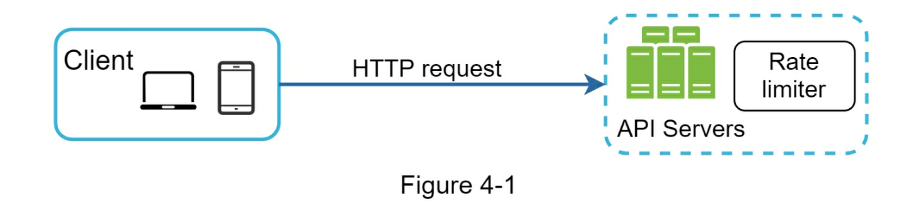
Besides the client and server-side implementations, there is an alternative
way. Instead of putting a rate limiter at the API servers, we create a rate
limiter middleware, which throttles requests to your APIs as shown in Figure
4-2.
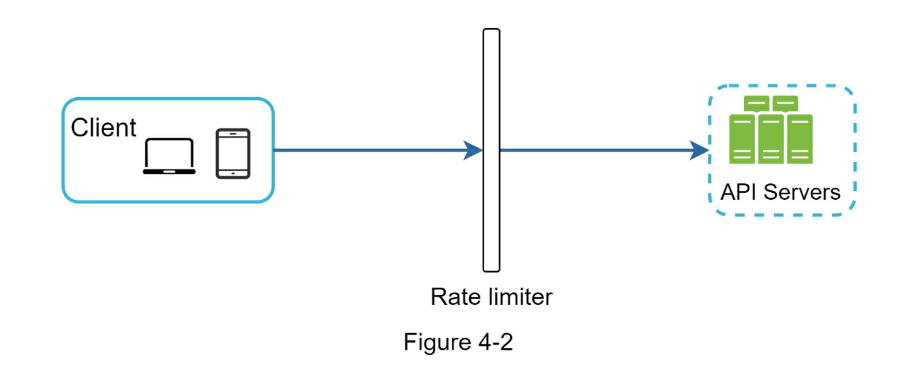
Let us use an example in Figure 4-3 to illustrate how rate limiting works in
this design.
Assume our API allows 2 requests per second, and a client sends 3 requests to
the server within a second. The first two requests are routed to API servers.
However, the rate limiter middleware throttles the third request and returns a
HTTP status code 429. The HTTP 429 response status code indicates a user has
sent too many requests.
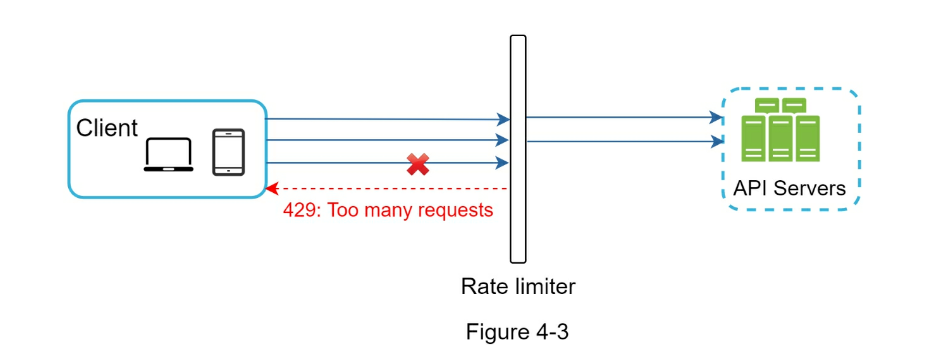
Cloud microservices [4] have become widely popular and rate limiting is usually
implemented within a component called API gateway. API gateway is a fully
managed service that supports rate limiting, SSL termination, authentication,
IP whitelisting, servicing static content, etc. For now, we only need to know
that the API gateway is a middleware that supports rate limiting.
While designing a rate limiter, an important question to ask ourselves is:
where should the rater limiter be implemented, on the server-side or in a
gateway? There is no absolute answer.
It depends on your company’s current technology stack, engineering resources,
priorities, goals, etc. Here are a few general guidelines:
- Evaluate your current technology stack, such as programming language, cache
service, etc. Make sure your current programming language is efficient to
implement rate limiting on the server-side.
- Identify the rate limiting algorithm that fits your business needs. When you
implement everything on the server-side, you have full control of the
algorithm. However, your choice might be limited if you use a third-party
gateway.
- If you have already used microservice architecture and included an API
gateway in the design to perform authentication, IP whitelisting, etc., you
may add a rate limiter to the API gateway.
-
Building your own rate limiting service takes time. If you do not have
enough engineering resources to implement a rate limiter, a commercial API
gateway is a better option.
Algorithms for rate limiting
Rate limiting can be implemented using different algorithms, and each of them
has distinct pros and cons. Even though this chapter does not focus on
algorithms, understanding them at high-level helps to choose the right
algorithm or combination of algorithms to fit our use cases. Here is a list of
popular algorithms:
- Token bucket
- Leaking bucket
- Fixed window counter
- Sliding window log
- Sliding window counter
Token bucket algorithm
The token bucket algorithm is widely used for rate limiting. It is simple, well
understood and commonly used by internet companies. Both Amazon [5] and Stripe
- use this algorithm to throttle their API requests.
The token bucket algorithm work as follows:
- A token bucket is a container that has pre-defined capacity.
- Tokens are put in the bucket at preset rates periodically.
- Once the bucket is full, no more tokens are added. As shown in Figure 4-4,
the token bucket capacity is 4. The refiller puts 2 tokens into the bucket
every second. Once the bucket is full, extra tokens will overflow.
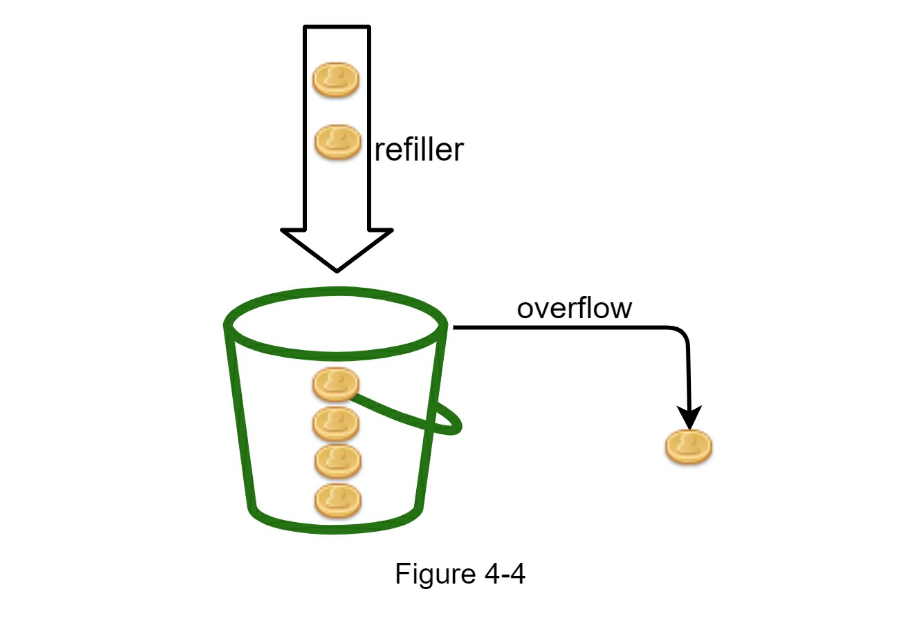
- Each request consumes one token. When a request arrives, we check if there
are enough tokens in the bucket. Figure 4-5 explains how it works.
- If there are enough tokens, we take one token out for each request, and the
request goes through.
- If there are not enough tokens, the request is dropped.
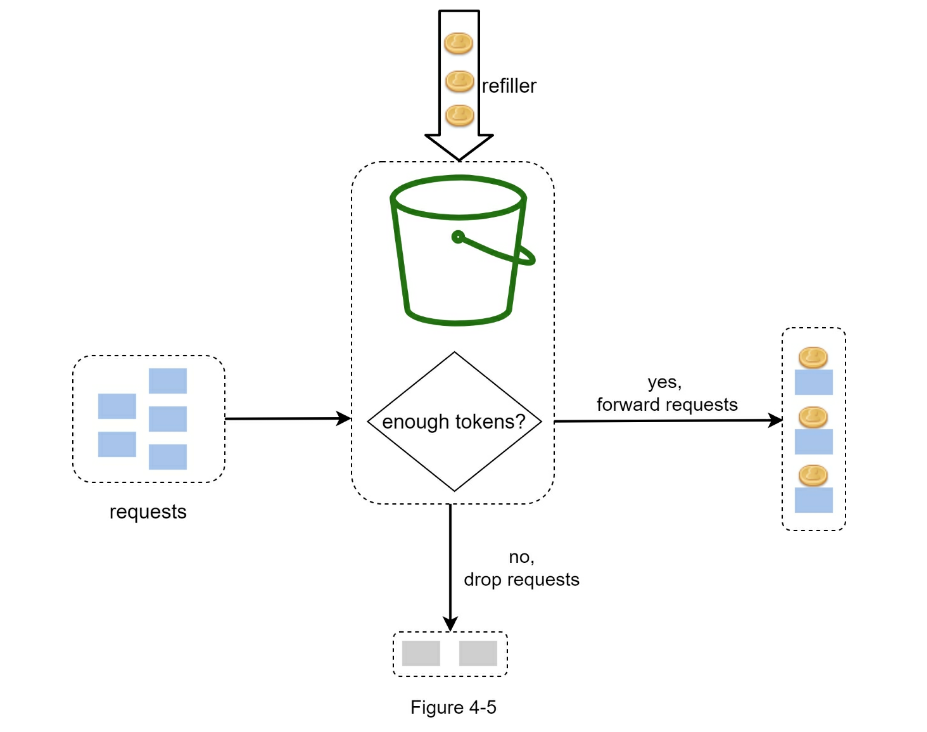
Figure 4-6 illustrates how token consumption, refill, and rate limiting logic
work. In this example, the token bucket size is 4, and the refill rate is 4 per
1 minute.
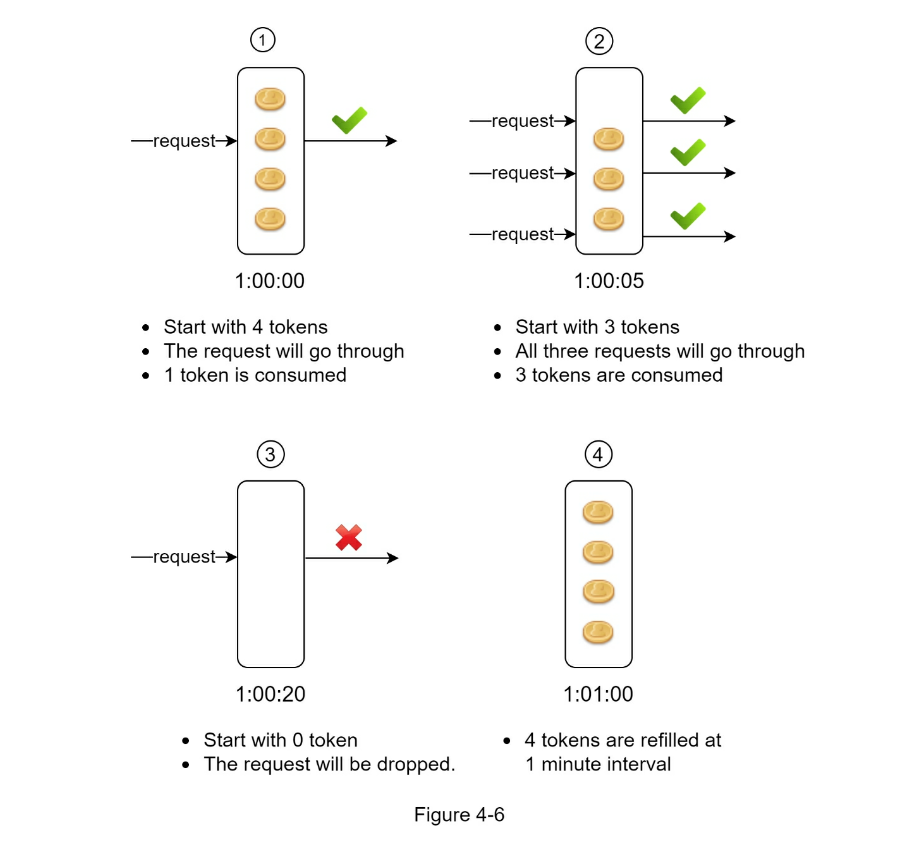
The token bucket algorithm takes two parameters:
-
Bucket size: the maximum number of tokens allowed in the bucket
-
Refill rate: number of tokens put into the bucket every second
How many buckets do we need? This varies, and it depends on the rate-limiting
rules. Here are a few examples.
- It is usually necessary to have different buckets for different API
endpoints. For instance, if a user is allowed to make 1 post per second, add
150 friends per day, and like 5 posts per second, 3 buckets are required for
each user.
- If we need to throttle requests based on IP addresses, each IP address
requires a bucket.
- If the system allows a maximum of 10,000 requests per second, it makes sense
to have a global bucket shared by all requests.
Pros:
- The algorithm is easy to implement.
- Memory efficient.
- Token bucket allows a burst of traffic for short periods. A request can go
through as long as there are tokens left.
Cons:
- Two parameters in the algorithm are bucket size and token refill rate.
- However, it might be challenging to tune them properly.
Leaking bucket algorithm
The leaking bucket algorithm is similar to the token bucket except that
requests are processed at a fixed rate. It is usually implemented with a
first-in-first-out (FIFO) queue. The algorithm works as follows:
- When a request arrives, the system checks if the queue is full. If it is not
full, the request is added to the queue.
- Otherwise, the request is dropped.
- Requests are pulled from the queue and processed at regular intervals.
Figure 4-7 explains how the algorithm works.
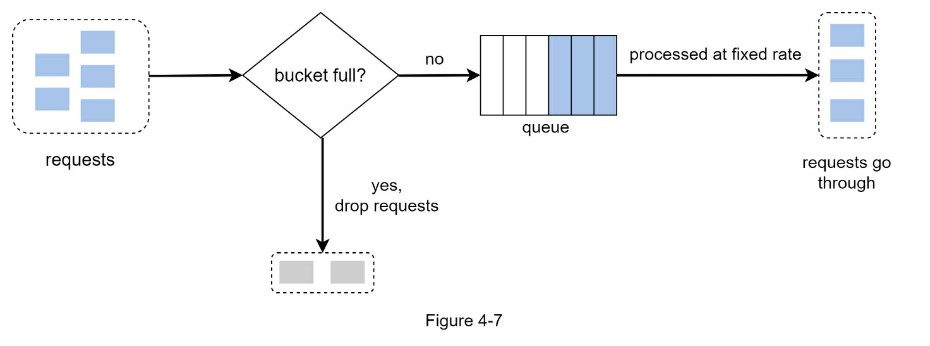
Leaking bucket algorithm takes the following two parameters:
-
Bucket size: it is equal to the queue size. The queue holds the requests to
be processed at a fixed rate.
-
Outflow rate: it defines how many requests can be processed at a fixed
rate, usually in seconds.
Shopify, an ecommerce company, uses leaky buckets for rate-limiting [7].
Pros:
- Memory efficient given the limited queue size.
- Requests are processed at a fixed rate therefore it is suitable for use cases
that a stable outflow rate is needed.
Cons:
- A burst of traffic fills up the queue with old requests, and if they are not
processed in time, recent requests will be rate limited.
- There are two parameters in the algorithm. It might not be easy to tune them
properly.
Fixed window counter algorithm
Fixed window counter algorithm works as follows:
- The algorithm divides the timeline into fix-sized time windows and assign a
counter for each window.
- Each request increments the counter by one.
- Once the counter reaches the pre-defined threshold, new requests are dropped
until a new time window starts.
Let us use a concrete example to see how it works. In Figure 4-8, the time unit
is 1 second and the system allows a maximum of 3 requests per second. In each
second window, if more than 3 requests are received, extra requests are dropped
as shown in Figure 4-8.
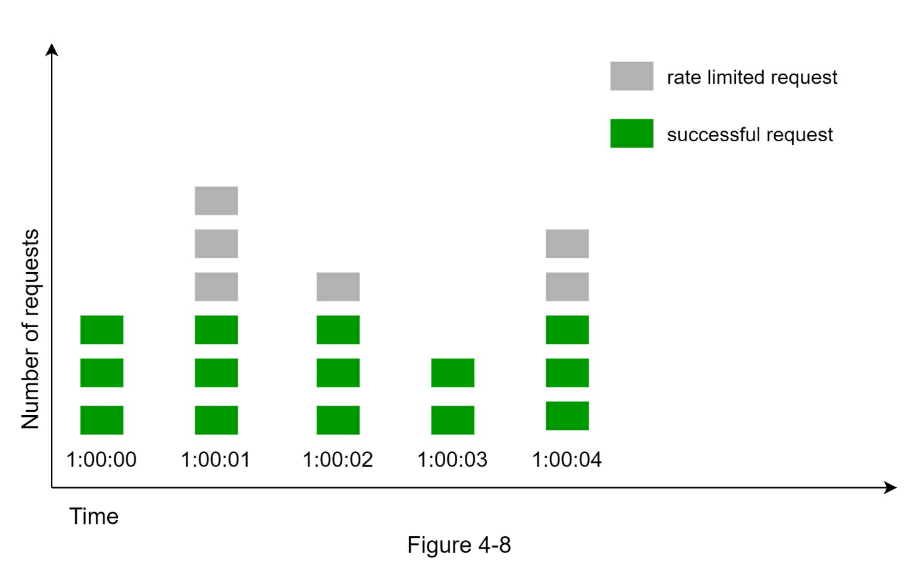
A major problem with this algorithm is that a burst of traffic at the edges of
time windows could cause more requests than allowed quota to go through.
Consider the following case:
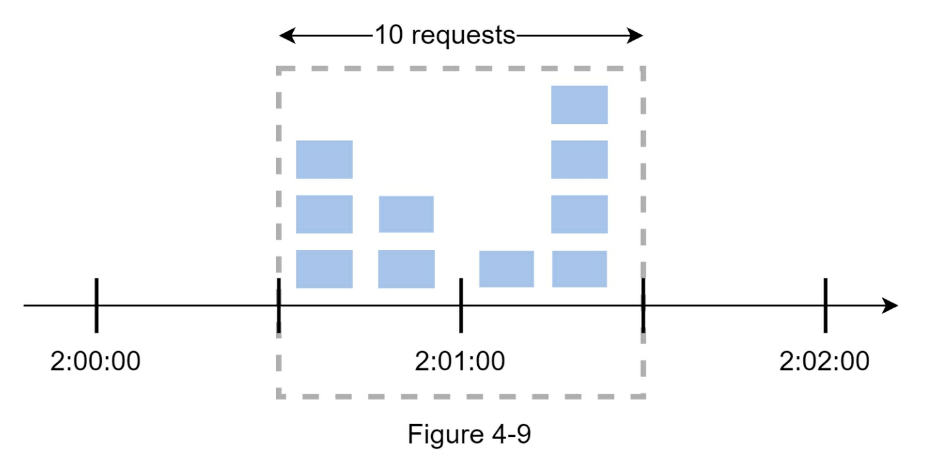
In Figure 4-9, the system allows a maximum of 5 requests per minute, and the
available quota resets at the human-friendly round minute. As seen, there are
five requests between 2:00:00 and 2:01:00 and five more requests between
2:01:00 and 2:02:00. For the one-minute window between 2:00:30 and 2:01:30, 10
requests go through. That is twice as many as allowed requests.
Pros:
- Memory efficient.
- Easy to understand.
- Resetting available quota at the end of a unit time window fits certain use
cases.
Cons:
- Spike in traffic at the edges of a window could cause more requests than the
allowed quota to go through.
Sliding window log algorithm
As discussed previously, the fixed window counter algorithm has a major issue: it allows
more requests to go through at the edges of a window. The sliding window log algorithm
fixes the issue. It works as follows:
- The algorithm keeps track of request timestamps. Timestamp data is usually kept in
cache, such as sorted sets of Redis [8].
- When a new request comes in, remove all the outdated timestamps. Outdated timestamps
are defined as those older than the start of the current time window.
- Add timestamp of the new request to the log.
- If the log size is the same or lower than the allowed count, a request is accepted.
Otherwise, it is rejected.
We explain the algorithm with an example as revealed in Figure 4-10.
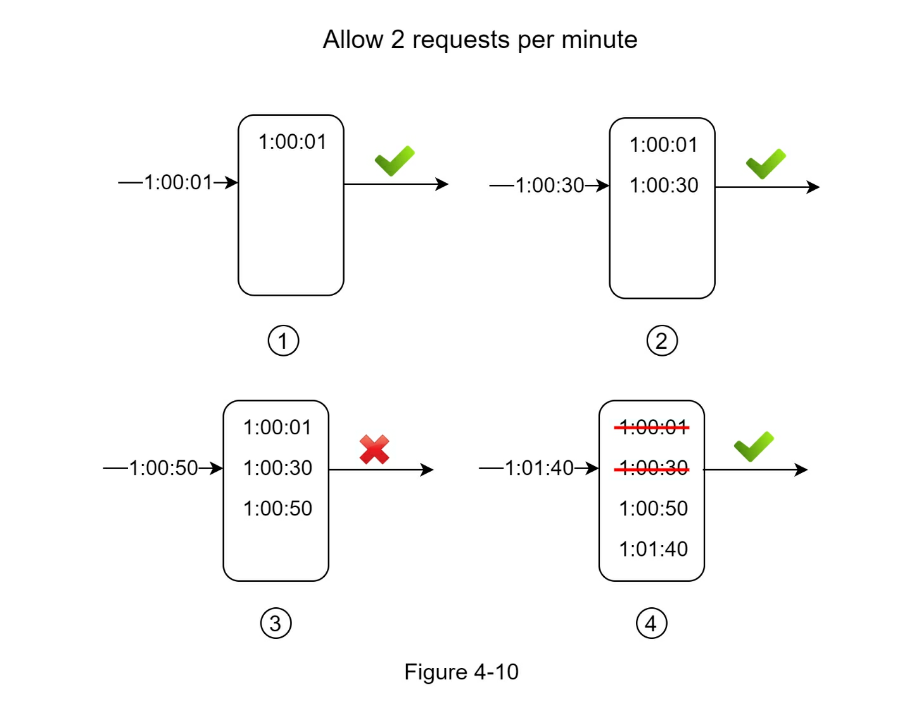
In this example, the rate limiter allows 2 requests per minute. Usually, Linux
timestamps are stored in the log. However, human-readable representation of
time is used in our example for better readability.
- The log is empty when a new request arrives at 1:00:01. Thus, the request is
allowed.
- A new request arrives at 1:00:30, the timestamp 1:00:30 is inserted into the
log. After the insertion, the log size is 2, not larger than the allowed
count. Thus, the request is allowed.
- A new request arrives at 1:00:50, and the timestamp is inserted into the log.
After the insertion, the log size is 3, larger than the allowed size 2.
Therefore, this request is rejected even though the timestamp remains in the
log.
- A new request arrives at 1:01:40. Requests in the range [1:00:40,1:01:40) are
within the latest time frame, but requests sent before 1:00:40 are outdated.
Two outdated timestamps, 1:00:01 and 1:00:30, are removed from the log. After
the remove operation, the log size becomes 2; therefore, the request is
accepted.
Pros:
- Rate limiting implemented by this algorithm is very accurate. In any rolling
window, requests will not exceed the rate limit.
Cons:
- The algorithm consumes a lot of memory because even if a request is rejected,
its timestamp might still be stored in memory.
Sliding window counter algorithm
The sliding window counter algorithm is a hybrid approach that combines the
fixed window counter and sliding window log. The algorithm can be implemented
by two different approaches. We will explain one implementation in this section
and provide reference for the other implementation at the end of the section.
Figure 4-11 illustrates how this algorithm works.
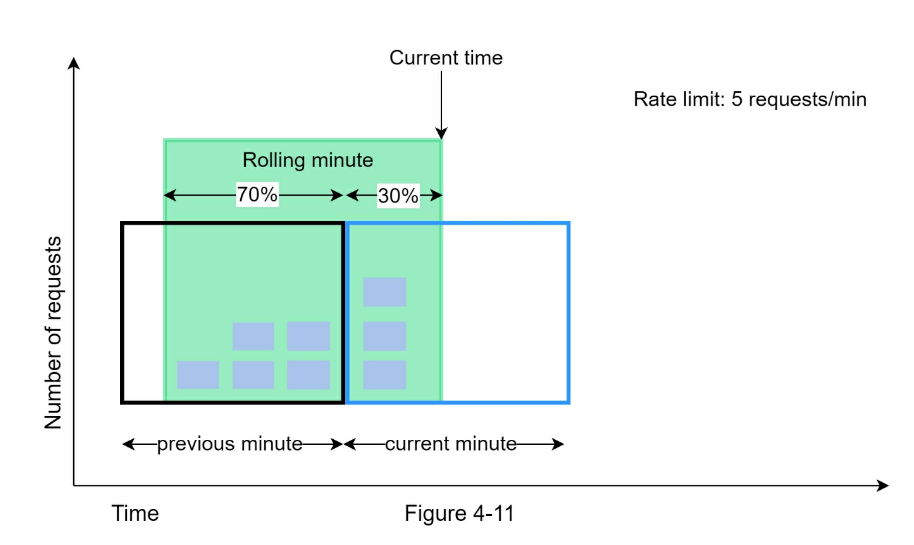
Assume the rate limiter allows a maximum of 7 requests per minute, and there
are 5 requests in the previous minute and 3 in the current minute. For a new
request that arrives at a 30% position in the current minute, the number of
requests in the rolling window is calculated using the following formula:
- Requests in current window + requests in the previous window * overlap
percentage of the rolling window and previous window
- Using this formula, we get 3 + 5 * 0.7% = 6.5 request. Depending on the use
case, the number can either be rounded up or down. In our example, it is
rounded down to 6.
Since the rate limiter allows a maximum of 7 requests per minute, the current
request can go through. However, the limit will be reached after receiving one
more request.
Due to the space limitation, we will not discuss the other implementation here.
Interested readers should refer to the reference material [9]. This algorithm
is not perfect. It has pros and cons.
Pros
- It smooths out spikes in traffic because the rate is based on the average
rate of the previous window.
- Memory efficient.
Cons
- It only works for not-so-strict look back window. It is an approximation of
the actual rate because it assumes requests in the previous window are evenly
distributed.
- However, this problem may not be as bad as it seems. According to experiments
done by Cloudflare [10], only 0.003% of requests are wrongly allowed or rate
limited among 400 million requests.
High-level architecture
The basic idea of rate limiting algorithms is simple. At the high-level, we
need a counter to keep track of how many requests are sent from the same user,
IP address, etc. If the counter is larger than the limit, the request is
disallowed.
Where shall we store counters? Using the database is not a good idea due to
slowness of disk access. In-memory cache is chosen because it is fast and
supports time-based expiration strategy. For instance, Redis [11] is a popular
option to implement rate limiting. It is an inmemory store that offers two
commands: INCR and EXPIRE.
- INCR: It increases the stored counter by 1.
- EXPIRE: It sets a timeout for the counter. If the timeout expires, the
counter is automatically deleted.
Figure 4-12 shows the high-level architecture for rate limiting, and this works
as follows:

- The client sends a request to rate limiting middleware.
- Rate limiting middleware fetches the counter from the corresponding bucket in
Redis and checks if the limit is reached or not.
- If the limit is reached, the request is rejected.
- If the limit is not reached, the request is sent to API servers. Meanwhile,
the system increments the counter and saves it back to Redis.
Step 3 - Design deep dive
The high-level design in Figure 4-12 does not answer the following questions:
- How are rate limiting rules created?
- Where are the rules stored?
- How to handle requests that are rate limited?
In this section, we will first answer the questions regarding rate limiting
rules and then go over the strategies to handle rate-limited requests. Finally,
we will discuss rate limiting in distributed environment, a detailed design,
performance optimization and monitoring.
Rate limiting rules
Lyft open-sourced their rate-limiting component [12]. We will peek inside of
the component and look at some examples of rate limiting rules:
domain: messaging
descriptors:
- key: message_type

Value: marketing
rate_limit:
unit: day
requests_per_unit: 5
In the above example, the system is configured to allow a maximum of 5
marketing messages per day. Here is another example:
domain: auth
descriptors:
- key: auth_type

Value: login
rate_limit:
unit: minute
requests_per_unit: 5
This rule shows that clients are not allowed to login more than 5 times in 1
minute. Rules are generally written in configuration files and saved on disk.
Exceeding the rate limit
In case a request is rate limited, APIs return a HTTP response code 429 (too
many requests) to the client. Depending on the use cases, we may enqueue the
rate-limited requests to be processed later. For example, if some orders are
rate limited due to system overload, we may keep those orders to be processed
later.
How does a client know whether it is being throttled? And how does a client
know the number of allowed remaining requests before being throttled? The
answer lies in HTTP response headers. The rate limiter returns the following
HTTP headers to clients:
-
X-Ratelimit-Remaining: The remaining number of allowed requests within the
window.
-
X-Ratelimit-Limit: It indicates how many calls the client can make per time
window.
-
X-Ratelimit-Retry-After: The number of seconds to wait until you can make a
request again without being throttled.
When a user has sent too many requests, a 429 too many requests error and
X-Ratelimit-Retry-After header are returned to the client.
Detailed design
Figure 4-13 presents a detailed design of the system.
- Rules are stored on the disk. Workers frequently pull rules from the disk and
store them in the cache.
- When a client sends a request to the server, the request is sent to the rate
limiter middleware first.
- Rate limiter middleware loads rules from the cache. It fetches counters and
last request timestamp from Redis cache. Based on the response, the rate
limiter decides:
- if the request is not rate limited, it is forwarded to API servers.
- if the request is rate limited, the rate limiter returns 429 too many
requests error to the client. In the meantime, the request is either dropped
or forwarded to the queue.
Rate limiter in a distributed environment
Building a rate limiter that works in a single server environment is not
difficult. However, scaling the system to support multiple servers and
concurrent threads is a different story.
There are two challenges:
- Race condition
- Synchronization issue
Race condition
As discussed earlier, rate limiter works as follows at the high-level:
- Read the counter value from Redis.
- Check if ( counter + 1 ) exceeds the threshold.
- If not, increment the counter value by 1 in Redis.
Race conditions can happen in a highly concurrent environment as shown in
Figure 4-14.
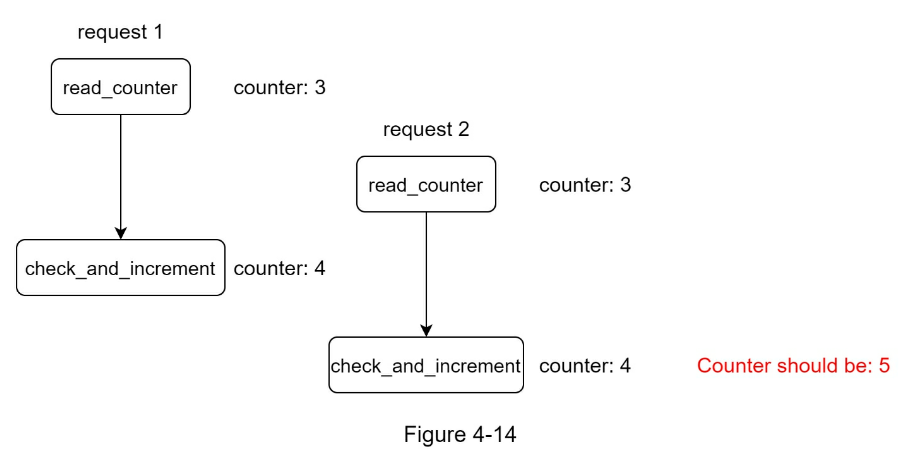
Assume the counter value in Redis is 3. If two requests concurrently read the
counter value before either of them writes the value back, each will increment
the counter by one and write it back without checking the other thread. Both
requests (threads) believe they have the correct counter value 4. However, the
correct counter value should be 5.
Locks are the most obvious solution for solving race condition. However,
locks will significantly slow down the system. Two strategies are commonly used
to solve the problem:
Lua script [13] and sorted sets data structure in Redis [8]. For readers
interested in these strategies, refer to the corresponding reference materials
- [13].
Synchronization issue
Synchronization is another important factor to consider in a distributed
environment. To support millions of users, one rate limiter server might not be
enough to handle the traffic.
When multiple rate limiter servers are used, synchronization is required. For
example, on the left side of Figure 4-15, client 1 sends requests to rate
limiter 1, and client 2 sends requests to rate limiter 2. As the web tier is
stateless, clients can send requests to a different rate limiter as shown on
the right side of Figure 4-15. If no synchronization happens, rate limiter 1
does not contain any data about client 2. Thus, the rate limiter cannot work
properly.
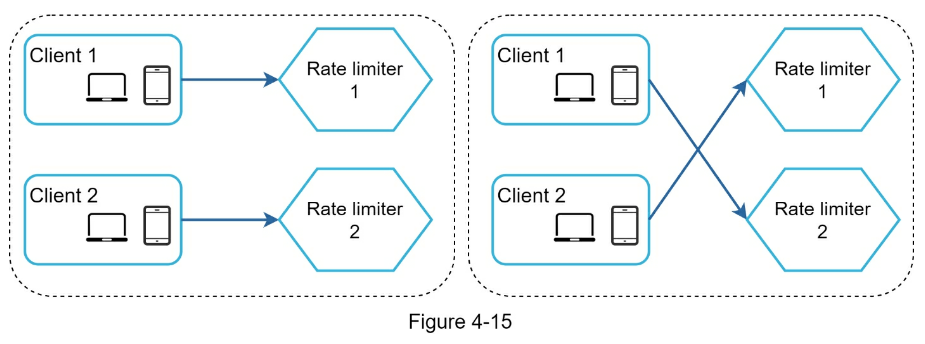
One possible solution is to use sticky sessions that allow a client to send
traffic to the same rate limiter. This solution is not advisable because it is
neither scalable nor flexible. A better approach is to use centralized data
stores like Redis. The design is shown in Figure 4-16.
Performance optimization is a common topic in system design interviews. We will cover two
areas to improve.
First, multi-data center setup is crucial for a rate limiter because latency is
high for users located far away from the data center. Most cloud service
providers build many edge server locations around the world. For example, as of
5/20 2020, Cloudflare has 194 geographically distributed edge servers [14].
Traffic is automatically routed to the closest edge server to reduce latency.
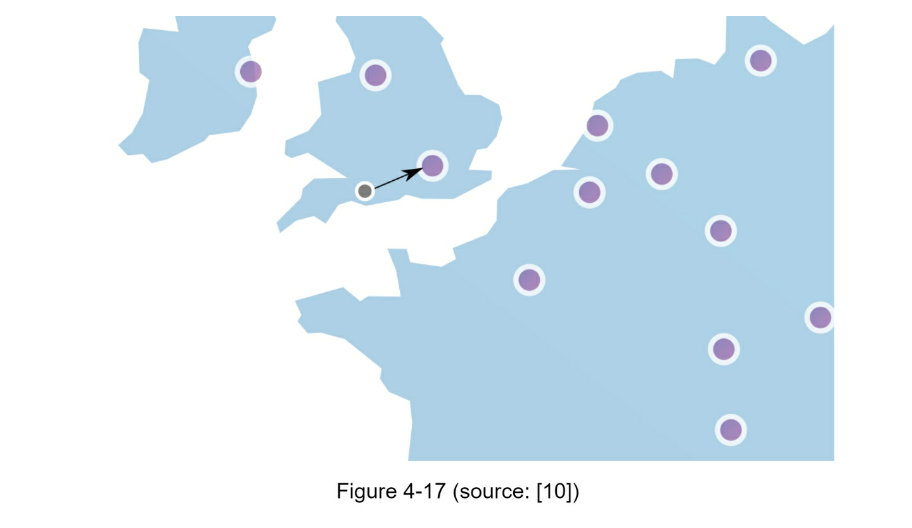
Second, synchronize data with an eventual consistency model. If you are unclear
about the eventual consistency model, refer to the “Consistency” section in
“Chapter 6: Design a Keyvalue Store.”
Monitoring
After the rate limiter is put in place, it is important to gather analytics
data to check whether the rate limiter is effective. Primarily, we want to make
sure:
- The rate limiting algorithm is effective.
- The rate limiting rules are effective.
For example, if rate limiting rules are too strict, many valid requests are
dropped. In this case, we want to relax the rules a little bit. In another
example, we notice our rate limiter becomes ineffective when there is a sudden
increase in traffic like flash sales. In this scenario, we may replace the
algorithm to support burst traffic. Token bucket is a good fit here.
Step 4 - Wrap up
In this chapter, we discussed different algorithms of rate limiting and their
pros/cons.
Algorithms discussed include:
- Token bucket
- Leaking bucket
- Fixed window
- Sliding window log
- Sliding window counter
Then, we discussed the system architecture, rate limiter in a distributed
environment, performance optimization and monitoring. Similar to any system
design interview questions, there are additional talking points you can mention
if time allows:
- Hard vs soft rate limiting.
- Hard: The number of requests cannot exceed the threshold.
- Soft: Requests can exceed the threshold for a short period.
- Rate limiting at different levels. In this chapter, we only talked about rate
limiting at the application level (HTTP: layer 7). It is possible to apply
rate limiting at other layers. For example, you can apply rate limiting by IP
addresses using Iptables [15] (IP: layer 3). Note: The Open Systems
Interconnection model (OSI model) has 7 layers [16]: Layer 1: Physical layer,
Layer 2: Data link layer, Layer 3: Network layer, Layer 4: Transport layer,
Layer 5: Session layer, Layer 6: Presentation layer, Layer 7: Application
layer.
- Avoid being rate limited. Design your client with best practices:
- Use client cache to avoid making frequent API calls.
- Understand the limit and do not send too many requests in a short time frame.
- Include code to catch exceptions or errors so your client can gracefully recover from exceptions.
- Add sufficient back off time to retry logic.
Congratulations on getting this far! Now give yourself a pat on the back. Good job!
Reference Materials
- Rate-limiting strategies and techniques: https://cloud.google.com/solutions/rate-limitingstrategies-techniques
- Twitter rate limits: https://developer.twitter.com/en/docs/basics/rate-limits
- Google docs usage limits: https://developers.google.com/docs/api/limits
- IBM microservices: https://www.ibm.com/cloud/learn/microservices
- Throttle API requests for better throughput:
https://docs.aws.amazon.com/apigateway/latest/developerguide/api-gateway-requestthrottling.html
- Stripe rate limiters: https://stripe.com/blog/rate-limiters
- Shopify REST Admin API rate limits: https://help.shopify.com/en/api/reference/restadmin-api-rate-limits
- Better Rate Limiting With Redis Sorted Sets:
https://engineering.classdojo.com/blog/2015/02/06/rolling-rate-limiter/
- System Design — Rate limiter and Data modelling:
https://medium.com/@saisandeepmopuri/system-design-rate-limiter-and-data-modelling9304b0d18250
- How we built rate limiting capable of scaling to millions of domains:
https://blog.cloudflare.com/counting-things-a-lot-of-different-things/
- Redis website: https://redis.io/
- Lyft rate limiting: https://github.com/lyft/ratelimit
- Scaling your API with rate limiters:
https://gist.github.com/ptarjan/e38f45f2dfe601419ca3af937fff574d#request-rate-limiter
- What is edge computing: https://www.cloudflare.com/learning/serverless/glossary/whatis-edge-computing/
- Rate Limit Requests with Iptables: https://blog.programster.org/rate-limit-requests-withiptables
- OSI model: https://en.wikipedia.org/wiki/OSI_model#Layer_architecture
CHAPTER 5: DESIGN CONSISTENT HASHING
To achieve horizontal scaling, it is important to distribute requests/data
efficiently and evenly across servers. Consistent hashing is a commonly used
technique to achieve this goal. But first, let us take an in-depth look at the
problem.
The rehashing problem
If you have n cache servers, a common way to balance the load is to use the
following hash method: serverIndex = hash(key) % N, where N is the size of
the server pool.
Let us use an example to illustrate how it works. As shown in Table 5-1, we
have 4 servers and 8 string keys with their hashes.
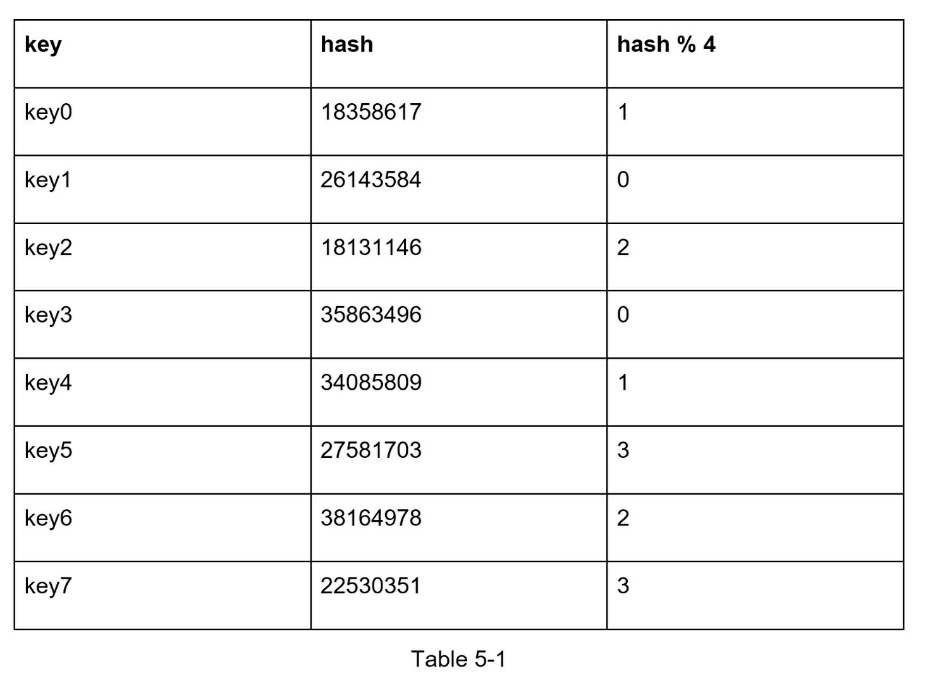
To fetch the server where a key is stored, we perform the modular operation
f(key) % 4. For instance, hash(key0) % 4 = 1 means a client must contact server
1 to fetch the cached data.
This approach works well when the size of the server pool is fixed, and the
data distribution is even. However, problems arise when new servers are added,
or existing servers are removed. For example, if server 1 goes offline, the
size of the server pool becomes 3. Using the same hash function, we get the
same hash value for a key. But applying modular operation gives us different
server indexes because the number of servers is reduced by 1. We get the
results as shown in Table 5-2 by applying hash % 3:
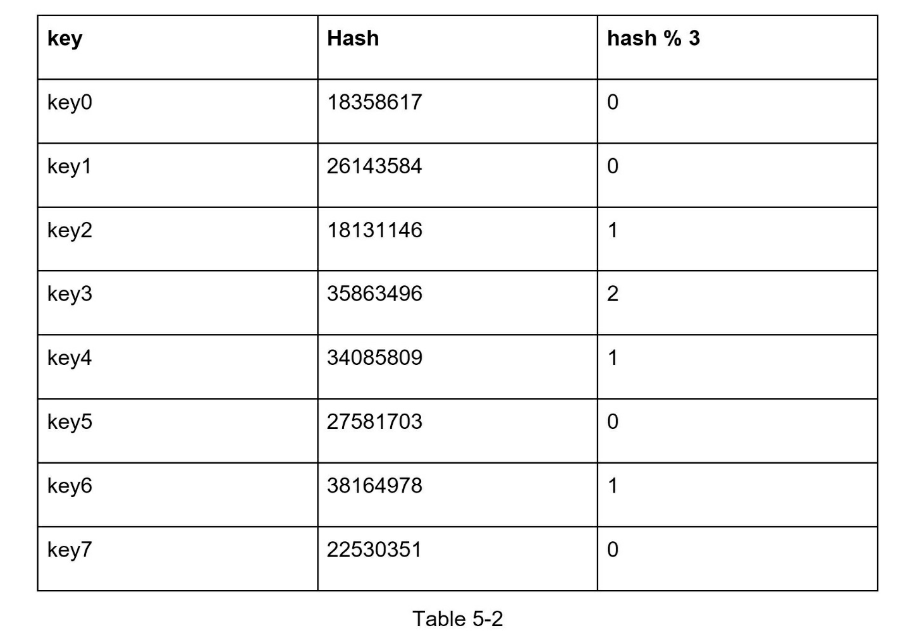
Figure 5-2 shows the new distribution of keys based on Table 5-2.
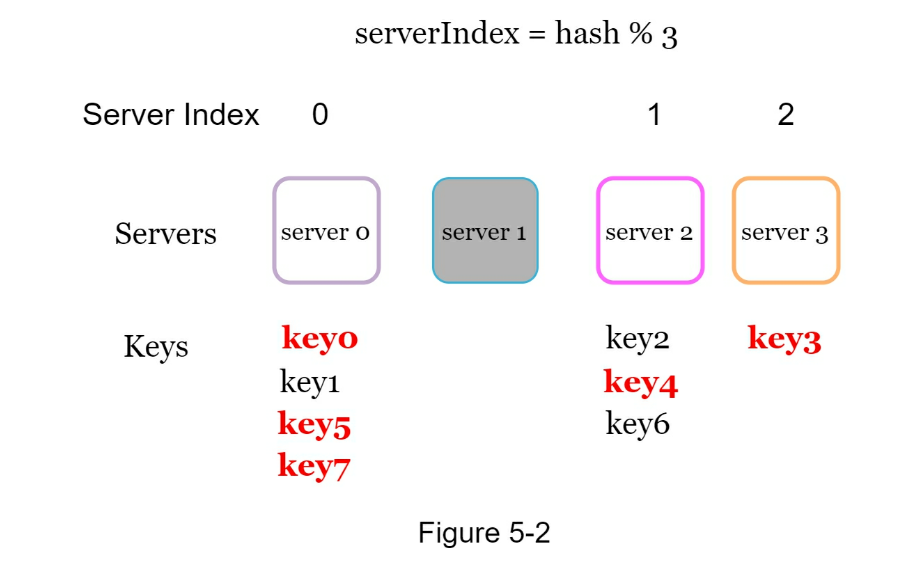
As shown in Figure 5-2, most keys are redistributed, not just the ones
originally stored in the offline server (server 1). This means that when server
1 goes offline, most cache clients will connect to the wrong servers to fetch
data. This causes a storm of cache misses. Consistent hashing is an effective
technique to mitigate this problem.
Consistent hashing
Quoted from Wikipedia: “Consistent hashing is a special kind of hashing such
that when a hash table is re-sized and consistent hashing is used, only k/n
keys need to be remapped on average, where k is the number of keys, and n is
the number of slots. In contrast, in most traditional hash tables, a change in
the number of array slots causes nearly all keys to be remapped [1]”.
Hash space and hash ring
Now we understand the definition of consistent hashing, let us find out how it
works.
Assume SHA-1 is used as the hash function f, and the output range of the hash
function is: x0, x1, x2, x3, …, xn. In cryptography, SHA-1’s hash space goes
from 0 to 2^160 - 1. That means x0 corresponds to 0, xn corresponds to 2^160 –
1, and all the other hash values in the middle fall between 0 and 2^160 - 1.
Figure 5-3 shows the hash space. By collecting both ends, we get a hash ring as
shown in Figure 5-4:
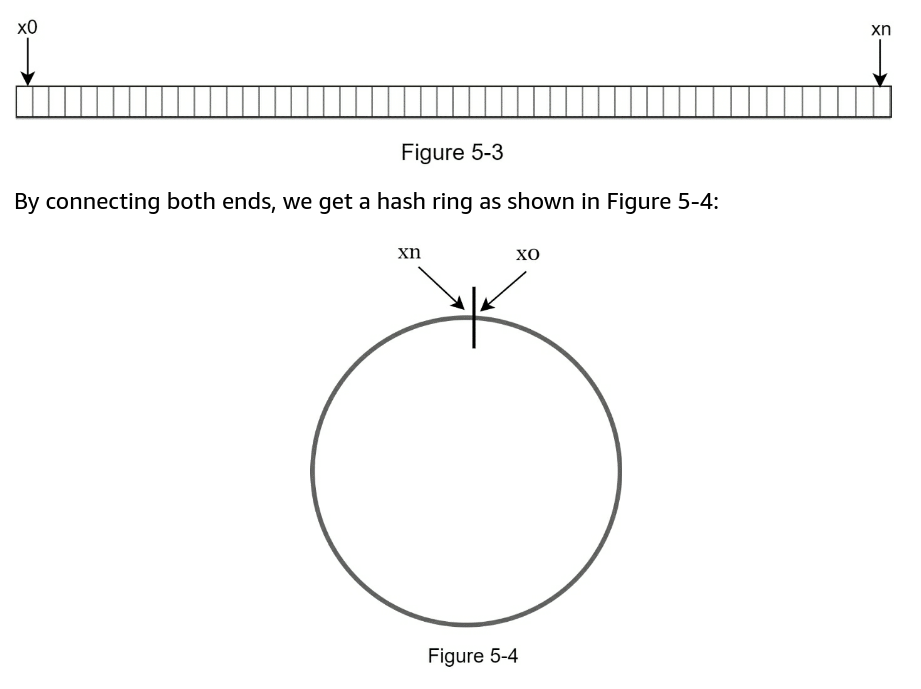
Hash servers
Using the same hash function f, we map servers based on server IP or name onto
the ring.
Figure 5-5 shows that 4 servers are mapped on the hash ring.
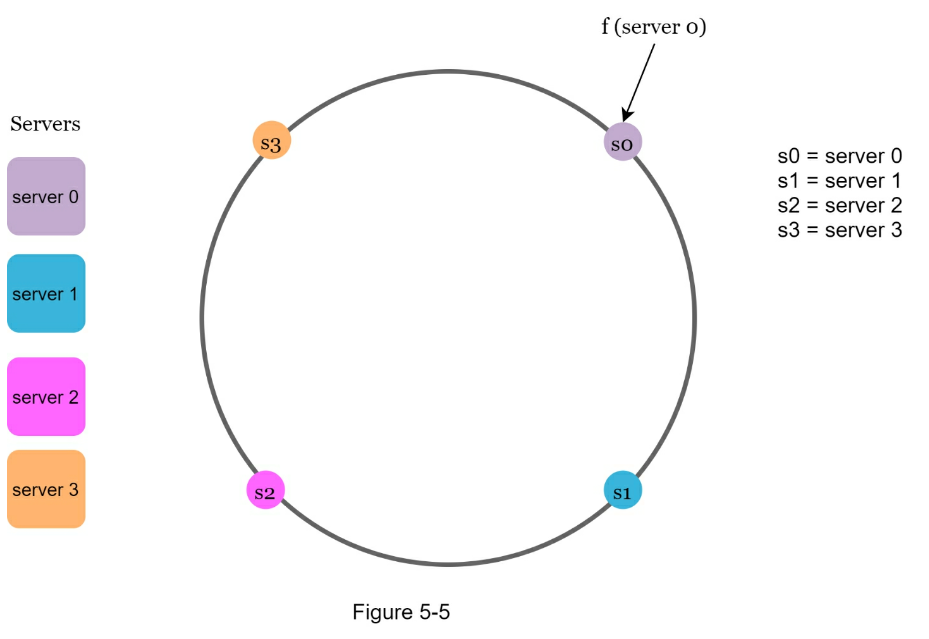
Hash keys
One thing worth mentioning is that hash function used here is different from
the one in “the rehashing problem,” and there is no modular operation. As shown
in Figure 5-6, 4 cache keys (key0, key1, key2, and key3) are hashed onto the
hash ring

Server lookup
To determine which server a key is stored on, we go clockwise from the key
position on the ring until a server is found. Figure 5-7 explains this process.
Going clockwise, key0 is stored on server 0; key1 is stored on server 1; key2
is stored on server 2 and key3 is stored on server 3.
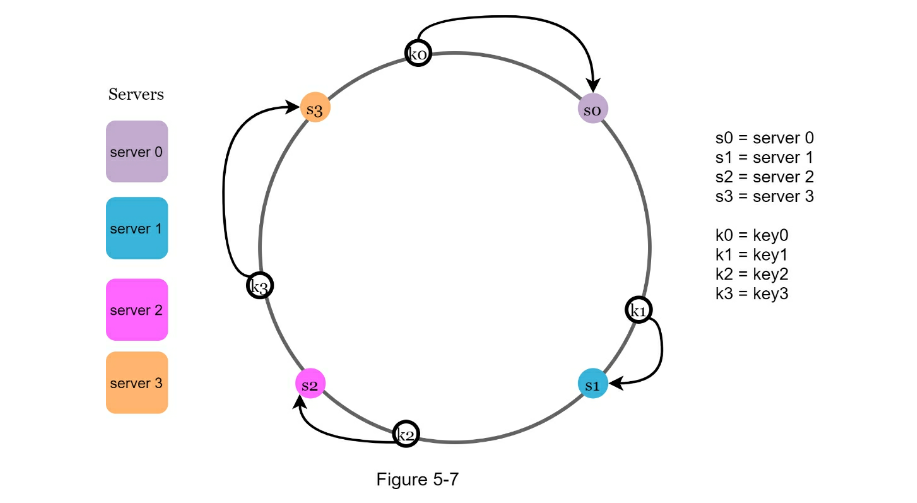
Add a server
Using the logic described above, adding a new server will only require
redistribution of a fraction of keys.
In Figure 5-8, after a new server 4 is added, only key0 needs to be
redistributed. k1, k2, and k3 remain on the same servers. Let us take a close
look at the logic. Before server 4 is added, key0 is stored on server 0. Now,
key0 will be stored on server 4 because server 4 is the first server it
encounters by going clockwise from key0’s position on the ring. The other keys
are not redistributed based on consistent hashing algorithm.
Remove a server
When a server is removed, only a small fraction of keys require redistribution
with consistent hashing. In Figure 5-9, when server 1 is removed, only key1
must be remapped to server 2. The rest of the keys are unaffected.
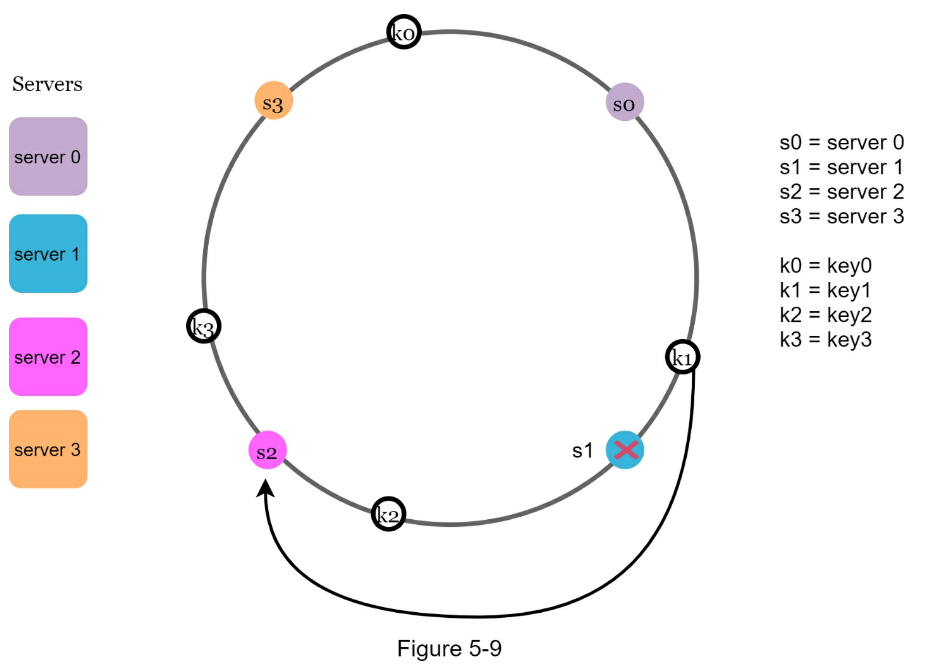
Two issues in the basic approach
The consistent hashing algorithm was introduced by Karger et al. at MIT [1]. The basic steps
are:
- Map servers and keys on to the ring using a uniformly distributed hash
function.
- To find out which server a key is mapped to, go clockwise from the key
position until the first server on the ring is found.
Two problems are identified with this approach. First, it is impossible to keep
the same size of partitions on the ring for all servers considering a server
can be added or removed. A partition is the hash space between adjacent
servers. It is possible that the size of the partitions on the ring assigned to
each server is very small or fairly large. In Figure 5-10, if s1 is removed,
s2’s partition (highlighted with the bidirectional arrows) is twice as large as
s0 and s3’s partition.
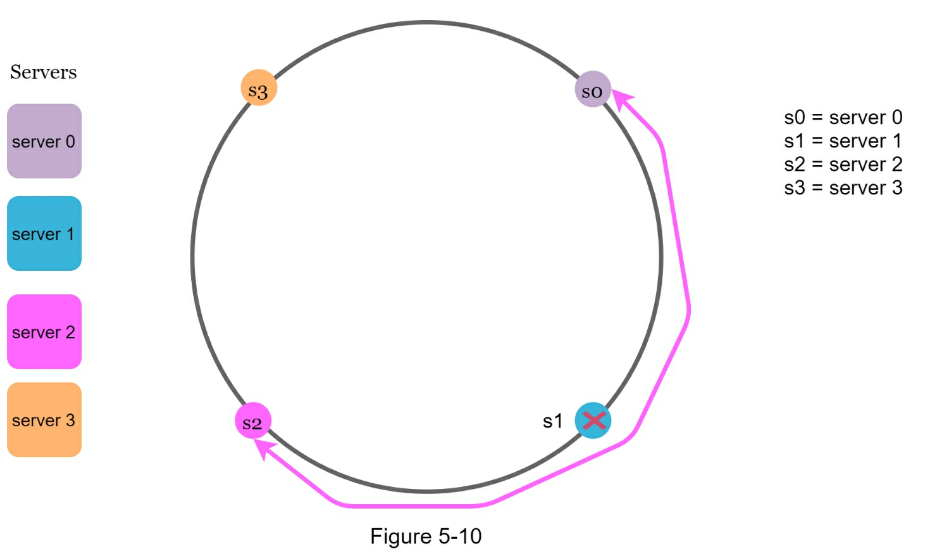
Second, it is possible to have a non-uniform key distribution on the ring. For
instance, if servers are mapped to positions listed in Figure 5-11, most of the
keys are stored on server 2.
However, server 1 and server 3 have no data.
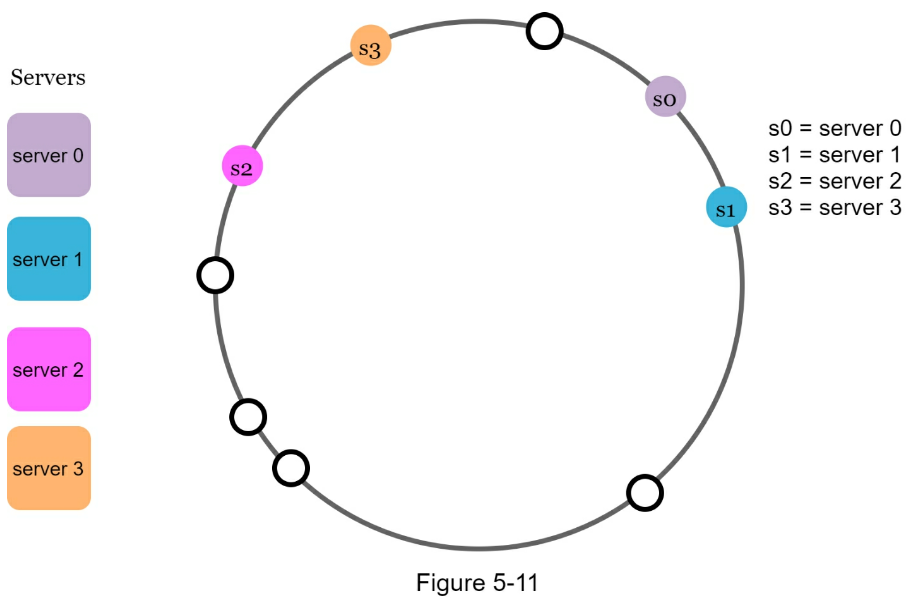
A technique called virtual nodes or replicas is used to solve these problems.
Virtual nodes
A virtual node refers to the real node, and each server is represented by
multiple virtual nodes on the ring. In Figure 5-12, both server 0 and server 1
have 3 virtual nodes. The 3 is arbitrarily chosen; and in real-world systems,
the number of virtual nodes is much larger.
Instead of using s0, we have s0_0, s0_1, and s0_2 to represent server 0 on the
ring. Similarly, s1_0, s1_1, and s1_2 represent server 1 on the ring. With
virtual nodes, each server is responsible for multiple partitions. Partitions
(edges) with label s0 are managed by server 0.
On the other hand, partitions with label s1 are managed by server 1.
To find which server a key is stored on, we go clockwise from the key’s
location and find the first virtual node encountered on the ring. In Figure
5-13, to find out which server k0 is stored on, we go clockwise from k0’s
location and find virtual node s1_1, which refers to server 1.
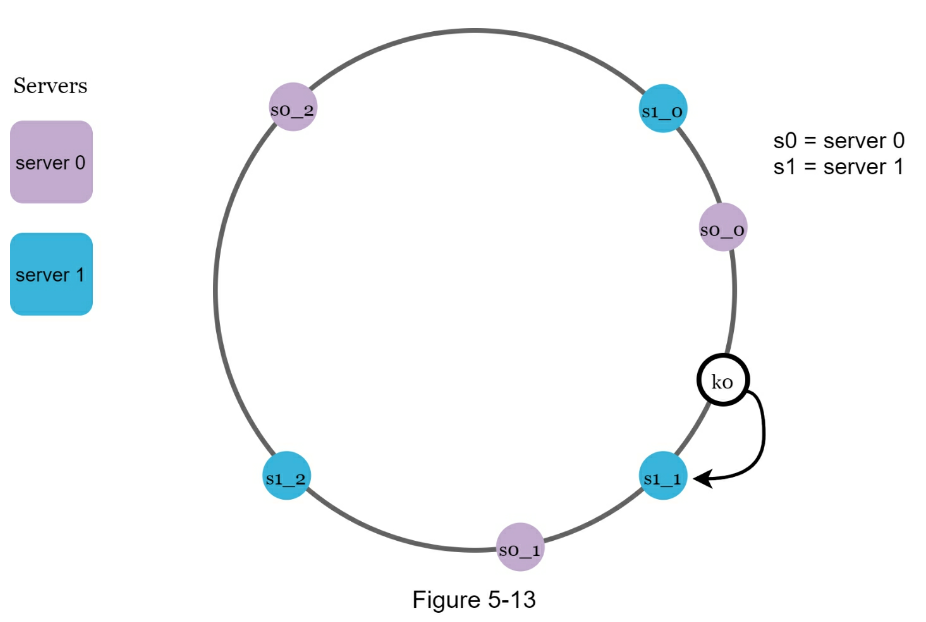
As the number of virtual nodes increases, the distribution of keys becomes more
balanced.
This is because the standard deviation gets smaller with more virtual nodes,
leading to balanced data distribution. Standard deviation measures how data are
spread out. The outcome of an experiment carried out by online research [2]
shows that with one or two hundred virtual nodes, the standard deviation is
between 5% (200 virtual nodes) and 10% (100 virtual nodes) of the mean. The
standard deviation will be smaller when we increase the number of virtual
nodes. However, more spaces are needed to store data about virtual nodes.
This is a tradeoff, and we can tune the number of virtual nodes to fit our
system requirements.
Find affected keys
When a server is added or removed, a fraction of data needs to be
redistributed. How can we find the affected range to redistribute the keys?
In Figure 5-14, server 4 is added onto the ring. The affected range starts from s4 (newly
added node) and moves anticlockwise around the ring until a server is found (s3). Thus, keys
located between s3 and s4 need to be redistributed to s4.
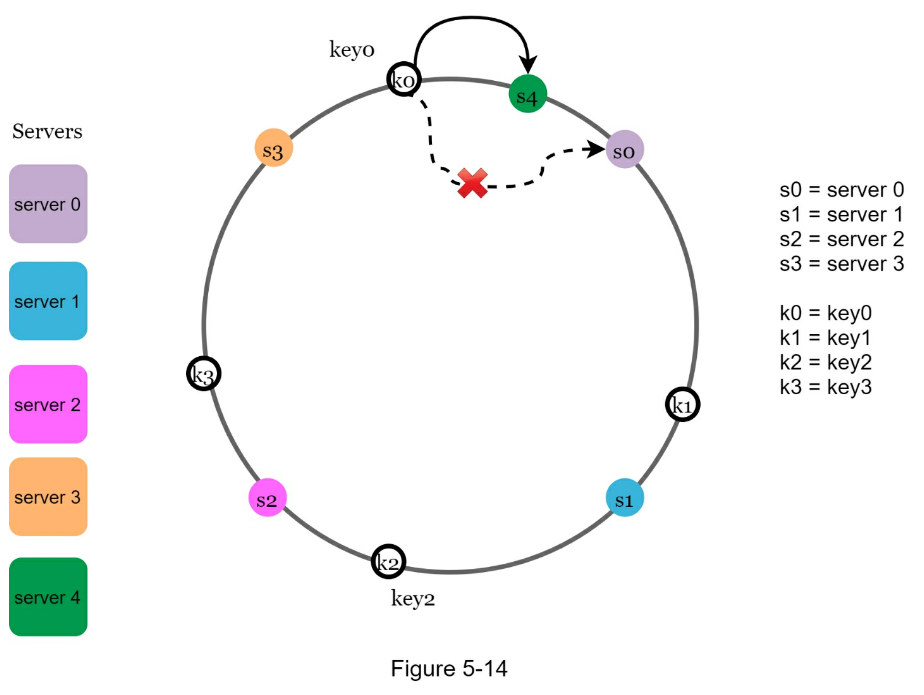
When a server (s1) is removed as shown in Figure 5-15, the affected range starts from s1
(removed node) and moves anticlockwise around the ring until a server is found (s0). Thus,
keys located between s0 and s1 must be redistributed to s2.
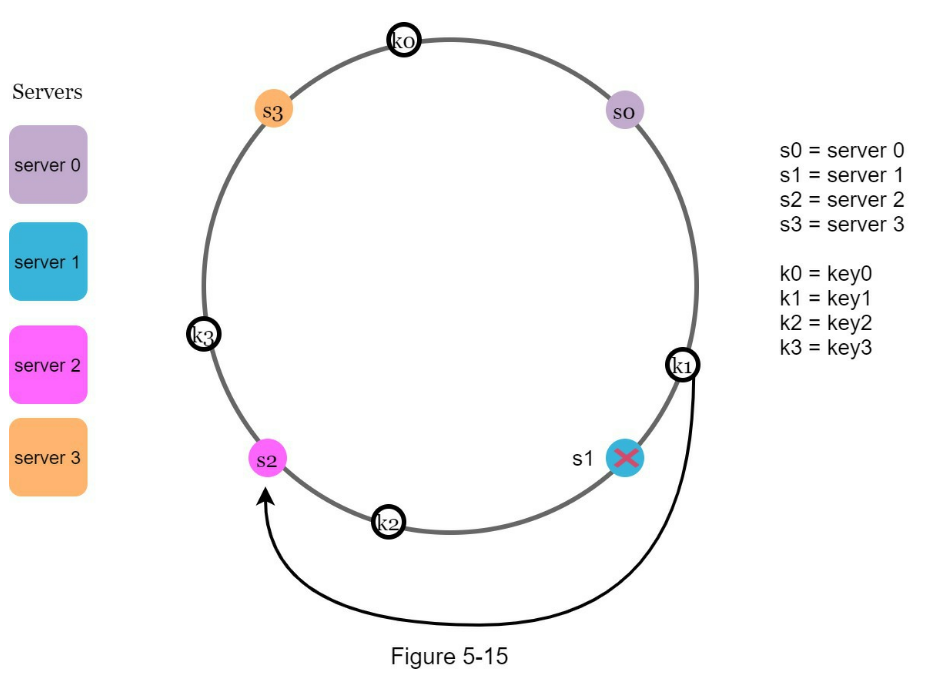
Wrap up
In this chapter, we had an in-depth discussion about consistent hashing,
including why it is needed and how it works. The benefits of consistent hashing
include:
- Minimized keys are redistributed when servers are added or removed.
- It is easy to scale horizontally because data are more evenly distributed.
- Mitigate hotspot key problem. Excessive access to a specific shard could
cause server overload. Imagine data for Katy Perry, Justin Bieber, and Lady
Gaga all end up on the same shard. Consistent hashing helps to mitigate the
problem by distributing the data more evenly.
Consistent hashing is widely used in real-world systems, including some notable
ones:
- Partitioning component of Amazon’s Dynamo database [3]
- Data partitioning across the cluster in Apache Cassandra [4]
- Discord chat application [5]
- Akamai content delivery network [6]
- Maglev network load balancer [7]
Congratulations on getting this far! Now give yourself a pat on the back. Good
job!
Reference Materials
- [1] Consistent hashing: https://en.wikipedia.org/wiki/Consistent_hashing
- [2] Consistent Hashing: https://tom-e-white.com/2007/11/consistent-hashing.html
- [3] Dynamo: Amazon’s Highly Available Key-value Store: https://www.allthingsdistributed.com/files/amazon-dynamo-sosp2007.pdf
- [4] Cassandra - A Decentralized Structured Storage System: http://www.cs.cornell.edu/Projects/ladis2009/papers/Lakshman-ladis2009.PDF
- [5] How Discord Scaled Elixir to 5,000,000 Concurrent Users: https://blog.discord.com/scaling-elixir-f9b8e1e7c29b
- [6] CS168: The Modern Algorithmic Toolbox Lecture #1: Introduction and Consistent Hashing: http://theory.stanford.edu/~tim/s16/l/l1.pdf
- [7] Maglev: A Fast and Reliable Software Network Load Balancer: https://static.googleusercontent.com/media/research.google.com/en//pubs/archive/44824.pdf
CHAPTER 6: DESIGN A KEY-VALUE STORE
A key-value store, also referred to as a key-value database, is a
non-relational database. Each unique identifier is stored as a key with its
associated value. This data pairing is known as a “key-value” pair.
In a key-value pair, the key must be unique, and the value associated with the
key can be accessed through the key. Keys can be plain text or hashed values.
For performance reasons, a short key works better. What do keys look like? Here
are a few examples:
- Plain text key: “last_logged_in_at”
- Hashed key: 253DDEC4
The value in a key-value pair can be strings, lists, objects, etc. The value is
usually treated as an opaque object in key-value stores, such as Amazon dynamo
[1], Memcached [2], Redis [3], etc.
Here is a data snippet in a key-value store:
| key |
value |
| 145 |
john |
| 147 |
bob |
| 525 |
julia |
In this chapter, you are asked to design a key-value store that supports the
following operations:
-
put(key, value) // insert “value” associated with “key”
-
get(key) // get “value” associated with “key”
Understand the problem and establish design scope
There is no perfect design. Each design achieves a specific balance regarding
the tradeoffs of the read, write, and memory usage. Another tradeoff has to be
made was between consistency and availability. In this chapter, we design a
key-value store that comprises of the following characteristics:
- The size of a key-value pair is small: less than 10 KB.
- Ability to store big data.
- High availability: The system responds quickly, even during failures.
- High scalability: The system can be scaled to support large data set.
- Automatic scaling: The addition/deletion of servers should be automatic based
on traffic.
- Tunable consistency.
- Low latency.
Single server key-value store
Developing a key-value store that resides in a single server is easy. An
intuitive approach is to store key-value pairs in a hash table, which keeps
everything in memory. Even though memory access is fast, fitting everything in
memory may be impossible due to the space constraint. Two optimizations can be
done to fit more data in a single server:
- Data compression
- Store only frequently used data in memory and the rest on disk
Even with these optimizations, a single server can reach its capacity very
quickly. A distributed key-value store is required to support big data.
Distributed key-value store
A distributed key-value store is also called a distributed hash table, which
distributes keyvalue pairs across many servers. When designing a distributed
system, it is important to understand CAP (Consistency, Availability, Partition
Tolerance) theorem.
CAP theorem
CAP theorem states it is impossible for a distributed system to simultaneously
provide more than two of these three guarantees:
- consistency,
- availability, and
- partition tolerance.
Consistency: consistency means all clients see the same data at the same
time no matter which node they connect to.
Availability: availability means any client which requests data gets a
response even if some of the nodes are down.
Partition Tolerance: a partition indicates a communication break between
two nodes. Partition tolerance means the system continues to operate despite network partitions.
CAP theorem states that one of the three properties must be sacrificed to support 2 of the 3
properties as shown in Figure 6-1.
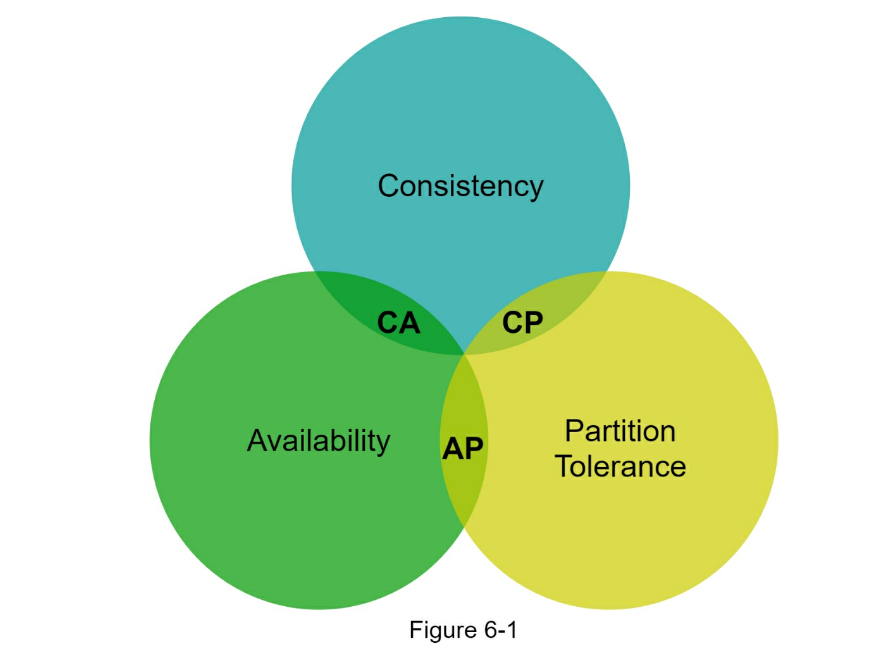
Nowadays, key-value stores are classified based on the two CAP characteristics
they support:
-
CP (consistency and partition tolerance) systems: a CP key-value store
supports consistency and partition tolerance while sacrificing availability.
-
AP (availability and partition tolerance) systems: an AP key-value store
supports availability and partition tolerance while sacrificing consistency.
-
CA (consistency and availability) systems: a CA key-value store supports
consistency and availability while sacrificing partition tolerance. Since
network failure is unavoidable, a distributed system must tolerate network
partition. Thus, a CA system cannot exist in real-world applications.
What you read above is mostly the definition part. To make it easier to
understand, let us take a look at some concrete examples. In distributed
systems, data is usually replicated multiple times. Assume data are replicated
on three replica nodes, n1, n2 and n3 as shown in Figure 6- 2.
Ideal situation
In the ideal world, network partition never occurs. Data written to n1 is
automatically replicated to n2 and n3. Both consistency and availability are
achieved.
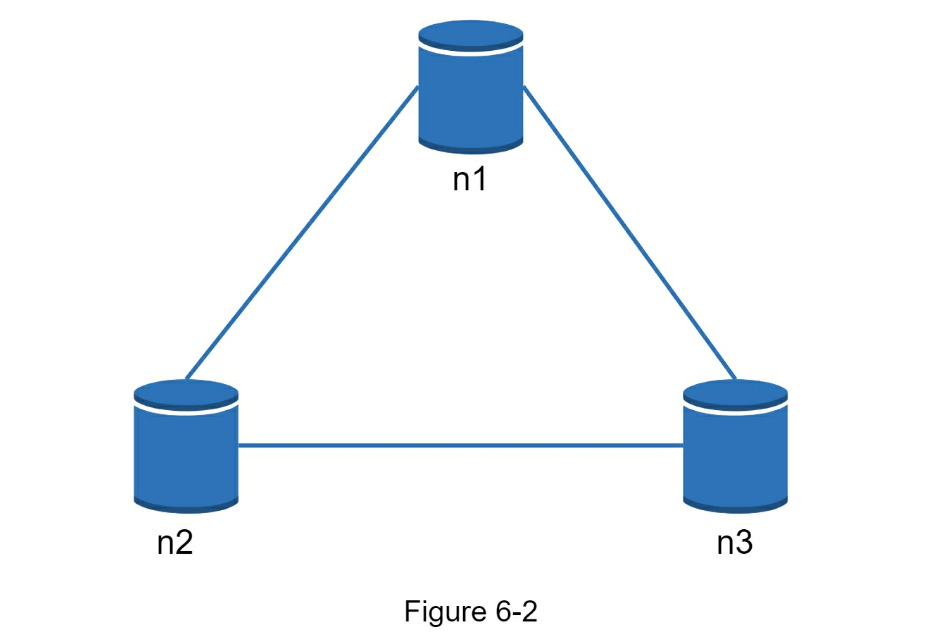
Real-world distributed systems
In a distributed system, partitions cannot be avoided, and when a partition
occurs, we must choose between consistency and availability. In Figure 6-3, n3
goes down and cannot communicate with n1 and n2. If clients write data to n1 or
n2, data cannot be propagated to n3. If data is written to n3 but not
propagated to n1 and n2 yet, n1 and n2 would have stale data.
If we choose consistency over availability (CP system), we must block all
write operations to n1 and n2 to avoid data inconsistency among these three
servers, which makes the system unavailable. Bank systems usually have
extremely high consistent requirements. For example, it is crucial for a bank
system to display the most up-to-date balance info. If inconsistency occurs due
to a network partition, the bank system returns an error before the
inconsistency is resolved.
However, if we choose availability over consistency (AP system), the system
keeps accepting reads, even though it might return stale data. For writes,
n1 and n2 will keep accepting writes, and data will be synced to n3 when the
network partition is resolved.
Choosing the right CAP guarantees that fit your use case is an important step
in building a distributed key-value store. You can discuss this with your
interviewer and design the system accordingly.
System components
In this section, we will discuss the following core components and techniques
used to build a key-value store:
- Data partition
- Data replication
- Consistency
- Inconsistency resolution
- Handling failures
- System architecture diagram
- Write path
- Read path
The content below is largely based on three popular key-value store systems:
Dynamo [4], Cassandra [5], and BigTable [6].
Data partition
For large applications, it is infeasible to fit the complete data set in a
single server. The simplest way to accomplish this is to split the data into
smaller partitions and store them in multiple servers. There are two challenges
while partitioning the data:
- Distribute data across multiple servers evenly.
- Minimize data movement when nodes are added or removed.
Consistent hashing discussed in Chapter 5 is a great technique to solve these
problems. Let us revisit how consistent hashing works at a high-level.
- First, servers are placed on a hash ring. In Figure 6-4, eight servers,
represented by s0, s1, …, s7, are placed on the hash ring.
- Next, a key is hashed onto the same ring, and it is stored on the first
server encountered while moving in the clockwise direction. For instance,
key0 is stored in s1 using this logic.
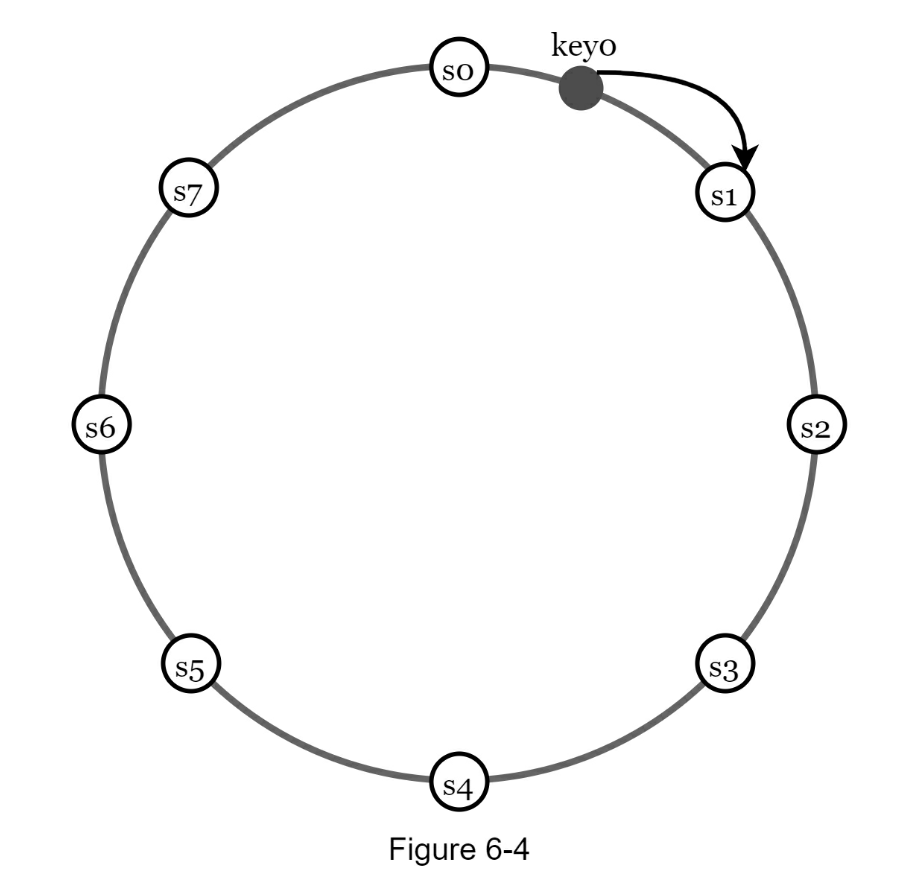
Using consistent hashing to partition data has the following advantages:
-
Automatic scaling: servers could be added and removed automatically
depending on the load.
-
Heterogeneity: the number of virtual nodes for a server is proportional to
the server capacity. For example, servers with higher capacity are assigned
with more virtual nodes.
Data replication
To achieve high availability and reliability, data must be replicated
asynchronously over N servers, where N is a configurable parameter. These N
servers are chosen using the following logic: after a key is mapped to a
position on the hash ring, walk clockwise from that position and choose the
first N servers on the ring to store data copies. In Figure 6-5 (N = 3), key0
is replicated at s1, s2, and s3.
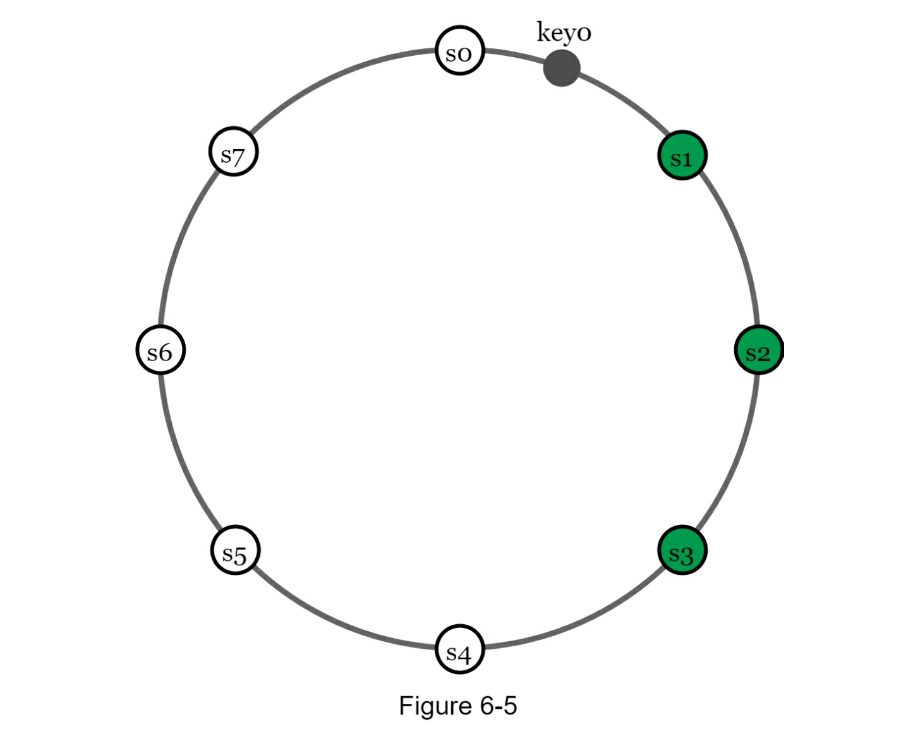
With virtual nodes, the first N nodes on the ring may be owned by fewer than N
physical servers. To avoid this issue, we only choose unique servers while
performing the clockwise walk logic.
Nodes in the same data center often fail at the same time due to power outages,
network issues, natural disasters, etc. For better reliability, replicas are
placed in distinct data centers, and data centers are connected through
high-speed networks.
Consistency
Since data is replicated at multiple nodes, it must be synchronized across
replicas. Quorum consensus can guarantee consistency for both read and write
operations. Let us establish a few definitions first.
-
N = The number of replicas
-
W = A write quorum of size W. For a write operation to be considered as
successful, write operation must be acknowledged from W replicas.
-
R = A read quorum of size R. For a read operation to be considered as
successful, read operation must wait for responses from at least R replicas.
Consider the following example shown in Figure 6-6 with N = 3.
W = 1 does not mean data is written on one server. For instance, with the
configuration in Figure 6-6, data is replicated at s0, s1, and s2. W = 1 means
that the coordinator must receive at least one acknowledgment before the write
operation is considered as successful. For instance, if we get an
acknowledgment from s1, we no longer need to wait for acknowledgements from s0
and s2. A coordinator acts as a proxy between the client and the nodes.
The configuration of W, R and N is a typical tradeoff between latency and
consistency.
If W = 1 or R = 1, an operation is returned quickly because a coordinator
only needs to wait for a response from any of the replicas.
If W or R > 1, the system offers better consistency; however, the query
will be slower because the coordinator must wait for the response from the
slowest replica.
If W + R > N, strong consistency is guaranteed because there must be at
least one overlapping node that has the latest data to ensure consistency.
How to configure N, W, and R to fit our use cases? Here are some of the
possible setups:
- If R = 1 and W = N, the system is optimized for a fast read.
- If W = 1 and R = N, the system is optimized for fast write.
- If W + R > N, strong consistency is guaranteed (Usually N = 3, W = R = 2).
- If W + R <= N, strong consistency is not guaranteed.
Depending on the requirement, we can tune the values of W, R, N to achieve the
desired level of consistency.
Consistency models
Consistency model is other important factor to consider when designing a
key-value store. A consistency model defines the degree of data consistency,
and a wide spectrum of possible consistency models exist:
-
Strong consistency: any read operation returns a value corresponding to
the result of the most updated write data item. A client never sees
out-of-date data.
-
Weak consistency: subsequent read operations may not see the most updated
value.
-
Eventual consistency: this is a specific form of weak consistency. Given
enough time, all updates are propagated, and all replicas are consistent.
Strong consistency is usually achieved by forcing a replica not to accept new reads/writes
until every replica has agreed on current write. This approach is not ideal for highly available
systems because it could block new operations.
Dynamo and Cassandra adopt eventual consistency, which is our recommended
consistency model for our key-value store.
From concurrent writes, eventual consistency allows inconsistent values to
enter the system and force the client to read the values to reconcile.
The next section explains how reconciliation works with versioning.
Inconsistency resolution: versioning
Replication gives high availability but causes inconsistencies among replicas.
Versioning and vector locks are used to solve inconsistency problems.
Versioning means treating each data modification as a new immutable version of
data. Before we talk about versioning, let us use an example to explain how
inconsistency happens:
As shown in Figure 6-7, both replica nodes n1 and n2 have the same value. Let
us call this value the original value. Server 1 and server 2 get the same value
for get(“name”) operation.
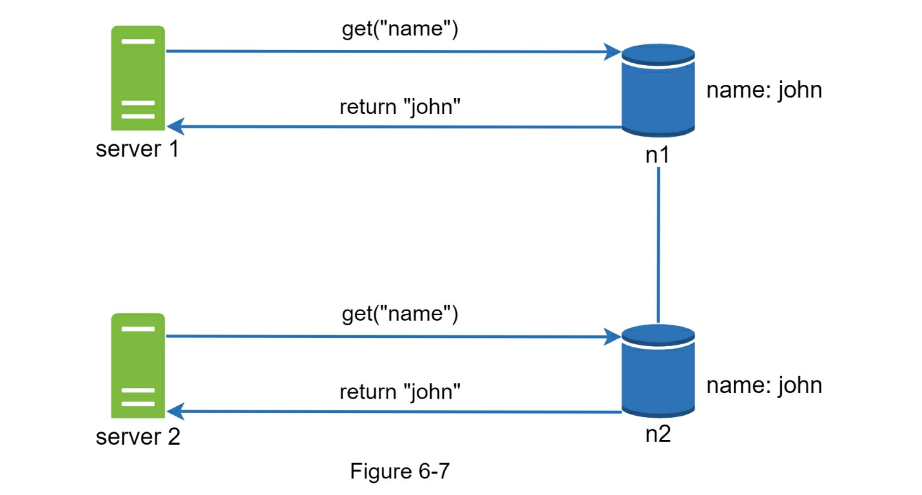
Next, server 1 changes the name to “johnSanFrancisco”, and server 2 changes the
name to “johnNewYork” as shown in Figure 6-8. These two changes are performed
simultaneously.
Now, we have conflicting values, called versions v1 and v2.
In this example, the original value could be ignored because the modifications
were based on it. However, there is no clear way to resolve the conflict of the
last two versions. To resolve this issue, we need a versioning system that can
detect conflicts and reconcile conflicts.
A vector clock is a common technique to solve this problem. Let us examine how
vector clocks work.
A vector clock is a [server, version] pair associated with a data item. It
can be used to check if one version precedes, succeeds, or in conflict with
others.
Assume a vector clock is represented by D([S1, v1], [S2, v2], …, [Sn, vn]),
where D is a data item, v1 is a version counter, and s1 is a server number,
etc. If data item D is written to server
Si, the system must perform one of the following tasks.
- Increment vi if [Si, vi] exists.
- Otherwise, create a new entry [Si, 1].
The above abstract logic is explained with a concrete example as shown in
Figure 6-9.
- A client writes a data item D1 to the system, and the write is handled by
server Sx, which now has the vector clock D1[(Sx, 1)].
- Another client reads the latest D1, updates it to D2, and writes it back. D2
descends from D1 so it overwrites D1. Assume the write is handled by the
same server Sx, which now has vector clock D2([Sx, 2]).
- Another client reads the latest D2, updates it to D3, and writes it back.
Assume the write is handled by server Sy, which now has vector clock D3([Sx,
2], [Sy, 1])).
- Another client reads the latest D2, updates it to D4, and writes it back.
Assume the write is handled by server Sz, which now has D4([Sx, 2], [Sz,
1])).
- When another client reads D3 and D4, it discovers a conflict, which is
caused by data item D2 being modified by both Sy and Sz. The conflict is
resolved by the client and updated data is sent to the server. Assume the
write is handled by Sx, which now has
D5([Sx, 3], [Sy, 1], [Sz, 1]). We will explain how to detect conflict shortly.
Using vector clocks, it is easy to tell that a version X is an ancestor (i.e.
no conflict) of version Y if the version counters for each participant in the
vector clock of Y is greater than or equal to the ones in version X.
For example, the vector clock D([s0, 1], [s1, 1])] is an ancestor of D([s0, 1],
[s1, 2]). Therefore, no conflict is recorded.
Similarly, you can tell that a version X is a sibling (i.e., a conflict exists)
of Y if there is any participant in Y’s vector clock who has a counter that is
less than its corresponding counter in X.
For example, the following two vector clocks indicate there is a conflict:
D([s0, 1], [s1, 2]) and D([s0, 2], [s1, 1]).
Even though vector clocks can resolve conflicts, there are two notable
downsides. First, vector clocks add complexity to the client because it needs
to implement conflict resolution logic.
Second, the [server: version] pairs in the vector clock could grow rapidly. To
fix this problem, we set a threshold for the length, and if it exceeds the
limit, the oldest pairs are removed. This can lead to inefficiencies in
reconciliation because the descendant relationship cannot be determined
accurately. However, based on Dynamo paper [4], Amazon has not yet encountered
this problem in production; therefore, it is probably an acceptable solution
for most companies.
Handling failures
As with any large system at scale, failures are not only inevitable but common.
Handling failure scenarios is very important. In this section, we first
introduce techniques to detect failures. Then, we go over common failure
resolution strategies.
Failure detection
In a distributed system, it is insufficient to believe that a server is down
because another server says so. Usually, it requires at least two independent
sources of information to mark a server down.
As shown in Figure 6-10, all-to-all multicasting is a straightforward solution. However, this is
inefficient when many servers are in the system.
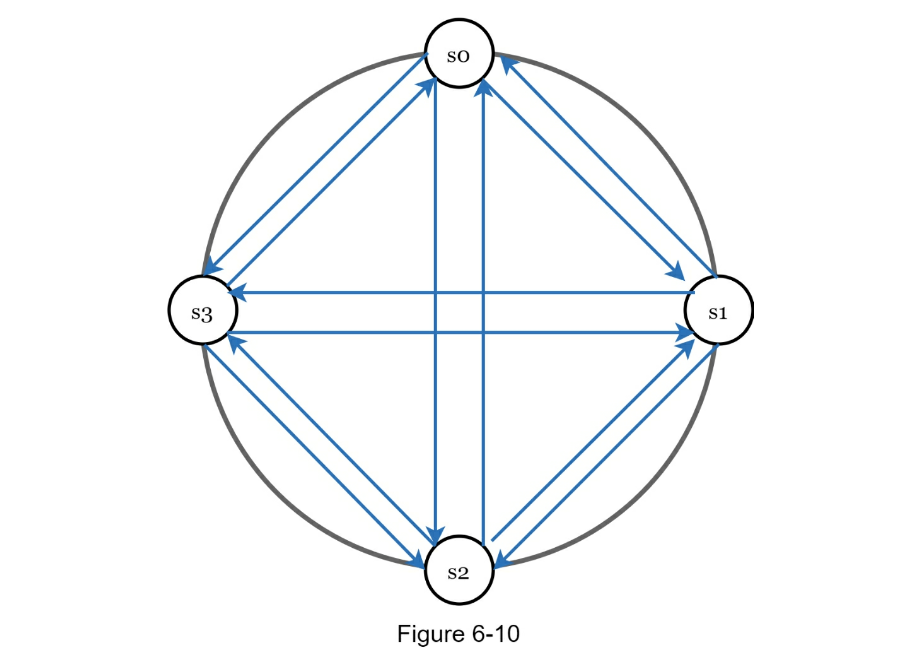
A better solution is to use decentralized failure detection methods like gossip
protocol.
Gossip protocol works as follows:
- Each node maintains a node membership list, which contains member IDs and
heartbeat counters.
- Each node periodically increments its heartbeat counter.
- Each node periodically sends heartbeats to a set of random nodes, which in
turn propagate to another set of nodes.
- Once nodes receive heartbeats, membership list is updated to the latest
info.
- If the heartbeat has not increased for more than predefined periods, the
member is considered as offline.
As shown in Figure 6-11:
- Node s0 maintains a node membership list shown on the left side.
- Node s0 notices that node s2’s (member ID = 2) heartbeat counter has not
increased for a long time.
- Node s0 sends heartbeats that include s2’s info to a set of random nodes.
Once other nodes confirm that s2’s heartbeat counter has not been updated for
a long time, node s2 is marked down, and this information is propagated to
other nodes.
Handling temporary failures
After failures have been detected through the gossip protocol, the system needs
to deploy certain mechanisms to ensure availability. In the strict quorum
approach, read and write operations could be blocked as illustrated in the
quorum consensus section.
A technique called “sloppy quorum” [4] is used to improve availability.
Instead of enforcing the quorum requirement, the system chooses the first W
healthy servers for writes and first R healthy servers for reads on the hash
ring. Offline servers are ignored.
If a server is unavailable due to network or server failures, another server
will process requests temporarily. When the down server is up, changes will be
pushed back to achieve data consistency. This process is called hinted
handoff. Since s2 is unavailable in Figure 6- 12, reads and writes will be
handled by s3 temporarily. When s2 comes back online, s3 will hand the data
back to s2.
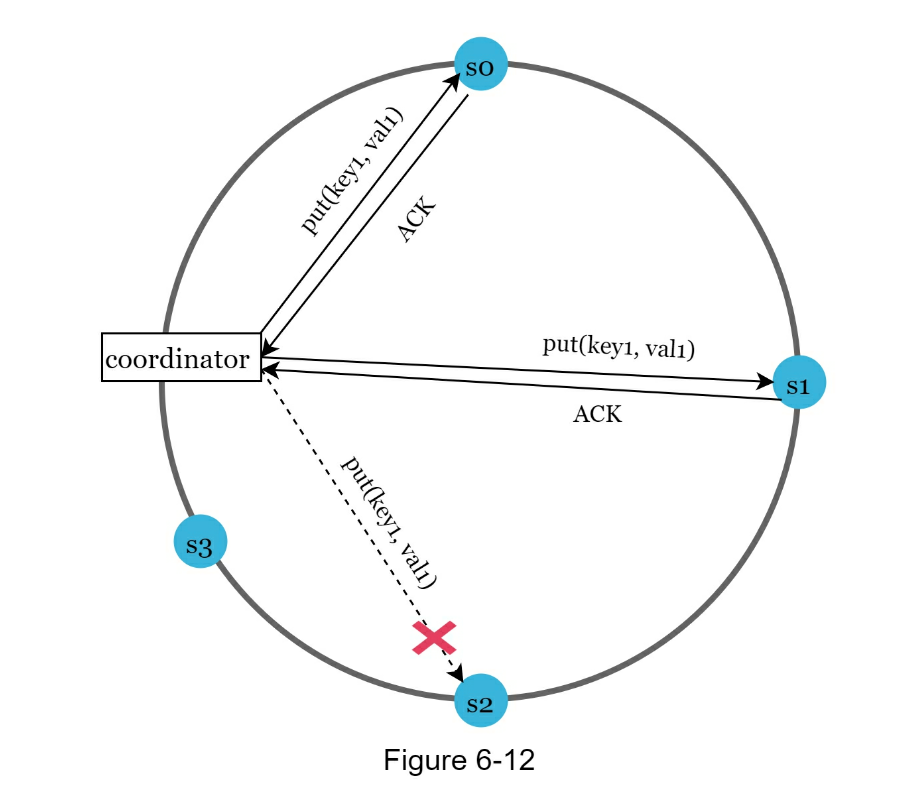
Handling permanent failures
Hinted handoff is used to handle temporary failures. What if a replica is
permanently unavailable? To handle such a situation, we implement an
anti-entropy protocol to keep replicas in sync.
Anti-entropy involves comparing each piece of data on replicas and updating
each replica to the newest version. A Merkle tree is used for inconsistency
detection and minimizing the amount of data transferred.
Quoted from Wikipedia [7]: “A hash tree or Merkle tree is a tree in which every
non-leaf node is labeled with the hash of the labels or values (in case of
leaves) of its child nodes.”
Hash trees allow efficient and secure verification of the contents of large
data structures”.
Assuming key space is from 1 to 12, the following steps show how to build a
Merkle tree.
Highlighted boxes indicate inconsistency.
6-13. A bucket is used as the root level node to maintain a limited depth of
the tree.
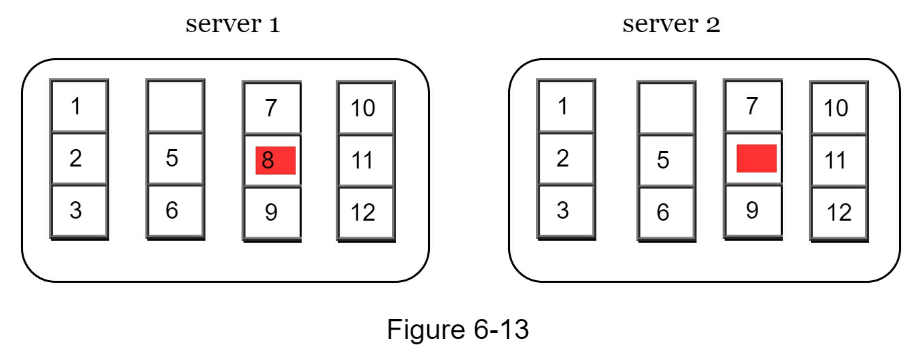
hashing method (Figure 6-14).
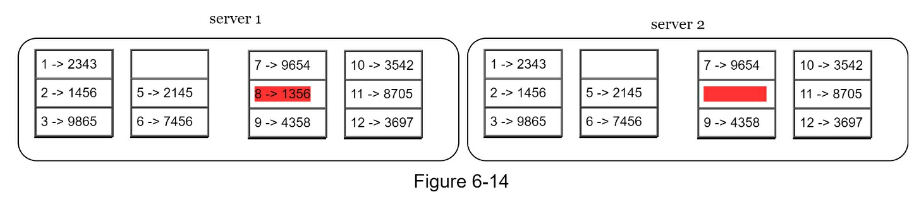

Step 4: Build the tree upwards till root by calculating hashes of children
(Figure 6-16).
To compare two Merkle trees, start by comparing the root hashes. If root hashes
match, both servers have the same data. If root hashes disagree, then the left
child hashes are compared followed by right child hashes. You can traverse the
tree to find which buckets are not synchronized and synchronize those buckets
only.
Using Merkle trees, the amount of data needed to be synchronized is
proportional to the differences between the two replicas, and not the amount
of data they contain. In real-world systems, the bucket size is quite big. For
instance, a possible configuration is one million buckets per one billion keys,
so each bucket only contains 1000 keys.
Handling data center outage
Data center outage could happen due to power outage, network outage, natural
disaster, etc.
To build a system capable of handling data center outage, it is important to
replicate data across multiple data centers. Even if a data center is
completely offline, users can still access data through the other data centers.
System architecture diagram
Now that we have discussed different technical considerations in designing a
key-value store, we can shift our focus on the architecture diagram, shown in
Figure 6-17.
Main features of the architecture are listed as follows:
- Clients communicate with the key-value store through simple APIs: get(key)
and put(key, value).
- A coordinator is a node that acts as a proxy between the client and the
key-value store.
- Nodes are distributed on a ring using consistent hashing.
- The system is completely decentralized so adding and moving nodes can be
automatic.
- Data is replicated at multiple nodes.
- There is no single point of failure as every node has the same set of
responsibilities.
As the design is decentralized, each node performs many tasks as presented in
Figure 6-18.
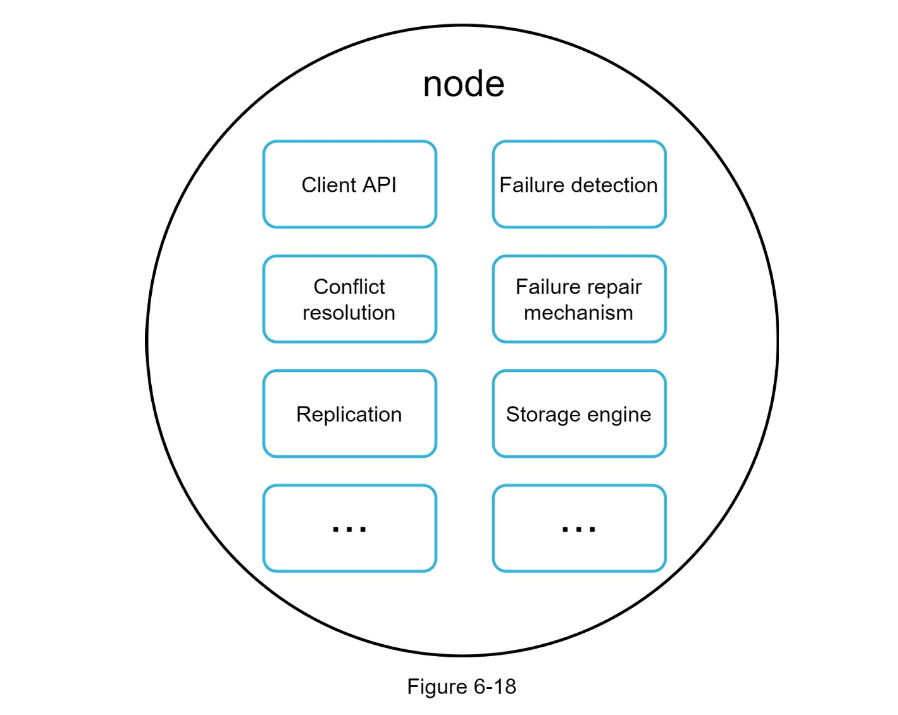
Write path
Figure 6-19 explains what happens after a write request is directed to a
specific node. Please note the proposed designs for write/read paths are
primary based on the architecture of Cassandra [8].
- The write request is persisted on a commit log file.
-
Data is saved in the memory cache.
- When the memory cache is full or reaches a predefined threshold, data is
flushed to SSTable [9] on disk.
Note: A sorted-string table (SSTable) is a sorted list of <key, value> pairs.
For readers interested in learning more about SStable, refer to the reference
material [9].
Read path
After a read request is directed to a specific node, it first checks if data is
in the memory cache. If so, the data is returned to the client as shown in
Figure 6-20.
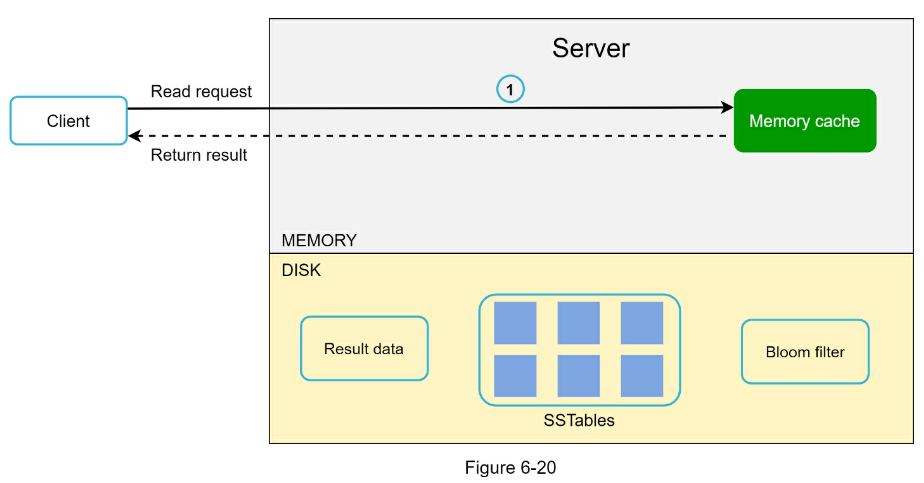
If the data is not in memory, it will be retrieved from the disk instead. We
need an efficient way to find out which SSTable contains the key.
Bloom filter [10] is commonly used to solve this problem.
The read path is shown in Figure 6-21 when data is not in memory.
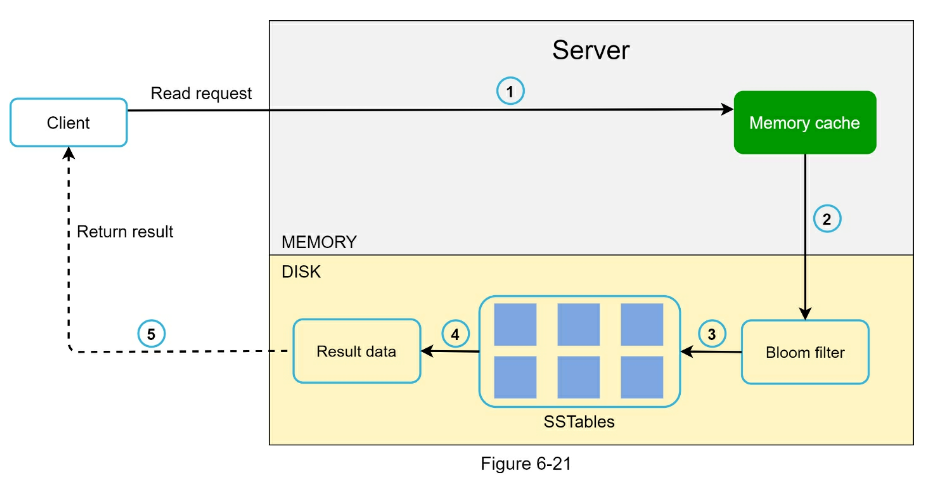
- The system first checks if data is in memory. If not, go to step 2.
- If data is not in memory, the system checks the bloom filter.
- The bloom filter is used to figure out which SSTables might contain the key.
- SSTables return the result of the data set.
- The result of the data set is returned to the client.
Summary
This chapter covers many concepts and techniques. To refresh your memory, the following
table summarizes features and corresponding techniques used for a distributed key-value
store.
| Goals/Problems |
Technique |
| Ability to store big data |
Use consistent hashing to spread the load across servers |
| High Availability reads |
Data replication & multi-data center setup |
| High Availability write |
Versioning and conflict resolution with vector locks
|
| Dataset partition |
consistent hashing |
| Incremental scalability |
consistent hashing |
| Heterogeneity |
consistent hashing |
| Tunable consistency |
quorum consensus |
| Handling temporary failures |
sloppy quorum & hinted handoff
|
| Handling permanent failures |
merkle tree |
| Handling DC outage |
X-DC replication |
Reference materials
- [1] Amazon DynamoDB: https://aws.amazon.com/dynamodb/
- [2] memcached: https://memcached.org/
- [3] Redis: https://redis.io/
- [4] Dynamo: Amazon’s Highly Available Key-value Store: https://www.allthingsdistributed.com/files/amazon-dynamo-sosp2007.pdf
- [5] Cassandra: https://cassandra.apache.org/
- [6] Bigtable: A Distributed Storage System for Structured Data: https://static.googleusercontent.com/media/research.google.com/en//archive/bigtableosdi06.pdf
- [7] Merkle tree: https://en.wikipedia.org/wiki/Merkle_tree
- [8] Cassandra architecture: https://cassandra.apache.org/doc/latest/architecture/
- [9] SStable: https://www.igvita.com/2012/02/06/sstable-and-log-structured-storage-leveldb/
- [10] Bloom filter https://en.wikipedia.org/wiki/Bloom_filter
CHAPTER 7: DESIGN A UNIQUE ID GENERATOR IN DISTRIBUTED SYSTEMS
In this chapter, you are asked to design a unique ID generator in distributed
systems. Your first thought might be to use a primary key with the
auto_increment attribute in a traditional database. However, auto_increment
does not work in a distributed environment because a single database server is
not large enough and generating unique IDs across multiple databases with
minimal delay is challenging.
Here are a few examples of unique IDs:
| user_id |
| 1234567890 |
| 2345678901 |
| 3456789012 |
| 4567890123 |
Step 1 - Understand the problem and establish design scope
Asking clarification questions is the first step to tackle any system design
interview question. Here is an example of candidate-interviewer interaction:
- Candidate: What are the characteristics of unique IDs?
- Interviewer: IDs must be unique and sortable.
- Candidate: For each new record, does ID increment by 1?
- Interviewer: The ID increments by time but not necessarily only increments by 1.
IDs created in the evening are larger than those created in the morning on the same day.
- Candidate: Do IDs only contain numerical values?
- Interviewer: Yes, that is correct.
- Candidate: What is the ID length requirement?
- Interviewer: IDs should fit into 64-bit.
- Candidate: What is the scale of the system?
- Interviewer: The system should be able to generate 10,000 IDs per second.
Above are some of the sample questions that you can ask your interviewer. It is
important to understand the requirements and clarify ambiguities. For this
interview question, the requirements are listed as follows:
- IDs must be unique.
- IDs are numerical values only.
- IDs fit into 64-bit.
- IDs are ordered by date.
- Ability to generate over 10,000 unique IDs per second.
Step 2 - Propose high-level design and get buy-in
Multiple options can be used to generate unique IDs in distributed systems. The
options we considered are:
- Multi-master replication
- Universally unique identifier (UUID)
- Ticket server
- Twitter snowflake approach
Let us look at each of them, how they work, and the pros/cons of each option.
Multi-master replication
As shown in Figure 7-2, the first approach is multi-master replication.
This approach uses the databases’ auto_increment feature. Instead of increasing
the next ID by 1, we increase it by k, where k is the number of database
servers in use. As illustrated in Figure 7-2, next ID to be generated is equal
to the previous ID in the same server plus 2. This solves some scalability
issues because IDs can scale with the number of database servers.
However, this strategy has some major drawbacks:
- Hard to scale with multiple data centers
- IDs do not go up with time across multiple servers.
- It does not scale well when a server is added or removed.
UUID
A UUID is another easy way to obtain unique IDs. UUID is a 128-bit number
used to identify information in computer systems. UUID has a very low
probability of getting collusion.
Quoted from Wikipedia, “after generating 1 billion UUIDs every second for approximately
100 years would the probability of creating a single duplicate reach 50%” [1].
Here is an example of UUID: 09c93e62-50b4-468d-bf8a-c07e1040bfb2. UUIDs can be
generated independently without coordination between servers.
In this design, each web server contains an ID generator, and a web server is
responsible for generating IDs independently.
Pros:
- Generating UUID is simple. No coordination between servers is needed so there
will not be any synchronization issues.
- The system is easy to scale because each web server is responsible for
generating IDs they consume. ID generator can easily scale with web servers.
Cons:
- IDs are 128 bits long, but our requirement is 64 bits.
- IDs do not go up with time.
- IDs could be non-numeric.
Ticket Server
Ticket servers are another interesting way to generate unique IDs. Flicker
developed ticket servers to generate distributed primary keys [2]. It is worth
mentioning how the system works.
The idea is to use a centralized auto_increment feature in a single database
server (Ticket Server). To learn more about this, refer to flicker’s
engineering blog article [2].
Pros:
- Numeric IDs.
- It is easy to implement, and it works for small to medium-scale applications.
Cons:
- Single point of failure. Single ticket server means if the ticket server goes
down, all systems that depend on it will face issues. To avoid a single point
of failure, we can set up multiple ticket servers. However, this will
introduce new challenges such as data synchronization.
Approaches mentioned above give us some ideas about how different ID generation
systems work. However, none of them meet our specific requirements; thus, we
need another approach. Twitter’s unique ID generation system called “snowflake”
- is inspiring and can satisfy our requirements.
Divide and conquer is our friend. Instead of generating an ID directly, we
divide an ID into different sections. Figure 7-5 shows the layout of a 64-bit
ID.
Each section is explained below.
-
Sign bit: 1 bit. It will always be 0. This is reserved for future uses. It
can potentially be used to distinguish between signed and unsigned numbers.
-
Timestamp: 41 bits. Milliseconds since the epoch or custom epoch. We use
Twitter snowflake default epoch 1288834974657, equivalent to Nov 04, 2010,
01:42:54 UTC.
-
Datacenter ID: 5 bits, which gives us 2 ^ 5 = 32 datacenters.
-
Machine ID: 5 bits, which gives us 2 ^ 5 = 32 machines per datacenter.
-
Sequence number: 12 bits. For every ID generated on that machine/process,
the sequence number is incremented by 1. The number is reset to 0 every
millisecond.
Step 3 - Design deep dive
In the high-level design, we discussed various options to design a unique ID
generator in distributed systems. We settle on an approach that is based on the
Twitter snowflake ID generator. Let us dive deep into the design.
Datacenter IDs and machine IDs are chosen at the startup time, generally fixed
once the system is up running. Any changes in datacenter IDs and machine IDs
require careful review since an accidental change in those values can lead to
ID conflicts. Timestamp and sequence numbers are generated when the ID
generator is running.
Timestamp
The most important 41 bits make up the timestamp section. As timestamps grow
with time, IDs are sortable by time. Figure 7-7 shows an example of how binary
representation is converted to UTC. You can also convert UTC back to binary
representation using a similar method.
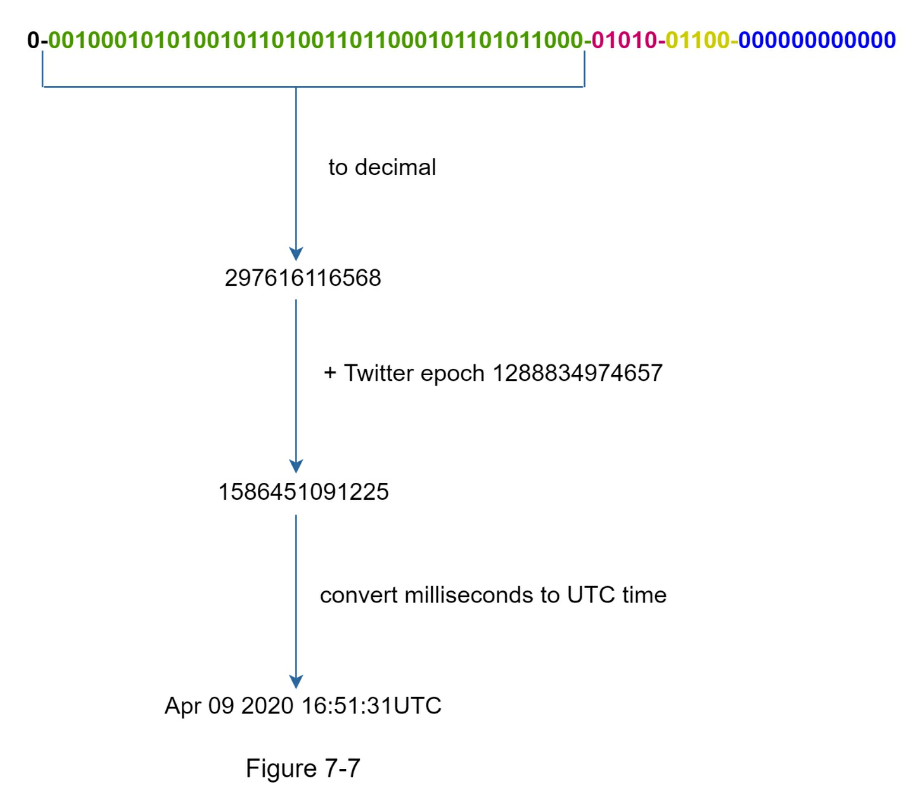
The maximum timestamp that can be represented in 41 bits is
2 ^ 41 - 1 = 2199023255551 milliseconds (ms), which gives us: ~ 69 years =
2199023255551 ms / 1000 seconds / 365 days / 24 hours/ 3600 seconds. This means the ID
generator will work for 69 years and having a custom epoch time close to today’s date delays
the overflow time. After 69 years, we will need a new epoch time or adopt other techniques
to migrate IDs.
Sequence number
Sequence number is 12 bits, which give us 2 ^ 12 = 4096 combinations. This
field is 0 unless more than one ID is generated in a millisecond on the same
server. In theory, a machine can support a maximum of 4096 new IDs per
millisecond.
Step 4 - Wrap up
In this chapter, we discussed different approaches to design a unique ID
generator: multimaster replication, UUID, ticket server, and Twitter
snowflake-like unique ID generator. We settle on snowflake as it supports all
our use cases and is scalable in a distributed environment.
If there is extra time at the end of the interview, here are a few additional
talking points:
-
Clock synchronization. In our design, we assume ID generation servers have
the same clock. This assumption might not be true when a server is running on
multiple cores. The same challenge exists in multi-machine scenarios.
Solutions to clock synchronization are out of the scope of this book;
however, it is important to understand the problem exists. Network Time
Protocol is the most popular solution to this problem. For interested
readers, refer to the reference material [4].
-
Section length tuning. For example, fewer sequence numbers but more timestamp
bits are effective for low concurrency and long-term applications.
-
High availability. Since an ID generator is a mission-critical system, it
must be highly available.
Reference materials
- [1] Universally unique identifier: https://en.wikipedia.org/wiki/Universally_unique_identifier
- [2] Ticket Servers: Distributed Unique Primary Keys on the Cheap: https://code.flickr.net/2010/02/08/ticket-servers-distributed-unique-primary-keys-on-thecheap/
- [3] Announcing Snowflake: https://blog.twitter.com/engineering/en_us/a/2010/announcingsnowflake.html
- [4] Network time protocol: https://en.wikipedia.org/wiki/Network_Time_Protocol
CHAPTER 8: DESIGN A URL SHORTENER
In this chapter, we will tackle an interesting and classic system design
interview question: designing a URL shortening service like tinyurl.
Step 1 - Understand the problem and establish design scope
System design interview questions are intentionally left open-ended. To design
a well-crafted system, it is critical to ask clarification questions.
- Candidate: Can you give an example of how a URL shortener work?
- Interviewer: Assume URL
https://www.systeminterview.com/q=chatsystem&c=loggedin&v=v3&l=long is the
original URL. Your service creates an alias with shorter length:
https://tinyurl.com/y7keocwj. If you click the alias, it redirects you to the
original URL.
- Candidate: What is the traffic volume?
- Interviewer: 100 million URLs are generated per day.
- Candidate: How long is the shortened URL?
- Interviewer: As short as possible.
- Candidate: What characters are allowed in the shortened URL?
- Interviewer: Shortened URL can be a combination of numbers (0-9) and
characters (a-z, AZ).
- Candidate: Can shortened URLs be deleted or updated?
- Interviewer: For simplicity, let us assume shortened URLs cannot be deleted
or updated.
Here are the basic use cases:
-
URL shortening: given a long URL => return a much shorter URL
-
URL redirecting: given a shorter URL => redirect to the original URL
-
High availability, scalability, and fault tolerance considerations
Back of the envelope estimation
-
Write operation: 100 million URLs are generated per day.
-
Write operation per second: 100 million / 24 /3600 = 1160
-
Read operation: Assuming ratio of read operation to write operation is
10:1, read operation per second: 1160 * 10 = 11,600
-
Assuming the URL shortener service will run for 10 years, this means we
must support 100 million * 365 * 10 = 365 billion records.
-
Assume average URL length is 100.
-
Storage requirement over 10 years: 365 billion * 100 bytes * 10 years = 365
TB
It is important for you to walk through the assumptions and calculations with
your interviewer so that both of you are on the same page.
Step 2 - Propose high-level design and get buy-in
In this section, we discuss the API endpoints, URL redirecting, and URL
shortening flows.
API Endpoints
API endpoints facilitate the communication between clients and servers. We will
design the APIs REST-style. If you are unfamiliar with restful API, you can
consult external materials, such as the one in the reference material [1]. A
URL shortener primary needs two API endpoints.
- URL shortening. To create a new short URL, a client sends a POST request,
which contains one parameter: the original long URL. The API looks like
this:
POST api/v1/data/shorten
- request parameter: {longUrl: longURLString}
- return shortURL
- URL redirecting. To redirect a short URL to the corresponding long URL, a client sends a GET request. The API looks like this:
GET api/v1/shortUrl
- Return longURL for HTTP redirection
URL redirecting
Figure 8-1 shows what happens when you enter a tinyurl onto the browser. Once
the server receives a tinyurl request, it changes the short URL to the long URL
with 301 redirect.
The detailed communication between clients and servers is shown in Figure 8-2.
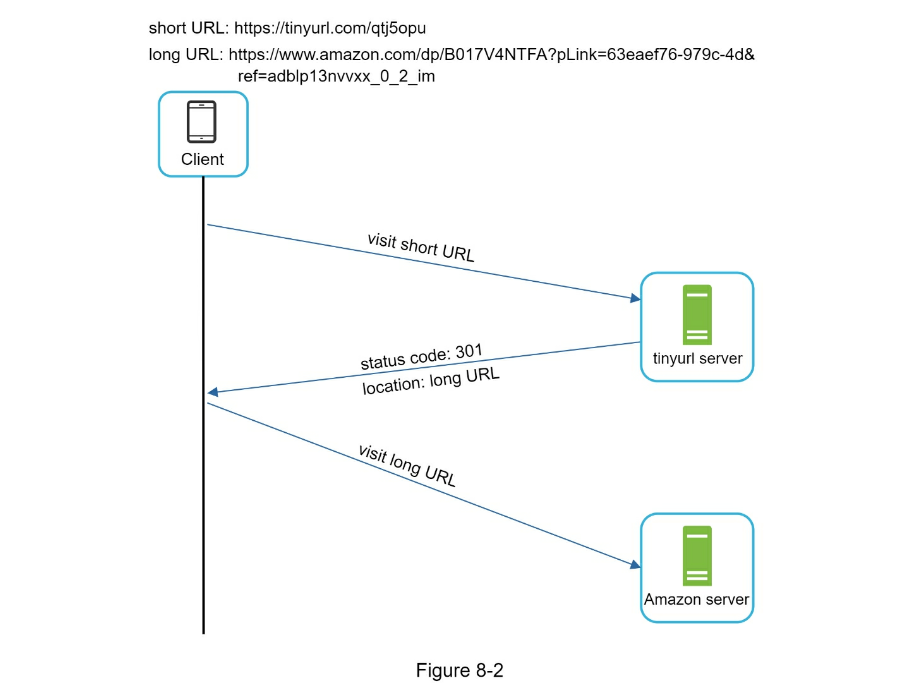
One thing worth discussing here is 301 redirect vs 302 redirect.
301 redirect. A 301 redirect shows that the requested URL is
“permanently” moved to the long URL. Since it is permanently redirected,
the browser caches the response, and subsequent requests for the same URL will
not be sent to the URL shortening service.
Instead, requests are redirected to the long URL server directly.
302 redirect. A 302 redirect means that the URL is “temporarily” moved
to the long URL, meaning that subsequent requests for the same URL will be sent
to the URL shortening service first. Then, they are redirected to the long URL
server.
Each redirection method has its pros and cons.
- If the priority is to reduce the server load, using 301 redirect makes
sense as only the first request of the same URL is sent to URL shortening
servers.
- However, if analytics is important, 302 redirect is a better choice as it
can track click rate and source of the click more easily.
The most intuitive way to implement URL redirecting is to use hash tables.
Assuming the hash table stores <shortURL, longURL> pairs, URL redirecting can
be implemented by the following:
- Get longURL: longURL = hashTable.get(shortURL)
- Once you get the longURL, perform the URL redirect.
URL shortening
Let us assume the short URL looks like this: www.tinyurl.com/{hashValue}. To
support the URL shortening use case, we must find a hash function fx that maps
a long URL to the hashValue, as shown in Figure 8-3.
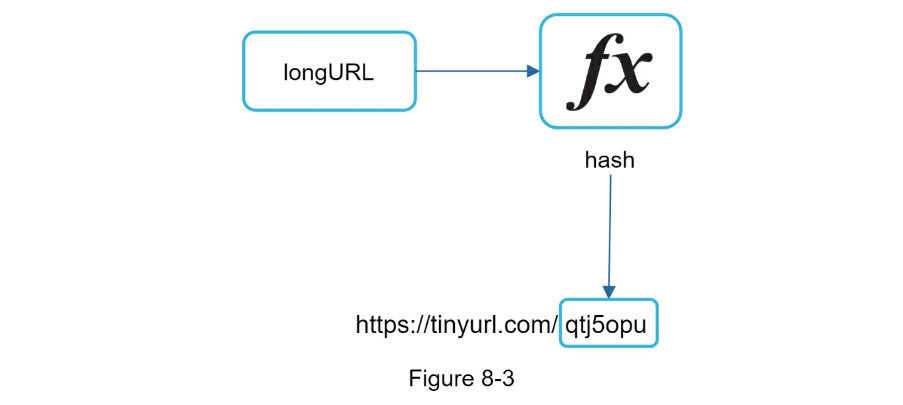
The hash function must satisfy the following requirements:
- Each longURL must be hashed to one hashValue.
- Each hashValue can be mapped back to the longURL.
Detailed design for the hash function is discussed in deep dive.
Step 3 - Design deep dive
Up until now, we have discussed the high-level design of URL shortening and URL
redirecting. In this section, we dive deep into the following: data model, hash
function, URL shortening and URL redirecting.
Data model
In the high-level design, everything is stored in a hash table. This is a good
starting point; however, this approach is not feasible for real-world systems
as memory resources are limited and expensive. A better option is to store
<shortURL, longURL> mapping in a relational database. Figure 8-4 shows a simple
database table design. The simplified version of the table contains 3 columns:
id, shortURL, longURL.
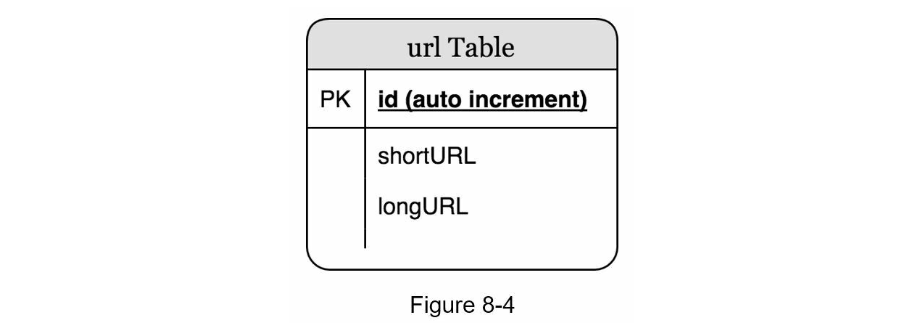
Hash function
Hash function is used to hash a long URL to a short URL, also known as
hashValue.
Hash value length
The hashValue consists of characters from [0-9, a-z, A-Z], containing 10 + 26 + 26 = 62
possible characters. To figure out the length of hashValue, find the smallest n
such that 62^n ≥ 365 billion. The system must support up to 365 billion URLs
based on the back of the envelope estimation. Table 8-1 shows the length of
hashValue and the corresponding maximal number of URLs it can support.
When n = 7, 62 ^ n = ~3.5 trillion, 3.5 trillion is more than enough to hold
365 billion URLs, so the length of hashValue is 7.
We will explore two types of hash functions for a URL shortener. The first one
is “hash + collision resolution”, and the second one is “base 62 conversion.”
Let us look at them one by one.
Hash + collision resolution
To shorten a long URL, we should implement a hash function that hashes a long URL to a 7-
character string. A straightforward solution is to use well-known hash
functions like CRC32, MD5, or SHA-1. The following table compares the hash
results after applying different hash functions on this URL:
https://en.wikipedia.org/wiki/Systems_design.
As shown in Table 8-2, even the shortest hash value (from CRC32) is too long
(more than 7 characters). How can we make it shorter?
The first approach is to collect the first 7 characters of a hash value;
however, this method can lead to hash collisions. To resolve hash
collisions, we can recursively append a new predefined string until no more
collision is discovered. This process is explained in Figure 8-5.
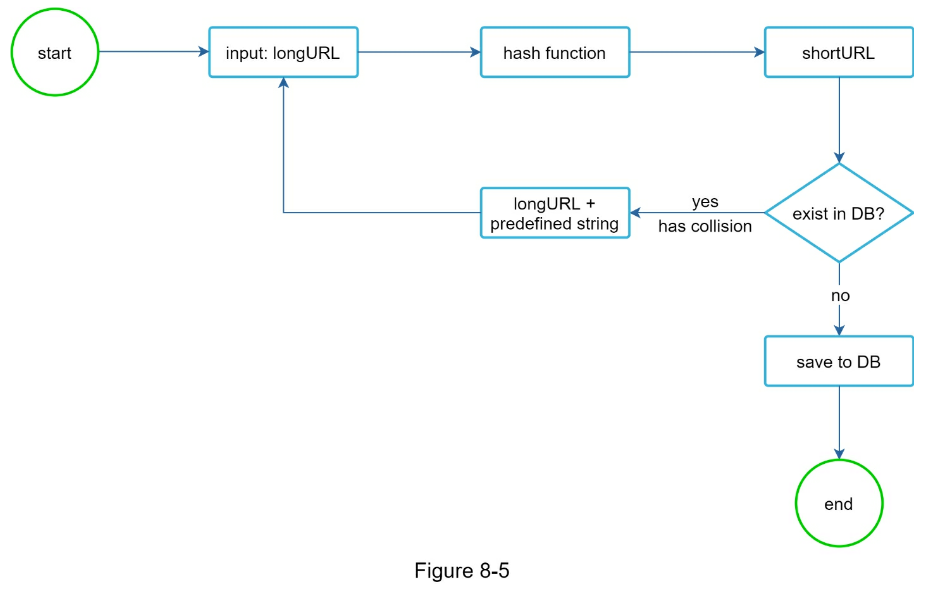
This method can eliminate collision; however, it is expensive to query the
database to check if a shortURL exists for every request.
A technique called bloom filters [2] can improve performance. A bloom
filter is a space-efficient probabilistic technique to test if an element is a
member of a set. Refer to the reference material [2] for more details.
Base 62 conversion
Base conversion is another approach commonly used for URL shorteners. Base
conversion helps to convert the same number between its different number
representation systems. Base 62 conversion is used as there are 62 possible
characters for hashValue.
Let us use an example to explain how the conversion
works: convert 1115710 base 10 to base 62 representation (1115710 represents
11157 in a base 10 system).
- From its name, base 62 is a way of using 62 characters for encoding. The
mappings are: 0-0, …, 9-9, 10-a, 11-b, …, 35-z, 36-A, …, 61-Z, where
‘a’ stands for 10, ‘z’ stands for 61, etc.
- 1115710 = 2 x 62^2 + 55 x 62^1 + 59 x 62^0 = [2, 55, 59] -> [2, T, X] in base
62 representation. Figure 8-6 shows the conversation process.
Thus, the short URL is https://tinyurl.com/2TX
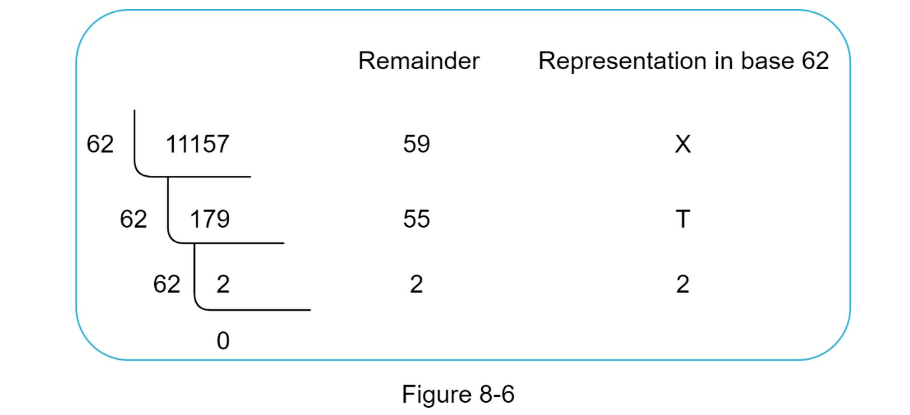
Comparison of the two approaches
Table 8-3 shows the differences of the two approaches.
| Hash + collision resolution |
Base 62 conversion |
| Fixed short URL length |
The short URL length is not fixed. Goes up with ID |
| Does not need a unique ID generator |
Depends on a unique ID generator |
| Collision is possible and must be resolved |
Collision impossible |
| Impossible to figure out the next available shortURL |
Can figure out next available shortUL as Id increments by 1. Possible security concern |
URL shortening deep dive
As one of the core pieces of the system, we want the URL shortening flow to be
logically simple and functional. Base 62 conversion is used in our design. We
build the following diagram (Figure 8-7) to demonstrate the flow.
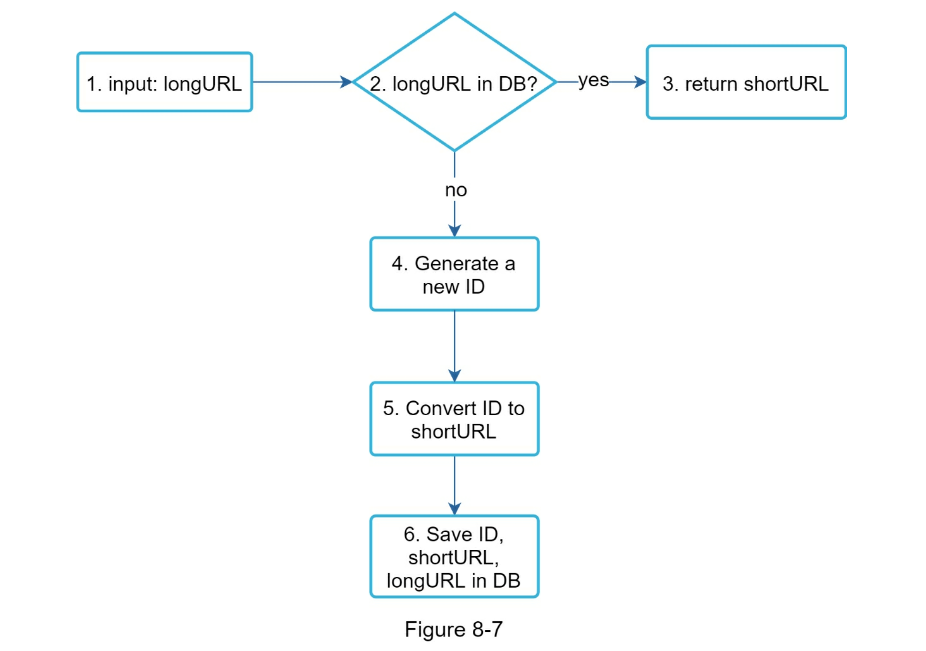
- longURL is the input.
- The system checks if the longURL is in the database.
- If it is, it means the longURL was converted to shortURL before. In this
case, fetch the shortURL from the database and return it to the client.
- If not, the longURL is new. A new unique ID (primary key) Is generated by
the unique ID generator.
- Convert the ID to shortURL with base 62 conversion.
- Create a new database row with the ID, shortURL, and longURL.
To make the flow easier to understand, let us look at a concrete example.
- Assuming the input longURL is: https://en.wikipedia.org/wiki/Systems_design
- Unique ID generator returns ID: 2009215674938.
- Convert the ID to shortURL using the base 62 conversion. ID (2009215674938)
is converted to “zn9edcu”.
- Save ID, shortURL, and longURL to the database as shown in Table 8-4.
| id |
shortURL |
longURL |
| 2009215674938 |
zn9edcu |
https://en.wikipedia.org/wiki/Systems_design |
The distributed unique ID generator is worth mentioning. Its primary function
is to generate globally unique IDs, which are used for creating shortURLs. In a
highly distributed environment, implementing a unique ID generator is
challenging. Luckily, we have already discussed a few solutions in “Chapter 7:
Design A Unique ID Generator in Distributed Systems”. You can refer back to it
to refresh your memory.
URL redirecting deep dive
Figure 8-8 shows the detailed design of the URL redirecting. As there are more
reads than writes, <shortURL, longURL> mapping is stored in a cache to improve
performance.
The flow of URL redirecting is summarized as follows:
- A user clicks a short URL link: https://tinyurl.com/zn9edcu
- The load balancer forwards the request to web servers.
- If a shortURL is already in the cache, return the longURL directly.
- If a shortURL is not in the cache, fetch the longURL from the database. If
it is not in the database, it is likely a user entered an invalid shortURL.
- The longURL is returned to the user.
Step 4 - Wrap up
In this chapter, we talked about the API design, data model, hash function, URL
shortening, and URL redirecting.
If there is extra time at the end of the interview, here are a few additional
talking points.
-
Rate limiter: A potential security problem we could face is that malicious
users send an overwhelmingly large number of URL shortening requests. Rate
limiter helps to filter out requests based on IP address or other filtering
rules. If you want to refresh your memory about rate limiting, refer to
“Chapter 4: Design a rate limiter”.
-
Web server scaling: Since the web tier is stateless, it is easy to scale
the web tier by adding or removing web servers.
-
Database scaling: Database replication and sharding are common techniques.
-
Analytics: Data is increasingly important for business success. Integrating
an analytics solution to the URL shortener could help to answer important
questions like how many people click on a link? When do they click the link?
etc.
-
Availability, consistency, and reliability. These concepts are at the core
of any large system’s success. We discussed them in detail in Chapter 1,
please refresh your memory on these topics.
Reference materials
- [1] A RESTful Tutorial: https://www.restapitutorial.com/index.html
- [2] Bloom filter: https://en.wikipedia.org/wiki/Bloom_filter
CHAPTER 9: DESIGN A WEB CRAWLER
In this chapter, we focus on web crawler design: an interesting and classic
system design interview question.
A web crawler is known as a robot or spider. It is widely used by search
engines to discover new or updated content on the web. Content can be a web
page, an image, a video, a PDF file, etc. A web crawler starts by collecting a
few web pages and then follows links on those pages to collect new content.
Figure 9-1 shows a visual example of the crawl process.
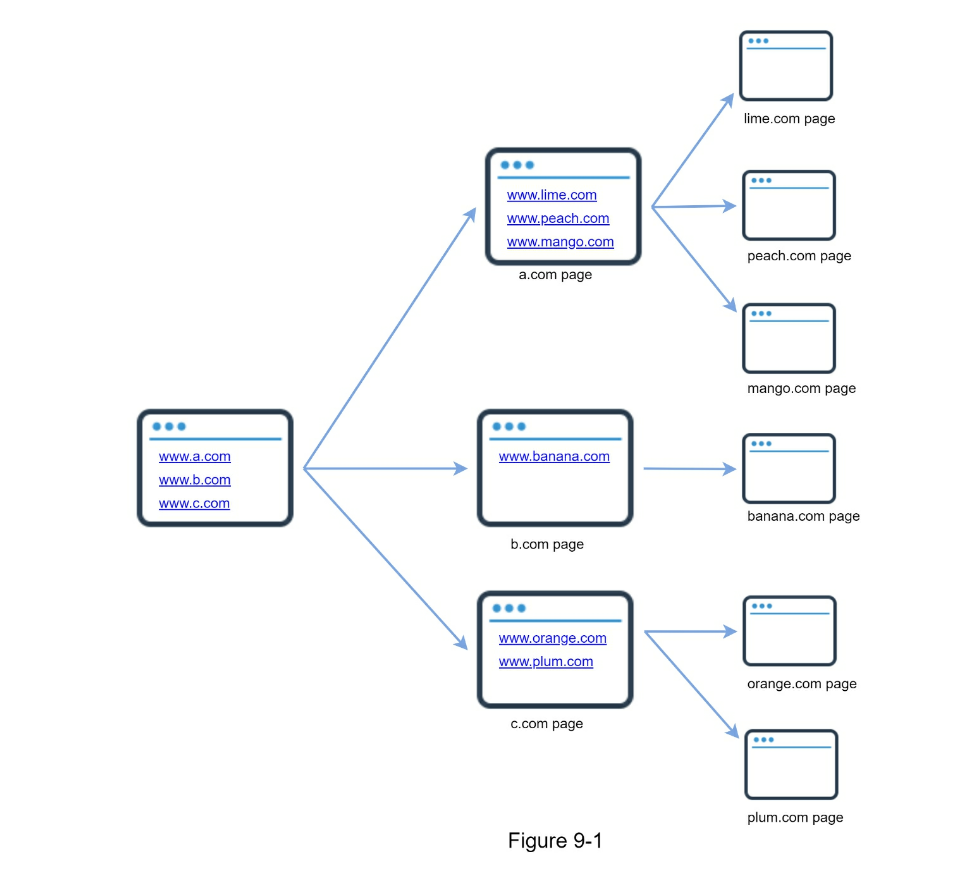
A crawler is used for many purposes:
- Search engine indexing: This is the most common use case. A crawler collects
web pages to create a local index for search engines. For example, Googlebot
is the web crawler behind the Google search engine.
- Web archiving: This is the process of collecting information from the web to
preserve data for future uses. For instance, many national libraries run
crawlers to archive web sites. Notable examples are the US Library of
Congress [1] and the EU web archive [2].
- Web mining: The explosive growth of the web presents an unprecedented
opportunity for data mining. Web mining helps to discover useful knowledge
from the internet. For example, top financial firms use crawlers to download
shareholder meetings and annual reports to learn key company initiatives.
- Web monitoring. The crawlers help to monitor copyright and trademark
infringements over the Internet. For example, Digimarc [3] utilizes crawlers
to discover pirated works and reports.
The complexity of developing a web crawler depends on the scale we intend to
support. It could be either a small school project, which takes only a few
hours to complete or a gigantic project that requires continuous improvement
from a dedicated engineering team. Thus, we will explore the scale and features
to support below.
Step 1 - Understand the problem and establish design scope
The basic algorithm of a web crawler is simple:
- Given a set of URLs, download all the web pages addressed by the URLs.
- Extract URLs from these web pages
- Add new URLs to the list of URLs to be downloaded. Repeat these 3 steps.
Does a web crawler work truly as simple as this basic algorithm? Not exactly.
Designing a vastly scalable web crawler is an extremely complex task. It is
unlikely for anyone to design a massive web crawler within the interview
duration. Before jumping into the design, we must ask questions to understand
the requirements and establish design scope:
- Candidate: What is the main purpose of the crawler? Is it used for search
engine indexing, data mining, or something else?
- Interviewer: Search engine indexing.
- Candidate: How many web pages does the web crawler collect per month?
- Interviewer: 1 billion pages.
- Candidate: What content types are included? HTML only or other content
types such as PDFs and images as well?
- Interviewer: HTML only.
- Candidate: Shall we consider newly added or edited web pages?
- Interviewer: Yes, we should consider the newly added or edited web pages.
- Candidate: Do we need to store HTML pages crawled from the web?
- Interviewer: Yes, up to 5 years
- Candidate: How do we handle web pages with duplicate content?
- Interviewer: Pages with duplicate content should be ignored.
Above are some of the sample questions that you can ask your interviewer. It is
important to understand the requirements and clarify ambiguities. Even if you
are asked to design a straightforward product like a web crawler, you and your
interviewer might not have the same assumptions.
Beside functionalities to clarify with your interviewer, it is also important
to note down the following characteristics of a good web crawler:
-
Scalability: The web is very large. There are billions of web pages out
there. Web crawling should be extremely efficient using parallelization.
-
Robustness: The web is full of traps. Bad HTML, unresponsive servers,
crashes, malicious links, etc. are all common. The crawler must handle all
those edge cases.
-
Politeness: The crawler should not make too many requests to a website
within a short time interval.
-
Extensibility: The system is flexible so that minimal changes are needed to
support new content types. For example, if we want to crawl image files in
the future, we should not need to redesign the entire system.
Back of the envelope estimation
The following estimations are based on many assumptions, and it is important to
communicate with the interviewer to be on the same page.
- Assume 1 billion web pages are downloaded every month.
- QPS: 1,000,000,000 / 30 days / 24 hours / 3600 seconds = ~400 pages per
second.
-
Peak QPS = 2 * QPS = 800
- Assume the average web page size is 500k.
- 1-billion-page x 500k = 500 TB storage per month. If you are unclear about
digital storage units, go through “Power of 2” section in Chapter 2 again.
- Assuming data are stored for five years, 500 TB * 12 months * 5 years = 30
PB. A 30 PB storage is needed to store five-year content.
Step 2 - Propose high-level design and get buy-in
Once the requirements are clear, we move on to the high-level design. Inspired
by previous studies on web crawling [4] [5], we propose a high-level design as
shown in Figure 9-2.

First, we explore each design component to understand their functionalities.
Then, we examine the crawler workflow step-by-step.
Seed URLs
A web crawler uses seed URLs as a starting point for the crawl process. For
example, to crawl all web pages from a university’s website, an intuitive way
to select seed URLs is to use the university’s domain name.
To crawl the entire web, we need to be creative in selecting seed URLs. A good
seed URL serves as a good starting point that a crawler can utilize to traverse
as many links as possible.
The general strategy is to divide the entire URL space into smaller ones. The
first proposed approach is based on locality as different countries may have
different popular websites.
Another way is to choose seed URLs based on topics; for example, we can
divide URL space into shopping, sports, healthcare, etc. Seed URL selection is
an open-ended question. You are not expected to give the perfect answer. Just
think out loud.
URL Frontier
Most modern web crawlers split the crawl state into two: to be downloaded and
already downloaded. The component that stores URLs to be downloaded is called
the URL Frontier.
You can refer to this as a First-in-First-out (FIFO) queue. For detailed
information about the URL Frontier, refer to the deep dive.
HTML Downloader
The HTML downloader downloads web pages from the internet. Those URLs are
provided by the URL Frontier.
DNS Resolver
To download a web page, a URL must be translated into an IP address. The HTML
Downloader calls the DNS Resolver to get the corresponding IP address for the
URL. For instance, URL www.wikipedia.org is converted to IP address
198.35.26.96 as of 3/5/2019.
Content Parser
After a web page is downloaded, it must be parsed and validated because
malformed web pages could provoke problems and waste storage space.
Implementing a content parser in a crawl server will slow down the crawling
process. Thus, the content parser is a separate component.
Content Seen?
Online research [6] reveals that 29% of the web pages are duplicated contents,
which may cause the same content to be stored multiple times. We introduce the
“Content Seen?” data structure to eliminate data redundancy and shorten
processing time. It helps to detect new content previously stored in the
system. To compare two HTML documents, we can compare them character by
character. However, this method is slow and time-consuming, especially when
billions of web pages are involved. An efficient way to accomplish this task is
to compare the hash values of the two web pages [7].
Content Storage
It is a storage system for storing HTML content. The choice of storage system depends on
factors such as data type, data size, access frequency, life span, etc. Both disk and memory
are used.
-
Most of the content is stored on disk because the data set is too big to fit in memory.
-
Popular content is kept in memory to reduce latency.
URL Extractor parses and extracts links from HTML pages. Figure 9-3 shows an example of
a link extraction process. Relative paths are converted to absolute URLs by adding the
“https://en.wikipedia.org” prefix.
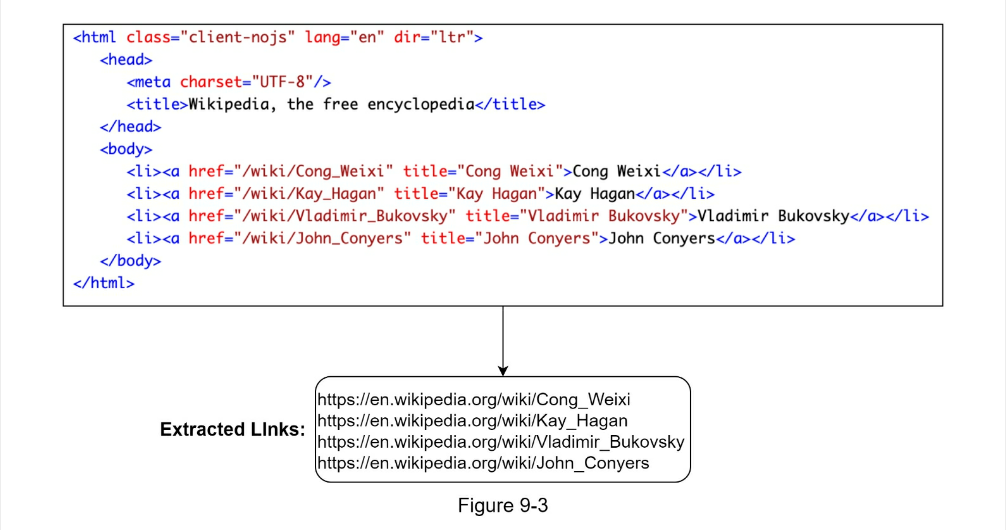
URL Filter
The URL filter excludes certain content types, file extensions, error links and
URLs in “blacklisted” sites.
URL Seen?
“URL Seen?” is a data structure that keeps track of URLs that are visited
before or already in the Frontier. “URL Seen?” helps to avoid adding the same
URL multiple times as this can increase server load and cause potential
infinite loops.
Bloom filter and hash table are common techniques to implement the “URL
Seen?” component. We will not cover the detailed implementation of the bloom
filter and hash table here. For more information, refer to the reference
materials [4] [8].
URL Storage
URL Storage stores already visited URLs.
So far, we have discussed every system component. Next, we put them together to
explain the workflow.
Web crawler workflow
To better explain the workflow step-by-step, sequence numbers are added in the
design diagram as shown in Figure 9-4.
- Step 1: Add seed URLs to the URL Frontier
- Step 2: HTML Downloader fetches a list of URLs from URL Frontier.
- Step 3: HTML Downloader gets IP addresses of URLs from DNS resolver and
starts downloading.
- Step 4: Content Parser parses HTML pages and checks if pages are malformed.
- Step 5: After content is parsed and validated, it is passed to the “Content
Seen?” component.
- Step 6: “Content Seen” component checks if a HTML page is already in the
storage.
- If it is in the storage, this means the same content in a different URL has
already been processed. In this case, the HTML page is discarded.
- If it is not in the storage, the system has not processed the same content
before. The content is passed to Link Extractor.
- Step 7: Link extractor extracts links from HTML pages.
- Step 8: Extracted links are passed to the URL filter.
- Step 9: After links are filtered, they are passed to the “URL Seen?”
component.
- Step 10: “URL Seen” component checks if a URL is already in the storage, if
yes, it is processed before, and nothing needs to be done.
- Step 11: If a URL has not been processed before, it is added to the URL
Frontier.
Step 3 - Design deep dive
Up until now, we have discussed the high-level design. Next, we will discuss
the most important building components and techniques in depth:
- Depth-first search (DFS) vs Breadth-first search (BFS)
- URL frontier
- HTML Downloader
- Robustness
- Extensibility
- Detect and avoid problematic content
DFS vs BFS
You can think of the web as a directed graph where web pages serve as nodes and
hyperlinks (URLs) as edges. The crawl process can be seen as traversing a
directed graph from one web page to others. Two common graph traversal
algorithms are DFS and BFS. However, DFS is usually not a good choice because
the depth of DFS can be very deep.
BFS is commonly used by web crawlers and is implemented by a first-in-first-out
(FIFO) queue. In a FIFO queue, URLs are dequeued in the order they are
enqueued. However, this implementation has two problems:
- Most links from the same web page are linked back to the same host. In Figure
9-5, all the links in wikipedia.com are internal links, making the crawler
busy processing URLs from the same host (wikipedia.com). When the crawler
tries to download web pages in parallel, Wikipedia servers will be flooded
with requests. This is considered as “impolite”.
-
Standard BFS does not take the priority of a URL into consideration. The
web is large and not every page has the same level of quality and importance.
Therefore, we may want to prioritize URLs according to their page ranks, web
traffic, update frequency, etc.
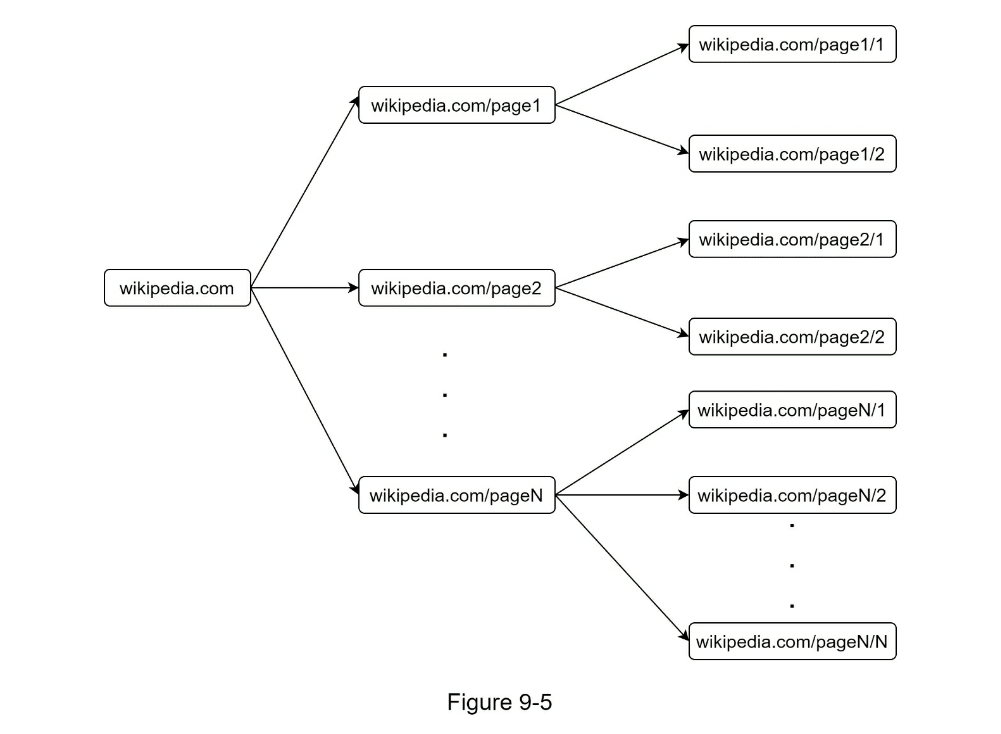
URL frontier
URL frontier helps to address these problems. A URL frontier is a data
structure that stores URLs to be downloaded. The URL frontier is an important
component to ensure politeness,
URL prioritization, and freshness. A few noteworthy papers on URL frontier are
mentioned in the reference materials [5] [9]. The findings from these papers
are as follows:
Politeness
Generally, a web crawler should avoid sending too many requests to the same
hosting server within a short period. Sending too many requests is considered
as “impolite” or even treated as denial-of-service (DOS) attack. For example,
without any constraint, the crawler can send thousands of requests every second
to the same website. This can overwhelm the web servers.
The general idea of enforcing politeness is to download one page at a time from
the same host. A delay can be added between two download tasks. The politeness
constraint is implemented by maintain a mapping from website hostnames to
download (worker) threads.
Each downloader thread has a separate FIFO queue and only downloads URLs
obtained from that queue. Figure 9-6 shows the design that manages politeness.

- Queue router: It ensures that each queue (b1, b2, … bn) only contains URLs
from the same host.
- Mapping table: It maps each host to a queue.
- FIFO queues b1, b2 to bn: Each queue contains URLs from the same host.
- Queue selector: Each worker thread is mapped to a FIFO queue, and it only
downloads URLs from that queue. The queue selection logic is done by the
Queue selector.
- Worker thread 1 to N. A worker thread downloads web pages one by one from the
same host. A delay can be added between two download tasks.
Priority
A random post from a discussion forum about Apple products carries very different weight
than posts on the Apple home page. Even though they both have the “Apple” keyword, it is
sensible for a crawler to crawl the Apple home page first.
We prioritize URLs based on usefulness, which can be measured by PageRank [10], website
traffic, update frequency, etc. “Prioritizer” is the component that handles URL prioritization.
Refer to the reference materials [5] [10] for in-depth information about this concept.
Figure 9-7 shows the design that manages URL priority.
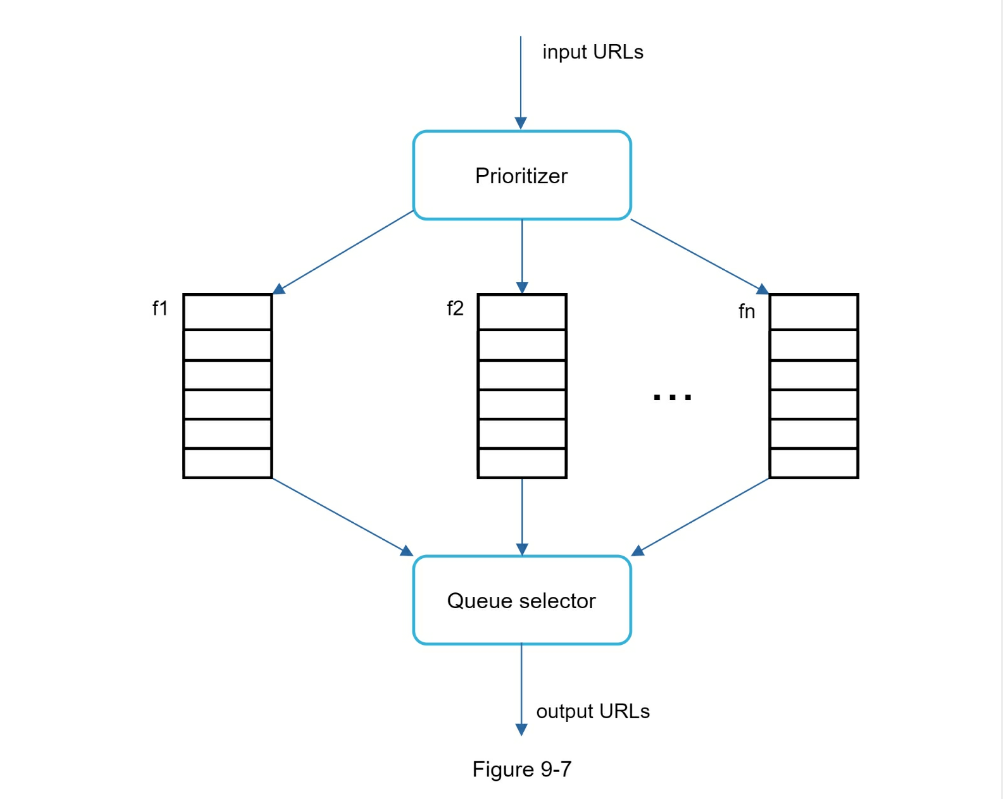
- Prioritizer: It takes URLs as input and computes the priorities.
- Queue f1 to fn: Each queue has an assigned priority. Queues with high
priority are selected with higher probability.
- Queue selector: Randomly choose a queue with a bias towards queues with
higher priority.
Figure 9-8 presents the URL frontier design, and it contains two modules:
- Front queues: manage prioritization
- Back queues: manage politeness
Freshness
Web pages are constantly being added, deleted, and edited. A web crawler must
periodically recrawl downloaded pages to keep our data set fresh. Recrawl all
the URLs is timeconsuming and resource intensive. Few strategies to optimize
freshness are listed as follows:
- Recrawl based on web pages’ update history.
- Prioritize URLs and recrawl important pages first and more frequently.
Storage for URL Frontier
In real-world crawl for search engines, the number of URLs in the frontier
could be hundreds of millions [4]. Putting everything in memory is neither
durable nor scalable. Keeping everything in the disk is undesirable neither
because the disk is slow; and it can easily become a bottleneck for the crawl.
We adopted a hybrid approach. The majority of URLs are stored on disk, so the
storage space is not a problem. To reduce the cost of reading from the disk and
writing to the disk, we maintain buffers in memory for enqueue/dequeue
operations. Data in the buffer is periodically written to the disk.
HTML Downloader
The HTML Downloader downloads web pages from the internet using the HTTP
protocol.
Before discussing the HTML Downloader, we look at Robots Exclusion Protocol
first.
Robots.txt
Robots.txt, called Robots Exclusion Protocol, is a standard used by websites to
communicate with crawlers. It specifies what pages crawlers are allowed to
download. Before attempting to crawl a web site, a crawler should check its
corresponding robots.txt first and follow its rules.
To avoid repeat downloads of robots.txt file, we cache the results of the file.
The file is downloaded and saved to cache periodically. Here is a piece of
robots.txt file taken from https://www.amazon.com/robots.txt. Some of the
directories like creatorhub are disallowed for Google bot.
User-agent: Googlebot
Disallow: `/creatorhub/*`
Disallow: `/rss/people/*/reviews`
Disallow: `/gp/pdp/rss/*/reviews`
Disallow: `/gp/cdp/member-reviews/`
Disallow: `/gp/aw/cr/`
Besides robots.txt, performance optimization is another important concept we
will cover for the HTML downloader.
Below is a list of performance optimizations for HTML downloader.
1. Distributed crawl
To achieve high performance, crawl jobs are distributed into multiple servers,
and each server runs multiple threads. The URL space is partitioned into
smaller pieces; so, each downloader is responsible for a subset of the URLs.
Figure 9-9 shows an example of a distributed crawl.
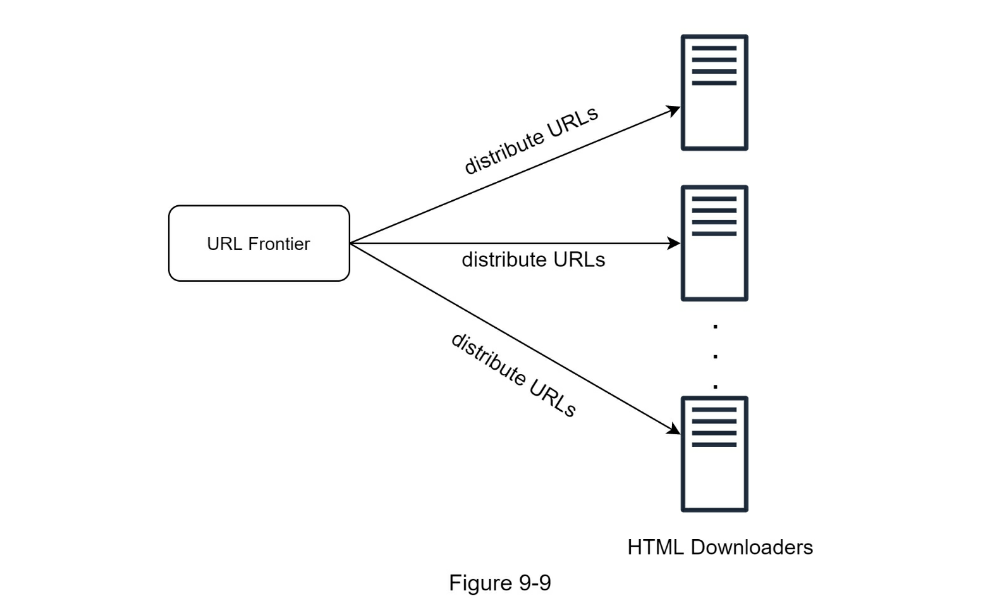
2. Cache DNS Resolver
DNS Resolver is a bottleneck for crawlers because DNS requests might take time
due to the synchronous nature of many DNS interfaces. DNS response time ranges
from 10ms to 200ms. Once a request to DNS is carried out by a crawler thread,
other threads are blocked until the first request is completed. Maintaining our
DNS cache to avoid calling DNS frequently is an effective technique for speed
optimization. Our DNS cache keeps the domain name to IP address mapping and is
updated periodically by cron jobs.
3. Locality
Distribute crawl servers geographically. When crawl servers are closer to website hosts,
crawlers experience faster download time. Design locality applies to most of the system
components: crawl servers, cache, queue, storage, etc.
4. Short timeout
Some web servers respond slowly or may not respond at all. To avoid long wait
time, a maximal wait time is specified. If a host does not respond within a
predefined time, the crawler will stop the job and crawl some other pages.
Robustness
Besides performance optimization, robustness is also an important
consideration. We present a few approaches to improve the system robustness:
-
Consistent hashing: This helps to distribute loads among downloaders. A new
downloader server can be added or removed using consistent hashing. Refer to
Chapter 5: Design consistent hashing for more details.
-
Save crawl states and data: To guard against failures, crawl states and
data are written to a storage system. A disrupted crawl can be restarted
easily by loading saved states and data.
-
Exception handling: Errors are inevitable and common in a large-scale
system. The crawler must handle exceptions gracefully without crashing the
system.
-
Data validation: This is an important measure to prevent system errors.
Extensibility
As almost every system evolves, one of the design goals is to make the system flexible
enough to support new content types. The crawler can be extended by plugging in new
modules. Figure 9-10 shows how to add new modules.
- PNG Downloader module is plugged-in to download PNG files.
- Web Monitor module is added to monitor the web and prevent copyright and
trademark infringements.
Detect and avoid problematic content
This section discusses the detection and prevention of redundant, meaningless,
or harmful content.
1. Redundant content
As discussed previously, nearly 30% of the web pages are duplicates. Hashes or checksums
help to detect duplication [11].
2. Spider traps
A spider trap is a web page that causes a crawler in an infinite loop. For
instance, an infinite deep directory structure is listed as follows:
www.spidertrapexample.com/foo/bar/foo/bar/foo/bar/…
Such spider traps can be avoided by setting a maximal length for URLs. However,
no onesize-fits-all solution exists to detect spider traps. Websites containing
spider traps are easy to identify due to an unusually large number of web pages
discovered on such websites. It is hard to develop automatic algorithms to
avoid spider traps; however, a user can manually verify and identify a spider
trap, and either exclude those websites from the crawler or apply some
customized URL filters.
3. Data noise
Some of the contents have little or no value, such as advertisements, code
snippets, spam URLs, etc. Those contents are not useful for crawlers and should
be excluded if possible.
Step 4 - Wrap up
In this chapter, we first discussed the characteristics of a good crawler:
scalability, politeness, extensibility, and robustness. Then, we proposed a
design and discussed key components.
Building a scalable web crawler is not a trivial task because the web is
enormously large and full of traps. Even though we have covered many topics, we
still miss many relevant talking points:
- Server-side rendering: Numerous websites use scripts like JavaScript, AJAX,
etc to generate links on the fly. If we download and parse web pages
directly, we will not be able to retrieve dynamically generated links. To
solve this problem, we perform server-side rendering (also called dynamic
rendering) first before parsing a page [12].
-
Filter out unwanted pages: With finite storage capacity and crawl resources,
an anti-spam component is beneficial in filtering out low quality and spam
pages [13] [14].
-
Database replication and sharding: Techniques like replication and sharding
are used to improve the data layer availability, scalability, and
reliability.
-
Horizontal scaling: For large scale crawl, hundreds or even thousands of
servers are needed to perform download tasks. The key is to keep servers
stateless.
-
Availability, consistency, and reliability: These concepts are at the core of
any large system’s success. We discussed these concepts in detail in Chapter 1.
Refresh your memory on these topics.
-
Analytics: Collecting and analyzing data are important parts of any system
because data is key ingredient for fine-tuning.
Reference materials
- [1] US Library of Congress: https://www.loc.gov/websites/
- [2] EU Web Archive: http://data.europa.eu/webarchive
- [3] Digimarc: https://www.digimarc.com/products/digimarc-services/piracy-intelligence
- [4] Heydon A., Najork M. Mercator: A scalable, extensible web crawler World Wide Web, 2 (4) (1999), pp. 219-229
- [5] By Christopher Olston, Marc Najork: Web Crawling. http://infolab.stanford.edu/~olston/publications/crawling_survey.pdf
- [6] 29% Of Sites Face Duplicate Content Issues: https://tinyurl.com/y6tmh55y
- [7] Rabin M.O., et al. Fingerprinting by random polynomials Center for Research in Computing Techn., Aiken Computation Laboratory, Univ. (1981)
- [8] B. H. Bloom, “Space/time trade-offs in hash coding with allowable errors,” Communications of the ACM, vol. 13, no. 7, pp. 422–426, 1970.
- [9] Donald J. Patterson, Web Crawling: https://www.ics.uci.edu/~lopes/teaching/cs221W12/slides/Lecture05.pdf
- [10] L. Page, S. Brin, R. Motwani, and T. Winograd, “The PageRank citation ranking: Bringing order to the web,” Technical Report, Stanford University, 1998.
- [11] Burton Bloom. Space/time trade-offs in hash coding with allowable errors. Communications of the ACM, 13(7), pages 422–426, July 1970.
- [12] Google Dynamic Rendering: https://developers.google.com/search/docs/guides/dynamic-rendering
- [13] T. Urvoy, T. Lavergne, and P. Filoche, “Tracking web spam with hidden style similarity,” in Proceedings of the 2nd International Workshop on Adversarial Information Retrieval on the Web, 2006.
- [14] H.-T. Lee, D. Leonard, X. Wang, and D. Loguinov, “IRLbot: Scaling to 6 billion pages and beyond,” in Proceedings of the 17th International World Wide Web Conference, 2008.
CHAPTER 10: DESIGN A NOTIFICATION SYSTEM
A notification system has already become a very popular feature for many
applications in recent years. A notification alerts a user with important
information like breaking news, product updates, events, offerings, etc. It has
become an indispensable part of our daily life.
A notification is more than just mobile push notification. Three types of
notification formats are: mobile push notification, SMS message, and Email.
Figure 10-1 shows an example of each of these notifications.
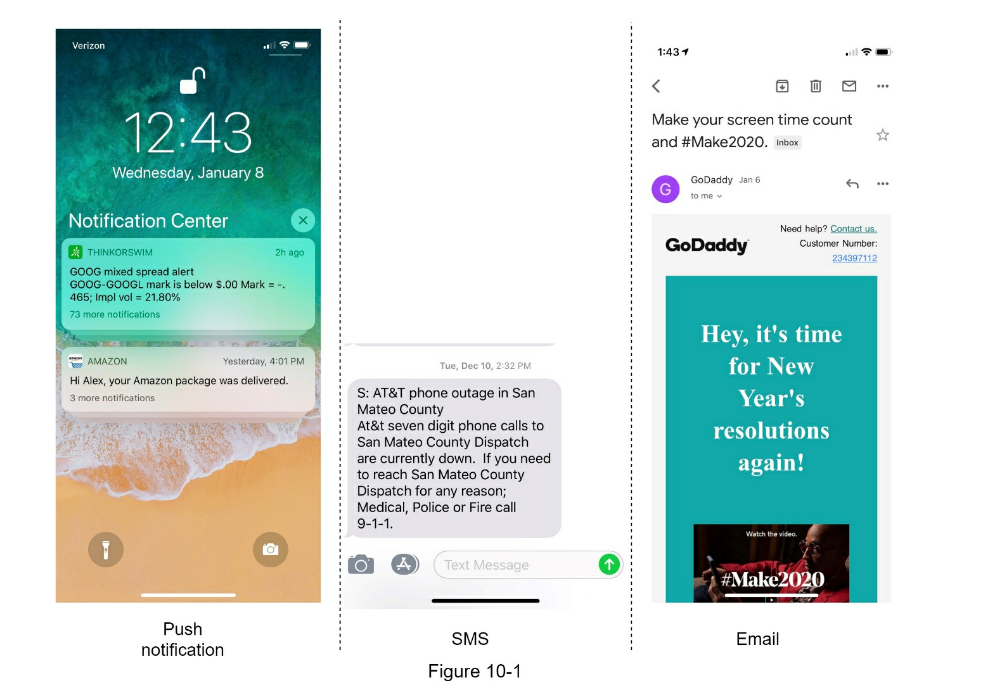
Step 1 - Understand the problem and establish design scope
Building a scalable system that sends out millions of notifications a day is
not an easy task. It requires a deep understanding of the notification
ecosystem. The interview question is purposely designed to be open-ended and
ambiguous, and it is your responsibility to ask questions to clarify the
requirements.
- Candidate: What types of notifications does the system support?
- Interviewer: Push notification, SMS message, and email.
- Candidate: Is it a real-time system?
- Interviewer: Let us say it is a soft real-time system. We want a user to
receive notifications as soon as possible. However, if the system is under a
high workload, a slight delay is acceptable.
- Candidate: What are the supported devices?
- Interviewer: iOS devices, android devices, and laptop/desktop.
- Candidate: What triggers notifications?
- Interviewer: Notifications can be triggered by client applications. They can
also be scheduled on the server-side.
- Candidate: Will users be able to opt-out?
- Interviewer: Yes, users who choose to opt-out will no longer receive
notifications.
- Candidate: How many notifications are sent out each day?
- Interviewer: 10 million mobile push notifications, 1 million SMS messages,
and 5 million emails.
Step 2 - Propose high-level design and get buy-in
This section shows the high-level design that supports various notification
types: iOS push notification, Android push notification, SMS message, and
Email. It is structured as follows:
- Different types of notifications
-
Contact info gathering flow
- Notification sending/receiving flow
Different types of notifications
We start by looking at how each notification type works at a high level.
iOS push notification
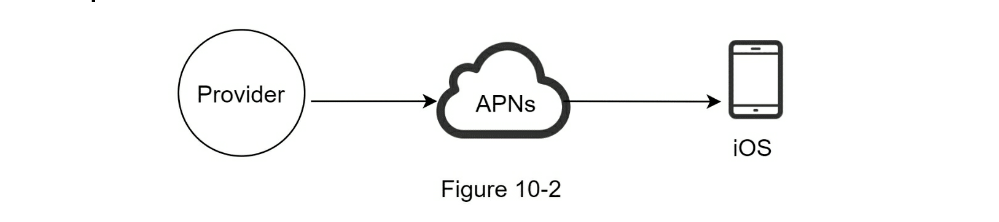
We primary need three components to send an iOS push notification:
-
Provider. A provider builds and sends notification requests to Apple Push
Notification Service (APNS). To construct a push notification, the provider
provides the following data:
-
Device token: This is a unique identifier used for sending push notifications.
-
Payload: This is a JSON dictionary that contains a notification’s payload. Below is an example.
-
APNS: This is a remote service provided by Apple to propagate push
notifications to iOS devices.
-
iOS Device: It is the end client, which receives push notifications.
{
  "aps":{
  "alert":{
  "title": "Game Request",
  "body": "bob wants to play chess",
  "action-loc-key": "PLAY"
  },
  "badge":5
  }
}
Android push notification
Android adopts a similar notification flow. Instead of using APNs, Firebase
Cloud Messaging (FCM) is commonly used to send push notifications to android
devices.
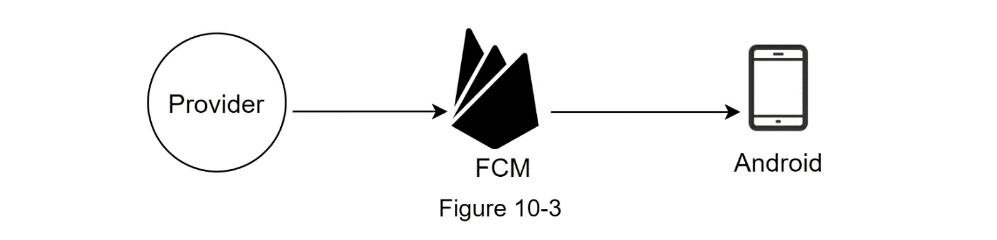
SMS message
For SMS messages, third party SMS services like Twilio [1], Nexmo [2], and
many others are commonly used. Most of them are commercial services.
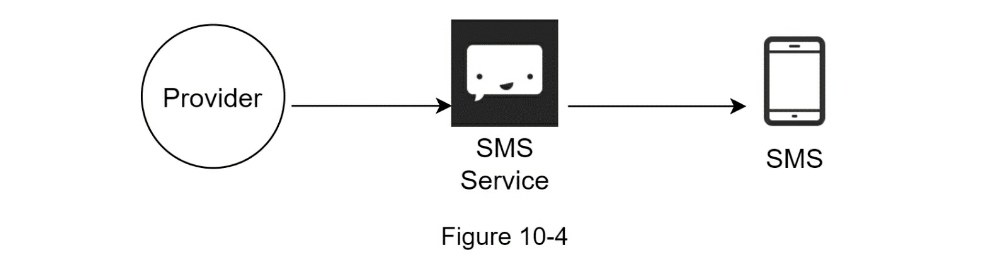
Email
Although companies can set up their own email servers, many of them opt for
commercial email services. Sendgrid [3] and Mailchimp [4] are among the most
popular email services, which offer a better delivery rate and data analytics.
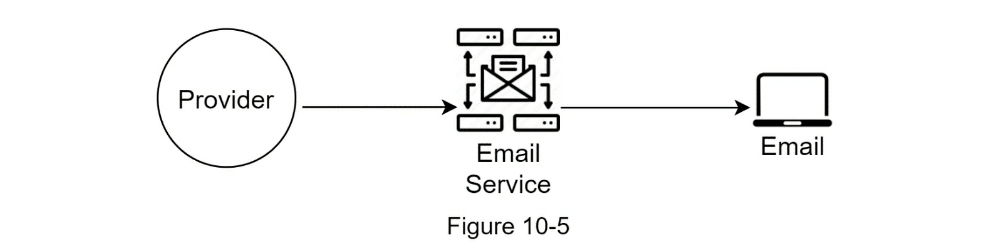
Figure 10-6 shows the design after including all the third-party services.

To send notifications, we need to gather mobile device tokens, phone numbers,
or email addresses. As shown in Figure 10-7, when a user installs our app or
signs up for the first time, API servers collect user contact info and store it
in the database.
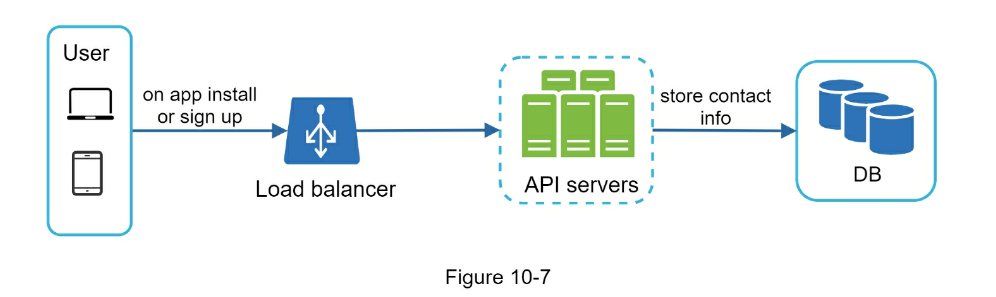
Figure 10-8 shows simplified database tables to store contact info. Email
addresses and phone numbers are stored in the user table, whereas device tokens
are stored in the device table. A user can have multiple devices, indicating
that a push notification can be sent to all the user devices.

Notification sending/receiving flow
We will first present the initial design; then, propose some optimizations.
High-level design
Figure 10-9 shows the design, and each system component is explained below.

Service 1 to N:
A service can be a micro-service, a cron job, or a distributed system that
triggers notification sending events. For example, a billing service sends
emails to remind customers of their due payment or a shopping website tells
customers that their packages will be delivered tomorrow via SMS messages.
Notification system:
The notification system is the centerpiece of sending/receiving notifications.
Starting with something simple, only one notification server is used. It
provides APIs for services 1 to N, and builds notification payloads for third party services.
Third-party services:
Third party services are responsible for delivering notifications to users.
While integrating with third-party services, we need to pay extra attention to
extensibility. Good extensibility means a flexible system that can easily
plugging or unplugging of a third-party service. Another important
consideration is that a third-party service might be unavailable in new markets
or in the future. For instance, FCM is unavailable in China. Thus, alternative
third-party services such as Jpush, PushY, etc are used there.
iOS, Android, SMS, Email: Users receive notifications on their devices.
Three problems are identified in this design:
- Single point of failure (SPOF): A single notification server means SPOF.
-
Hard to scale: The notification system handles everything related to push
notifications in one server. It is challenging to scale databases, caches,
and different notification processing components independently.
-
Performance bottleneck: Processing and sending notifications can be
resource intensive.
For example, constructing HTML pages and waiting for responses from third party
services could take time. Handling everything in one system can result in the
system overload, especially during peak hours.
High-level design (improved)
After enumerating challenges in the initial design, we improve the design as
listed below:
- Move the database and cache out of the notification server.
- Add more notification servers and set up automatic horizontal scaling.
- Introduce message queues to decouple the system components.
Figure 10-10 shows the improved high-level design.
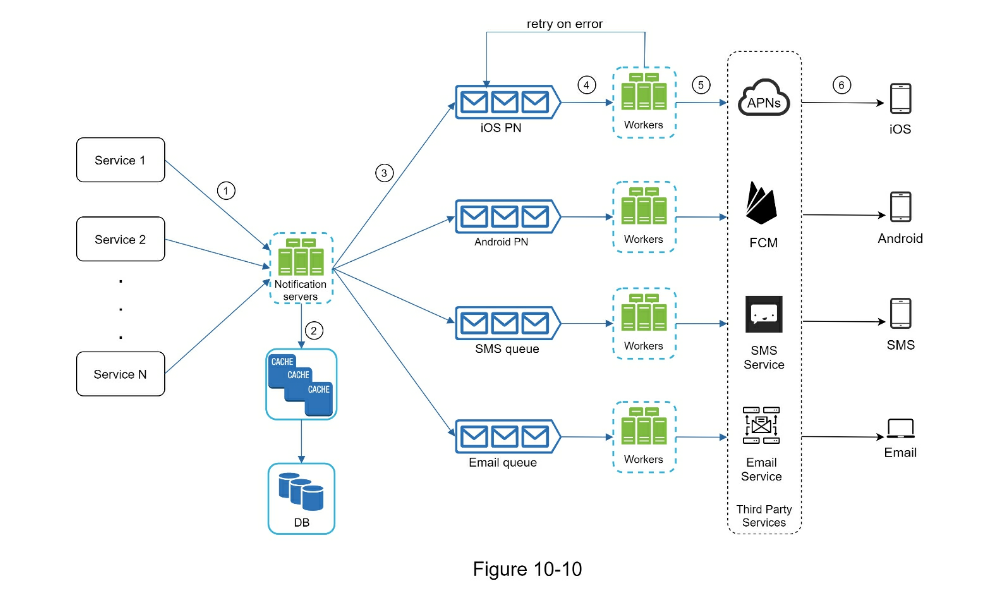
The best way to go through the above diagram is from left to right:
Service 1 to N:
They represent different services that send notifications via APIs provided by
notification servers.
Notification servers:
They provide the following functionalities:
- Provide APIs for services to send notifications. Those APIs are only
accessible internally or by verified clients to prevent spams.
- Carry out basic validations to verify emails, phone numbers, etc.
- Query the database or cache to fetch data needed to render a notification.
- Put notification data to message queues for parallel processing.
Here is an example of the API to send an email:
POST https://api.example.com/v/sms/send
Request body
{
  "to": [
  {
  "user_id": 123456
  }
  ],
  "from": {
  "email": "from@examples.com"
  },
  "subject": "Hello world",
  "content": [
  {
  "type": "text/plain",
  "value": "hellow world"
  }
  ]
}
Cache:
User info, device info, notification templates are cached.
DB:
It stores data about user, notification, settings, etc.
Message queues:
They remove dependencies between components. Message queues serve as buffers
when high volumes of notifications are to be sent out. Each notification type
is assigned with a distinct message queue so an outage in one third-party
service will not affect other notification types.
Workers:
Workers are a list of servers that pull notification events from message queues
and send them to the corresponding third-party services.
Third-party services:
Already explained in the initial design.
iOS, Android, SMS, Email:
Already explained in the initial design.
Next, let us examine how every component works together to send a notification:
- A service calls APIs provided by notification servers to send notifications.
-
Notification servers fetch metadata such as user info, device token, and
notification setting from the cache or database.
- A notification event is sent to the corresponding queue for processing. For
instance, an iOS push notification event is sent to the iOS PN queue.
-
Workers pull notification events from message queues.
-
Workers send notifications to third party services.
-
Third-party services send notifications to user devices.
Step 3 - Design deep dive
In the high-level design, we discussed different types of notifications,
contact info gathering flow, and notification sending/receiving flow. We will
explore the following in deep dive:
- Reliability.
- Additional component and considerations: notification template, notification
settings, rate limiting, retry mechanism, security in push notifications,
monitor queued notifications and event tracking.
- Updated design.
Reliability
We must answer a few important reliability questions when designing a
notification system in distributed environments.
How to prevent data loss?
One of the most important requirements in a notification system is that it
cannot lose data.
Notifications can usually be delayed or re-ordered, but never lost. To satisfy
this requirement, the notification system persists notification data in a
database and implements a retry mechanism. The notification log database is
included for data persistence.
Will recipients receive a notification exactly once?
The short answer is no. Although notification is delivered exactly once most of
the time, the distributed nature could result in duplicate notifications. To
reduce the duplication occurrence, we introduce a dedupe mechanism and handle
each failure case carefully. Here is a simple dedupe logic:
- When a notification event first arrives, we check if it is seen before by
checking the event ID.
- If it is seen before, it is discarded.
- Otherwise, we will send out the notification.
For interested readers to explore why we cannot have exactly once delivery,
refer to the reference material [5].
Additional components and considerations
We have discussed how to collect user contact info, send, and receive a
notification. A notification system is a lot more than that. Here we discuss
additional components including template reusing, notification settings, event
tracking, system monitoring, rate limiting, etc.
Notification template
A large notification system sends out millions of notifications per day, and
many of these notifications follow a similar format. Notification templates are
introduced to avoid building every notification from scratch. A notification
template is a preformatted notification to create your unique notification by
customizing parameters, styling, tracking links, etc. Here is an example
template of push notifications.
- BODY:
You dreamed of it. We dared it. [ITEM NAME] is back — only until
[DATE].
- CTA:
Order Now. Or, Save My [ITEM NAME]
The benefits of using notification templates include maintaining a consistent
format, reducing the margin error, and saving time.
Notification setting
Users generally receive way too many notifications daily and they can easily
feel overwhelmed. Thus, many websites and apps give users fine-grained control
over notification settings. This information is stored in the notification
setting table, with the following fields:
user_id bigInt
channel varchar # push notification, email or SMS
opt_in boolean # opt-in to receive notification
Before any notification is sent to a user, we first check if a user is opted-in
to receive this type of notification.
Rate limiting
To avoid overwhelming users with too many notifications, we can limit the
number of notifications a user can receive. This is important because receivers
could turn off notifications completely if we send too often.
Retry mechanism
When a third-party service fails to send a notification, the notification will
be added to the message queue for retrying. If the problem persists, an alert
will be sent out to developers.
Security in push notifications
For iOS or Android apps, appKey and appSecret are used to secure push
notification APIs [6]. Only authenticated or verified clients are allowed to
send push notifications using our APIs. Interested users should refer to the
reference material [6].
Monitor queued notifications
A key metric to monitor is the total number of queued notifications. If the
number is large, the notification events are not processed fast enough by
workers. To avoid delay in the notification delivery, more workers are needed.
Figure 10-12 (credit to [7]) shows an example of queued messages to be
processed.
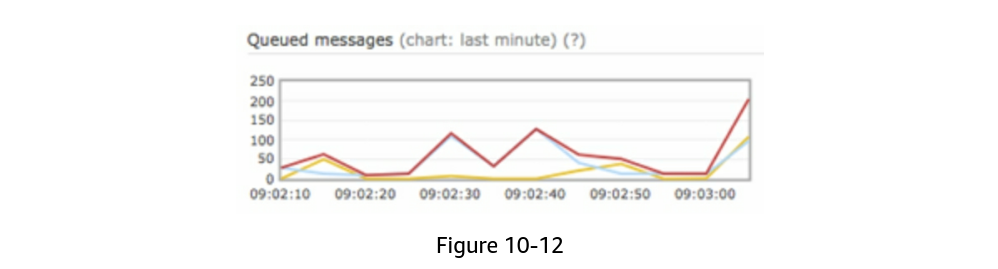
Events tracking
Notification metrics, such as open rate, click rate, and engagement are
important in understanding customer behaviors. Analytics service implements
events tracking. Integration between the notification system and the analytics
service is usually required. Figure 10-13 shows an example of events that might
be tracked for analytics purposes.
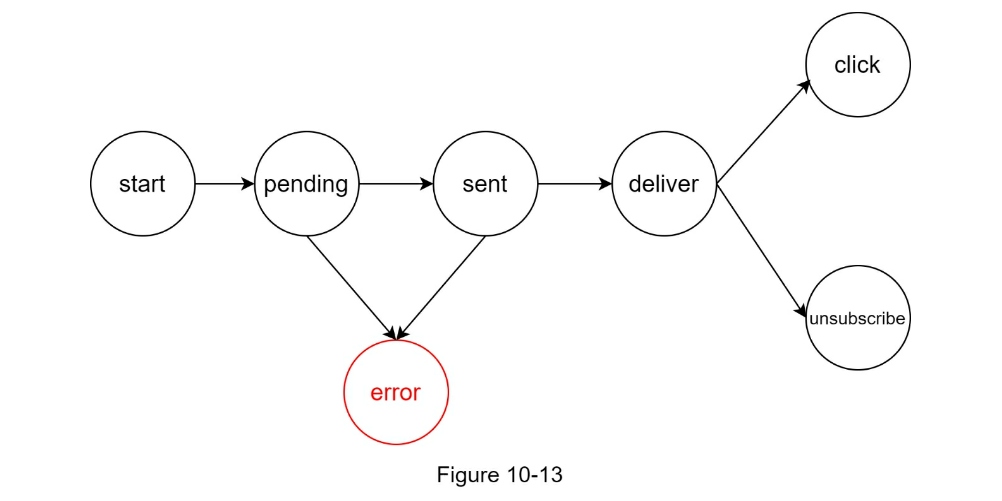
Updated design
In this design, many new components are added in comparison with the previous
design.
- The notification servers are equipped with two more critical features:
authentication and rate-limiting.
- We also add a retry mechanism to handle notification failures. If the
system fails to send notifications, they are put back in the messaging queue
and the workers will retry for a predefined number of times.
- Furthermore, notification templates provide a consistent and efficient
notification creation process.
- Finally, monitoring and tracking systems are added for system health checks
and future improvements.
Step 4 - Wrap up
Notifications are indispensable because they keep us posted with important
information. It could be a push notification about your favorite movie on
Netflix, an email about discounts on new products, or a message about your
online shopping payment confirmation.
In this chapter, we described the design of a scalable notification system that
supports multiple notification formats: push notification, SMS message, and
email. We adopted message queues to decouple system components.
Besides the high-level design, we dug deep into more components and
optimizations.
-
Reliability: We proposed a robust retry mechanism to minimize the failure
rate.
-
Security: AppKey/appSecret pair is used to ensure only verified clients can
send notifications.
-
Tracking and monitoring: These are implemented in any stage of a
notification flow to capture important stats.
- _Respect user settings: Users may opt-out of receiving notifications. Our
system checks user settings first before sending notifications.
-
Rate limiting: Users will appreciate a frequency capping on the number of
notifications they receive.
Reference materials
- [1] Twilio SMS: https://www.twilio.com/sms
- [2] Nexmo SMS: https://www.nexmo.com/products/sms
- [3] Sendgrid: https://sendgrid.com/
- [4] Mailchimp: https://mailchimp.com/
- [5] You Cannot Have Exactly-Once Delivery: https://bravenewgeek.com/you-cannot-haveexactly-once-delivery/
- [6] Security in Push Notifications: https://cloud.ibm.com/docs/services/mobilepush?topic=mobile-pushnotification-security-in-push-notifications
- [7] RadditMQ: https://bit.ly/2sotIa6
CHAPTER 11: DESIGN A NEWS FEED SYSTEM
In this chapter, you are asked to design a news feed system. What is news feed?
According to the Facebook help page, “News feed is the constantly updating list
of stories in the middle of your home page. News Feed includes status updates,
photos, videos, links, app activity, and likes from people, pages, and groups
that you follow on Facebook” [1]. This is a popular interview question. Similar
questions commonly asked are: design Facebook news feed, Instagram feed,
Twitter timeline, etc.
Step 1 - Understand the problem and establish design scope
The first set of clarification questions are to understand what the interviewer
has in mind when she asks you to design a news feed system. At the very least,
you should figure out what features to support. Here is an example of
candidate-interviewer interaction:
- Candidate: Is this a mobile app? Or a web app? Or both?
- Candidate: What are the important features?
- Interview: A user can publish a post and see her friends’ posts on the news feed page.
- Candidate: Is the news feed sorted by reverse chronological order or any
particular order such as topic scores? For instance, posts from your close
friends have higher scores.
- Interviewer: To keep things simple, let us assume the feed is sorted by reverse chronological order.
- Candidate: How many friends can a user have?
- Candidate: What is the traffic volume?
- Interviewer: 10 million DAU
- Candidate: Can feed contain images, videos, or just text?
- Interviewer: It can contain media files, including both images and videos.
Now you have gathered the requirements, we focus on designing the system.
Step 2 - Propose high-level design and get buy-in
The design is divided into two flows: feed publishing and news feed building.
-
Feed publishing: when a user publishes a post, corresponding data is
written into cache and database. A post is populated to her friends’ news
feed.
-
Newsfeed building: for simplicity, let us assume the news feed is built by
aggregating friends’ posts in reverse chronological order.
Newsfeed APIs
The news feed APIs are the primary ways for clients to communicate with
servers. Those APIs are HTTP based that allow clients to perform actions, which
include posting a status, retrieving news feed, adding friends, etc. We discuss
two most important APIs: feed publishing API and news feed retrieval API.
Feed publishing API
To publish a post, a HTTP POST request will be sent to the server. The API is shown below:
POST /v1/me/feed
Params:
- content: content is the text of the post.
- auth_token: it is used to authenticate API requests.
Newsfeed retrieval API
The API to retrieve news feed is shown below:
GET /v1/me/feed
Params:
- auth_token: it is used to authenticate API requests.
Feed publishing
Figure 11-2 shows the high-level design of the feed publishing flow.
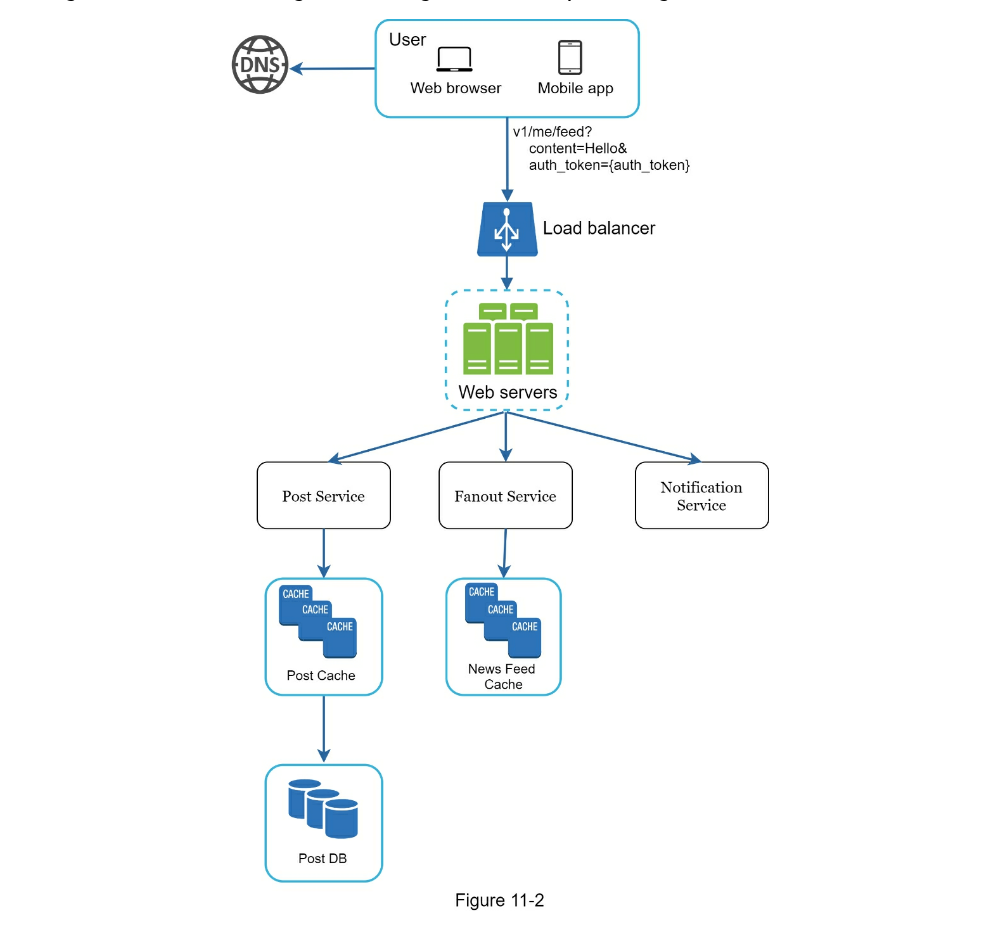
-
User: a user can view news feeds on a browser or mobile app. A user makes a
post with content “Hello” through API:
/v1/me/feed?content=Hello&auth_token={auth_token}
-
Load balancer: distribute traffic to web servers.
-
Web servers: web servers redirect traffic to different internal services.
-
Post service: persist post in the database and cache.
-
Fanout service: push new content to friends’ news feed. Newsfeed data is
stored in the cache for fast retrieval.
-
Notification service: inform friends that new content is available and send
out push notifications.
Newsfeed building
In this section, we discuss how news feed is built behind the scenes. Figure 11-3 shows the
high-level design:
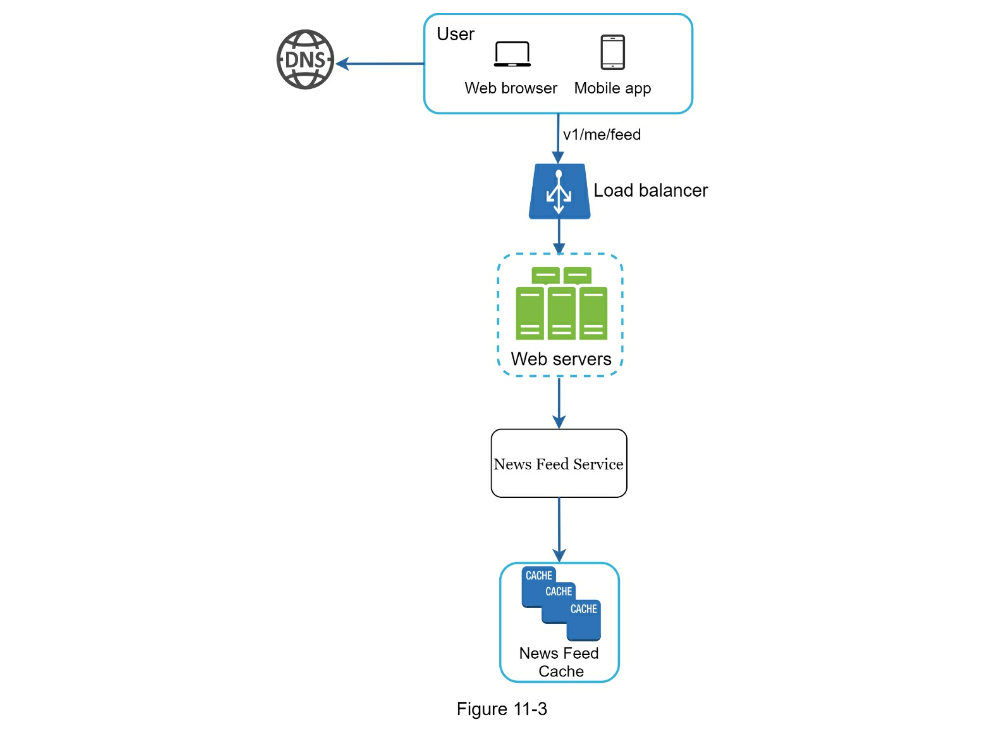
- User: a user sends a request to retrieve her news feed. The request looks
like this:
/v1/me/feed.
- Load balancer: load balancer redirects traffic to web servers.
- Web servers: web servers route requests to newsfeed service.
- Newsfeed service: news feed service fetches news feed from the cache.
- Newsfeed cache: store news feed IDs needed to render the news feed.
Step 3 - Design deep dive
The high-level design briefly covered two flows: feed publishing and news feed
building. Here, we discuss those topics in more depth.
Feed publishing deep dive
Figure 11-4 outlines the detailed design for feed publishing. We have discussed most of
components in high-level design, and we will focus on two components: web servers and
fanout service.
Web servers
Besides communicating with clients, web servers enforce authentication and
rate-limiting.
Only users signed in with valid auth_token are allowed to make posts. The
system limits the number of posts a user can make within a certain period,
vital to prevent spam and abusive content.
Fanout service
Fanout is the process of delivering a post to all friends. Two types of fanout
models are: fanout on write (also called push model) and fanout on read
(also called pull model). Both models have pros and cons. We explain their
workflows and explore the best approach to support our system.
Fanout on write.
With this approach, news feed is pre-computed during write time. A new post is
delivered to friends’ cache immediately after it is published.
Pros:
- The news feed is generated in real-time and can be pushed to friends
immediately.
-
Fetching news feed is fast because the news feed is pre-computed during
write time.
Cons:
- If a user has many friends, fetching the friend list and generating news
feeds for all of them are slow and time consuming. It is called hotkey
problem.
- For inactive users or those rarely log in, pre-computing news feeds waste
computing resources.
Fanout on read.
The news feed is generated during read time. This is an on-demand model. Recent
posts are pulled when a user loads her home page.
Pros:
- For inactive users or those who rarely log in, fanout on read works better
because it will not waste computing resources on them.
- Data is not pushed to friends so there is no hotkey problem.
Cons:
-
Fetching the news feed is slow as the news feed is not pre-computed.
We adopt a hybrid approach to get benefits of both approaches and avoid
pitfalls in them.
Since fetching the news feed fast is crucial, we use a push model for the
majority of users.
For celebrities or users who have many friends/followers, we let followers pull
news content on-demand to avoid system overload. Consistent hashing is a useful
technique to mitigate the hotkey problem as it helps to distribute
requests/data more evenly.
Let us take a close look at the fanout service as shown in Figure 11-5.
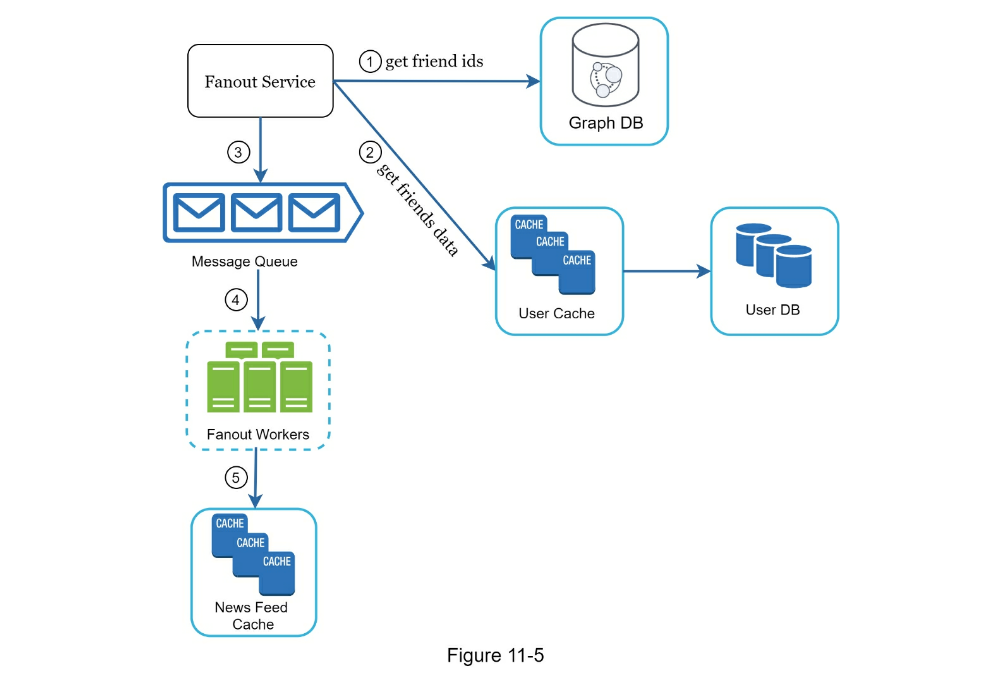
The fanout service works as follows:
-
Fetch friend IDs from the graph database. Graph databases are suited for
managing friend relationship and friend recommendations. Interested readers
wishing to learn more about this concept should refer to the reference
material [2].
-
Get friends info from the user cache. The system then filters out friends
based on user settings. For example, if you mute someone, her posts will not
show up on your news feed even though you are still friends. Another reason
why posts may not show is that a user could selectively share information
with specific friends or hide it from other people.
- Send friends list and new post ID to the message queue.
-
Fanout workers fetch data from the message queue and store news feed data
in the news feed cache. You can think of the news feed cache as a
<post_id, user_id> mapping table. Whenever a new post is made, it will be
appended to the news feed table as shown in Figure 11-6. The memory
consumption can become very large if we store the entire user and post
objects in the cache. Thus, only IDs are stored. To keep the memory size
small, we set a configurable limit. The chance of a user scrolling through
thousands of posts in news feed is slim. Most users are only interested in
the latest content, so the cache miss rate is low.
- Store <post_id, user_id > in news feed cache. Figure 11-6 shows an example
of what the news feed looks like in cache.
Newsfeed retrieval deep dive
Figure 11-7 illustrates the detailed design for news feed retrieval.
As shown in Figure 11-7, media content (images, videos, etc.) are stored in CDN
for fast retrieval. Let us look at how a client retrieves news feed.
- A user sends a request to retrieve her news feed. The request looks like
this: /v1/me/feed
- The load balancer redistributes requests to web servers.
- Web servers call the news feed service to fetch news feeds.
- News feed service gets a list post IDs from the news feed cache.
- A user’s news feed is more than just a list of feed IDs. It contains
username, profile picture, post content, post image, etc. Thus, the news
feed service fetches the complete user and post objects from caches (user
cache and post cache) to construct the fully hydrated news feed.
- The fully hydrated news feed is returned in JSON format back to the client
for rendering.
Cache architecture
Cache is extremely important for a news feed system. We divide the cache tier
into 5 layers as shown in Figure 11-8.
-
News Feed: It stores IDs of news feeds.
-
Content: It stores every post data. Popular content is stored in hot cache.
- _Social Graph: It stores user relationship data.
-
Action: It stores info about whether a user liked a post, replied a post,
or took other actions on a post.
-
Counters: It stores counters for like, reply, follower, following, etc.
Step 4 - Wrap up
In this chapter, we designed a news feed system. Our design contains two flows:
feed publishing and news feed retrieval.
Like any system design interview questions, there is no perfect way to design a
system. Every company has its unique constraints, and you must design a system
to fit those constraints.
Understanding the tradeoffs of your design and technology choices are
important. If there are a few minutes left, you can talk about scalability
issues. To avoid duplicated discussion, only high-level talking points are
listed below.
Scaling the database:
- Vertical scaling vs Horizontal scaling
- SQL vs NoSQL
- Master-slave replication
- Read replicas
- Consistency models
- Database sharding
Other talking points:
- Keep web tier stateless
- Cache data as much as you can
- Support multiple data centers
- Lose couple components with message queues
- Monitor key metrics. For instance, QPS during peak hours and latency while
users refreshing their news feed are interesting to monitor.
Reference materials
- How News Feed Works: https://www.facebook.com/help/327131014036297/
- Friend of Friend recommendations Neo4j and SQL Sever: http://geekswithblogs.net/brendonpage/archive/2015/10/26/friend-of-friendrecommendations-with-neo4j.aspx
CHAPTER 12: DESIGN A CHAT SYSTEM
In this chapter we explore the design of a chat system. Almost everyone uses a
chat app. Figure 12-1 shows some of the most popular apps in the marketplace.
A chat app performs different functions for different people. It is extremely
important to nail down the exact requirements. For example, you do not want to
design a system that focuses on group chat when the interviewer has one-on-one
chat in mind. It is important to explore the feature requirements.
Step 1 - Understand the problem and establish design scope
It is vital to agree on the type of chat app to design. In the marketplace,
there are one-on-one chat apps like Facebook Messenger, WeChat, and WhatsApp,
office chat apps that focus on group chat like Slack, or game chat apps, like
Discord, that focus on large group interaction and low voice chat latency.
The first set of clarification questions should nail down what the interviewer
has in mind exactly when she asks you to design a chat system. At the very
least, figure out if you should focus on a one-on-one chat or group chat app.
Some questions you might ask are as follows:
- Candidate: What kind of chat app shall we design? 1 on 1 or group based?
- Interviewer: It should support both 1 on 1 and group chat.
- Candidate: Is this a mobile app? Or a web app? Or both?
- Candidate: What is the scale of this app? A startup app or massive scale?
- Interviewer: It should support 50 million daily active users (DAU).
- Candidate: For group chat, what is the group member limit?
- Interviewer: A maximum of 100 people
- Candidate: What features are important for the chat app? Can it support attachment?
- Interviewer: 1 on 1 chat, group chat, online indicator. The system only supports text
messages.
- Candidate: Is there a message size limit?
- Interviewer: Yes, text length should be less than 100,000 characters long.
- Candidate: Is end-to-end encryption required?
- Interviewer: Not required for now but we will discuss that if time allows.
- Candidate: How long shall we store the chat history?
In the chapter, we focus on designing a chat app like Facebook messenger, with
an emphasis on the following features:
- A one-on-one chat with low delivery latency
- _Small group chat _(max of 100 people)
- Online presence
-
Multiple device support. The same account can be logged in to multiple
accounts at the same time.
- Push notifications
It is also important to agree on the design scale. We will design a system that supports 50
million DAU.
Step 2 - Propose high-level design and get buy-in
To develop a high-quality design, we should have a basic knowledge of how
clients and servers communicate. In a chat system, clients can be either mobile
applications or web applications. Clients do not communicate directly with each
other. Instead, each client connects to a chat service, which supports all the
features mentioned above. Let us focus on fundamental operations. The chat
service must support the following functions:
- Receive messages from other clients.
- Find the right recipients for each message and relay the message to the
recipients.
-
If a recipient is not online, hold the messages for that recipient on the
server until she is online.
Figure 12-2 shows the relationships between clients (sender and receiver) and the chat
service.
When a client intends to start a chat, it connects the chats service using one
or more network protocols. For a chat service, the choice of network protocols
is important. Let us discuss this with the interviewer.
Requests are initiated by the client for most client/server applications. This
is also true for the sender side of a chat application. In Figure 12-2, when
the sender sends a message to the receiver via the chat service, it uses the
time-tested HTTP protocol, which is the most common web protocol. In this
scenario, the client opens a HTTP connection with the chat service and sends
the message, informing the service to send the message to the receiver. The
keep-alive is efficient for this because the keep-alive header allows a client
to maintain a persistent connection with the chat service. It also reduces the
number of TCP handshakes.
HTTP is a fine option on the sender side, and many popular chat applications
such as Facebook [1] used HTTP initially to send messages.
However, the receiver side is a bit more complicated. Since HTTP is
client-initiated, it is not trivial to send messages from the server. Over the
years, many techniques are used to simulate a server-initiated connection:
polling, long polling, and WebSocket. Those are important techniques widely
used in system design interviews so let us examine each of them.
Polling
As shown in Figure 12-3, polling is a technique that the client periodically
asks the server if there are messages available. Depending on polling
frequency, polling could be costly. It could consume precious server resources
to answer a question that offers no as an answer most of the time.
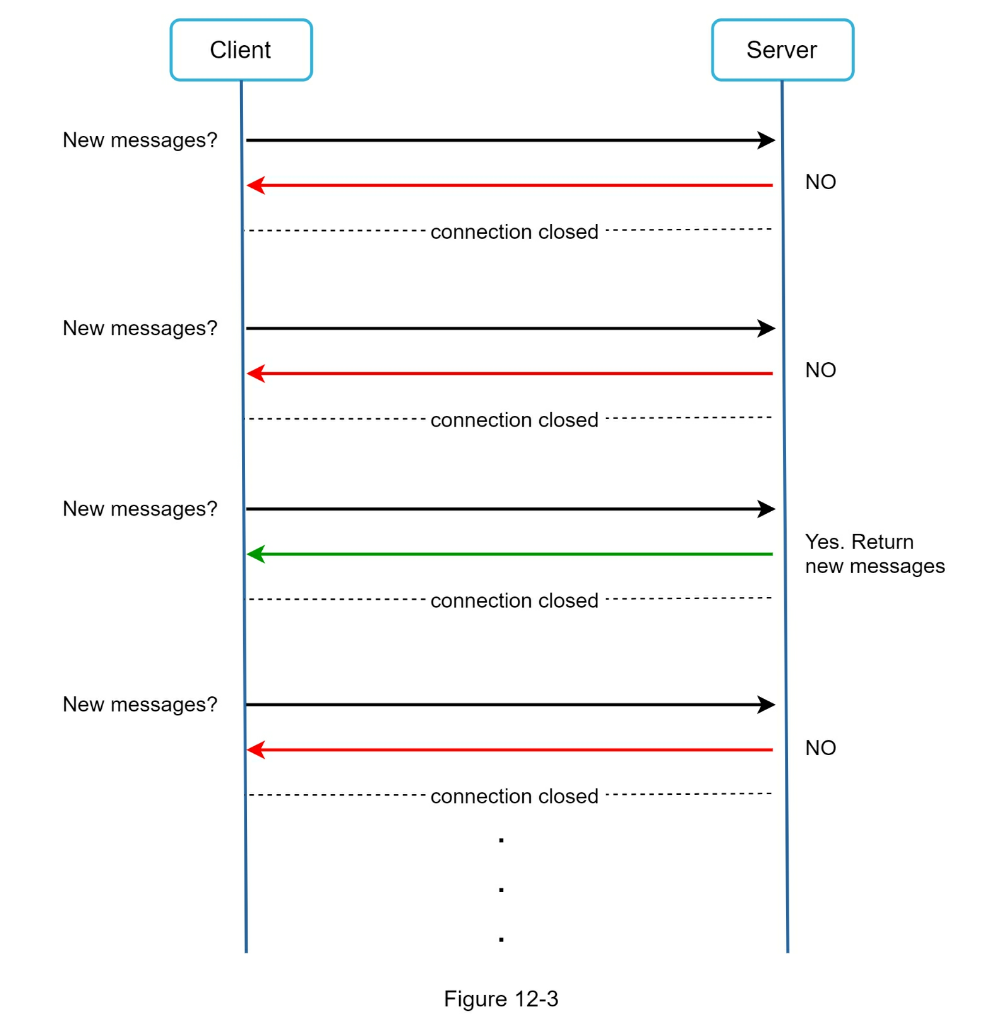
Long polling
Because polling could be inefficient, the next progression is long polling
(Figure 12-4).
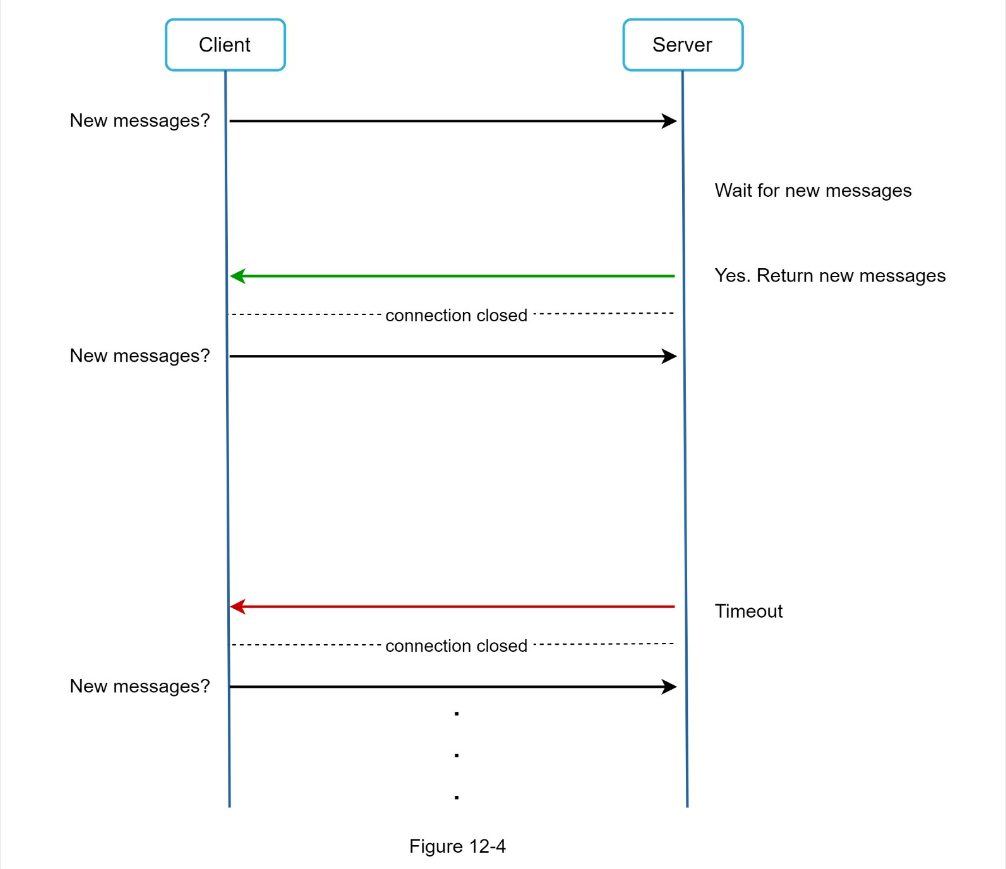
In long polling, a client holds the connection open until there are actually
new messages available or a timeout threshold has been reached. Once the client
receives new messages, it immediately sends another request to the server,
restarting the process. Long polling has a few drawbacks:
- Sender and receiver may not connect to the same chat server. HTTP based
servers are usually stateless. If you use round robin for load balancing, the
server that receives the message might not have a long-polling connection
with the client who receives the message.
- A server has no good way to tell if a client is disconnected.
- It is inefficient. If a user does not chat much, long polling still makes
periodic connections after timeouts.
WebSocket
WebSocket is the most common solution for sending asynchronous updates from
server to client. Figure 12-5 shows how it works.
WebSocket connection is initiated by the client. It is bi-directional and
persistent. It starts its life as a HTTP connection and could be “upgraded”
via some well-defined handshake to a WebSocket connection. Through this
persistent connection, a server could send updates to a client. WebSocket
connections generally work even if a firewall is in place. This is because
they use port 80 or 443 which are also used by HTTP/HTTPS connections.
Earlier we said that on the sender side HTTP is a fine protocol to use, but
since WebSocket is bidirectional, there is no strong technical reason not to
use it also for sending. Figure 12-6 shows how WebSockets (ws) is used for both
sender and receiver sides.
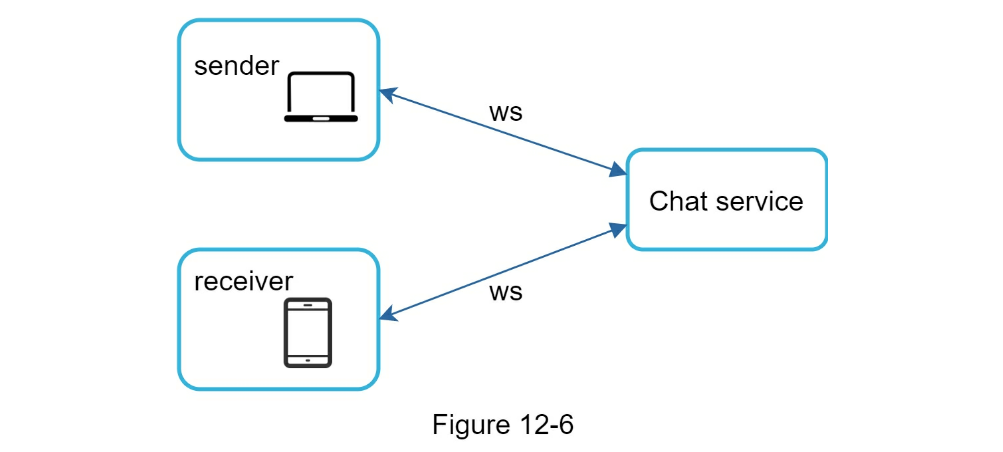
By using WebSocket for both sending and receiving, it simplifies the design and
makes implementation on both client and server more straightforward. Since
WebSocket connections are persistent, efficient connection management is
critical on the server-side.
High-level design
Just now we mentioned that WebSocket was chosen as the main communication
protocol between the client and server for its bidirectional communication, it
is important to note that everything else does not have to be WebSocket. In
fact, most features (sign up, login, user profile, etc) of a chat application
could use the traditional request/response method over HTTP. Let us drill in a
bit and look at the high-level components of the system.
As shown in Figure 12-7, the chat system is broken down into three major
categories:
- stateless services,
- stateful services, and
- third-party integration.
Stateless Services
Stateless services are traditional public-facing request/response services,
used to manage the login, signup, user profile, etc. These are common features
among many websites and apps.
Stateless services sit behind a load balancer whose job is to route requests to
the correct services based on the request paths. These services can be
monolithic or individual microservices. We do not need to build many of these
stateless services by ourselves as there are services in the market that can be
integrated easily. The one service that we will discuss more in deep dive is
the service discovery. Its primary job is to give the client a list of DNS host
names of chat servers that the client could connect to.
Stateful Service
The only stateful service is the chat service. The service is stateful
because each client maintains a persistent network connection to a chat
server. In this service, a client normally does not switch to another chat
server as long as the server is still available. The service discovery
coordinates closely with the chat service to avoid server overloading. We will
go into detail in deep dive.
Third-party integration
For a chat app, push notification is the most important third-party
integration. It is a way to inform users when new messages have arrived, even
when the app is not running. Proper integration of push notification is
crucial. Refer to Chapter 10 Design a notification system for more information.
Scalability
On a small scale, all services listed above could fit in one server. Even at
the scale we design for, it is in theory possible to fit all user connections
in one modern cloud server. The number of concurrent connections that a server
can handle will most likely be the limiting factor. In our scenario, at 1M
concurrent users, assuming each user connection needs 10K of memory on the
server (this is a very rough figure and very dependent on the language choice),
it only needs about 10GB of memory to hold all the connections on one box.
If we propose a design where everything fits in one server, this may raise a
big red flag in the interviewer’s mind. No technologist would design such a
scale in a single server. Single server design is a deal breaker due to
many factors. The single point of failure is the biggest among them.
However, it is perfectly fine to start with a single server design. Just make sure the
interviewer knows this is a starting point. Putting everything we mentioned together, Figure
12-8 shows the adjusted high-level design.
In Figure 12-8, the client maintains a persistent WebSocket connection to a
chat server for real-time messaging.
-
Chat servers facilitate message sending/receiving.
-
Presence servers manage online/offline status.
-
API servers handle everything including user login, signup, change profile,
etc.
-
Notification servers send push notifications.
- Finally, the key-value store is used to store chat history. When an offline
user comes online, she will see all her previous chat history.
Storage
At this point, we have servers ready, services up running and third-party
integrations complete. Deep down the technical stack is the data layer. Data
layer usually requires some effort to get it correct. An important decision we
must make is to decide on the right type of database to use: relational
databases or NoSQL databases? To make an informed decision, we will examine
the data types and read/write patterns.
Two types of data exist in a typical chat system. The first is generic
data, such as user profile, setting, user friends list. These data are stored
in robust and reliable relational databases.
Replication and sharding are common techniques to satisfy availability and
scalability requirements.
The second is unique to chat systems: chat history data. It is important to
understand the read/write pattern.
- The amount of data is enormous for chat systems. A previous study [2]
reveals that Facebook messenger and Whatsapp process 60 billion messages a
day.
- Only recent chats are accessed frequently. Users do not usually look up for
old chats.
- Although very recent chat history is viewed in most cases, users might use
features that require random access of data, such as search, view your
mentions, jump to specific messages, etc. These cases should be supported by
the data access layer.
- The read to write ratio is about 1:1 for 1 on 1 chat apps.
Selecting the correct storage system that supports all of our use cases is
crucial. We recommend key-value stores for the following reasons:
- Key-value stores allow easy horizontal scaling.
- Key-value stores provide very low latency to access data.
-
Relational databases do not handle long tail [3] of data well. When the
indexes grow large, random access is expensive.
-
Key-value stores are adopted by other proven reliable chat applications.
For example, both Facebook messenger and Discord use key-value stores.
Facebook messenger uses HBase [4], and Discord uses Cassandra [5].
Data models
Just now, we talked about using key-value stores as our storage layer. The most
important data is message data. Let us take a close look.
Message table for 1 on 1 chat
The primary key is message_id, which helps to decide message sequence. We
cannot rely on created_at to decide the message sequence because two messages
can be created at the same time.
Message table for group chat
- message_id
- message_from
- message_to
- content
- created_at
Message table for group chat
The composite primary key is (channel_id, message_id). Channel and group
represent the same meaning here. channel_id is the partition key because all
queries in a group chat operate in a channel.
- channel_id
- message_id
- user_id
- content
- created_at
Message ID
How to generate message_id is an interesting topic worth exploring. Message_id
carries the responsibility of ensuring the order of messages. To ascertain the
order of messages, message_id must satisfy the following two requirements:
- IDs must be unique.
- IDs should be sortable by time, meaning new rows have higher IDs than old
ones.
How can we achieve those two guarantees? The first idea that comes to mind is
the “auto_increment” keyword in MySql. However, NoSQL databases usually do not
provide such a feature.
The second approach is to use a global 64-bit sequence number generator like
Snowflake [6]. This is discussed in “Chapter 7: Design a unique ID generator in
a distributed system”.
The final approach is to use local sequence number generator. Local means IDs
are only unique within a group. The reason why local IDs work is that
maintaining message sequence within one-on-one channel or a group channel is
sufficient. This approach is easier to implement in comparison to the global
ID implementation.
Step 3 - Design deep dive
In a system design interview, usually you are expected to dive deep into some
of the components in the high-level design. For the chat system, service
discovery, messaging flows, and online/offline indicators worth deeper
exploration.
Service discovery
The primary role of service discovery is to recommend the best chat server for
a client based on the criteria like geographical location, server capacity,
etc. Apache Zookeeper [7] is a popular open-source solution for service
discovery. It registers all the available chat servers and picks the best chat
server for a client based on predefined criteria.
Figure 12-11 shows how service discovery (Zookeeper) works.
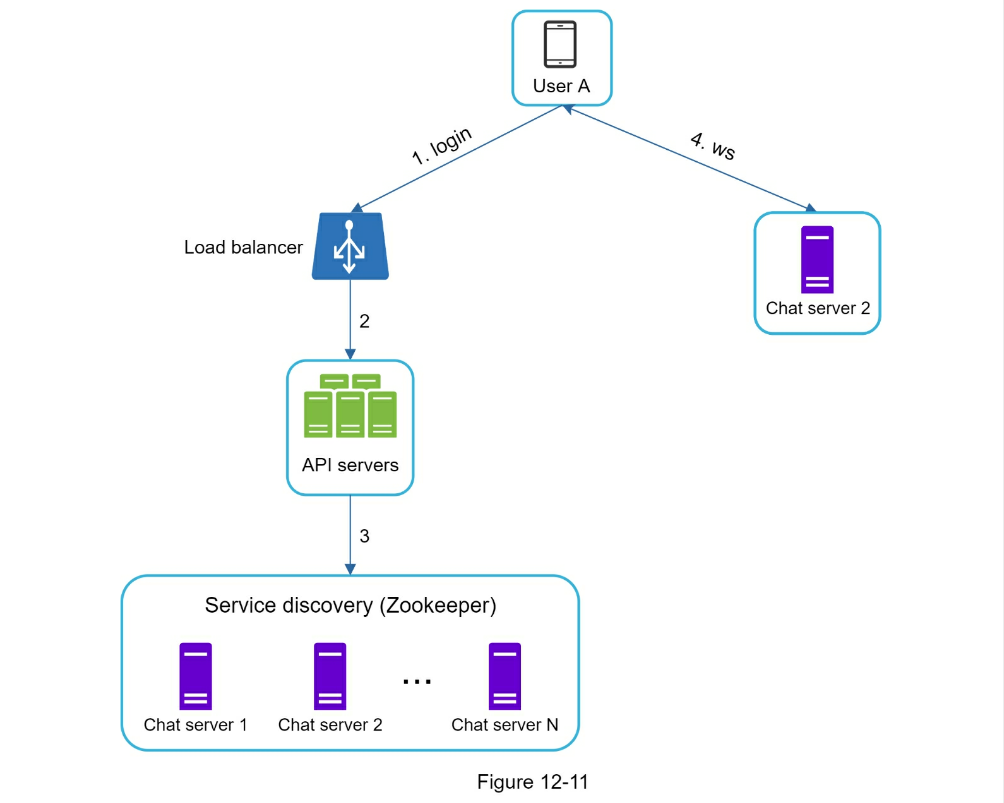
- User A tries to log in to the app.
- The load balancer sends the login request to API servers.
- After the backend authenticates the user, service discovery finds the best
chat server for User A. In this example, server 2 is chosen and the server
info is returned back to User A.
- User A connects to chat server 2 through WebSocket.
Message flows
It is interesting to understand the end-to-end flow of a chat system. In this
section, we will explore 1 on 1 chat flow, message synchronization across
multiple devices and group chat flow.
1 on 1 chat flow
Figure 12-12 explains what happens when User A sends a message to User B.
- User A sends a chat message to Chat server 1.
- Chat server 1 obtains a message ID from the ID generator.
- Chat server 1 sends the message to the message sync queue.
- The message is stored in a key-value store. 5.a. If User B is online, the
message is forwarded to Chat server 2 where User B is connected. 5.b. If
User B is offline, a push notification is sent from push notification (PN)
servers.
- Chat server 2 forwards the message to User B. There is a persistent
WebSocket connection between User B and Chat server 2.
Message synchronization across multiple devices
Many users have multiple devices. We will explain how to sync messages across
multiple devices. Figure 12-13 shows an example of message synchronization.
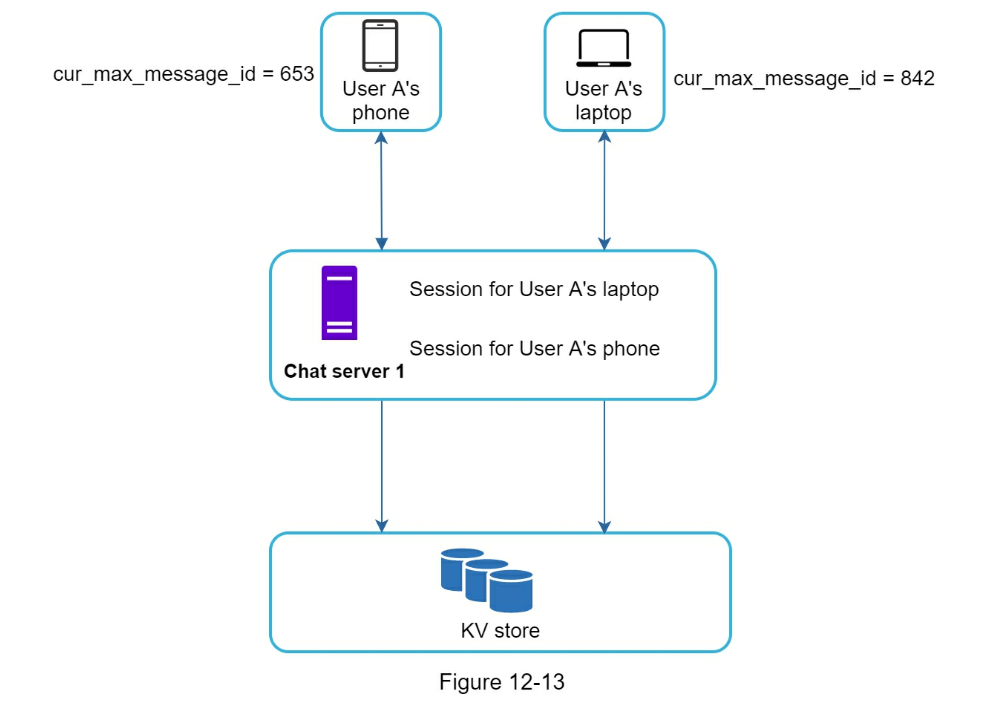
In Figure 12-13, user A has two devices: a phone and a laptop. When User A
logs in to the chat app with her phone, it establishes a WebSocket connection
with Chat server 1. Similarly, there is a connection between the laptop and
Chat server 1.
Each device maintains a variable called cur_max_message_id, which keeps track
of the latest message ID on the device. Messages that satisfy the following two
conditions are considered as news messages:
- The recipient ID is equal to the currently logged-in user ID.
- Message ID in the key-value store is larger than cur_max_message_id .
With distinct cur_max_message_id on each device, message synchronization is
easy as each device can get new messages from the KV store.
Small group chat flow
In comparison to the one-on-one chat, the logic of group chat is more
complicated. Figure 12-14 and 12-15 explain the flow.
Figure 12-14 explains what happens when User A sends a message in a group
chat. Assume there are 3 members in the group (User A, User B and user C).
First, the message from User A is copied to each group member’s message sync
queue: one for User B and the second for User C. You can think of the message
sync queue as an inbox for a recipient. This design choice is good for small
group chat because:
- it simplifies message sync flow as each client only needs to check its own
inbox to get new messages.
- when the group number is small, storing a copy in each recipient’s inbox is
not too expensive.
WeChat uses a similar approach, and it limits a group to 500 members [8].
However, for groups with a lot of users, storing a message copy for each member
is not acceptable.
On the recipient side, a recipient can receive messages from multiple users.
Each recipient has an inbox (message sync queue) which contains messages from
different senders. Figure 12-15 illustrates the design.
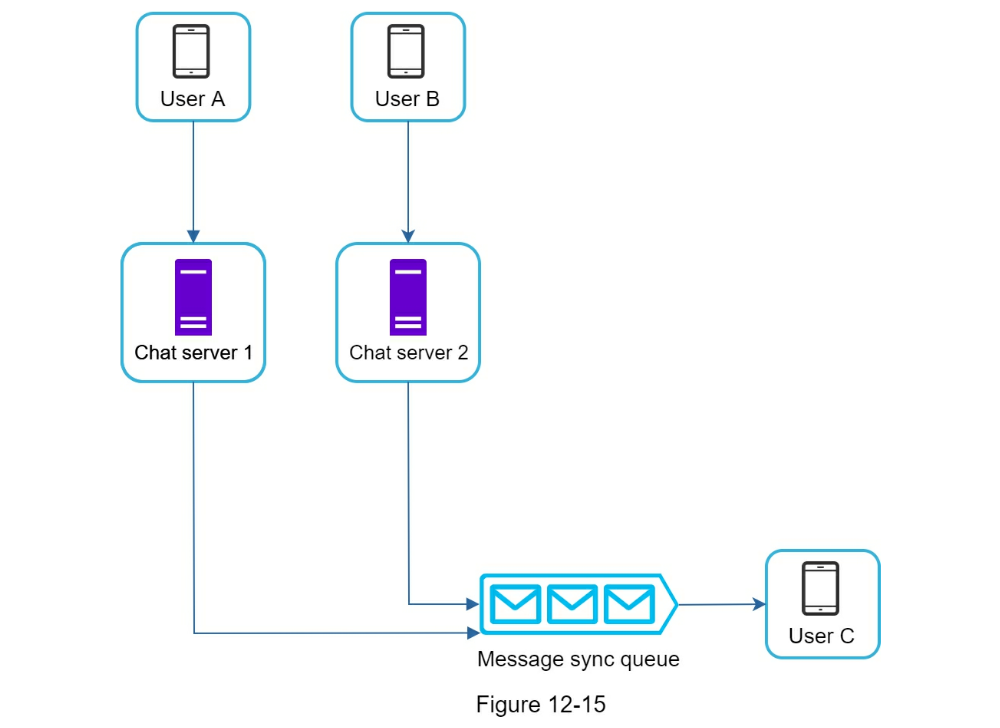
Online presence
An online presence indicator is an essential feature of many chat applications.
Usually, you can see a green dot next to a user’s profile picture or username.
This section explains what happens behind the scenes.
In the high-level design, presence servers are responsible for managing online
status and communicating with clients through WebSocket. There are a few flows
that will trigger online status change. Let us examine each of them.
User login
The user login flow is explained in the “Service Discovery” section. After a
WebSocket connection is built between the client and the real-time service,
user A’s online status and last_active_at timestamp are saved in the KV store.
Presence indicator shows the user is online after she logs in.
User logout
When a user logs out, it goes through the user logout flow as shown in
Figure 12-17. The online status is changed to offline in the KV store. The
presence indicator shows a user is offline.
User disconnection
We all wish our internet connection is consistent and reliable. However, that
is not always the case; thus, we must address this issue in our design. When a
user disconnects from the internet, the persistent connection between the
client and server is lost. A naive way to handle user disconnection is to mark
the user as offline and change the status to online when the connection
re-establishes. However, this approach has a major flaw. It is common for users
to disconnect and reconnect to the internet frequently in a short time. For
example, network connections can be on and off while a user goes through a
tunnel. Updating online status on every disconnect/reconnect would make the
presence indicator change too often, resulting in poor user experience.
We introduce a heartbeat mechanism to solve this problem. Periodically, an
online client sends a heartbeat event to presence servers. If presence servers
receive a heartbeat event within a certain time, say x seconds from the client,
a user is considered as online. Otherwise, it is offline.
In Figure 12-18, the client sends a heartbeat event to the server every 5
seconds. After sending 3 heartbeat events, the client is disconnected and does
not reconnect within x = 30 seconds (This number is arbitrarily chosen to
demonstrate the logic). The online status is changed to offline.
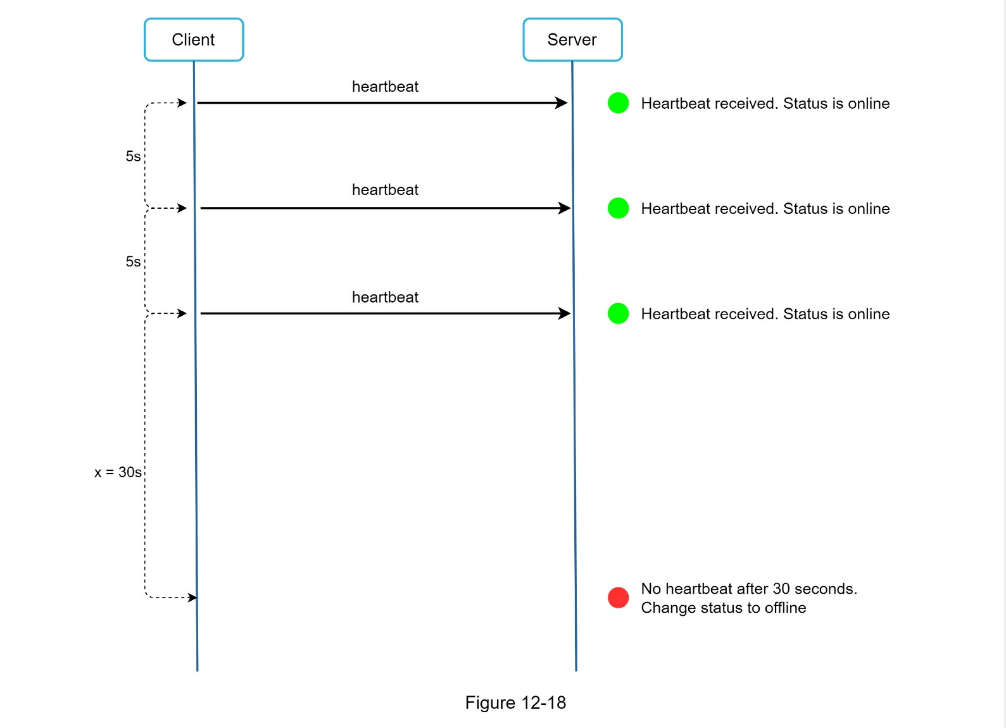
Online status fanout
How do user A’s friends know about the status changes? Figure 12-19 explains
how it works.
Presence servers use a publish-subscribe model, in which each friend pair
maintains a channel. When User A’s online status changes, it publishes the
event to three channels, channel A-B, A-C, and A-D. Those three channels are
subscribed by User B, C, and D, respectively. Thus, it is easy for friends to
get online status updates. The communication between clients and servers is
through real-time WebSocket.
The above design is effective for a small user group. For instance, WeChat uses
a similar approach because its user group is capped to 500. For larger groups,
informing all members about online status is expensive and time consuming.
Assume a group has 100,000 members.
Each status change will generate 100,000 events. To solve the performance
bottleneck, a possible solution is to fetch online status only when a user
enters a group or manually refreshes the friend list.
Step 4 - Wrap up
In this chapter, we presented a chat system architecture that supports both
1-to-1 chat and small group chat. WebSocket is used for real-time communication
between the client and server. The chat system contains the following
components: chat servers for real-time messaging, presence servers for managing
online presence, push notification servers for sending push notifications,
key-value stores for chat history persistence and API servers for other
functionalities.
If you have extra time at the end of the interview, here are additional talking
points:
- Extend the chat app to support media files such as photos and videos. Media
files are significantly larger than text in size. Compression, cloud storage,
and thumbnails are interesting topics to talk about.
- End-to-end encryption. Whatsapp supports end-to-end encryption for messages.
Only the sender and the recipient can read messages. Interested readers
should refer to the article in the reference materials [9].
- Caching messages on the client-side is effective to reduce the data transfer
between the client and server.
- Improve load time. Slack built a geographically distributed network to cache
users’ data, channels, etc. for better load time [10].
- Error handling.
- The chat server error. There might be hundreds of thousands, or even more
persistent connections to a chat server. If a chat server goes offline,
service discovery (Zookeeper) will provide a new chat server for clients to
establish new connections with.
- Message resent mechanism. Retry and queueing are common techniques for
resending messages.
Reference Materials
- Erlang at Facebook: https://www.erlangfactory.com/upload/presentations/31/EugeneLetuchy-ErlangatFacebook.pdf
- Messenger and WhatsApp process 60 billion messages a day: https://www.theverge.com/2016/4/12/11415198/facebook-messenger-whatsapp-numbermessages-vs-sms-f8-2016
- Long tail: https://en.wikipedia.org/wiki/Long_tail
- The Underlying Technology of Messages: https://www.facebook.com/notes/facebookengineering/the-underlying-technology-of-messages/454991608919/
- How Discord Stores Billions of Messages: https://blog.discordapp.com/how-discordstores-billions-of-messages-7fa6ec7ee4c7
- Announcing Snowflake: https://blog.twitter.com/engineering/en_us/a/2010/announcingsnowflake.html
- Apache ZooKeeper: https://zookeeper.apache.org/
- From nothing: the evolution of WeChat background system (Article in Chinese): https://www.infoq.cn/article/the-road-of-the-growth-weixin-background
- End-to-end encryption: https://faq.whatsapp.com/en/android/28030015/
- Flannel: An Application-Level Edge Cache to Make Slack Scale: https://slack.engineering/flannel-an-application-level-edge-cache-to-make-slack-scaleb8a6400e2f6b
CHAPTER 13: DESIGN A SEARCH AUTOCOMPLETE SYSTEM
When searching on Google or shopping at Amazon, as you type in the search box, one or
more matches for the search term are presented to you. This feature is referred to as
autocomplete, typeahead, search-as-you-type, or incremental search. Figure 13-1 presents an
example of a Google search showing a list of autocompleted results when “dinner” is typed
into the search box. Search autocomplete is an important feature of many products. This leads
us to the interview question: design a search autocomplete system, also called “design top k”
or “design top k most searched queries”.
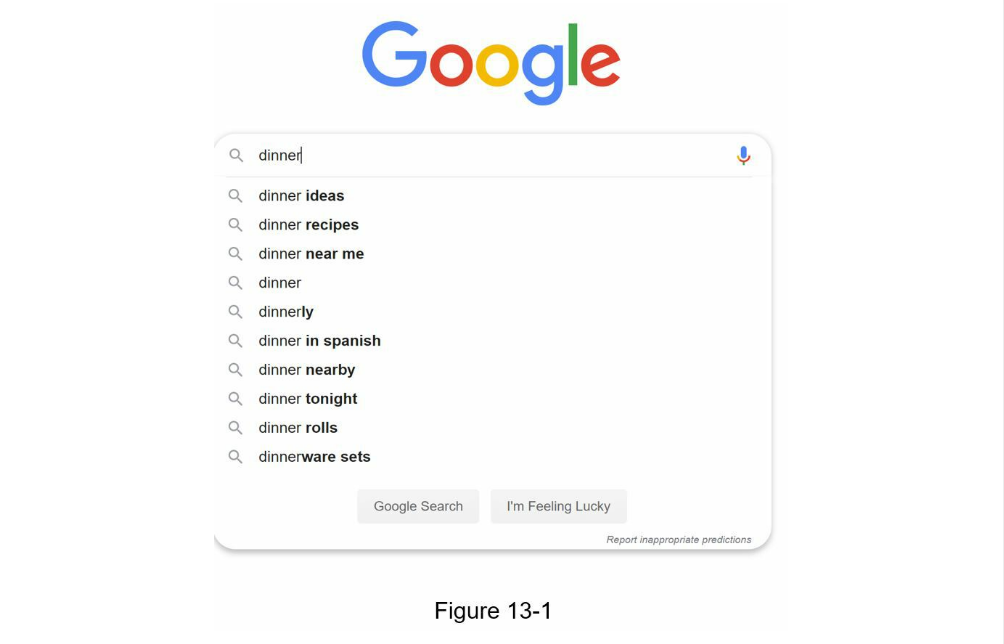
Step 1 - Understand the problem and establish design scope
The first step to tackle any system design interview question is to ask enough questions to
clarify requirements. Here is an example of candidate-interviewer interaction:
Candidate: Is the matching only supported at the beginning of a search query or in the
middle as well?
- Interviewer: Only at the beginning of a search query.
Candidate: How many autocomplete suggestions should the system return?
Candidate: How does the system know which 5 suggestions to return?
- Interviewer: This is determined by popularity, decided by the historical
query frequency.
Candidate: Does the system support spell check?
- Interviewer: No, spell check or autocorrect is not supported.
Candidate: Are search queries in English?
- Interviewer: Yes. If time allows at the end, we can discuss multi-language
support.
Candidate: Do we allow capitalization and special characters?
- Interviewer: No, we assume all search queries have lowercase alphabetic
characters.
Candidate: How many users use the product?
- Interviewer: 10 million DAU.
Requirements
Here is a summary of the requirements:
-
Fast response time: As a user types a search query, autocomplete
suggestions must show up fast enough. An article about Facebook’s
autocomplete system [1] reveals that the system needs to return results
within 100 milliseconds. Otherwise it will cause stuttering.
-
Relevant: Autocomplete suggestions should be relevant to the search term.
-
Sorted: Results returned by the system must be sorted by popularity or
other ranking models.
-
Scalable: The system can handle high traffic volume.
-
Highly available: The system should remain available and accessible when
part of the system is offline, slows down, or experiences unexpected network
errors.
Back of the envelope estimation
- Assume 10 million daily active users (DAU).
- An average person performs 10 searches per day.
- 20 bytes of data per query string:
- Assume we use ASCII character encoding. 1 character = 1 byte
- Assume a query contains 4 words, and each word contains 5 characters on
average.
- That is 4 x 5 = 20 bytes per query.
- For every character entered into the search box, a client sends a request to
the backend for autocomplete suggestions. On average, 20 requests are sent
for each search query. For example, the following 6 requests are sent to the
backend by the time you finish typing “dinner”. search?q=d search?q=di
search?q=din search?q=dinn search?q=dinne search?q=dinner
- ~24,000 query per second (QPS) = 10,000,000 users * 10 queries / day * 20
characters / 24 hours / 3600 seconds.
- Peak QPS = QPS * 2 = ~48,000
- Assume 20% of the daily queries are new. 10 million * 10 queries / day * 20
byte per query * 20% = 0.4 GB. This means 0.4GB of new data is added to
storage daily.
Step 2 - Propose high-level design and get buy-in
At the high-level, the system is broken down into two:
- Data gathering service: It gathers user input queries and aggregates them in
real-time.
Real-time processing is not practical for large data sets; however, it is a
good starting point. We will explore a more realistic solution in deep dive.
- Query service: Given a search query or prefix, return 5 most frequently
searched terms.
Data gathering service
Let us use a simplified example to see how data gathering service works. Assume
we have a frequency table that stores the query string and its frequency as
shown in Figure 13-2. In the beginning, the frequency table is empty.
Later, users enter queries “twitch”, “twitter”, “twitter,” and “twillo”
sequentially. Figure 13-2 shows how the frequency table is updated.
Query service
Assume we have a frequency table as shown in Table 13-1. It has two fields.
- Query: it stores the query string.
- Frequency: it represents the number of times a query has been searched.
When a user types “tw” in the search box, the following top 5 searched queries
are displayed (Figure 13-3), assuming the frequency table is based on Table
13-1.
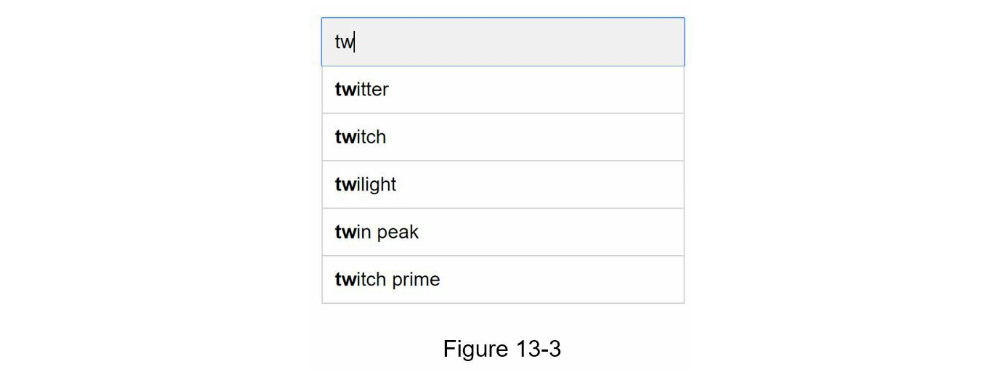
To get top 5 frequently searched queries, execute the following SQL query:
select * from frequency_table
where query like `prefix%`
order by frequence desc
limit 5
This is an acceptable solution when the data set is small. When it is large,
accessing the database becomes a bottleneck. We will explore optimizations in
deep dive.
Step 3 - Design deep dive
In the high-level design, we discussed data gathering service and query service. The highlevel design is not optimal, but it serves as a good starting point. In this section, we will dive
deep into a few components and explore optimizations as follows:
- Trie data structure
- Data gathering service
- Query service
- Scale the storage
- Trie operations
Trie data structure
Relational databases are used for storage in the high-level design. However,
fetching the top 5 search queries from a relational database is inefficient.
The data structure trie (prefix tree) is used to overcome the problem. As trie
data structure is crucial for the system, we will dedicate significant time to
design a customized trie. Please note that some of the ideas are from articles
[2] and [3].
Understanding the basic trie data structure is essential for this interview
question. However, this is more of a data structure question than a system
design question. Besides, many online materials explain this concept. In this
chapter, we will only discuss an overview of the trie data structure and focus
on how to optimize the basic trie to improve response time.
Trie (pronounced “try”) is a tree-like data structure that can compactly
store strings. The name comes from the word retrieval, which indicates it is
designed for string retrieval operations. The main idea of trie consists of the
following:
- A trie is a tree-like data structure.
- The root represents an empty string.
- Each node stores a character and has 26 children, one for each possible
character. To save space, we do not draw empty links.
- Each tree node represents a single word or a prefix string.
Figure 13-5 shows a trie with search queries “tree”, “try”, “true”, “toy”,
“wish”, “win”. Search queries are highlighted with a thicker border.
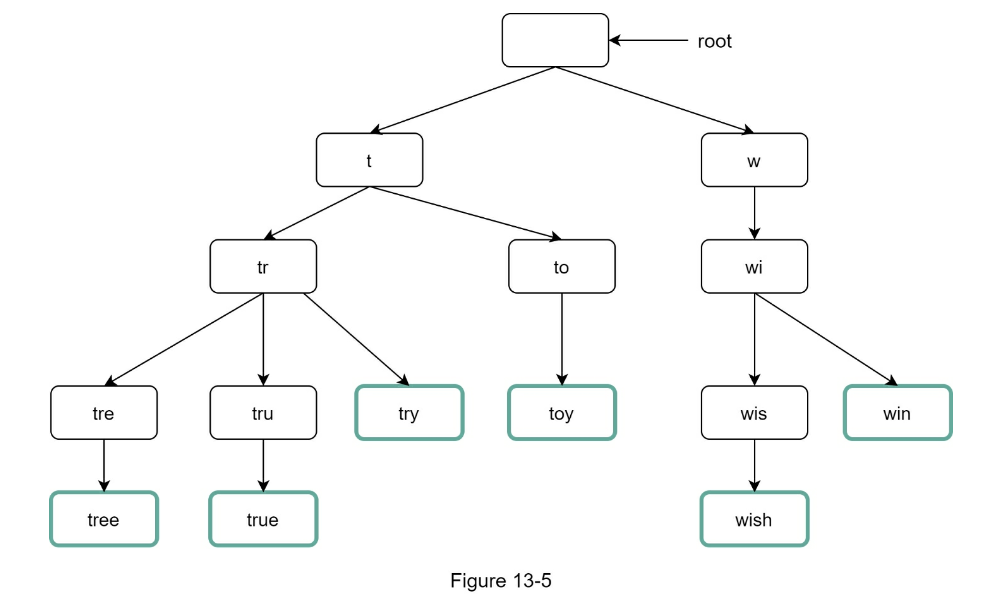
Basic trie data structure stores characters in nodes. To support sorting by
frequency, frequency info needs to be included in nodes. Assume we have the
following frequency table.
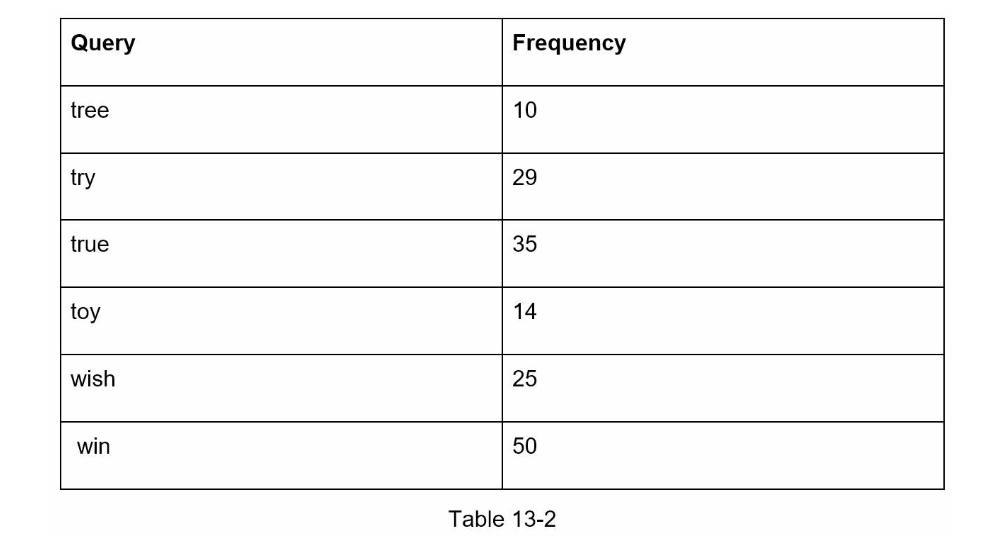
After adding frequency info to nodes, updated trie data structure is shown in Figure 13-6.
How does autocomplete work with trie? Before diving into the algorithm, let us define some
terms.
-
p: length of a prefix
-
n: total number of nodes in a trie
-
c: number of children of a given node
Steps to get top k most searched queries are listed below:
- Find the prefix. Time complexity:
O(p).
- Traverse the subtree from the prefix node to get all valid children. A child
is valid if it can form a valid query string. Time complexity:
O(c)
- Sort the children and get top k. Time complexity:
O(clogc)
Let us use an example as shown in Figure 13-7 to explain the algorithm.
Assume k equals to 2 and a user types “tr” in the search box. The algorithm
works as follows:
- Step 1: Find the prefix node “tr”.
- Step 2: Traverse the subtree to get all valid children. In this case, nodes
[tree: 10], [true: 35], [try: 29] are valid.
- Step 3: Sort the children and get top 2. [true: 35] and [try: 29] are the top
2 queries with prefix “tr”.
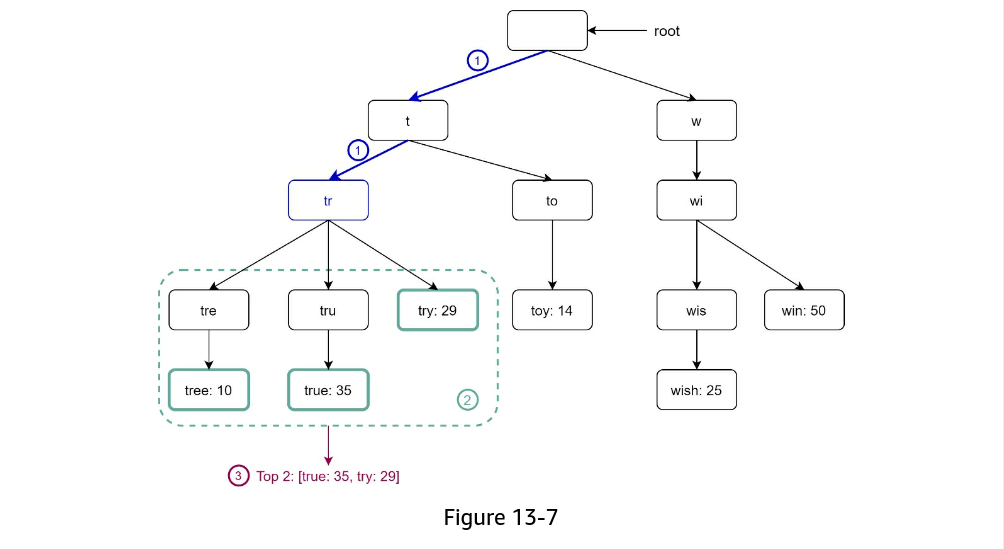
The time complexity of this algorithm is the sum of time spent on each step
mentioned above:
The above algorithm is straightforward. However, it is too slow because we need
to traverse the entire trie to get top k results in the worst-case scenario.
Below are two optimizations:
- Limit the max length of a prefix
- Cache top search queries at each node
Let us look at these optimizations one by one.
Limit the max length of a prefix
Users rarely type a long search query into the search box. Thus, it is safe to
say p is a small integer number, say 50. If we limit the length of a prefix,
the time complexity for “Find the prefix” can be reduced from O(p) to O(small
constant), aka O(1).
Cache top search queries at each node
To avoid traversing the whole trie, we store top k most frequently used queries
at each node.
Since 5 to 10 autocomplete suggestions are enough for users, k is a relatively
small number.
In our specific case, only the top 5 search queries are cached.
By caching top search queries at every node, we significantly reduce the time
complexity to retrieve the top 5 queries. However, this design requires a lot
of space to store top queries at every node. Trading space for time is well
worth it as fast response time is very important.
Figure 13-8 shows the updated trie data structure. Top 5 queries are stored on each node. For
example, the node with prefix “be” stores the following: [best: 35, bet: 29, bee: 20, be: 15,
beer: 10].
Let us revisit the time complexity of the algorithm after applying those two
optimizations:
- Find the prefix node. Time complexity:
O(1)
- Return top k. Since top k queries are cached, the time complexity for this
step is
O(1).
As the time complexity for each of the steps is reduced to O(1), our algorithm
takes only O(1) to fetch top k queries.
Data gathering service
In our previous design, whenever a user types a search query, data is updated
in real-time.
This approach is not practical for the following two reasons:
- Users may enter billions of queries per day. Updating the trie on every query
significantly slows down the query service.
- Top suggestions may not change much once the trie is built. Thus, it is
unnecessary to update the trie frequently.
To design a scalable data gathering service, we examine where data comes from
and how data is used. Real-time applications like Twitter require up to date
autocomplete suggestions.
However, autocomplete suggestions for many Google keywords might not change
much on a daily basis.
Despite the differences in use cases, the underlying foundation for data
gathering service remains the same because data used to build the trie is
usually from analytics or logging services.
Figure 13-9 shows the redesigned data gathering service. Each component is
examined one by one.
Analytics Logs. It stores raw data about search queries. Logs are append-only
and are not indexed. Table 13-3 shows an example of the log file.
Aggregators. The size of analytics logs is usually very large, and data is
not in the right format. We need to aggregate data so it can be easily
processed by our system.
Depending on the use case, we may aggregate data differently. For real-time
applications such as Twitter, we aggregate data in a shorter time interval as
real-time results are important. On the other hand, aggregating data less
frequently, say once per week, might be good enough for many use cases. During
an interview session, verify whether real-time results are important. We assume
trie is rebuilt weekly.
Aggregated Data.
Table 13-4 shows an example of aggregated weekly data. “time” field represents the start
time of a week. “frequency” field is the sum of the occurrences for the corresponding query
in that week.
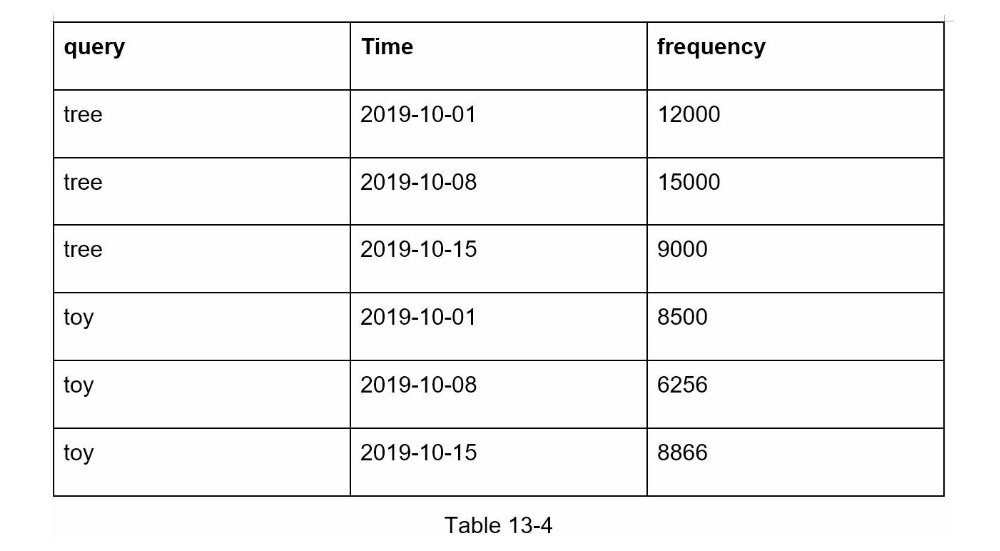
Workers. Workers are a set of servers that perform asynchronous jobs at regular intervals. They build the trie data structure and store it in Trie DB.
Trie Cache. Trie Cache is a distributed cache system that keeps trie in
memory for fast read. It takes a weekly snapshot of the DB.
Trie DB. Trie DB is the persistent storage. Two options are available to
store the data:
- Document store: Since a new trie is built weekly, we can periodically take a
snapshot of it, serialize it, and store the serialized data in the database.
Document stores like MongoDB [4] are good fits for serialized data.
- Key-value store: A trie can be represented in a hash table form [4] by
applying the following logic:
- Every prefix in the trie is mapped to a key in a hash table.
- Data on each trie node is mapped to a value in a hash table.
Figure 13-10 shows the mapping between the trie and hash table.
In Figure 13-10, each trie node on the left is mapped to the <key, value>
pair on the right. If you are unclear how key-value stores work, refer to
Chapter 6: Design a key-value store.
Query service
In the high-level design, query service calls the database directly to fetch
the top 5 results.
Figure 13-11 shows the improved design as previous design is inefficient.
- A search query is sent to the load balancer.
- The load balancer routes the request to API servers.
- API servers get trie data from Trie Cache and construct autocomplete
suggestions for the client.
- In case the data is not in Trie Cache, we replenish data back to the cache.
This way, all subsequent requests for the same prefix are returned from the
cache. A cache miss can happen when a cache server is out of memory or
offline.
Query service requires lightning-fast speed. We propose the following
optimizations:
-
AJAX request. For web applications, browsers usually send AJAX requests to
fetch autocomplete results. The main benefit of AJAX is that
sending/receiving a request/response does not refresh the whole web page.
-
Browser caching. For many applications, autocomplete search suggestions may
not change much within a short time. Thus, autocomplete suggestions can be
saved in browser cache to allow subsequent requests to get results from the
cache directly. Google search engine uses the same cache mechanism.
Figure 13-12 shows the response header when you type “system design
interview” on the Google search engine. As you can see, Google caches the
results in the browser for 1 hour. Please note: “private” in cache-control
means results are intended for a single user and must not be cached by a
shared cache. “maxage=3600” means the cache is valid for 3600 seconds, aka,
an hour.
-
Data sampling: For a large-scale system, logging every search query
requires a lot of processing power and storage. Data sampling is important.
For instance, only 1 out of every N requests is logged by the system.
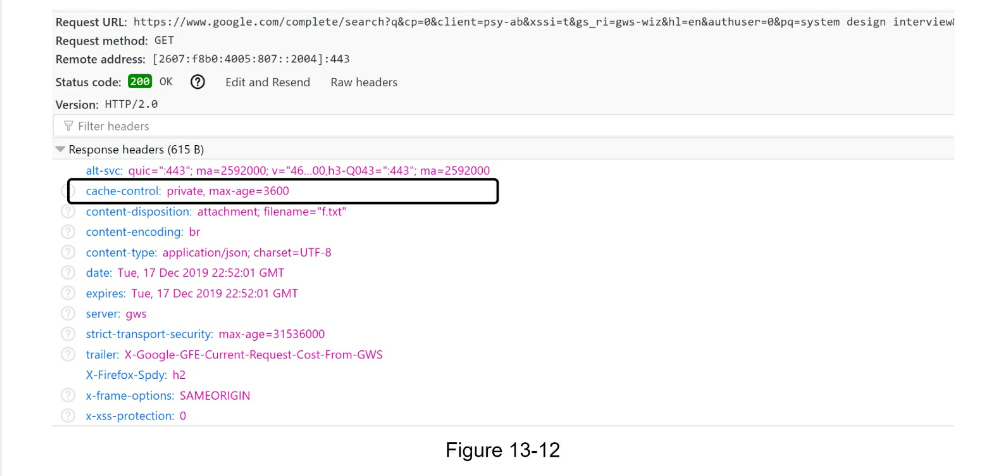
Trie operations
Trie is a core component of the autocomplete system. Let us look at how trie
operations (create, update, and delete) work.
Create
Trie is created by workers using aggregated data. The source of data is from Analytics Log/DB.
Update
There are two ways to update the trie.
- Update the trie weekly. Once a new trie is created, the new trie replaces
the old one.
- Update individual trie node directly. We try to avoid this operation because
it is slow. However, if the size of the trie is small, it is an acceptable
solution. When we update a trie node, its ancestors all the way up to the
root must be updated because ancestors store top queries of children.
Figure 13-13 shows an example of how the update operation works. On the
left side, the search query “beer” has the original value 10. On the right
side, it is updated to 30. As you can see, the node and its ancestors have
the “beer” value updated to 30.
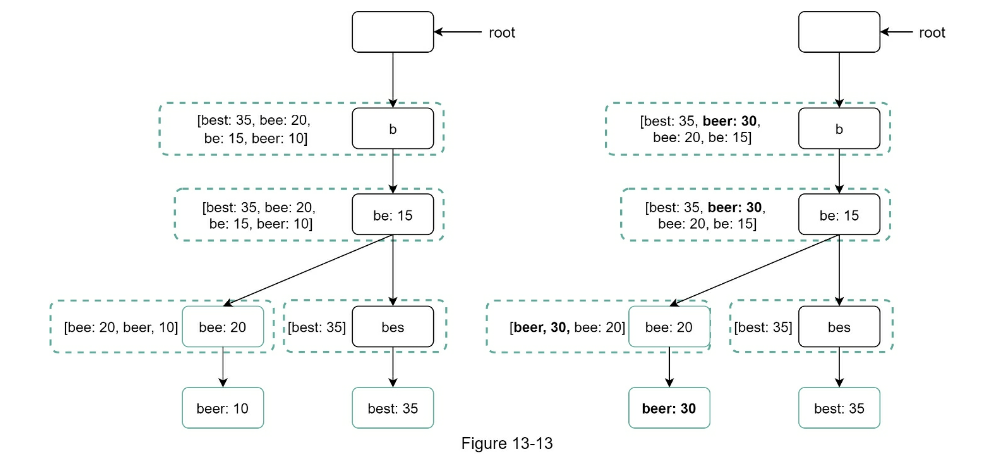
Delete
We have to remove hateful, violent, sexually explicit, or dangerous
autocomplete suggestions. We add a filter layer (Figure 13-14) in front of
the Trie Cache to filter out unwanted suggestions. Having a filter layer gives
us the flexibility of removing results based on different filter rules.
Unwanted suggestions are removed physically from the database asynchronically
so the correct data set will be used to build trie in the next update cycle.
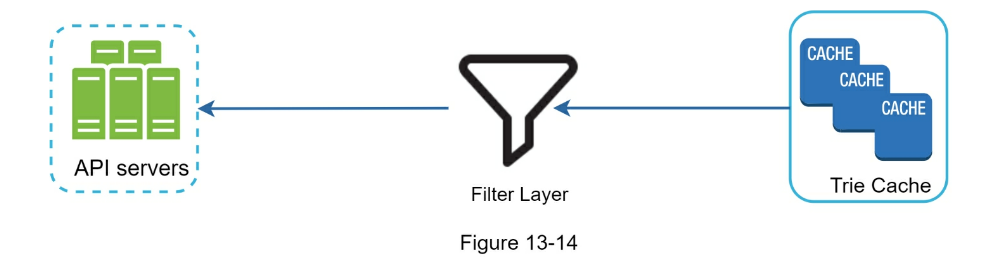
Scale the storage
Now that we have developed a system to bring autocomplete queries to users, it
is time to solve the scalability issue when the trie grows too large to fit in
one server.
Since English is the only supported language, a naive way to shard is based on
the first character. Here are some examples.
- If we need two servers for storage, we can store queries starting with ‘a’ to
‘m’ on the first server, and ‘n’ to ‘z’ on the second server.
- If we need three servers, we can split queries into ‘a’ to ‘i’, ‘j’ to ‘r’
and ‘s’ to ‘z’.
Following this logic, we can split queries up to 26 servers because there are
26 alphabetic characters in English. Let us define sharding based on the first
character as first level sharding. To store data beyond 26 servers, we can
shard on the second or even at the third level. For example, data queries that
start with ‘a’ can be split into 4 servers: ‘aa-ag’, ‘ahan’, ‘ao-au’, and
‘av-az’.
At the first glance this approach seems reasonable, until you realize that
there are a lot more words that start with the letter ‘c’ than ‘x’. This
creates uneven distribution.
To mitigate the data imbalance problem, we analyze historical data distribution
pattern and apply smarter sharding logic as shown in Figure 13-15. The
shard map manager maintains a lookup database for identifying where rows should
be stored. For example, if there are a similar number of historical queries for
‘s’ and for ‘u’, ‘v’, ‘w’, ‘x’, ‘y’ and ‘z’ combined, we can maintain two
shards: one for ‘s’ and one for ‘u’ to ‘z’.
Step 4 - Wrap up
After you finish the deep dive, your interviewer might ask you some follow up questions.
Interviewer: How do you extend your design to support multiple languages?
- To support other non-English queries, we store Unicode characters in trie
nodes. If you are not familiar with Unicode, here is the definition: “an
encoding standard covers all the characters for all the writing systems of
the world, modern and ancient” [5].
Interviewer: What if top search queries in one country are different from others?
- In this case, we might build different tries for different countries. To
improve the response time, we can store tries in CDNs.
Interviewer: How can we support the trending (real-time) search queries?
- Assuming a news event breaks out, a search query suddenly becomes popular.
Our original design will not work because:
- Offline workers are not scheduled to update the trie yet because this is
scheduled to run on weekly basis.
- Even if it is scheduled, it takes too long to build the trie.
Building a real-time search autocomplete is complicated and is beyond the scope
of this book so we will only give a few ideas:
- Reduce the working data set by sharding.
- Change the ranking model and assign more weight to recent search queries.
- Data may come as streams, so we do not have access to all the data at once.
Streaming data means data is generated continuously. Stream processing
requires a different set of systems: Apache Hadoop MapReduce [6], Apache
Spark Streaming [7], Apache Storm [8], Apache Kafka [9], etc. Because all
those topics require specific domain knowledge, we are not going into detail
here.
Reference Materials
- The Life of a Typeahead Query: https://www.facebook.com/notes/facebookengineering/the-life-of-a-typeahead-query/389105248919/
- How We Built Prefixy: A Scalable Prefix Search Service for Powering Autocomplete: https://medium.com/@prefixyteam/how-we-built-prefixy-a-scalable-prefix-search-servicefor-powering-autocomplete-c20f98e2eff1
- Prefix Hash Tree An Indexing Data Structure over Distributed Hash Tables: https://people.eecs.berkeley.edu/~sylvia/papers/pht.pdf
- MongoDB wikipedia: https://en.wikipedia.org/wiki/MongoDB
- Unicode frequently asked questions: https://www.unicode.org/faq/basic_q.html
- Apache hadoop: https://hadoop.apache.org/
- Spark streaming: https://spark.apache.org/streaming/
- Apache storm: https://storm.apache.org/
- Apache kafka: https://kafka.apache.org/documentation/
CHAPTER 14: DESIGN YOUTUBE
In this chapter, you are asked to design YouTube. The solution to this question
can be applied to other interview questions like designing a video sharing
platform such as Netflix and Hulu.
YouTube looks simple: content creators upload videos and viewers click play. Is
it really that simple? Not really. There are lots of complex technologies
underneath the simplicity. Let us look at some impressive statistics,
demographics, and fun facts of YouTube in 2020 [1] [2].
- Total number of monthly active users: 2 billion.
- Number of videos watched per day: 5 billion.
-
73% of US adults use YouTube.
-
50 million creators on YouTube.
-
YouTube’s Ad revenue was $15.1 billion for the full year 2019, up 36% from
2018.
- YouTube is responsible for 37% of all mobile internet traffic.
- YouTube is available in 80 different languages.
From these statistics, we know YouTube is enormous, global and makes a lot of
money.
Step 1 - Understand the problem and establish design scope
As revealed in Figure 14-1, besides watching a video, you can do a lot more on YouTube. For
example, comment, share, or like a video, save a video to playlists, subscribe to a channel,
etc. It is impossible to design everything within a 45- or 60-minute interview. Thus, it is
important to ask questions to narrow down the scope.
- Candidate: What features are important?
- Interviewer: Ability to upload a video and watch a video.
- Candidate: What clients do we need to support?
- Interviewer: Mobile apps, web browsers, and smart TV.
- Candidate: How many daily active users do we have?
- Candidate: What is the average daily time spent on the product?
- Candidate: Do we need to support international users?
- Interviewer: Yes, a large percentage of users are international users.
- Candidate: What are the supported video resolutions?
- Interviewer: The system accepts most of the video resolutions and formats.
- Candidate: Is encryption required?
- Candidate: Any file size requirement for videos?
- Interviewer: Our platform focuses on small and medium-sized videos. The maximum
allowed video size is 1GB.
- Candidate: Can we leverage some of the existing cloud infrastructures provided by Amazon, Google, or Microsoft?
- Interviewer: That is a great question. Building everything from scratch is unrealistic for most companies
- it is recommended to leverage some of the existing cloud services.
In the chapter, we focus on designing a video streaming service with the
following features:
- Ability to upload videos fast
- Smooth video streaming
- Ability to change video quality
- Low infrastructure cost
- High availability, scalability, and reliability requirements
- Clients supported: mobile apps, web browser, and smart TV
Back of the envelope estimation
The following estimations are based on many assumptions, so it is important to
communicate with the interviewer to make sure she is on the same page.
- Assume the product has 5 million daily active users (DAU).
- Users watch 5 videos per day.
- 10% of users upload 1 video per day.
- Assume the average video size is 300 MB.
- Total daily storage space needed: 5 million * 10% * 300 MB = 150TB
- CDN cost.
- When cloud CDN serves a video, you are charged for data transferred out of the CDN.
- Let us use Amazon’s CDN CloudFront for cost estimation (Figure 14-2) [3].
- Assume 100% of traffic is served from the United States.
- The average cost per GB is $0.02.
- For simplicity, we only calculate the cost of video streaming. 5 million * 5 videos * 0.3GB * $0.02 = $150,000 per day.

From the rough cost estimation, we know serving videos from the CDN costs lots
of money.
Even though cloud providers are willing to lower the CDN costs significantly
for big customers, the cost is still substantial. We will discuss ways to
reduce CDN costs in deep dive.
Step 2 - Propose high-level design and get buy-in
As discussed previously, the interviewer recommended leveraging existing cloud
services instead of building everything from scratch. CDN and blob storage
are the cloud services we will leverage. Some readers might ask why not
building everything by ourselves? Reasons are listed below:
- System design interviews are not about building everything from scratch.
Within the limited time frame, choosing the right technology to do a job
right is more important than explaining how the technology works in detail.
For instance, mentioning blob storage for storing source videos is enough for
the interview. Talking about the detailed design for blob storage could be an
overkill.
- Building scalable blob storage or CDN is extremely complex and costly. Even
large companies like Netflix or Facebook do not build everything themselves.
Netflix leverages Amazon’s cloud services [4], and Facebook uses Akamai’s CDN
[5].
At the high-level, the system comprises three components (Figure 14-3).
Client: You can watch YouTube on your computer, mobile phone, and smartTV.
CDN: Videos are stored in CDN. When you press play, a video is streamed from
the CDN.
API servers: Everything else except video streaming goes through API servers.
This includes feed recommendation, generating video upload URL, updating
metadata database and cache, user signup, etc.
In the question/answer session, the interviewer showed interests in two flows:
- Video uploading flow
- Video streaming flow
We will explore the high-level design for each of them.
Video uploading flow
Figure 14-4 shows the high-level design for the video uploading.
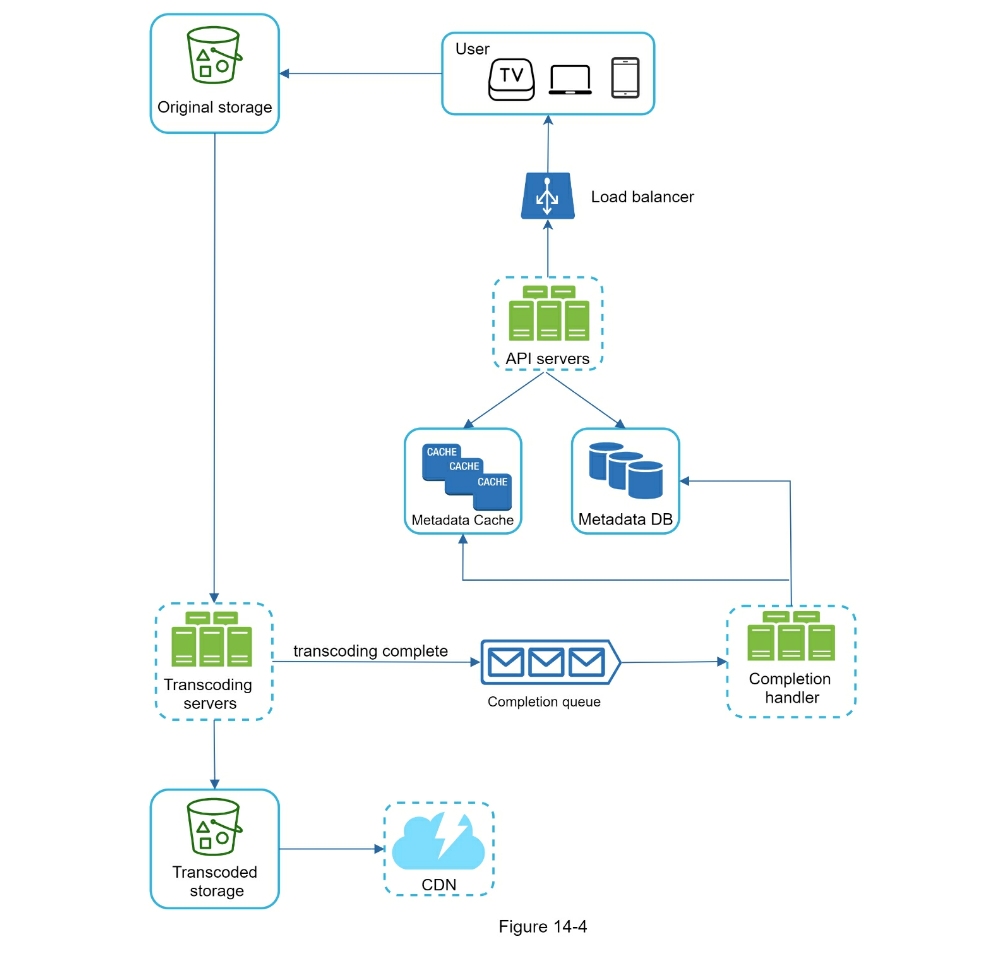
It consists of the following components:
-
User: A user watches YouTube on devices such as a computer, mobile phone,
or smart TV.
-
Load balancer: A load balancer evenly distributes requests among API
servers.
-
API servers: All user requests go through API servers except video
streaming.
-
Metadata DB: Video metadata are stored in Metadata DB. It is sharded and
replicated to meet performance and high availability requirements.
-
Metadata cache: For better performance, video metadata and user objects are
cached.
-
Original storage: A blob storage system is used to store original videos. A
quotation in Wikipedia regarding blob storage shows that: “A Binary Large
Object (BLOB) is a collection of binary data stored as a single entity in a
database management system” [6].
-
Transcoding servers: Video transcoding is also called video encoding. It is
the process of converting a video format to other formats (MPEG, HLS, etc),
which provide the best video streams possible for different devices and
bandwidth capabilities.
-
Transcoded storage: It is a blob storage that stores transcoded video
files.
-
CDN: Videos are cached in CDN. When you click the play button, a video is
streamed from the CDN.
-
Completion queue: It is a message queue that stores information about video
transcoding completion events.
-
Completion handler: This consists of a list of workers that pull event data
from the completion queue and update metadata cache and database.
Now that we understand each component individually, let us examine how the
video uploading flow works. The flow is broken down into two processes running
in parallel.
- Upload the actual video.
- Update video metadata. Metadata contains information about video URL, size,
resolution, format, user info, etc.
Flow 1: upload the actual video
Figure 14-5 shows how to upload the actual video. The explanation is shown
below:
- Videos are uploaded to the original storage.
- Transcoding servers fetch videos from the original storage and start
transcoding.
- Once transcoding is complete, the following two steps are executed in
parallel:
- 3a. Transcoded videos are sent to transcoded storage.
- 3b. Transcoding completion events are queued in the completion queue.
- 3a.1. Transcoded videos are distributed to CDN.
- 3b.1. Completion handler contains a bunch of workers that continuously pull event data from the queue.
- 3b.1.a. and 3b.1.b. Completion handler updates the metadata database and cache when video transcoding is complete.
- API servers inform the client that the video is successfully uploaded and is
ready for streaming.
While a file is being uploaded to the original storage, the client in parallel
sends a request to update the video metadata as shown in Figure 14-6. The
request contains video metadata, including file name, size, format, etc. API
servers update the metadata cache and database.
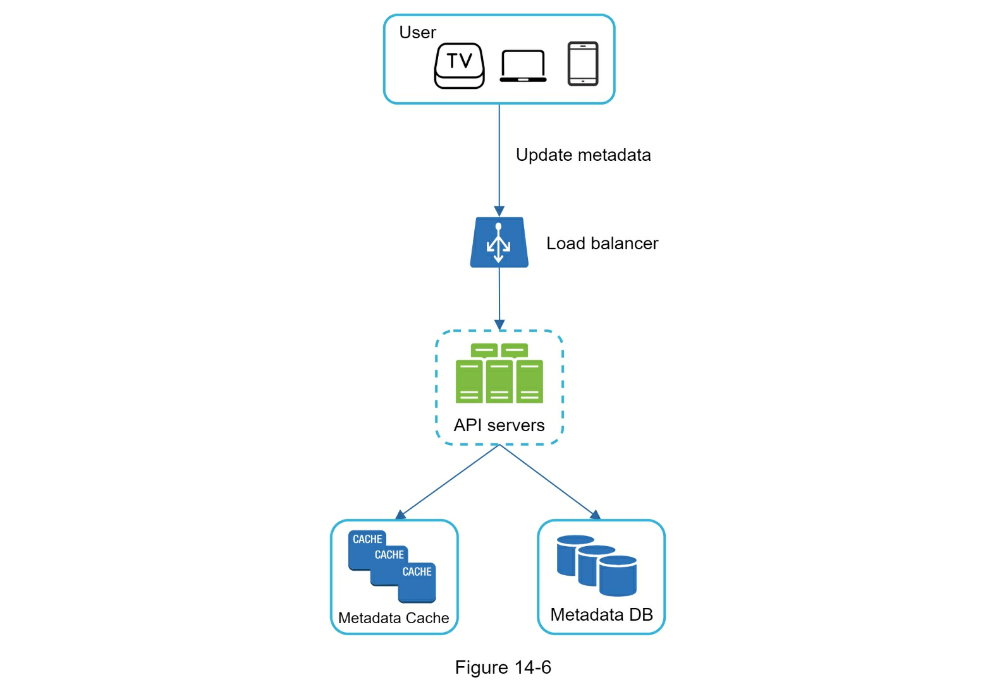
Video streaming flow
Whenever you watch a video on YouTube, it usually starts streaming immediately
and you do not wait until the whole video is downloaded. Downloading means the
whole video is copied to your device, while streaming means your device
continuously receives video streams from remote source videos. When you watch
streaming videos, your client loads a little bit of data at a time so you can
watch videos immediately and continuously.
Before we discuss video streaming flow, let us look at an important concept:
streaming protocol. This is a standardized way to control data transfer for
video streaming. Popular streaming protocols are:
- MPEG–DASH. MPEG stands for “Moving Picture Experts Group” and DASH stands for
“Dynamic Adaptive Streaming over HTTP”.
- Apple HLS. HLS stands for “HTTP Live Streaming”.
- Microsoft Smooth Streaming.
- Adobe HTTP Dynamic Streaming (HDS).
You do not need to fully understand or even remember those streaming protocol
names as they are low-level details that require specific domain knowledge. The
important thing here is to understand that different streaming protocols
support different video encodings and playback players. When we design a video
streaming service, we have to choose the right streaming protocol to support
our use cases. To learn more about streaming protocols, here is an excellent
article [7].
Videos are streamed from CDN directly. The edge server closest to you will deliver the
video. Thus, there is very little latency. Figure 14-7 shows a high level of design for video
streaming.
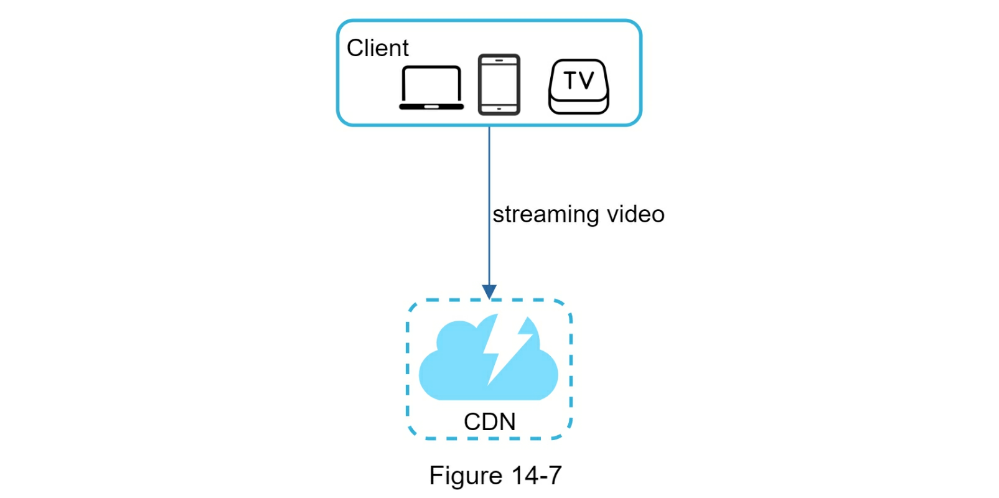
Step 3 - Design deep dive
In the high-level design, the entire system is broken down in two parts: video
uploading flow and video streaming flow. In this section, we will refine both
flows with important optimizations and introduce error handling mechanisms.
Video transcoding
When you record a video, the device (usually a phone or camera) gives the video
file a certain format. If you want the video to be played smoothly on other
devices, the video must be encoded into compatible bitrates and formats.
Bitrate is the rate at which bits are processed over time. A higher bitrate
generally means higher video quality. High bitrate streams need more processing
power and fast internet speed.
Video transcoding is important for the following reasons:
- Raw video consumes large amounts of storage space. An hour-long high
definition video recorded at 60 frames per second can take up a few hundred
GB of space.
- Many devices and browsers only support certain types of video formats. Thus,
it is important to encode a video to different formats for compatibility
reasons.
- To ensure users watch high-quality videos while maintaining smooth playback,
it is a good idea to deliver higher resolution video to users who have high
network bandwidth and lower resolution video to users who have low bandwidth.
- Network conditions can change, especially on mobile devices. To ensure a
video is played continuously, switching video quality automatically or
manually based on network conditions is essential for smooth user experience.
Many types of encoding formats are available; however, most of them contain
two parts:
- Container: This is like a basket that contains the video file, audio, and
metadata. You can tell the container format by the file extension, such as
.avi, .mov, or .mp4.
- Codecs: These are compression and decompression algorithms aim to reduce the
video size while preserving the video quality. The most used video codecs are
H.264, VP9, and HEVC.
Directed acyclic graph (DAG) model
Transcoding a video is computationally expensive and time-consuming. Besides,
different content creators may have different video processing requirements.
For instance, some content creators require watermarks on top of their videos,
some provide thumbnail images themselves, and some upload high definition
videos, whereas others do not.
To support different video processing pipelines and maintain high parallelism,
it is important to add some level of abstraction and let client programmers
define what tasks to execute. For example, Facebook’s streaming video engine
uses a directed acyclic graph (DAG) programming model, which defines tasks in
stages so they can be executed sequentially or parallelly [8]. In our design,
we adopt a similar DAG model to achieve flexibility and parallelism. Figure
14-8 represents a DAG for video transcoding.
In Figure 14-8, the original video is split into video, audio, and
metadata. Here are some of the tasks that can be applied on a video file:
-
Inspection: Make sure videos have good quality and are not malformed.
-
Video encodings: Videos are converted to support different resolutions,
codec, bitrates, etc. Figure 14-9 shows an example of video encoded
files.
-
Thumbnail. Thumbnails can either be uploaded by a user or automatically
generated by the system.
-
Watermark: An image overlay on top of your video contains identifying
information about your video.

Video transcoding architecture
The proposed video transcoding architecture that leverages the cloud services,
is shown in Figure 14-10.

The architecture has six main components: preprocessor, DAG scheduler,
resource manager, task workers, temporary storage, and encoded video as the
output. Let us take a close look at each component.
Preprocessor
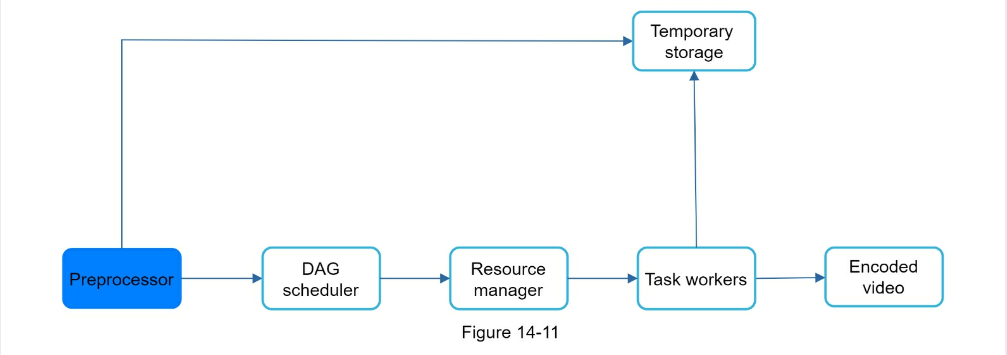
The preprocessor has 4 responsibilities:
- Video splitting. Video stream is split or further split into smaller Group
of Pictures (GOP) alignment. GOP is a group/chunk of frames arranged in a
specific order. Each chunk is an independently playable unit, usually a few
seconds in length.
- Some old mobile devices or browsers might not support video splitting.
Preprocessor split videos by GOP alignment for old clients.
- DAG generation. The processor generates DAG based on configuration files
client programmers write. Figure 14-12 is a simplified DAG
representation which has 2 nodes and 1 edge:
- This DAG representation is generated from the two configuration files below (Figure 14-13):
- Cache data. The preprocessor is a cache for segmented videos. For better
reliability, the preprocessor stores GOPs and metadata in temporary storage.
If video encoding fails, the system could use persisted data for retry
operations.

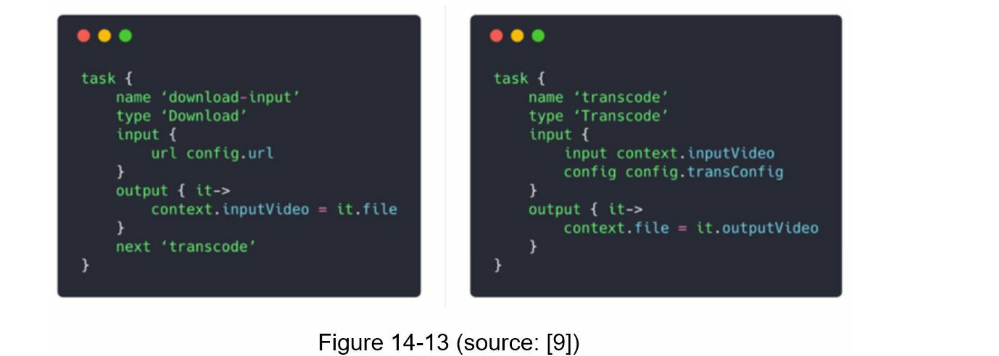
DAG scheduler
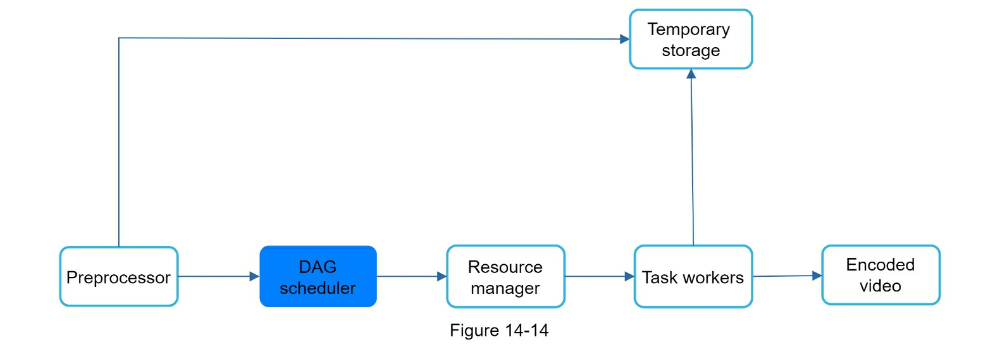
The DAG scheduler splits a DAG graph into stages of tasks and puts them in the task queue
in the resource manager. Figure 14-15 shows an example of how the DAG scheduler works.
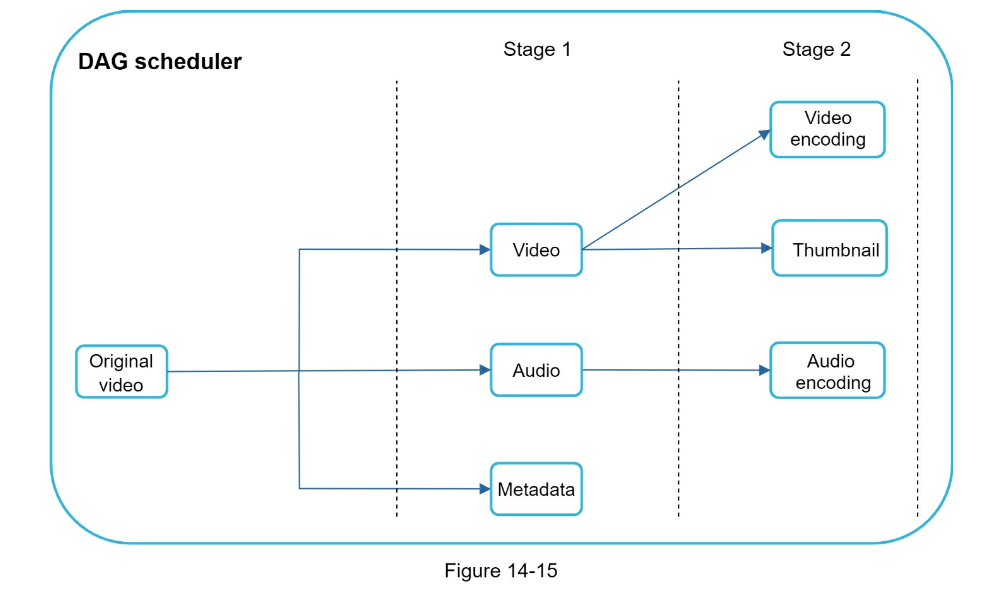
As shown in Figure 14-15, the original video is split into three stages: Stage 1: video, audio,
and metadata. The video file is further split into two tasks in stage 2: video encoding and
thumbnail. The audio file requires audio encoding as part of the stage 2 tasks.
Resource manager
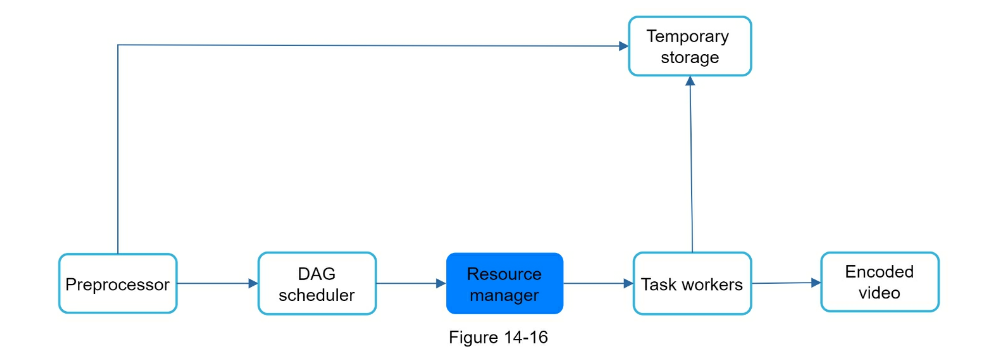
The resource manager is responsible for managing the efficiency of resource
allocation. It contains 3 queues and a task scheduler as shown in Figure
14-17.
- Task queue: It is a priority queue that contains tasks to be executed.
- Worker queue: It is a priority queue that contains worker utilization info.
- Running queue: It contains info about the currently running tasks and workers
running the tasks.
- Task scheduler: It picks the optimal task/worker, and instructs the chosen
task worker to execute the job.
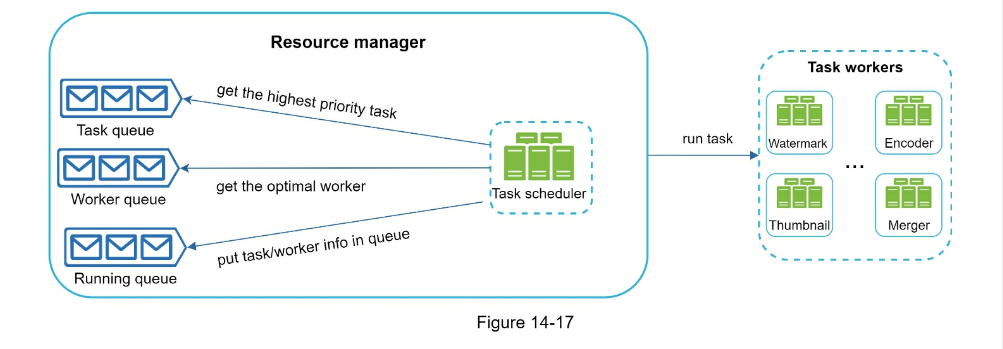
The resource manager works as follows:
- The task scheduler gets the highest priority task from the task queue.
- The task scheduler gets the optimal task worker to run the task from the worker queue.
- The task scheduler instructs the chosen task worker to run the task.
- The task scheduler binds the task/worker info and puts it in the running queue.
- The task scheduler removes the job from the running queue once the job is done.
Task workers
Task workers run the tasks which are defined in the DAG. Different task workers
may run different tasks as shown in Figure 14-19.
Temporary storage
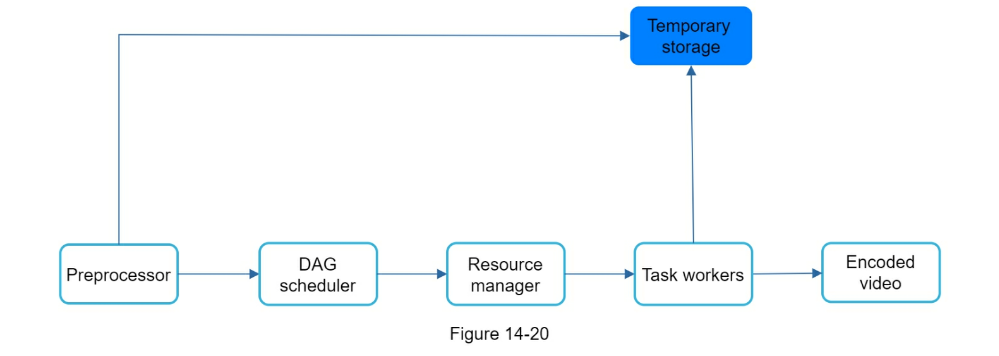
Multiple storage systems are used here. The choice of storage system depends on
factors like data type, data size, access frequency, data life span, etc. For
instance, metadata is frequently accessed by workers, and the data size is
usually small. Thus, caching metadata in memory is a good idea. For video or
audio data, we put them in blob storage. Data in temporary storage is freed up
once the corresponding video processing is complete.
Encoded video
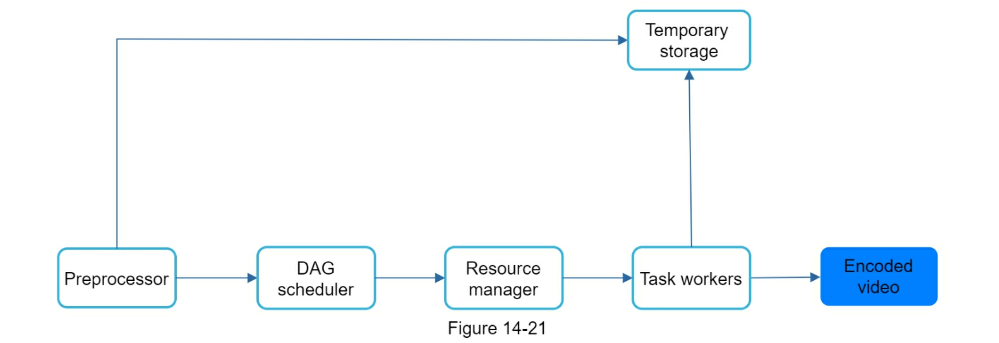
Encoded video is the final output of the encoding pipeline. Here is an example
of the output: funny_720p.mp4 .
System optimizations
At this point, you ought to have good understanding about the video uploading
flow, video streaming flow and video transcoding. Next, we will refine the
system with optimizations, including speed, safety, and cost-saving.
Speed optimization: parallelize video uploading
Uploading a video as a whole unit is inefficient. We can split a video into smaller chunks by
GOP alignment as shown in Figure 14-22.

This allows fast resumable uploads when the previous upload failed. The job of
splitting a video file by GOP can be implemented by the client to improve the
upload speed as shown in Figure 14-23.
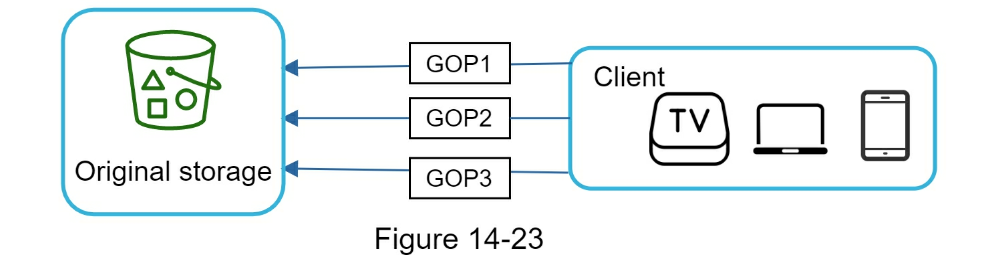
Speed optimization: place upload centers close to users
Another way to improve the upload speed is by setting up multiple upload centers across the
globe (Figure 14-24). People in the United States can upload videos to the North America
upload center, and people in China can upload videos to the Asian upload center. To achieve
this, we use CDN as upload centers.
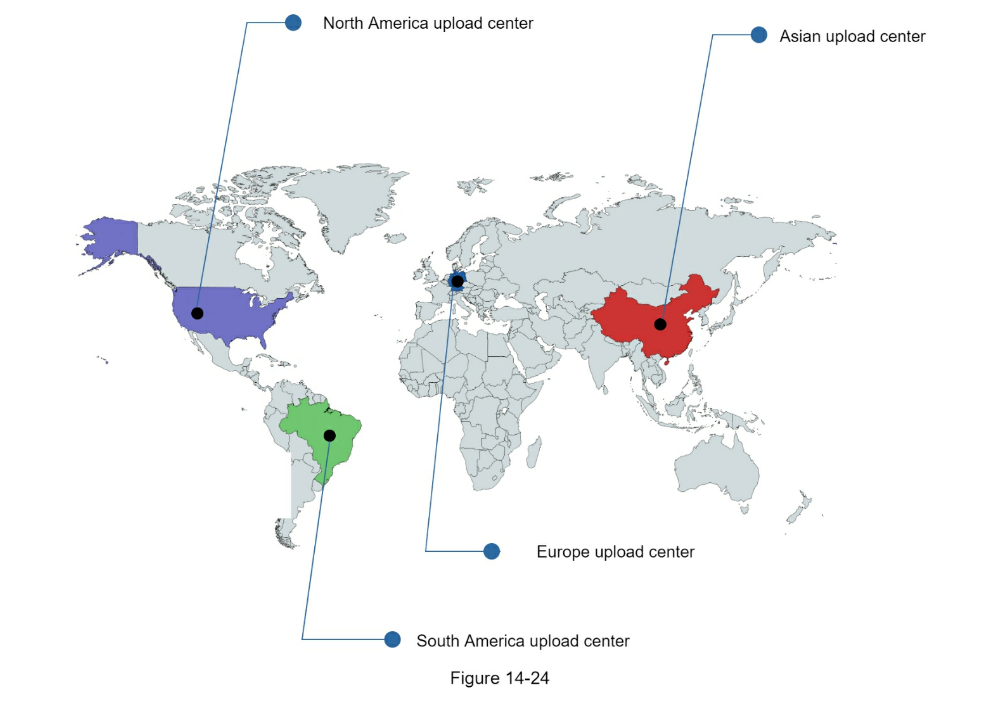
Speed optimization: parallelism everywhere
Achieving low latency requires serious efforts. Another optimization is to
build a loosely coupled system and enable high parallelism.
Our design needs some modifications to achieve high parallelism. Let us zoom in
to the flow of how a video is transferred from original storage to the CDN. The
flow is shown in Figure 14-25, revealing that the output depends on the
input of the previous step. This dependency makes parallelism difficult.
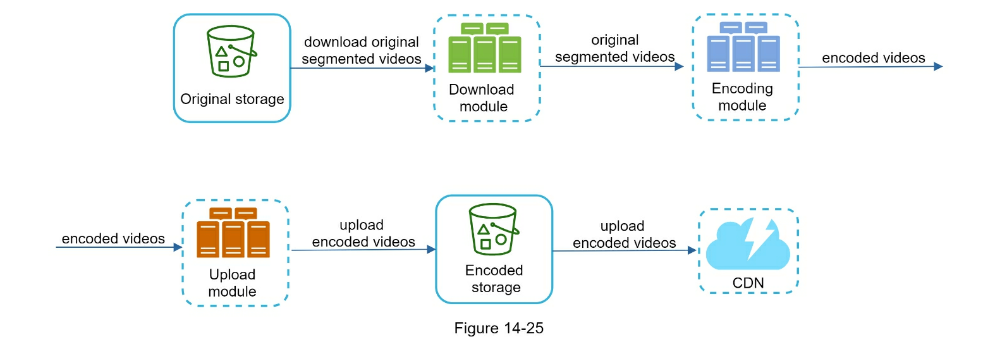
To make the system more loosely coupled, we introduced message queues as shown
in Figure 14-26. Let us use an example to explain how message queues make
the system more loosely coupled.
- Before the message queue is introduced, the encoding module must wait for the
output of the download module.
- After the message queue is introduced, the encoding module does not need to
wait for the output of the download module anymore. If there are events in
the message queue, the encoding module can execute those jobs in parallel.
Safety optimization: pre-signed upload URL
Safety is one of the most important aspects of any product. To ensure only authorized users
upload videos to the right location, we introduce pre-signed URLs as shown in Figure 14-27.
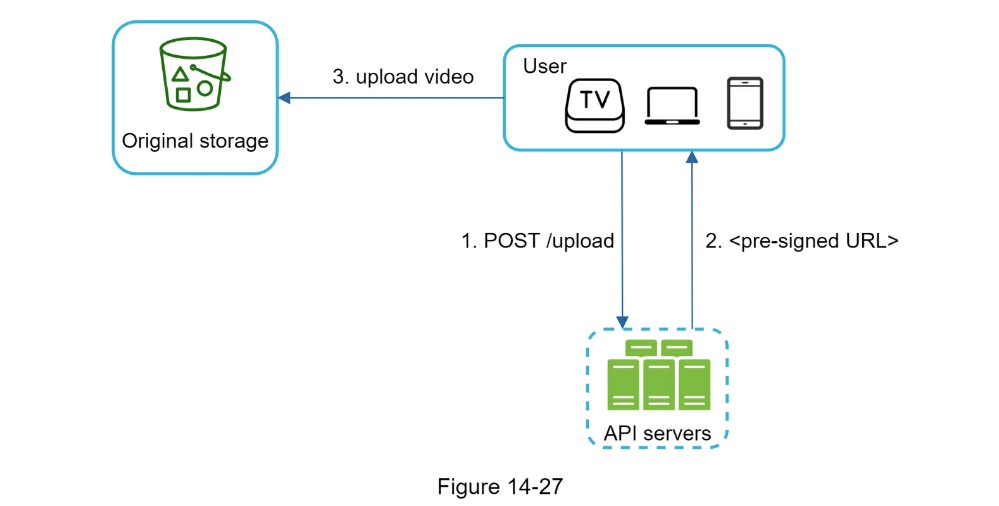
The upload flow is updated as follows:
- The client makes a HTTP request to API servers to fetch the pre-signed URL,
which gives the access permission to the object identified in the URL. The
term pre-signed URL is used by uploading files to Amazon S3. Other cloud
service providers might use a different name. For instance, Microsoft Azure
blob storage supports the same feature, but call it “Shared Access
Signature” [10].
- API servers respond with a pre-signed URL.
- Once the client receives the response, it uploads the video using the
pre-signed URL.
Safety optimization: protect your videos
Many content makers are reluctant to post videos online because they fear their
original videos will be stolen. To protect copyrighted videos, we can adopt one
of the following three safety options:
- Digital rights management (DRM) systems: Three major DRM systems are Apple
FairPlay, Google Widevine, and Microsoft PlayReady.
- AES encryption: You can encrypt a video and configure an authorization
policy. The encrypted video will be decrypted upon playback. This ensures
that only authorized users can watch an encrypted video.
- Visual watermarking: This is an image overlay on top of your video that
contains identifying information for your video. It can be your company logo
or company name.
Cost-saving optimization
CDN is a crucial component of our system. It ensures fast video delivery on a
global scale.
However, from the back of the envelope calculation, we know CDN is expensive,
especially when the data size is large. How can we reduce the cost?
Previous research shows that YouTube video streams follow long-tail
distribution [11] [12].
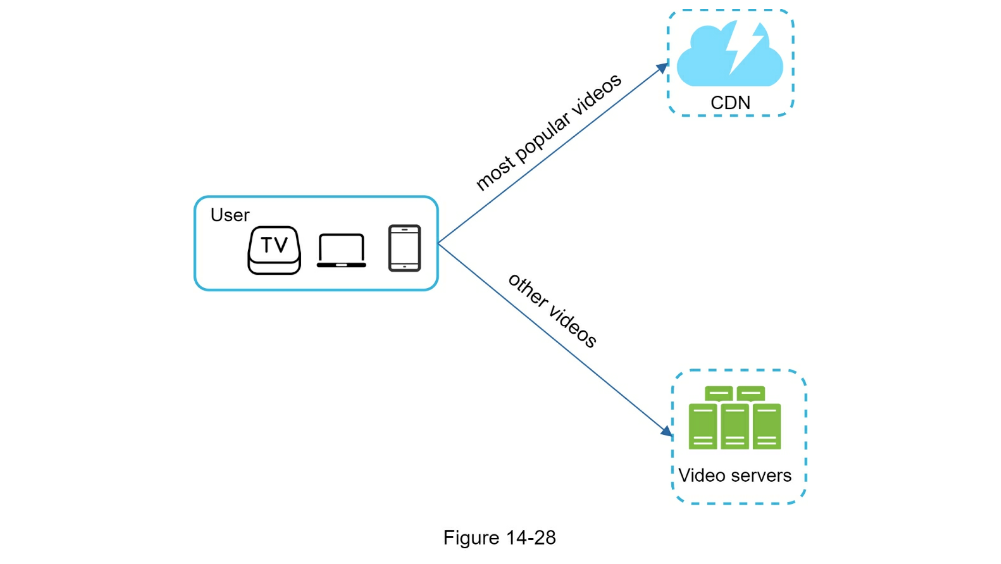
It means a few popular videos are accessed frequently but many others have few
or no viewers. Based on this observation, we implement a few optimizations:
-
Only serve the most popular videos from CDN and other videos from our high
capacity storage video servers (Figure 14-28).
- For less popular content, we may not need to store many encoded video
versions. Short videos can be encoded on-demand.
-
Some videos are popular only in certain regions. There is no need to
distribute these videos to other regions.
-
Build your own CDN like Netflix and partner with Internet Service
Providers (ISPs).
Building your CDN is a giant project; however, this could make sense for large
streaming companies. An ISP can be Comcast, AT&T, Verizon, or other internet
providers. ISPs are located all around the world and are close to users. By
partnering with ISPs, you can improve the viewing experience and reduce the
bandwidth charges.
All those optimizations are based on content popularity, user access pattern,
video size, etc. It is important to analyze historical viewing patterns before
doing any optimization. Here are some of the interesting articles on this
topic: [12] [13].
Error handling
For a large-scale system, system errors are unavoidable. To build a highly
fault-tolerant system, we must handle errors gracefully and recover from them
fast. Two types of errors exist:
-
Recoverable error. For recoverable errors such as video segment fails to
transcode, the general idea is to retry the operation a few times. If the
task continues to fail and the system believes it is not recoverable, it
returns a proper error code to the client.
-
Non-recoverable error. For non-recoverable errors such as malformed video
format, the system stops the running tasks associated with the video and
returns the proper error code to the client.
Typical errors for each system component are covered by the following playbook:
- Upload error: retry a few times.
- Split video error: if older versions of clients cannot split videos by GOP
alignment, the entire video is passed to the server. The job of splitting
videos is done on the server-side.
- Transcoding error: retry.
- Preprocessor error: regenerate DAG diagram.
- DAG scheduler error: reschedule a task.
- Resource manager queue down: use a replica.
- Task worker down: retry the task on a new worker.
- API server down: API servers are stateless so requests will be directed to a
different API server.
- Metadata cache server down: data is replicated multiple times. If one node
goes down, you can still access other nodes to fetch data. We can bring up a
new cache server to replace the dead one.
- Metadata DB server down:
- Master is down. If the master is down, promote one of the slaves to act as
the new master.
- Slave is down. If a slave goes down, you can use another slave for reads and
bring up another database server to replace the dead one.
Step 4 - Wrap up
In this chapter, we presented the architecture design for video streaming
services like YouTube. If there is extra time at the end of the interview, here
are a few additional points:
- Scale the API tier: Because API servers are stateless, it is easy to scale
API tier horizontally.
- Scale the database: You can talk about database replication and sharding.
- Live streaming: It refers to the process of how a video is recorded and
broadcasted in real time. Although our system is not designed specifically
for live streaming, live streaming and non-live streaming have some
similarities: both require uploading, encoding, and streaming. The notable
differences are:
-
Live streaming has a higher latency requirement, so it might need a
different streaming protocol.
-
Live streaming has a lower requirement for parallelism because small chunks
of data are already processed in real-time.
-
Live streaming requires different sets of error handling. Any error
handling that takes too much time is not acceptable.
-
Video takedowns: Videos that violate copyrights, pornography, or other
illegal acts shall be removed. Some can be discovered by the system during
the upload process, while others might be discovered through user flagging.
Congratulations on getting this far! Now give yourself a pat on the back. Good
job!
Reference Materials
- YouTube by the numbers: https://www.omnicoreagency.com/youtube-statistics/
- 2019 YouTube Demographics: https://blog.hubspot.com/marketing/youtube-demographics
- Cloudfront Pricing: https://aws.amazon.com/cloudfront/pricing/
- Netflix on AWS: https://aws.amazon.com/solutions/case-studies/netflix/
- Akamai homepage: https://www.akamai.com/
- Binary large object: https://en.wikipedia.org/wiki/Binary_large_object
- Here’s What You Need to Know About Streaming Protocols: https://www.dacast.com/blog/streaming-protocols/
- SVE: Distributed Video Processing at Facebook Scale: https://www.cs.princeton.edu/~wlloyd/papers/sve-sosp17.pdf
- Weibo video processing architecture (in Chinese): https://www.upyun.com/opentalk/399.html
- Delegate access with a shared access signature: https://docs.microsoft.com/en-us/rest/api/storageservices/delegate-access-with-shared-accesssignature
- YouTube scalability talk by early YouTube employee: https://www.youtube.com/watch?v=w5WVu624fY8
- Understanding the characteristics of internet short video sharing: A youtube-based measurement study. https://arxiv.org/pdf/0707.3670.pdf
- Content Popularity for Open Connect: https://netflixtechblog.com/content-popularity-for-open-connect-b86d56f613b
CHAPTER 15: DESIGN GOOGLE DRIVE
In recent years, cloud storage services such as Google Drive, Dropbox,
Microsoft OneDrive, and Apple iCloud have become very popular. In this chapter,
you are asked to design Google Drive.
Let us take a moment to understand Google Drive before jumping into the design.
Google Drive is a file storage and synchronization service that helps you store
documents, photos, videos, and other files in the cloud. You can access your
files from any computer, smartphone, and tablet. You can easily share those
files with friends, family, and coworkers [1]. Figure 15-1 and 15-2 show
what Google drive looks like on a browser and mobile application, respectively.
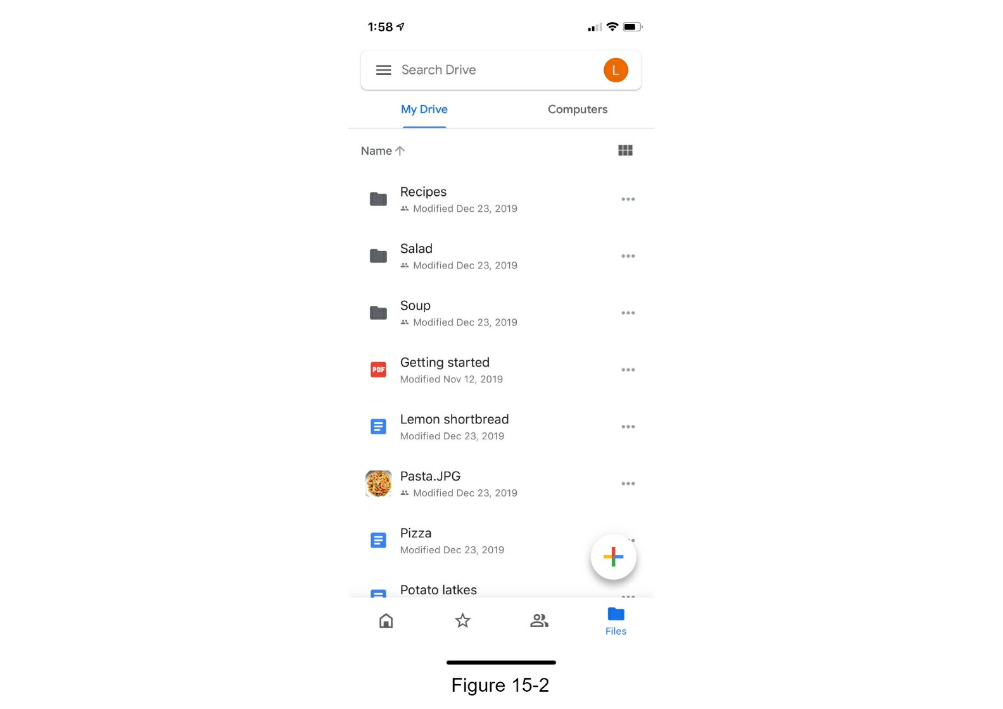
Step 1 - Understand the problem and establish design scope
Designing a Google drive is a big project, so it is important to ask questions
to narrow down the scope.
- Candidate: What are the most important features?
- Interviewer: Upload and download files, file sync, and notifications.
- Candidate: Is this a mobile app, a web app, or both?
- Candidate: What are the supported file formats?
- Interviewer: Any file type.
- Candidate: Do files need to be encrypted?
- Interview: Yes, files in the storage must be encrypted.
- Candidate: Is there a file size limit?
- Interview: Yes, files must be 10 GB or smaller.
- Candidate: How many users does the product have?
In this chapter, we focus on the following features:
-
Add files. The easiest way to add a file is to drag and drop a file into
Google drive.
-
Download files.
-
Sync files across multiple devices. When a file is added to one device, it is
automatically synced to other devices.
- See file revisions.
-
Share files with your friends, family, and coworkers
-
Send a notification when a file is edited, deleted, or shared with you.
Features not discussed in this chapter include:
- Google doc editing and collaboration. Google doc allows multiple people to
edit the same document simultaneously. This is out of our design scope.
Other than clarifying requirements, it is important to understand
non-functional requirements:
-
Reliability. Reliability is extremely important for a storage system. Data
loss is unacceptable.
-
Fast sync speed. If file sync takes too much time, users will become
impatient and abandon the product.
-
Bandwidth usage. If a product takes a lot of unnecessary network bandwidth,
users will be unhappy, especially when they are on a mobile data plan.
-
Scalability. The system should be able to handle high volumes of traffic.
-
High availability. Users should still be able to use the system when some
servers are offline, slowed down, or have unexpected network errors.
Back of the envelope estimation
- Assume the application has 50 million signed up users and 10 million DAU.
- Users get 10 GB free space.
- Assume users upload 2 files per day. The average file size is 500 KB.
- 1:1 read to write ratio.
- Total space allocated: 50 million * 10 GB = 500 Petabyte
- QPS for upload API: 10 million * 2 uploads / 24 hours / 3600 seconds = ~ 240
- Peak QPS = QPS * 2 = 480
Step 2 - Propose high-level design and get buy-in
Instead of showing the high-level design diagram from the beginning, we will
use a slightly different approach. We will start with something simple: build
everything in a single server.
Then, gradually scale it up to support millions of users. By doing this
exercise, it will refresh your memory about some important topics covered in
the book.
Let us start with a single server setup as listed below:
- A web server to upload and download files.
- A database to keep track of metadata like user data, login info, files info,
etc.
- A storage system to store files. We allocate 1TB of storage space to store
files.
We spend a few hours setting up an Apache web server, a MySql database, and a
directory called drive/ as the root directory to store uploaded files. Under
drive/ directory, there is a list of directories, known as namespaces. Each
namespace contains all the uploaded files for that user. The filename on the
server is kept the same as the original file name. Each file or folder can be
uniquely identified by joining the namespace and the relative path.
Figure 15-3 shows an example of how the /drive directory looks like on the
left side and its expanded view on the right side.
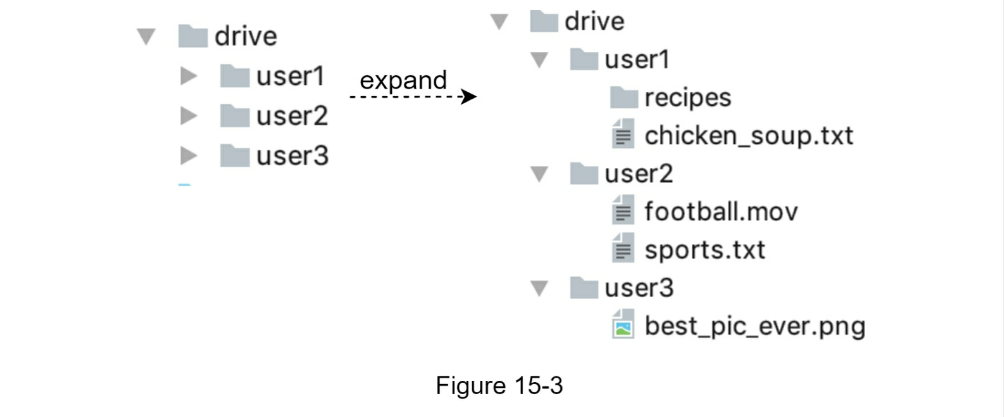
APIs
What do the APIs look like? We primary need 3 APIs: upload a file, download a
file, and get file revisions.
1. Upload a file to Google Drive
Two types of uploads are supported:
- Simple upload. Use this upload type when the file size is small.
- Resumable upload. Use this upload type when the file size is large and there
is high chance of network interruption.
Here is an example of resumable upload API:
https://api.example.com/files/upload?uploadType=resumable
Params:
- uploadType=resumable
- data: Local file to be uploaded.
A resumable upload is achieved by the following 3 steps [2]:
- Send the initial request to retrieve the resumable URL.
- Upload the data and monitor upload state.
- If upload is disturbed, resume the upload.
2. Download a file from Google Drive
Example API: https://api.example.com/files/download
Params:
- path: download file path.
Example params:
{
"path": "/recipes/soup/best_soup.txt"
}
3. Get file revisions
Example API: https://api.example.com/files/list_revisions
Params:
- path: The path to the file you want to get the revision history.
- limit: The maximum number of revisions to return.
Example params:
{
"path": "/recipes/soup/best_soup.txt",
"limit": 20
}
All the APIs require user authentication and use HTTPS. Secure Sockets Layer
(SSL) protects data transfer between the client and backend servers.
Move away from single server
As more files are uploaded, eventually you get the space full alert as shown in
Figure 15-4.

Only 10 MB of storage space is left! This is an emergency as users cannot
upload files anymore. The first solution comes to mind is to shard the data, so
it is stored on multiple storage servers. Figure 15-5 shows an example of
sharding based on user_id .
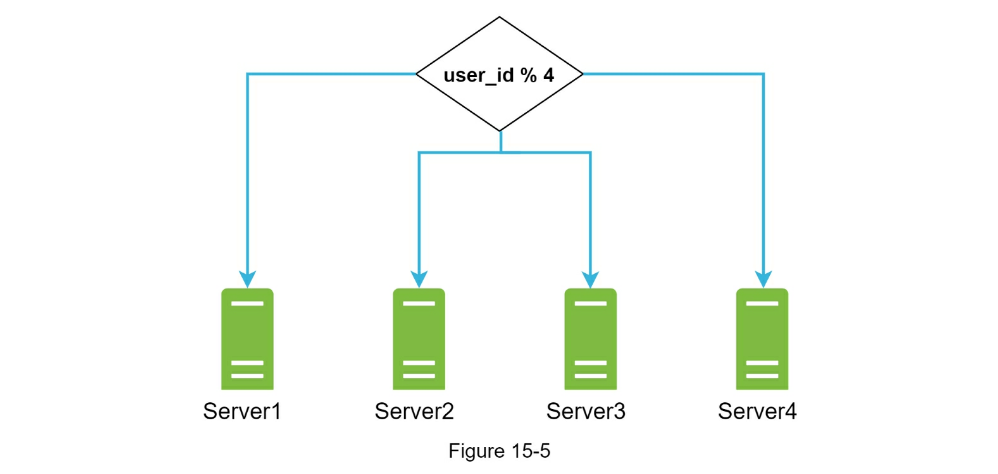
You pull an all-nighter to set up database sharding and monitor it closely.
Everything works smoothly again. You have stopped the fire, but you are still
worried about potential data losses in case of storage server outage. You ask
around and your backend guru friend Frank told you that many leading companies
like Netflix and Airbnb use Amazon S3 for storage. “Amazon Simple Storage
Service (Amazon S3) is an object storage service that offers industry-leading
scalability, data availability, security, and performance” [3]. You decide to
do some research to see if it is a good fit.
After a lot of reading, you gain a good understanding of the S3 storage system
and decide to store files in S3. Amazon S3 supports same-region and
cross-region replication. A region is a geographic area where Amazon web
services (AWS) have data centers. As shown in Figure 15-6, data can be
replicated on the same-region (left side) and cross-region (right side).
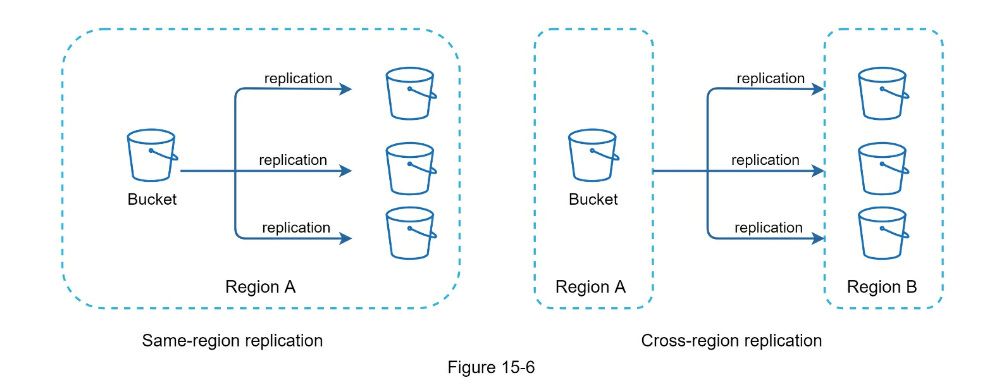
Redundant files are stored in multiple regions to guard against data loss and
ensure availability. A bucket is like a folder in file systems.
After putting files in S3, you can finally have a good night’s sleep without
worrying about data losses. To stop similar problems from happening in the
future, you decide to do further research on areas you can improve. Here are a
few areas you find:
-
Load balancer: Add a load balancer to distribute network traffic. A load
balancer ensures evenly distributed traffic, and if a web server goes down,
it will redistribute the traffic.
-
Web servers: After a load balancer is added, more web servers can be
added/removed easily, depending on the traffic load.
-
Metadata database: Move the database out of the server to avoid single
point of failure. In the meantime, set up data replication and sharding to
meet the availability and scalability requirements.
-
File storage: Amazon S3 is used for file storage. To ensure availability
and durability, files are replicated in two separate geographical regions.
After applying the above improvements, you have successfully decoupled web servers,
metadata database, and file storage from a single server. The updated design is
shown in Figure 15-7.
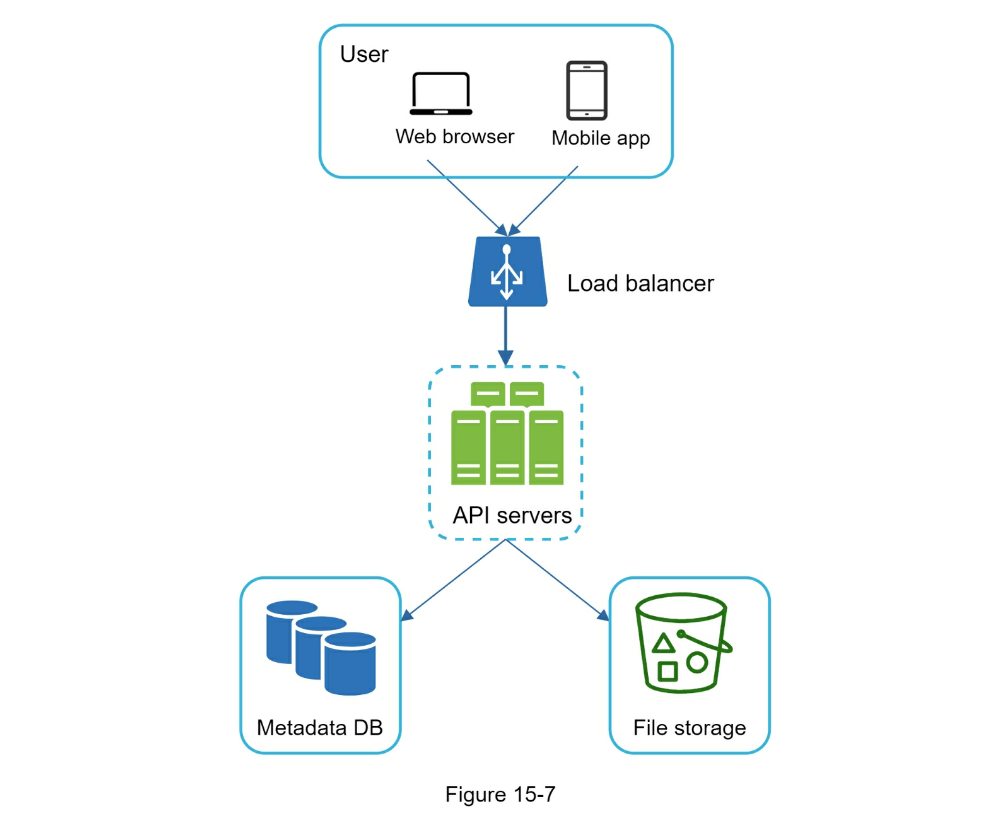
Sync conflicts
For a large storage system like Google Drive, sync conflicts happen from time
to time. When two users modify the same file or folder at the same time, a
conflict happens. How can we resolve the conflict? Here is our strategy: the
first version that gets processed wins, and the version that gets processed
later receives a conflict. Figure 15-8 shows an example of a sync conflict.
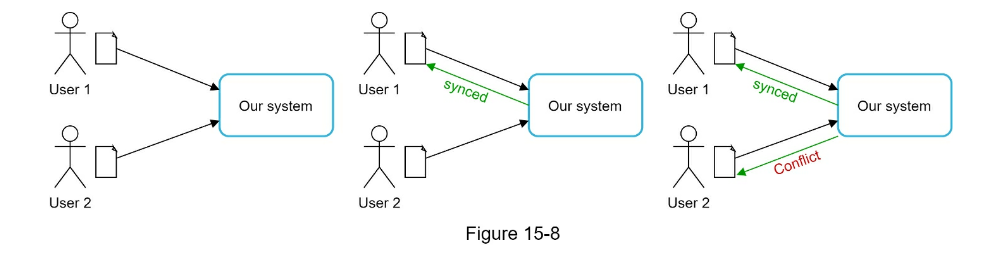
In Figure 15-8, user 1 and user 2 tries to update the same file at the same
time, but user 1’s file is processed by our system first. User 1’s update
operation goes through, but, user 2 gets a sync conflict. How can we resolve
the conflict for user 2? Our system presents both copies of the same file: user
2’s local copy and the latest version from the server (Figure 15-9). User 2
has the option to merge both files or override one version with the other.
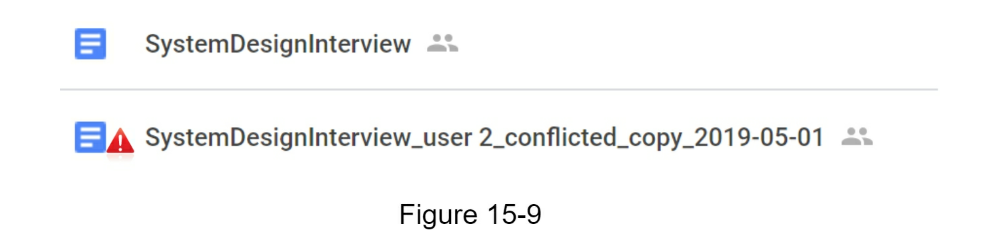
While multiple users are editing the same document at the same, it is
challenging to keep the document synchronized. Interested readers should refer
to the reference material [4] [5].
High-level design
Figure 15-10 illustrates the proposed high-level design. Let us examine
each component of the system.
User:
A user uses the application either through a browser or mobile app.
Block servers:
Block servers upload blocks to cloud storage. Block storage, referred to as
block-level storage, is a technology to store data files on cloud-based
environments. A file can be split into several blocks, each with a unique hash
value, stored in our metadata database. Each block is treated as an independent
object and stored in our storage system (S3). To reconstruct a file, blocks are
joined in a particular order. As for the block size, we use Dropbox as a
reference: it sets the maximal size of a block to 4MB [6].
Cloud storage
A file is split into smaller blocks and stored in cloud storage.
Cold storage
Cold storage is a computer system designed for storing inactive data, meaning
files are not accessed for a long time.
Load balancer
A load balancer evenly distributes requests among API servers.
API servers
These are responsible for almost everything other than the uploading flow. API
servers are used for user authentication, managing user profile, updating file
metadata, etc.
It stores metadata of users, files, blocks, versions, etc. Please note that
files are stored in the cloud and the metadata database only contains metadata.
Some of the metadata are cached for fast retrieval.
Notification service
It is a publisher/subscriber system that allows data to be transferred from
notification service to clients as certain events happen. In our specific case,
notification service notifies relevant clients when a file is
added/edited/removed elsewhere so they can pull the latest changes.
Offline backup queue
If a client is offline and cannot pull the latest file changes, the offline
backup queue stores the info so changes will be synced when the client is
online.
We have discussed the design of Google Drive at the high-level. Some of the components are
complicated and worth careful examination; we will discuss these in detail in the deep dive.
Step 3 - Design deep dive
In this section, we will take a close look at the following: block servers,
metadata database, upload flow, download flow, notification service, save
storage space and failure handling.
Block servers
For large files that are updated regularly, sending the whole file on each
update consumes a lot of bandwidth. Two optimizations are proposed to minimize
the amount of network traffic being transmitted:
-
Delta sync. When a file is modified, only modified blocks are synced
instead of the whole file using a sync algorithm [7] [8].
-
Compression. Applying compression on blocks can significantly reduce the
data size.
Thus, blocks are compressed using compression algorithms depending on file
types. For example, gzip and bzip2 are used to compress text files. Different
compression algorithms are needed to compress images and videos.
In our system, block servers do the heavy lifting work for uploading files.
Block servers process files passed from clients by splitting a file into
blocks, compressing each block, and encrypting them. Instead of uploading the
whole file to the storage system, only modified blocks are transferred.
Figure 15-11 shows how a block server works when a new file is added.
- A file is split into smaller blocks.
- Each block is compressed using compression algorithms.
- To ensure security, each block is encrypted before it is sent to cloud
storage.
- Blocks are uploaded to the cloud storage.
Figure 15-12 illustrates delta sync, meaning only modified blocks are
transferred to cloud storage. Highlighted blocks “block 2” and “block 5”
represent changed blocks. Using delta sync, only those two blocks are uploaded
to the cloud storage.
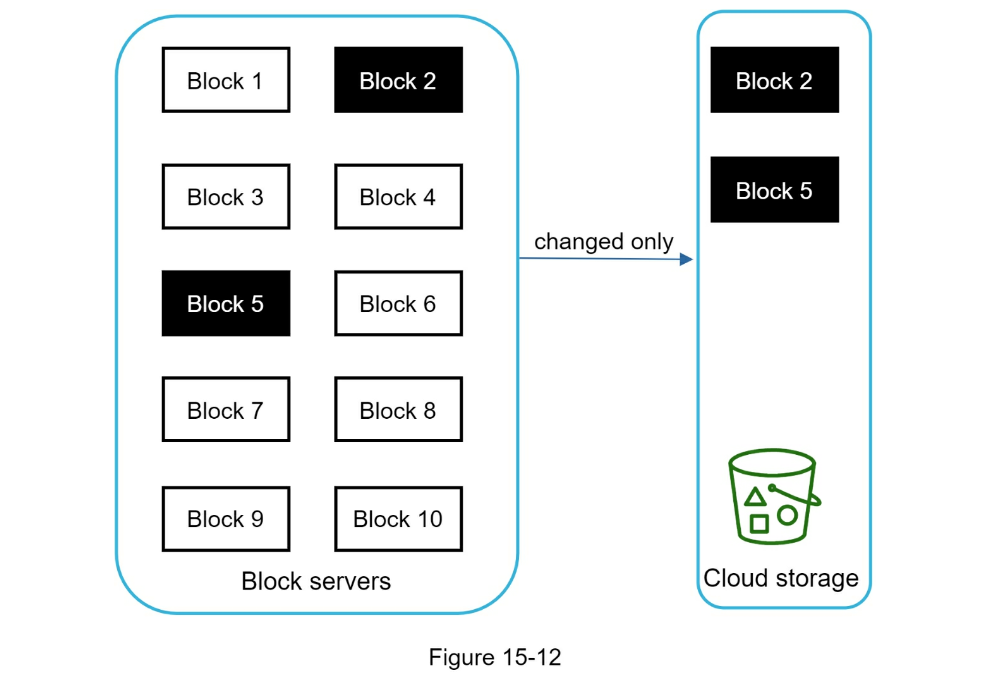
Block servers allow us to save network traffic by providing delta sync and
compression.
High consistency requirement
Our system requires strong consistency by default. It is unacceptable for a
file to be shown differently by different clients at the same time. The system
needs to provide strong consistency for metadata cache and database layers.
Memory caches adopt an eventual consistency model by default, which means
different replicas might have different data. To achieve strong consistency, we
must ensure the following:
- Data in cache replicas and the master is consistent.
- Invalidate caches on database write to ensure cache and database hold the
same value.
Achieving strong consistency in a relational database is easy because it
maintains the ACID (Atomicity, Consistency, Isolation, Durability) properties
[9]. However, NoSQL databases do not support ACID properties by default. ACID
properties must be programmatically incorporated in synchronization logic. In
our design, we choose relational databases because the ACID is natively
supported.
Figure 15-13 shows the database schema design. Please note this is a highly
simplified version as it only includes the most important tables and
interesting fields.

User
The user table contains basic information about the user such as username,
email, profile photo, etc.
Device
Device table stores device info. Push_id is used for sending and receiving
mobile push notifications. Please note a user can have multiple devices.
Namespace
A namespace is the root directory of a user.
File
File table stores everything related to the latest file.
File_version
It stores version history of a file. Existing rows are read-only to keep the
integrity of the file revision history.
Block
It stores everything related to a file block. A file of any version can be
reconstructed by joining all the blocks in the correct order.
Upload flow
Let us discuss what happens when a client uploads a file. To better understand
the flow, we draw the sequence diagram as shown in Figure 15-14.
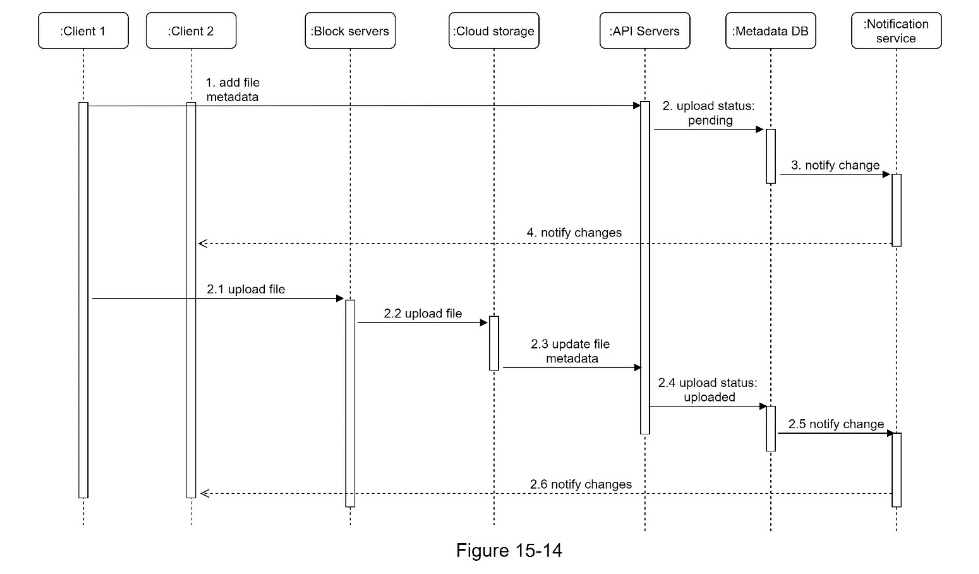
In Figure 15-14, two requests are sent in parallel: add file metadata and
upload the file to cloud storage. Both requests originate from client 1.
- Add file metadata.
- Client 1 sends a request to add the metadata of the new file.
- Store the new file metadata in metadata DB and change the file upload status to “pending.”
- Notify the notification service that a new file is being added.
- The notification service notifies relevant clients (client 2) that a file is being uploaded.
- Upload files to cloud storage.
- 2.1 Client 1 uploads the content of the file to block servers.
- 2.2 Block servers chunk the files into blocks, compress, encrypt the blocks, and upload them to cloud storage.
- 2.3 Once the file is uploaded, cloud storage triggers upload completion callback. The request is sent to API servers.
- 2.4 File status changed to “uploaded” in Metadata DB.
- 2.5 Notify the notification service that a file status is changed to “uploaded.”
- 2.6 The notification service notifies relevant clients (client 2) that a file is fully uploaded.
When a file is edited, the flow is similar, so we will not repeat it.
Download flow
Download flow is triggered when a file is added or edited elsewhere. How does a
client know if a file is added or edited by another client? There are two ways
a client can know:
- If client A is online while a file is changed by another client, notification
service will inform client A that changes are made somewhere so it needs to
pull the latest data.
- If client A is offline while a file is changed by another client, data will
be saved to the cache. When the offline client is online again, it pulls the
latest changes.
Once a client knows a file is changed, it first requests metadata via API
servers, then downloads blocks to construct the file. Figure 15-15 shows the
detailed flow. Note, only the most important components are shown in the
diagram due to space constraint.
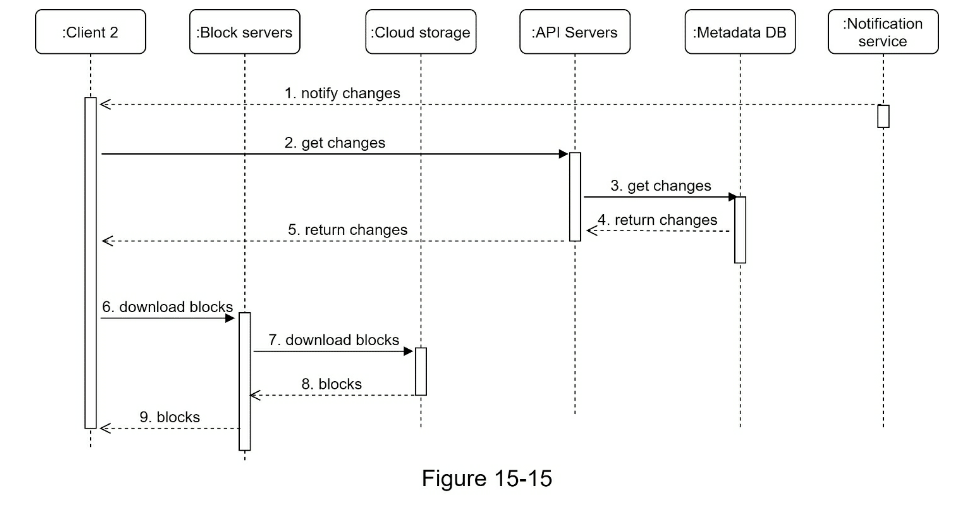
- Notification service informs client 2 that a file is changed somewhere else.
- Once client 2 knows that new updates are available, it sends a request to
fetch metadata.
- API servers call metadata DB to fetch metadata of the changes.
- Metadata is returned to the API servers.
- Client 2 gets the metadata.
- Once the client receives the metadata, it sends requests to block servers to
download blocks.
- Block servers first download blocks from cloud storage.
- Cloud storage returns blocks to the block servers.
- Client 2 downloads all the new blocks to reconstruct the file.
Notification service
To maintain file consistency, any mutation of a file performed locally needs to
be informed to other clients to reduce conflicts. Notification service is built
to serve this purpose. At the high-level, notification service allows data to
be transferred to clients as events happen. Here are a few options:
-
Long polling. Dropbox uses long polling [10].
-
WebSocket. WebSocket provides a persistent connection between the client and
the server. Communication is bi-directional.
Even though both options work well, we opt for long polling for the following
two reasons:
-
Communication for notification service is not bi-directional. The server
sends information about file changes to the client, but not vice versa.
-
WebSocket is suited for real-time bi-directional communication such as a chat
app. For
Google Drive, notifications are sent infrequently with no burst of data.
With long polling, each client establishes a long poll connection to the
notification service. If changes to a file are detected, the client will close
the long poll connection. Closing the connection means a client must connect to
the metadata server to download the latest changes. After a response is
received or connection timeout is reached, a client immediately sends a new
request to keep the connection open.
Save storage space
To support file version history and ensure reliability, multiple versions of
the same file are stored across multiple data centers. Storage space can be
filled up quickly with frequent backups of all file revisions. Three techniques
are proposed to reduce storage costs:
-
De-duplicate data blocks. Eliminating redundant blocks at the account level
is an easy way to save space. Two blocks are identical if they have the same
hash value.
- Adopt an intelligent data backup strategy. Two optimization strategies can
be applied:
-
Set a limit: We can set a limit for the number of versions to store. If the
limit is reached, the oldest version will be replaced with the new version.
-
Keep valuable versions only: Some files might be edited frequently. For
example, saving every edited version for a heavily modified document could
mean the file is saved over 1000 times within a short period. To avoid
unnecessary copies, we could limit the number of saved versions. We give more
weight to recent versions. Experimentation is helpful to figure out the
optimal number of versions to save.
-
Moving infrequently used data to cold storage. Cold data is the data that
has not been active for months or years. Cold storage like Amazon S3 glacier
[11] is much cheaper than S3.
Failure Handling
Failures can occur in a large-scale system and we must adopt design strategies
to address these failures. Your interviewer might be interested in hearing
about how you handle the following system failures:
-
Load balancer failure: If a load balancer fails, the secondary would become
active and pick up the traffic. Load balancers usually monitor each other
using a heartbeat, a periodic signal sent between load balancers. A load
balancer is considered as failed if it has not sent a heartbeat for some
time.
-
Block server failure: If a block server fails, other servers pick up
unfinished or pending jobs.
-
Cloud storage failure: S3 buckets are replicated multiple times in different
regions. If files are not available in one region, they can be fetched from
different regions.
-
API server failure: It is a stateless service. If an API server fails, the
traffic is redirected to other API servers by a load balancer.
-
Metadata cache failure: Metadata cache servers are replicated multiple times.
If one node goes down, you can still access other nodes to fetch data. We
will bring up a new cache server to replace the failed one.
- _Metadata DB failure.
-
Master down: If the master is down, promote one of the slaves to act as a new
master and bring up a new slave node.
-
Slave down: If a slave is down, you can use another slave for read operations
and bring another database server to replace the failed one.
-
Notification service failure: Every online user keeps a long poll connection
with the notification server. Thus, each notification server is connected
with many users. According to the Dropbox talk in 2012 [6], over 1 million
connections are open per machine. If a server goes down, all the long poll
connections are lost so clients must reconnect to a different server. Even
though one server can keep many open connections, it cannot reconnect all the
lost connections at once. Reconnecting with all the lost clients is a
relatively slow process.
-
Offline backup queue failure: Queues are replicated multiple times. If one
queue fails, consumers of the queue may need to re-subscribe to the backup
queue.
Step 4 - Wrap up
In this chapter, we proposed a system design to support Google Drive. The
combination of strong consistency, low network bandwidth and fast sync make the
design interesting. Our design contains two flows: manage file metadata and
file sync. Notification service is another important component of the system.
It uses long polling to keep clients up to date with file changes.
Like any system design interview questions, there is no perfect solution. Every
company has its unique constraints and you must design a system to fit those
constraints. Knowing the tradeoffs of your design and technology choices are
important. If there are a few minutes left, you can talk about different design
choices.
For example, we can upload files directly to cloud storage from the client
instead of going through block servers. The advantage of this approach is that
it makes file upload faster because a file only needs to be transferred once to
the cloud storage. In our design, a file is transferred to block servers first,
and then to the cloud storage. However, the new approach has a few drawbacks:
- First, the same chunking, compression, and encryption logic must be
implemented on different platforms (iOS, Android, Web). It is error-prone and
requires a lot of engineering effort. In our design, all those logics are
implemented in a centralized place: block servers.
- Second, as a client can easily be hacked or manipulated, implementing
encrypting logic on the client side is not ideal.
Another interesting evolution of the system is moving online/offline logic to a separate
service. Let us call it presence service. By moving presence service out of notification
servers, online/offline functionality can easily be integrated by other services.
Reference Materials
- Google Drive: https://www.google.com/drive/
- Upload file data: https://developers.google.com/drive/api/v2/manage-uploads
- Amazon S3: https://aws.amazon.com/s3
- Differential Synchronization https://neil.fraser.name/writing/sync/
- Differential Synchronization youtube talk https://www.youtube.com/watch?v=S2Hp_1jqpY8
- How We’ve Scaled Dropbox: https://youtu.be/PE4gwstWhmc
- Tridgell, A., & Mackerras, P. (1996). The rsync algorithm.
- Librsync. (n.d.). Retrieved April 18, 2015, from https://github.com/librsync/librsync
- ACID: https://en.wikipedia.org/wiki/ACID
- Dropbox security white paper: https://www.dropbox.com/static/business/resources/Security_Whitepaper.pdf
- Amazon S3 Glacier: https://aws.amazon.com/glacier/faqs/
CHAPTER 16: THE LEARNING CONTINUES
Designing good systems requires years of accumulation of knowledge. One
shortcut is to dive into real-world system architectures. Below is a collection
of helpful reading materials. We highly recommend you pay attention to both the
shared principles and the underlying technologies. Researching each technology
and understanding what problems it solves is a great way to strengthen your
knowledge base and refine the design process.
Real-world systems
The following materials can help you understand general design ideas of real system
architectures behind different companies.
- Facebook Timeline: Brought To You By The Power Of Denormalization: https://goo.gl/FCNrbm
- Scale at Facebook: https://goo.gl/NGTdCs
- Building Timeline: Scaling up to hold your life story: https://goo.gl/8p5wDV
- Erlang at Facebook (Facebook chat): https://goo.gl/zSLHrj
- Facebook Chat: https://goo.gl/qzSiWC
- Finding a needle in Haystack: Facebook’s photo storage: https://goo.gl/edj4FL
- Serving Facebook Multifeed: Efficiency, performance gains through redesign: https://goo.gl/adFVMQ
- Scaling Memcache at Facebook: https://goo.gl/rZiAhX
- TAO: Facebook’s Distributed Data Store for the Social Graph: https://goo.gl/Tk1DyH
- Amazon Architecture: https://goo.gl/k4feoW
- Dynamo: Amazon’s Highly Available Key-value Store: https://goo.gl/C7zxDL
- A 360 Degree View Of The Entire Netflix Stack: https://goo.gl/rYSDTz
- It’s All A/Bout Testing: The Netflix Experimentation Platform: https://goo.gl/agbA4K
- Netflix Recommendations: Beyond the 5 stars (Part 1): https://goo.gl/A4FkYi
- Netflix Recommendations: Beyond the 5 stars (Part 2): https://goo.gl/XNPMXm
- Google Architecture: https://goo.gl/dvkDiY
- The Google File System (Google Docs): https://goo.gl/xj5n9R
- Differential Synchronization (Google Docs): https://goo.gl/9zqG7x
- YouTube Architecture: https://goo.gl/mCPRUF
- Seattle Conference on Scalability: YouTube Scalability: https://goo.gl/dH3zYq
- Bigtable: A Distributed Storage System for Structured Data: https://goo.gl/6NaZca
- Instagram Architecture: 14 Million Users, Terabytes Of Photos, 100s Of Instances, Dozens
- Of Technologies: https://goo.gl/s1VcW5
- The Architecture Twitter Uses To Deal With 150M Active Users: https://goo.gl/EwvfRd
- Scaling Twitter: Making Twitter 10000 Percent Faster: https://goo.gl/nYGC1k
- Announcing Snowflake (Snowflake is a network service for generating unique ID numbers at high scale with some simple guarantees): https://goo.gl/GzVWYm
- Timelines at Scale: https://goo.gl/8KbqTy
- How Uber Scales Their Real-Time Market Platform: https://goo.gl/kGZuVy
- Scaling Pinterest: https://goo.gl/KtmjW3
- Pinterest Architecture Update: https://goo.gl/w6rRsf
- A Brief History of Scaling LinkedIn: https://goo.gl/8A1Pi8
- Flickr Architecture: https://goo.gl/dWtgYa
- How We’ve Scaled Dropbox: https://goo.gl/NjBDtC
- The WhatsApp Architecture Facebook Bought For $19 Billion: https://bit.ly/2AHJnFn
Company engineering blogs
If you are going to interview with a company, it is a great idea to read their
engineering blogs and get familiar with technologies and systems adopted and
implemented there. Besides, engineering blogs provide invaluable insights about
certain fields. Reading them regularly could help us become better engineers.
Here is a list of engineering blogs of well-known large companies and startups.
- Airbnb: https://medium.com/airbnb-engineering
- Amazon: https://developer.amazon.com/blogs
- Asana: https://blog.asana.com/category/eng
- Atlassian: https://developer.atlassian.com/blog
- Bittorrent: http://engineering.bittorrent.com
- Cloudera: https://blog.cloudera.com
- Docker: https://blog.docker.com
- Dropbox: https://blogs.dropbox.com/tech
- eBay: http://www.ebaytechblog.com
- Facebook: https://code.facebook.com/posts
- GitHub: https://githubengineering.com
- Google: https://developers.googleblog.com
- Groupon: https://engineering.groupon.com
- Highscalability: http://highscalability.com
- Instacart: https://tech.instacart.com
- Instagram: https://engineering.instagram.com
- Linkedin: https://engineering.linkedin.com/blog
- Mixpanel: https://mixpanel.com/blog
- Netflix: https://medium.com/netflix-techblog
- Nextdoor: https://engblog.nextdoor.com
- PayPal: https://www.paypal-engineering.com
- Pinterest: https://engineering.pinterest.com
- Quora: https://engineering.quora.com
- Reddit: https://redditblog.com
- Salesforce: https://developer.salesforce.com/blogs/engineering
- Shopify: https://engineering.shopify.com
- Slack: https://slack.engineering
- Soundcloud: https://developers.soundcloud.com/blog
- Spotify: https://labs.spotify.com
- Stripe: https://stripe.com/blog/engineering
- System design primer: https://github.com/donnemartin/system-design-primer
- Twitter: https://blog.twitter.com/engineering/en_us.html
- Thumbtack: https://www.thumbtack.com/engineering
- Uber: http://eng.uber.com
- Yahoo: https://yahooeng.tumblr.com
- Yelp: https://engineeringblog.yelp.com
- Zoom: https://medium.com/zoom-developer-blog
AFTERWORD
Congratulations! You are at the end of this interview guide. You have accumulated skills and
knowledge to design systems. Not everyone has the discipline to learn what you have learned.
Take a moment and pat yourself on the back. Your hard work will be paid off.
Landing a dream job is a long journey and requires lots of time and effort. Practice makes
perfect. Best luck!
Thank you for buying and reading this book. Without readers like you, our work would not
exist. We hope you have enjoyed the book!
If you don’t mind, please review this book on Amazon: https://tinyurl.com/y7d3ltbc It would
help me attract more wonderful readers like you.
Please subscribe to our email list if you want to be notified when new chapters are available:
https://bit.ly/3dtIcsE
If you have comments or questions about this book, feel free to send us an email at
systemdesigninsider@gmail.com. Besides, if you notice any errors, please let us know so we
can make corrections in the next edition. Thank you!